

Not sure where your leads are coming from in Wise Agent?
You’re not alone.
Many real estate professionals find it difficult to track which marketing campaigns generate quality leads.
The problem is that Wise Agent does not track UTM parameters from your marketing links by default. However, you can use third-party tools to solve this problem.
In this guide, we’ll show you exactly how to track UTM parameters in Wise Agent using tools like SourceLoop, so you can finally see which campaigns are bringing in your best clients.
How to Track UTM Parameters in Wise Agent CRM
- Wise Agent CRM does not natively track UTM parameters
- Install SourceLoop on your website to capture UTM data
- Add UTM parameters to all marketing links such as ads, emails, and social posts
- SourceLoop automatically captures leads using native integrations with 100+ tools
- UTM data is stored across multiple visits until a lead converts
- Sync captured leads and attribution data into Wise Agent CRM
- Use this data to identify which campaigns generate real leads and clients
Why Wise Agent Doesn’t Track UTM Parameters Natively
Wise Agent CRM primarily focuses on contact management and transaction tracking functionality rather than marketing attribution. The platform captures leads through forms and direct input, but it doesn’t automatically detect where those leads originated from your marketing campaigns.
This limitation makes it difficult to answer important questions such as:
- Which Facebook ad brought in your last three listings?
- Are your Google Ads worth the investment?
- Should you spend more on Zillow leads or focus on content marketing?
The National Association of Realtors reports that 77% of real estate professionals use multiple marketing channels according to the National Association of Realtors. This makes source attribution essential for optimizing ROI.
The solution is using intermediary tracking tools that capture UTM parameters and feed that data into Wise Agent CRM through integrations or manual processes.
5 Steps to Track UTM Parameters in Wise Agent
1. Install SourceLoop on Your Website
- Create an account at SourceLoop
- Copy the tracking script provided after signup
- Add the script to your website header or through your tag manager
- Confirm the script is loading on all pages
The setup takes only a few minutes and does not require coding knowledge.

After installation, SourceLoop automatically records campaign data such as utm_source, utm_medium, and utm_campaign for every visitor.
This ensures that even if a visitor returns days later to submit a contact form or book a showing, their original marketing source is still captured.
2. Create UTM-Tagged Marketing Links
UTM parameters are simple tags added to your marketing URLs to identify traffic sources. Use Google’s Campaign URL Builder to create properly formatted links.
Essential UTM Parameters for Real Estate:
- utm_source: Where the traffic comes from (e.g., facebook, google, zillow)
- utm_medium: The marketing medium (e.g., cpc, email, social)
- utm_campaign: Your specific campaign name (e.g., spring_listings, first_time_buyers)
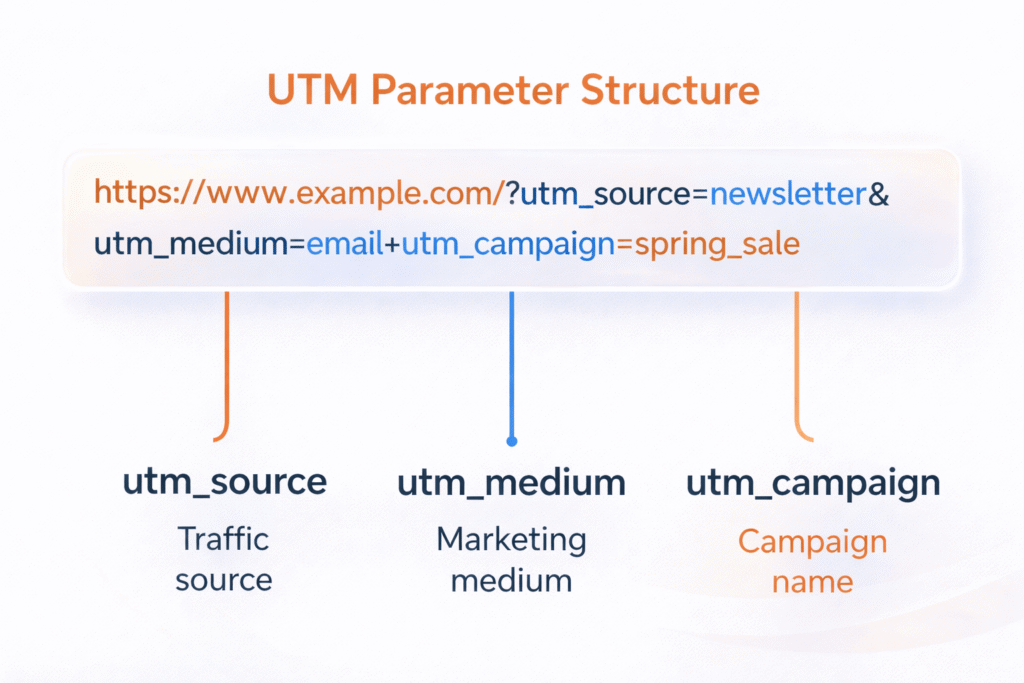
Real estate UTM examples:
For a Facebook ad promoting open houses:
https://yoursite.com/open-houses?utm_source=facebook&utm_medium=paid&utm_campaign=weekend_showingsFor an email newsletter featuring new listings:
https://yoursite.com/listings?utm_source=newsletter&utm_medium=email&utm_campaign=march_propertiesFor Google Ads targeting home sellers:
https://yoursite.com/sell?utm_source=google&utm_medium=cpc&utm_campaign=seller_leads3. SourceLoop Automatically Captures Leads
Once SourceLoop is installed and UTM parameters are added to your marketing links, SourceLoop automatically captures leads from your website.
SourceLoop has native integrations with 100+ lead capture and meeting tools. This means it works out of the box with most contact forms, chat widgets, and scheduling tools commonly used by real estate agents.
When a visitor submits a form or books a meeting, SourceLoop:
- Detects the lead creation event using its native integration
- Retrieves stored UTM and referrer data from the visitor session
- Associates the lead with the complete marketing journey
- Displays the lead and attribution details inside the SourceLoop dashboard
No additional configuration is required for supported tools.
If you are using a custom form, a less common plugin, or are unsure whether your setup is supported, you can contact the SourceLoop team to confirm compatibility or get guidance on setup.
4. Sync Leads and UTM Data with Wise Agent CRM

SourceLoop acts as a central place where all captured leads and their attribution data are stored.
From there, you can sync selected leads and UTM fields into Wise Agent CRM.
Syncing can be done using integrations such as automation tools or scheduled imports, depending on your setup.
Once synced, Wise Agent CRM records can include:
- Campaign source and medium
- Campaign name
- Landing page and referrer
- Lead creation details
This setup ensures that every lead inside Wise Agent CRM includes accurate marketing attribution.
You can continue to view all leads inside SourceLoop while selectively syncing them into Wise Agent CRM for follow up, reporting, and long term tracking.
What You Can Do with UTM Data in Wise Agent CRM
Once UTM parameters are captured by SourceLoop and synced into Wise Agent CRM, you gain clear visibility into which marketing efforts actually generate leads, appointments, and clients.
This turns marketing attribution from guesswork into measurable data.
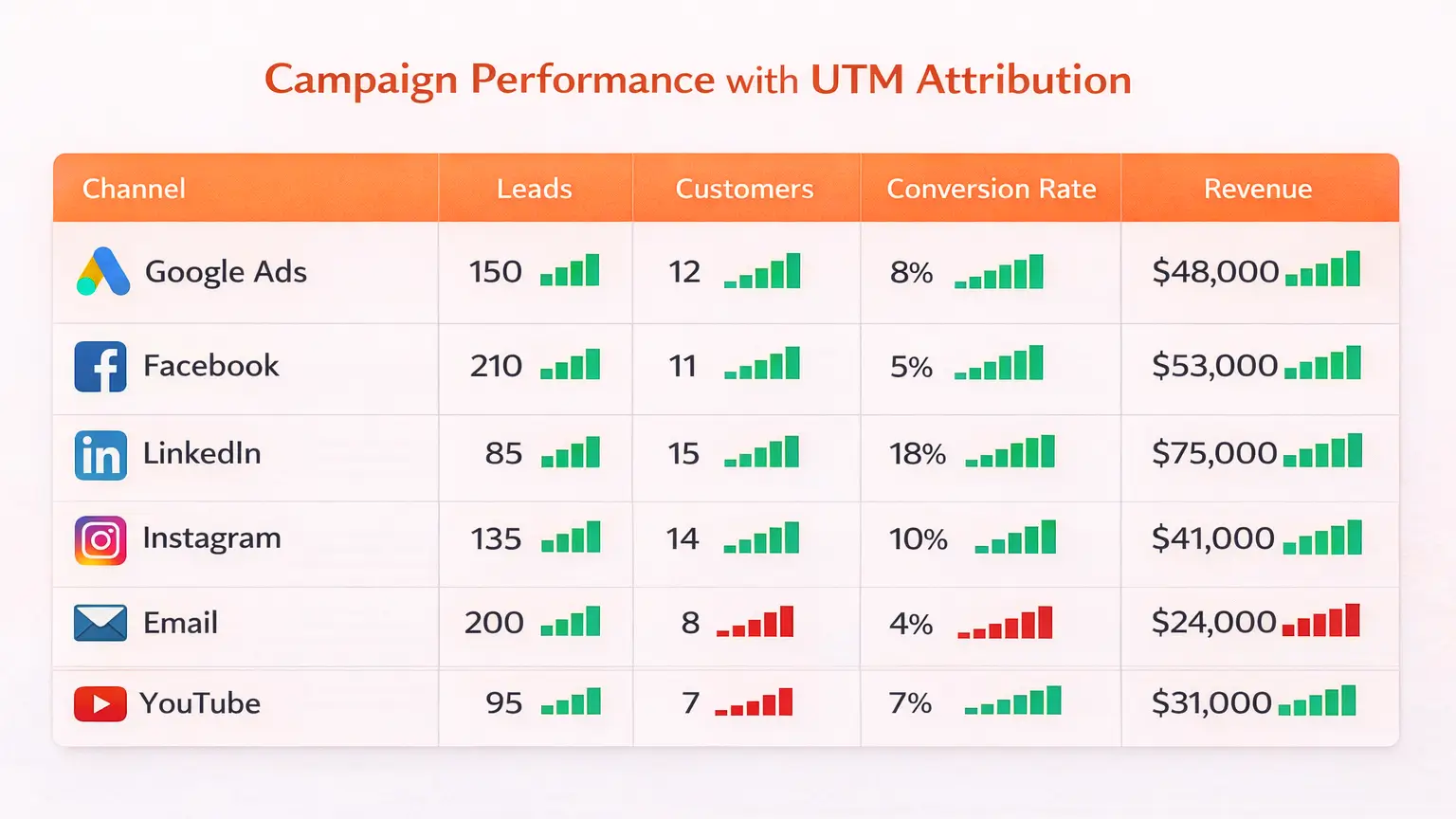
Track Which Campaigns Generate Real Leads
UTM tracking allows you to connect every lead in Wise Agent CRM to its original marketing source.
Instead of guessing whether Google Ads or Facebook is working, you can see it clearly.
| Channel | Website Clicks | Leads Captured | Appointments |
|---|---|---|---|
| Google Ads | 240 | 18 | 7 |
| Facebook Ads | 410 | 22 | 4 |
| Email Campaign | 95 | 14 | 9 |
This shows that email campaigns often convert fewer visitors but produce higher quality leads.
According to Campaign Monitor email marketing benchmarks, email continues to deliver one of the highest returns across industries.
Measure True Marketing ROI
UTM data allows you to measure marketing ROI at the revenue level, not just traffic or lead volume.
Marketing ROI is calculated by linking campaign cost to closed deals.
| Metric | Example Value |
|---|---|
| Monthly Ad Spend | $1,200 |
| Deals Closed | 3 |
| Average Commission | $6,000 |
| Revenue Generated | $18,000 |
This level of visibility helps you decide where to increase or cut spend.
Improve Lead Follow Up and Conversion
UTM parameters add context to every lead.
When you know how a lead found you, you can tailor your follow up.
Examples:
- Paid ads lead to faster outreach and appointment-focused messaging
- Email campaigns work better with relationship-driven follow ups
- Referral traffic benefits from personalized communication
Research from Harvard Business Review shows that faster and more relevant follow up significantly improves lead qualification.
Final Thoughts
Wise Agent CRM is a strong tool for managing contacts and follow ups, but it does not natively track where leads come from.
Without UTM tracking, it is difficult to know which marketing campaigns actually generate appointments and clients.
By using SourceLoop, you can capture UTM parameters when visitors first land on your website, store that data across multiple visits, and attach it to leads when they convert. This data can then be synced into Wise Agent CRM for reporting and follow up.
With accurate attribution in place, you can reduce wasted ad spend, double down on high performing campaigns, and make marketing decisions based on data instead of assumptions.
If you want to clearly see which channels grow your real estate business, proper UTM tracking is one of the highest impact improvements you can make.
Read more:
Frequently Asked Questions
Can Wise Agent CRM track UTM parameters natively?
No. Wise Agent CRM does not natively capture or store UTM parameters. UTM data must be captured before a lead enters the CRM.
How does SourceLoop help with UTM tracking for Wise Agent?
SourceLoop captures UTM parameters when visitors land on your website and stores them until a lead is created. The attribution data can then be synced into Wise Agent CRM.
Do I need technical knowledge to set this up?
No. SourceLoop requires only a simple tracking script installation. Most users can complete setup in a few minutes without coding.
What lead capture tools work with SourceLoop?
SourceLoop has native integrations with over 100 lead capture and meeting tools, including website forms, chat widgets, and scheduling tools. If you are unsure about your setup, you can contact the SourceLoop team to confirm compatibility.
Can I see leads in SourceLoop before syncing them to Wise Agent?
Yes. SourceLoop displays all captured leads and their attribution data in its dashboard. You can then choose how and when to sync those leads into Wise Agent CRM.

