

Are you tired of guessing which marketing campaigns drive quality leads to your construction business?
Without proper tracking, you might spend thousands on Google Ads while your best leads come from trade show referrals or local partnerships.
UTM parameter tracking in Buildxact CRM solves this problem by showing you exactly where each lead originated.
This guide walks you through five simple steps to track UTM parameters in Buildxact CRM.
You will finally see which marketing efforts generate profitable construction projects.
How to Track UTM Parameters in Buildxact CRM
- Buildxact CRM does not natively track UTM parameters
- Add UTM parameters to all marketing links such as ads, emails, and referral links
- Install SourceLoop on your website to capture UTM data at the first visit
- SourceLoop automatically captures leads from supported forms and quote requests
- UTM data is stored across multiple visits until a lead converts
- Sync captured leads and attribution data into Buildxact CRM
5 Simple Steps to Track UTM Parameters in Buildxact CRM
Here are five straightforward steps to capture UTM parameters in your Buildxact CRM workflow:
1. Install SourceLoop on Your Construction Website
To begin tracking UTM parameters, install SourceLoop on your construction company’s website:
- Create a free account at SourceLoop.ai
- Copy the tracking script provided after signup
- Add this snippet to your website’s
<head>section or Google Tag Manager

Once installed, SourceLoop automatically captures UTM parameters from every visitor, whether they come from Google Ads, trade show follow-up emails, or contractor referral links.
Example for a Kitchen Remodeling Company:
A homeowner searches “kitchen renovation contractors near me,” clicks your Google Ad, and visits:
https://www.yourkitchenpro.com/estimate?utm_source=google&utm_medium=cpc&utm_campaign=kitchen_remodel_2025&utm_term=kitchen_renovationSourceLoop captures the following data:
| Data Point | Value |
|---|---|
| Channel | Paid Search |
| Attribution_Source | Google (from utm_source=google) |
| Attribution_Campaign | kitchen_remodel_2025 |
| Attribution_Term | kitchen_renovation |
| Landing Page | /estimate |
| Last Seen | Current timestamp |
This data stays with the visitor throughout their browsing session and gets attached to their lead form when they submit.
2. Add UTM Parameters to All Your Marketing Links
For attribution to work properly, every marketing link needs UTM parameters. These simple tags tell you exactly how someone discovered your construction business.
When someone clicks a properly tagged link, SourceLoop stores that source information and passes it to Buildxact CRM when they become a lead.
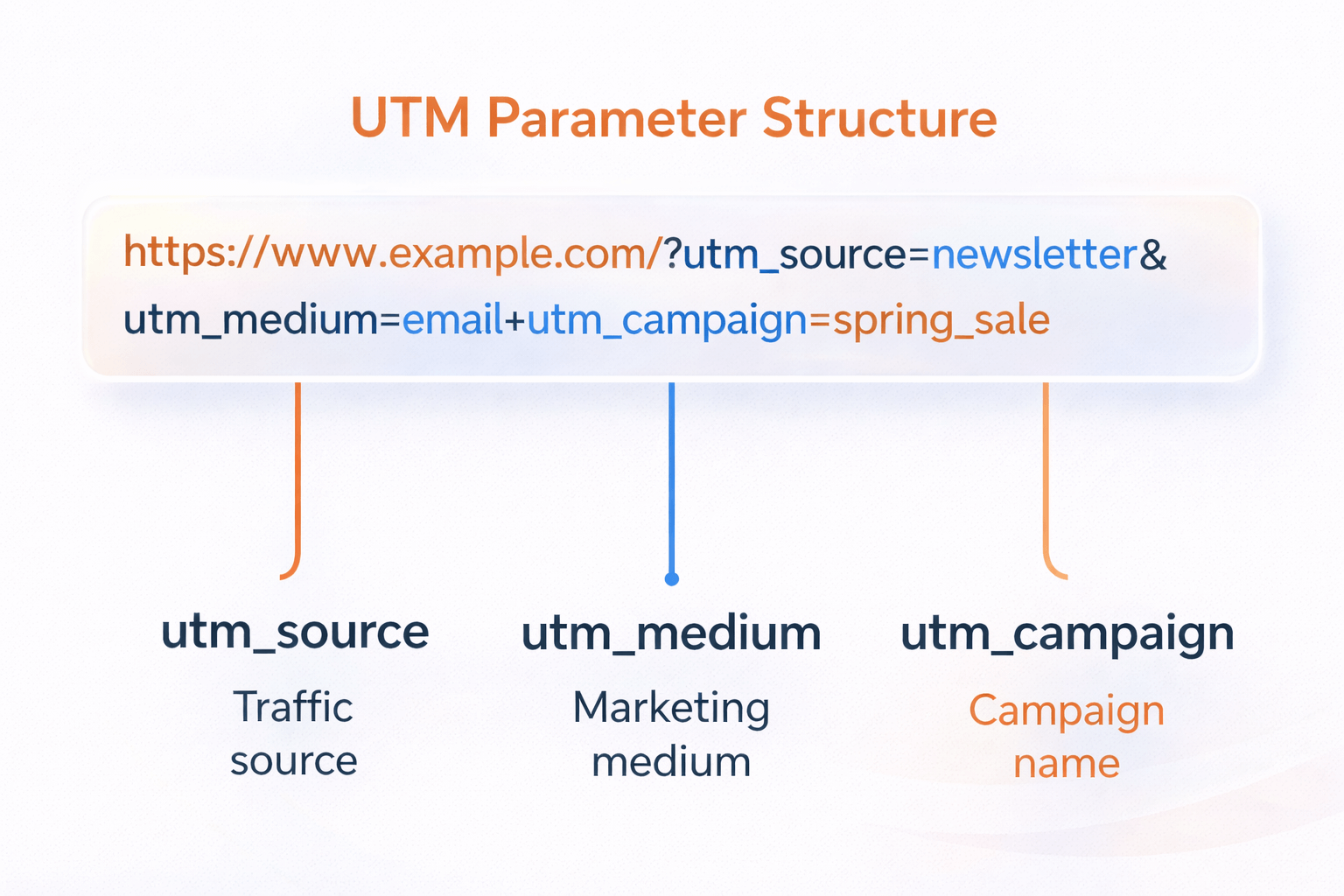
Construction Industry UTM Examples:
For Google Ads promoting bathroom remodels:
https://yoursite.com/bathroom-remodel?utm_source=google&utm_medium=cpc&utm_campaign=bathroom_q1_2025&utm_term=bathroom_contractorFor trade show follow-up emails:
https://yoursite.com/services?utm_source=email&utm_medium=email&utm_campaign=home_show_followup&utm_content=booth_visitorsFor contractor referral program:
https://yoursite.com/referral-discount?utm_source=contractor_network&utm_medium=referral&utm_campaign=partner_program&utm_content=jones_plumbingAccording to Google’s marketing guidelines, consistent UTM parameter naming helps track campaign performance across multiple platforms.
3. SourceLoop Automatically Captures Lead Attribution Data
SourceLoop works with 100+ lead capture tools including Calendly, Webflow Forms, Contact Form 7, and Gravity Forms—all tools commonly used by construction companies for estimate requests.
The system automatically detects when someone submits a lead form, attaches their UTM parameters and source data, and displays complete attribution information in your SourceLoop dashboard.
As long as the tracking script is installed, UTM parameters flow seamlessly from marketing campaigns to lead data.
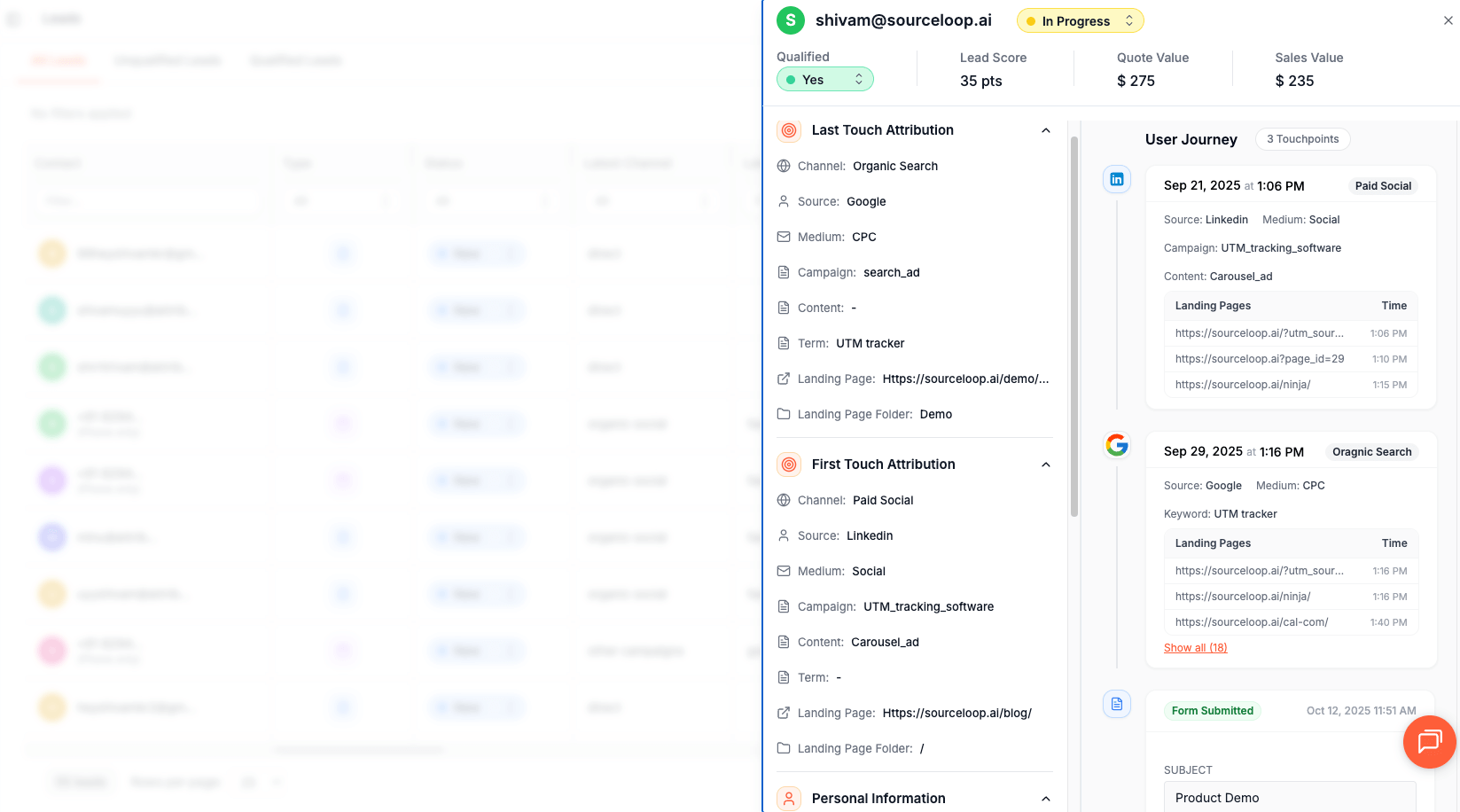
Real Construction Example:
A homeowner clicks your Facebook Ad for deck building, browses your portfolio for 10 minutes, then fills out your estimate form.
SourceLoop automatically captures that this lead came from social media, not “direct traffic” like most analytics tools would show.
4. Add Hidden Fields to Your Lead Forms (Optional)
For UTM parameters to appear directly in your form submissions, add hidden fields to your lead capture forms. These fields are invisible to visitors but capture valuable attribution data.
Recommended Hidden Fields for Construction Forms:
channel– Shows if lead came from paid search, social media, etc.attribution_source– Specific platform (Google, Facebook, trade show)attribution_medium– Campaign type (CPC, email, referral)attribution_campaign– Exact campaign nameattribution_term– Keywords or specific contentlandingpage– First page they visitedlastseen– Most recent website visit
First-Touch Attribution Fields (Advanced):
Many construction leads research for weeks before contacting contractors. These hidden fields show where they originally discovered you:
firstseen– Date of first website visitfirst_channel– Original traffic sourcefirst_source– Where they first found youfirst_campaign– Initial campaign that brought them
According to a research, 73% of B2B buyers research multiple touchpoints before making contact, making first-touch tracking crucial for construction companies.
Read more:
5. Sync UTM Data with Buildxact CRM
Once lead source data flows into SourceLoop, connecting it to Buildxact CRM takes minutes:
Option 1: Direct Webhook Integration
- Set up SourceLoop’s outbound webhook feature
- Configure webhook URL in your Buildxact CRM settings
- New leads automatically sync with full UTM parameters
Option 2: Zapier/Make.com Integration
- Connect SourceLoop to Buildxact CRM through Zapier or Make.com
- Map UTM parameter fields to appropriate Buildxact CRM fields
- Leads sync automatically with source attribution
Option 3: CSV Export
- Export leads from SourceLoop with UTM parameters
- Import into Buildxact CRM with source data intact
- Best for weekly or monthly data updates
The webhook approach provides real-time syncing, while automation tools offer more customization options for field mapping.
What You Can Do with UTM Data in Buildxact CRM
Now that UTM parameters flow into your CRM, here’s how construction companies use this data:
Identify Which Marketing Channels Bring Quality Construction Leads
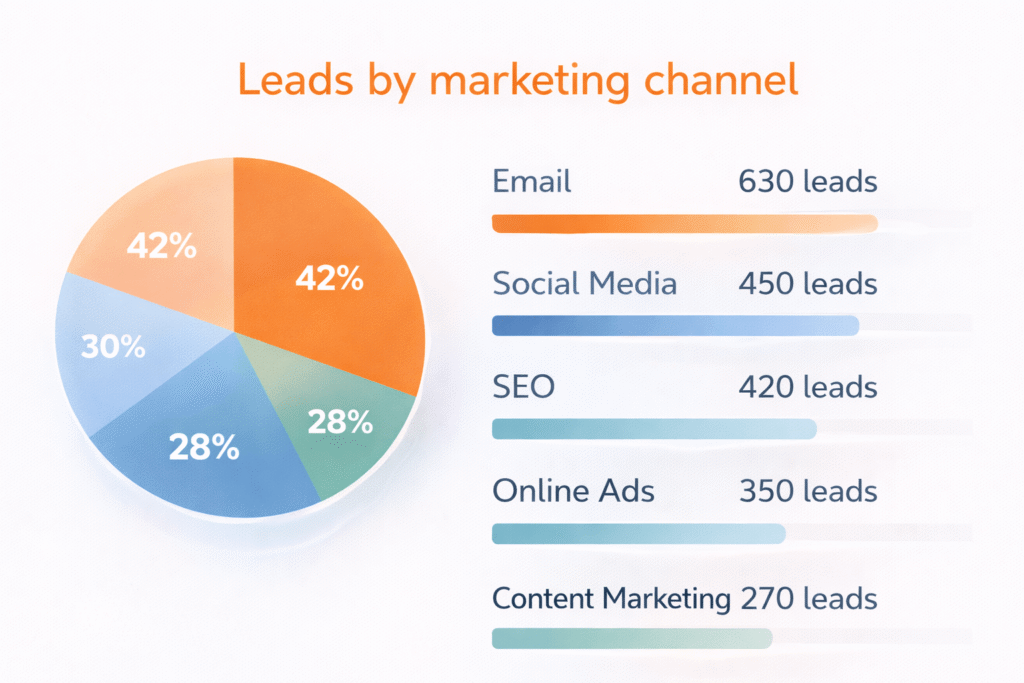
Raw lead counts don’t tell the whole story. UTM tracking reveals lead quality by source.
Example Analysis:
- 50 leads from Facebook Ads, 4 became paying customers ($80,000 total)
- 15 leads from trade show booth, 8 became customers ($240,000 total)
- 25 leads from Google Ads, 12 became customers ($180,000 total)
Trade show leads convert at 53% with higher project values, while Facebook leads convert at only 8%. This data helps you allocate marketing budget more effectively.
Track ROI for Trade Shows, Local Ads, and Referral Programs
Construction marketing spans multiple channels. UTM tracking helps calculate true return on investment for each.
Trade Show ROI Calculation:
- Booth cost: $8,000
- UTM-tracked leads: 22
- Closed projects: 6
- Revenue: $156,000
- ROI: 1,850%
Google Ads ROI:
- Monthly spend: $3,200
- UTM-tracked leads: 18
- Closed projects: 7
- Revenue: $98,000
- ROI: 2,963%
Route Leads to the Right Project Managers
Large construction companies often have specialized teams. UTM data enables automatic lead routing based on campaign source.
Routing Examples:
- Kitchen remodel campaigns → Residential project managers
- Commercial renovation ads → Commercial team
- Emergency repair keywords → Service department
- Trade show leads → Senior estimators
According to a research, proper lead routing increases conversion rates by 35% and reduces response time by 60%.
Calculate Customer Lifetime Value by Lead Source
Understanding long-term customer value helps optimize marketing spend as reported by Harvard Business Review. UTM tracking reveals which sources bring the most profitable customers.
Customer Value Analysis:
- Referral program customers: Average $45,000 first project, 67% return for additional work
- Google Ads customers: Average $28,000 first project, 34% return rate
- Trade show customers: Average $52,000 first project, 78% return rate
- Social media customers: Average $18,000 first project, 22% return rate
Conclusion
Tracking UTM parameters in Buildxact CRM eliminates the guesswork from construction marketing. With SourceLoop’s automated UTM capturing tool, you’ll know exactly which campaigns drive profitable projects versus those that just generate tire-kickers.
The five-step process—installing SourceLoop, adding UTM parameters to marketing links, capturing utm parameters automatically, implementing hidden fields, and syncing with Buildxact CRM—takes less than an hour to set up but provides years of valuable marketing insights.
Start with your highest-volume marketing campaigns first. Add UTM parameters to your Google Ads and trade show materials, then expand to email campaigns and referral programs. Within 30 days, you’ll have enough campaign data from various sources to make informed decisions about your construction marketing budget.
Ready to see where your best construction leads actually come from?
Try SourceLoop.ai for free and start tracking UTM parameters in your Buildxact CRM today.
FAQ: Track UTM Parameters in Buildxact CRM
Can Buildxact CRM track UTM parameters natively?
No. Buildxact CRM does not natively capture or store UTM parameters. Marketing attribution data must be collected before a lead enters Buildxact.
How can I track UTM parameters for Buildxact CRM?
You can track UTM parameters by using a website tracking tool like SourceLoop. SourceLoop captures UTM data when visitors land on your website and associates it with leads when they submit a form or request a quote.
Which UTM parameters should construction and contractor businesses track?
At a minimum, you should track utm_source, utm_medium, and utm_campaign. These parameters show where leads come from and which campaigns drive quote requests and enquiries.
Does UTM tracking work if a visitor returns later?
Yes. When UTM data is stored at the first visit, it can persist across multiple visits. If a prospect returns days later to submit a quote request, the original campaign attribution is retained.
Why is UTM tracking important for Buildxact users?
UTM tracking helps builders and contractors understand which marketing channels generate real enquiries and signed jobs, not just website traffic. This makes it easier to invest in high performing campaigns and reduce wasted marketing spend.
How does UTM data get into Buildxact CRM?
UTM data can be synced into Buildxact CRM using integrations such as automation tools, webhooks, or scheduled CSV imports. This allows each lead record in Buildxact to include campaign source and attribution details.

