

Not sure which marketing campaigns are bringing patients to your chiropractic practice?
You’re spending money on Google Ads, Facebook campaigns, and referral programs, but ChiroTouch CRM doesn’t tell you which efforts are actually working.
Without proper UTM tracking, you’re essentially flying blind with your marketing budget.
You might be pouring money into channels that barely convert while underfunding the campaigns that bring your best patients.
This guide shows you exactly how to track UTM parameters in ChiroTouch CRM using simple tools that require zero coding knowledge.
Let’s dive in.
How to Track UTM Parameters in ChiroTouch CRM
- Install SourceLoop’s tracking script on your website.
- Add UTM parameters to all marketing links (ads, email, social, partners).
- SourceLoop automatically captures and stores UTM data for every visitor.
- When a visitor submits a form, books a meeting, or chats, attribution data is attached to the lead.
- Sync the data into Flowlu CRM via webhook, Zapier/Make, or CSV import.
5 Steps to Track UTM Parameters in ChiroTouch CRM
Here’s how to set up comprehensive UTM tracking for your chiropractic practice:
Step 1: Install a UTM Tracking Tool on Your Website
Start by choosing a UTM capturing tool that works with healthcare websites.
SourceLoop.ai is particularly well-suited for chiropractic practices because it’s HIPAA-compliant and requires no coding knowledge.
Installation Process:
- Create a free account at SourceLoop.ai
- Copy the tracking script provided after signup
- Add the script to your website’s header section or through your tag manager
- Verify installation by checking that the script loads on all pages

Once installed, SourceLoop automatically captures UTM parameters from every visitor, storing them in secure cookies that persist across multiple page visits.
This means even if someone browses your site for 20 minutes before booking an appointment, you’ll still know their original source.
Step 2: Add UTM Parameters to All Marketing Links
Every marketing campaign needs properly tagged URLs. UTM parameters are simple additions to your website links that identify the source, medium, and campaign name.
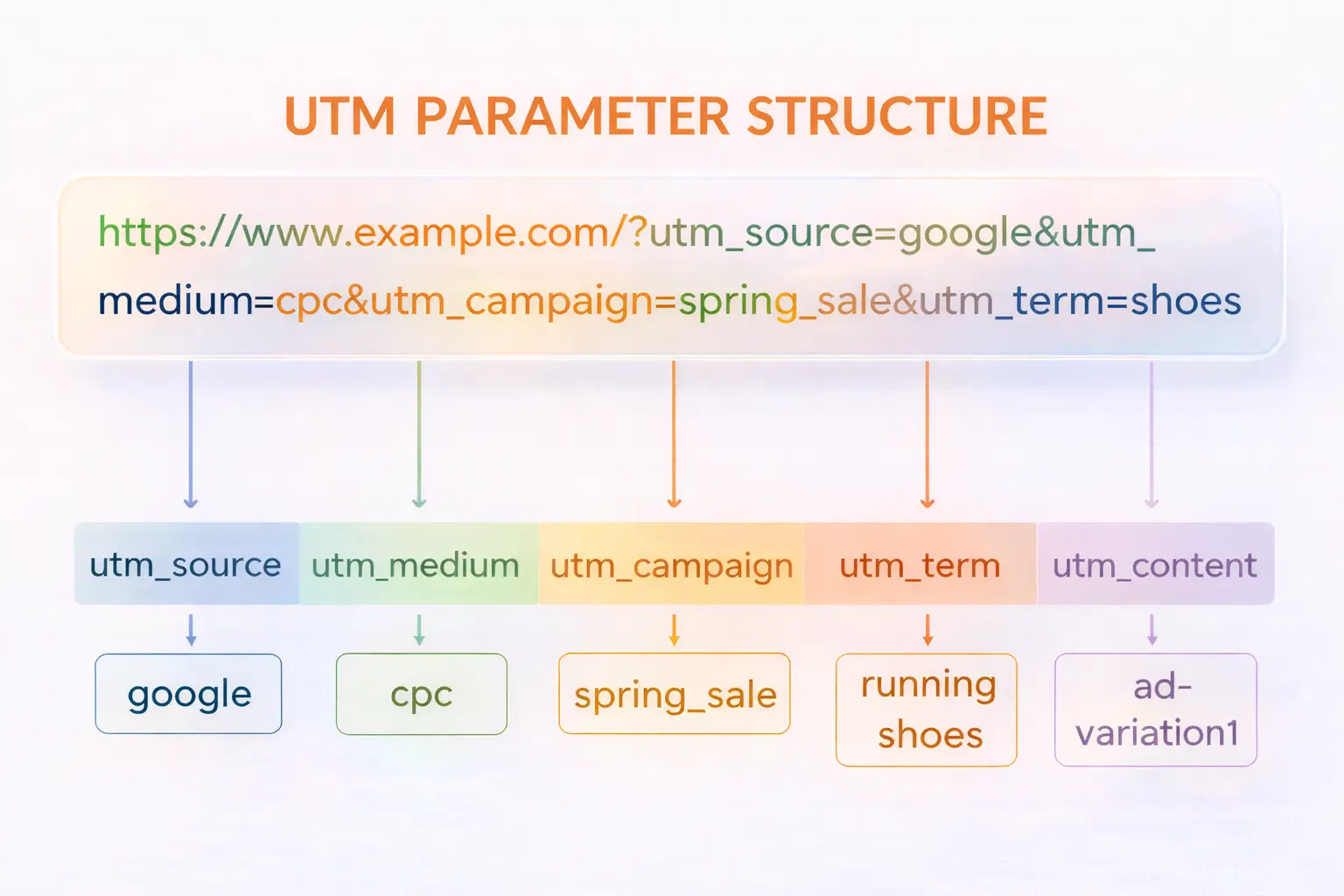
Example UTM-Tagged URLs:
For a Google Ads campaign promoting your new patient special:
https://yourpractice.com/new-patient?utm_source=google&utm_medium=cpc&utm_campaign=new_patient_special&utm_term=chiropractor_consultationFor a Facebook post about back pain treatment:
https://yourpractice.com/back-pain-treatment?utm_source=facebook&utm_medium=social&utm_campaign=back_pain_awareness&utm_content=exercise_videoFor your monthly email newsletter:
https://yourpractice.com/blog?utm_source=newsletter&utm_medium=email&utm_campaign=january_wellness_tipsUse Google’s Campaign URL Builder to create these tagged URLs consistently.
Step 3: Capture UTM Data Through Hidden Form Fields
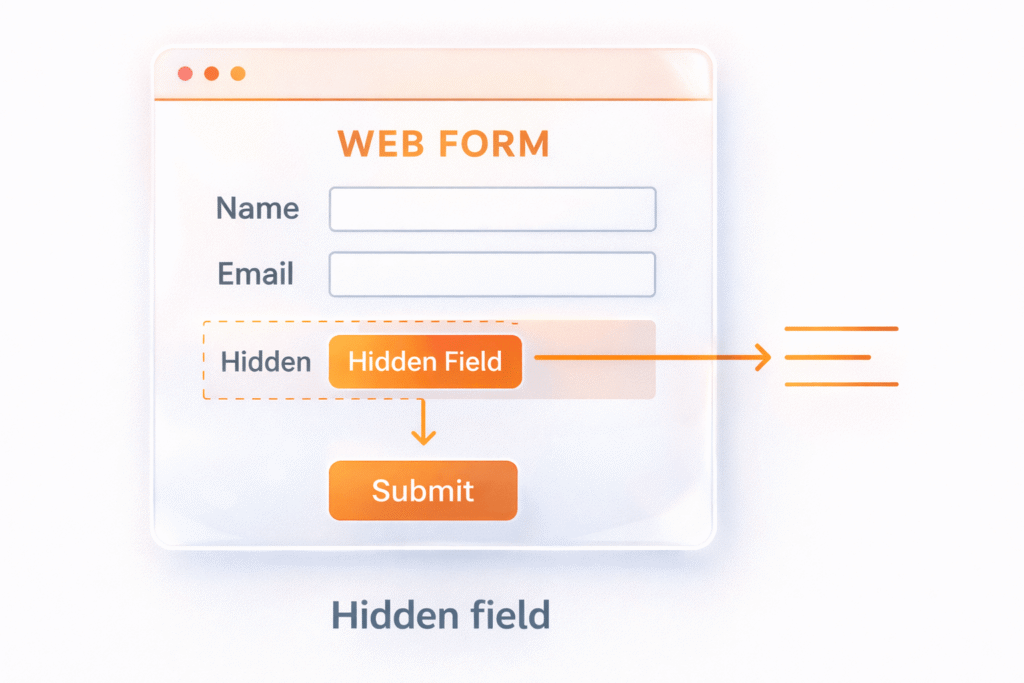
Your website forms need to capture the UTM data stored by your tracking tool.
Most form builders allow you to add hidden fields that aren’t visible to patients but collect attribution information automatically.
Recommended Hidden Fields:
utm_sourceutm_mediumutm_campaignutm_termutm_contentlanding_pagereferrer_url
When someone submits your “Schedule Appointment” form, these hidden fields automatically populate with their attribution data.
The patient only sees the standard fields (name, phone, email, preferred appointment time), but your form submission includes complete tracking information.
Popular form builders like Gravity Forms, Contact Form 7, and Webflow Forms all support hidden fields easily.
Step 4: Sync Attribution Data with ChiroTouch
Getting UTM data from your forms into ChiroTouch requires connecting your lead capture system to your CRM.
Several methods work well for chiropractic practices:
Direct Integration Options:
- Zapier Automation: Create automated workflows that send form submissions with UTM data directly to ChiroTouch
- Webhook Integration: If your form builder supports webhooks, you can push data to ChiroTouch’s API endpoints
- CSV Import: Export form submissions with attribution data and import them into ChiroTouch manually or on a schedule
What You Can Do with UTM Data in ChiroTouch
Once you successfully track utm parameters in ChiroTouch CRM, you unlock powerful insights that transform your marketing strategy. Here’s how to leverage this attribution information:
Track Which Campaigns Generate the Most Patients
With UTM data in ChiroTouch, you can see exactly which marketing efforts bring in actual patients versus just website visitors. This distinction is crucial for chiropractic practices because appointment bookings matter more than web traffic.
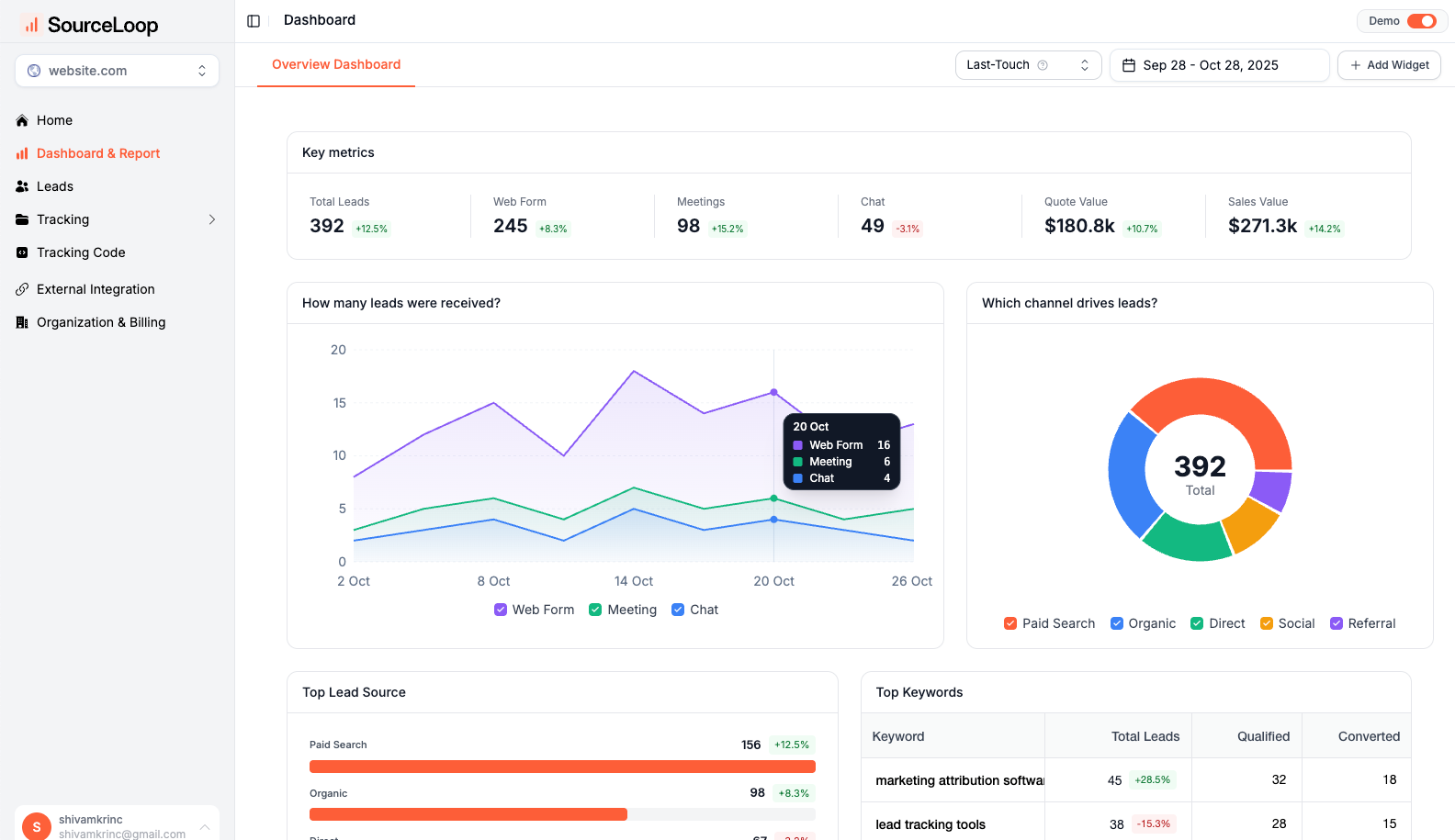
Example Analysis:
- Google Ads: 150 clicks, 12 appointment requests, 8 new patients
- Facebook Ads: 300 clicks, 6 appointment requests, 3 new patients
- Email Newsletter: 75 clicks, 9 appointment requests, 7 new patients
This data reveals that your email newsletter has the highest conversion rate, even though Facebook generates more traffic.
Calculate True Marketing ROI
UTM tracking enables precise ROI calculations for each campaign. Instead of guessing which marketing channels work best, you can calculate the actual return on investment.
ROI Calculation Example:
- Campaign Cost: $500 monthly Google Ads spend
- New Patients: 8 patients from Google Ads
- Average Patient Value: $1,200 lifetime value
- Total Revenue: $9,600
- ROI: 1,820% return on ad spend
This level of detail helps you allocate marketing budgets more effectively and justify increased spending on high-performing channels.
Optimize Follow-up Sequences by Lead Source
Different marketing campaigns attract patients with varying needs and expectations. UTM data allows you to customize your follow-up approach based on how each patient discovered your practice.
Tailored Follow-up Examples:
Pain Relief Campaign Leads: Send educational content about treatment options, success stories from similar cases, and scheduling incentives for quick relief.
Wellness Campaign Leads: Focus on preventive care benefits, lifestyle tips, and long-term health maintenance programs.
Referral Leads: Acknowledge the referring source, explain your collaborative approach, and provide updates to share with the referring provider.
Route Leads to Appropriate Staff Members
Large practices can use UTM data to automatically assign leads to the most appropriate team members based on the campaign source.
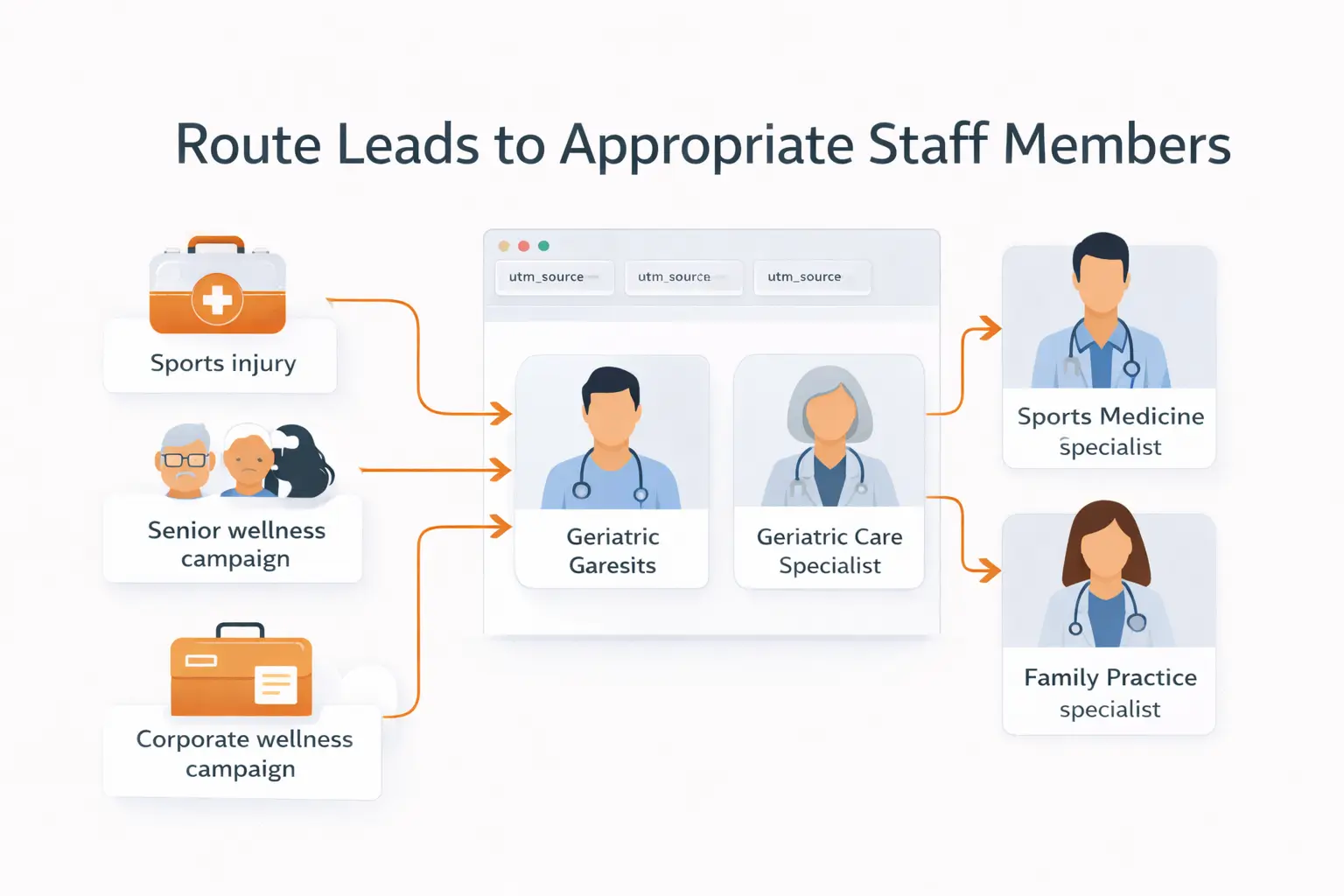
Smart Routing Examples:
- Sports injury campaigns → Sports medicine specialists
- Senior wellness campaigns → Geriatric care specialists
- Corporate wellness campaigns → Workplace injury experts
- Pediatric campaigns → Family practice specialists
This targeted routing improves patient experience and increases conversion rates because leads connect with the most relevant expertise immediately.
Final Thought on Capturing UTM Parameters in ChiroTouch
Tracking UTM parameters in ChiroTouch CRM transforms your marketing from guesswork into data-driven decision making. While ChiroTouch doesn’t natively capture this attribution information, tools like SourceLoop make implementation straightforward for any practice.
The investment in proper UTM tracking pays dividends through optimized marketing spend, improved patient acquisition, and better understanding of what drives growth in your practice. Start with one marketing channel, perfect your tracking setup, then expand to capture attribution data from all your marketing campaigns.
Ready to see exactly which marketing efforts bring in your best patients?
Try SourceLoop.ai free for 30 days and start tracking UTM parameters in ChiroTouch CRM today. passing that information to ChiroTouch when they convert into a lead or patient.
Read more:
Frequently Asked Questions
Can ChiroTouch CRM track UTM parameters natively?
No. ChiroTouch CRM does not natively track or store UTM parameters. It does not capture campaign source, medium, or attribution data from marketing links.
How can I track UTM parameters in ChiroTouch CRM?
You need a third-party UTM tracking tool to capture attribution data before it reaches ChiroTouch. SourceLoop captures UTM parameters on your website and syncs them into ChiroTouch when a lead or patient is created.
What UTM parameters should chiropractic practices track?
Chiropractic practices should track utm_source, utm_medium, utm_campaign, utm_content, and utm_term. These parameters identify which marketing campaigns generate appointments and patients.
Does SourceLoop track UTMs across multiple visits?
Yes. SourceLoop persists UTM data across multiple sessions using cookies. If a visitor returns later to book an appointment, the original campaign attribution is retained.
Do I need Google Tag Manager to use SourceLoop?
No. SourceLoop does not require Google Tag Manager or custom JavaScript. You only need to install a single tracking script on your website.
How is UTM data sent to ChiroTouch CRM?
UTM data can be sent to ChiroTouch using webhooks, Zapier or Make automations, or CSV imports. SourceLoop supports all three methods.
Can I see which campaigns generate actual patients?
Yes. By linking UTM data to patient records in ChiroTouch, SourceLoop allows you to identify which campaigns generate appointments and new patients, not just website traffic.
Can UTM data be used for lead routing?
Yes. UTM parameters can be used to route leads to specific staff members based on campaign source. This allows practices to assign leads to the most relevant specialists.
Is SourceLoop suitable for small chiropractic practices?
Yes. SourceLoop works for solo chiropractors, small clinics, and multi-location practices. Setup does not require technical expertise.
Why use SourceLoop instead of Google Analytics?
Google Analytics reports traffic but does not attach campaign data to individual patient records in ChiroTouch. SourceLoop connects UTM attribution directly to leads and patients, making it actionable for revenue and growth analysis.

