

Not sure where your best leads are coming from in Oracle NetSuite CRM? You’re not alone.
Without proper UTM tracking, marketing teams waste thousands of dollars on campaigns that don’t convert while missing opportunities to double down on what’s actually working.
The good news? You can set up comprehensive UTM parameter tracking in NetSuite CRM without any technical expertise.
In this guide, we’ll walk you through a simple 5-step process using SourceLoop that captures every lead’s true source and syncs it directly with your CRM.
Let’s dive in.
How to Track UTM Parameters in Oracle NetSuite CRM
- Install SourceLoop’s tracking script on your website.
- Add UTM parameters to all marketing links (ads, email, social, partners).
- SourceLoop automatically captures and stores UTM data for every visitor.
- When a visitor submits a form, books a meeting, or chats, attribution data is attached to the lead.
- Sync the data into NetSuite CRM via webhook, Zapier/Make, or CSV import.
5 Simple Steps to Track UTM Parameters in Oracle NetSuite CRM
1. Install SourceLoop.ai on Your Website
To start tracking utm parameters in Oracle NetSuite CRM, you’ll need a tool that automatically captures visitor data. SourceLoop makes this process simple:
- Create your free account at SourceLoop.ai
- Copy the tracking script provided after signup
- Add the script to your website’s
<head>section or through Google Tag Manager - Verify installation using the SourceLoop dashboard
Once installed, SourceLoop automatically captures UTM parameters from every visitor—whether they come from:
- Google Ads
- Social media campaigns
- Email marketing
- Partner websites
Real-world example: A SaaS company promoting their project management tool runs targeted LinkedIn ads. When someone clicks this link:
https://yourcompany.com/demo?utm_source=linkedin&utm_medium=paid&utm_campaign=pm_tool_demo&utm_term=project_management_softwareSourceLoop captures:
- Channel: Paid Social
- Attribution Source: LinkedIn
- Attribution Campaign: pm_tool_demo
- Attribution Term: project_management_software
- Landing Page: /demo
- First Seen: Complete timestamp of initial visit
2. Add UTM Parameters to Every Marketing Link

For tracking utm parameters to work effectively, every marketing link needs proper UTM tags. These simple URL parameters tell you exactly how visitors discovered your website.
When your links include UTM parameters, SourceLoop stores this data in visitor cookies and automatically passes it to your lead forms when someone converts.
Essential UTM parameter examples:
Google Search Ads:
https://yoursite.com/trial?utm_source=google&utm_medium=cpc&utm_campaign=free_trial_q1&utm_term=crm_softwareLinkedIn Sponsored Content:
https://yoursite.com/webinar?utm_source=linkedin&utm_medium=paid&utm_campaign=sales_automation_webinarEmail Newsletter:
https://yoursite.com/blog/sales-tips?utm_source=newsletter&utm_medium=email&utm_campaign=march_digestPartner Website:
https://yoursite.com/partnership?utm_source=partner_site&utm_medium=referral&utm_campaign=integration_announcementUse Google’s Campaign URL Builder to create consistent UTM parameters across all campaigns.
3. SourceLoop Automatically Captures Lead Data
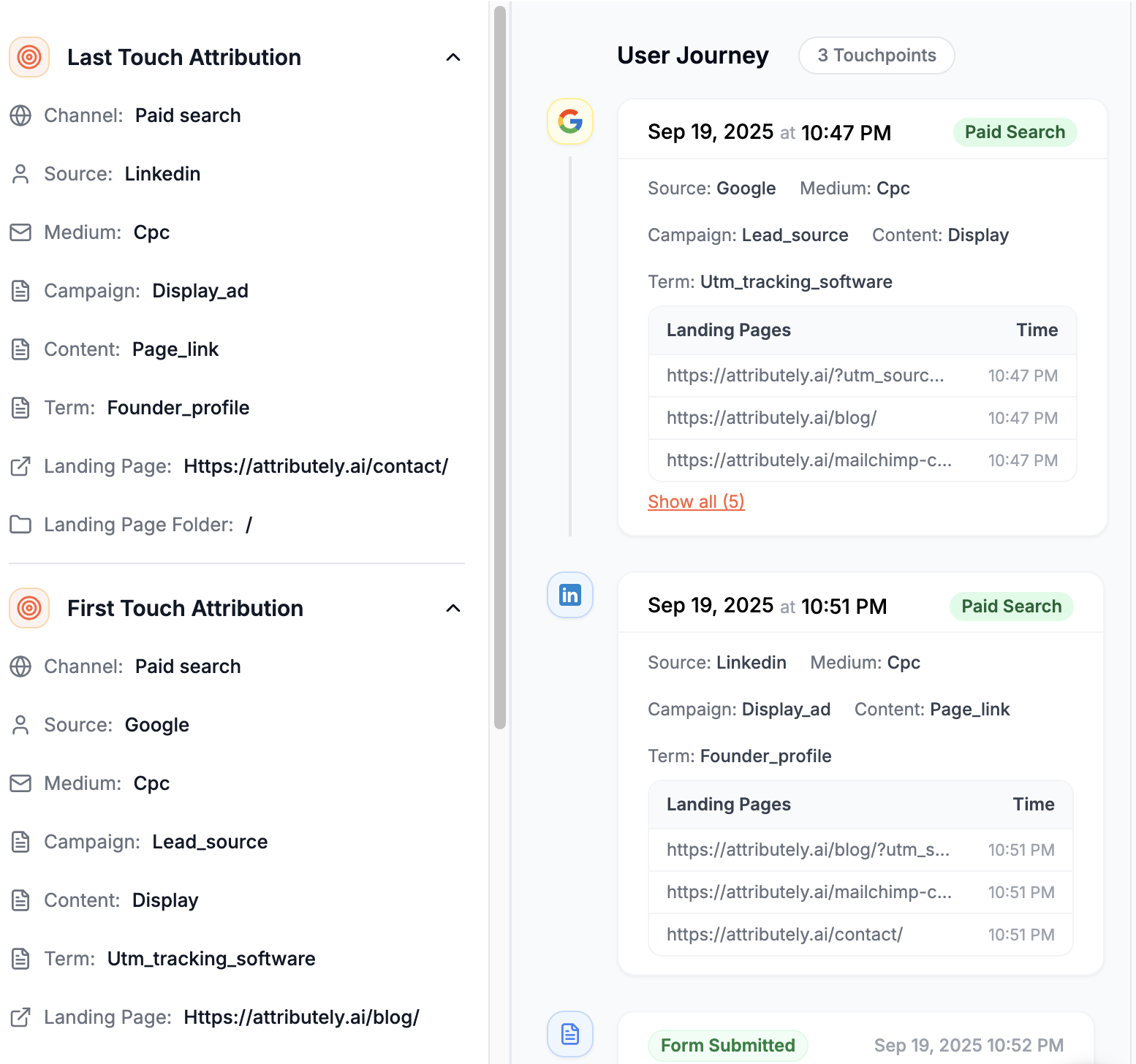
The beauty of SourceLoop is that it works with your existing lead capture setup. Whether you’re using Salesforce Web-to-Lead forms, HubSpot, Calendly, or custom contact forms, SourceLoop supports over 100 form tools out of the box.
No configuration required. Once the tracking script is installed:
- Every form submission is automatically detected
- Attribution data is captured and stored
- Lead information appears in your SourceLoop Leads Manager dashboard
- Complete visitor journey is tracked from first visit to conversion
This means you can start capture utm parameters immediately, even if your forms don’t have hidden fields set up yet.
4. Add Hidden Fields to Your Lead Forms (Optional)
For direct utm tracking for NetSuite integration, consider adding hidden fields to your lead capture forms. These invisible fields automatically populate with attribution data when visitors submit forms.
Recommended hidden field names:
channelattribution_sourceattribution_mediumattribution_campaignattribution_termlandingpagelandingpagefolderlastseen
Most form builders like Gravity Forms, Webflow, and Contact Form 7 support hidden fields. Simply add these fields to your forms, and SourceLoop will automatically populate them with the correct UTM data.
Pro tip: If your sales cycle is longer than 30 days, also add first-touch attribution fields:
firstseenfirst_channelfirst_sourcefirst_mediumfirst_campaignfirst_landingpage
This captures where leads originally discovered your brand, not just their last interaction before converting.
Read More:
- How to Track UTM Parameters in Vtiger CRM
- How to Track UTM Parameters in Less Annoying CRM
- How to Track UTM Parameters in Maximizer CRM
- How to Track UTM Parameters in ActiveCampaign CRM
- How to track UTM in Attio CRM
5. Sync UTM Data with Oracle NetSuite CRM
The final step connects your lead attribution data with NetSuite CRM. SourceLoop offers several integration options:
Option 1: Direct Webhook Integration
- Set up a webhook in your SourceLoop dashboard
- Configure NetSuite to receive lead data via REST API
- Map attribution fields to custom NetSuite lead fields
- Test the connection with a sample lead submission
Option 2: Zapier/Make.com Integration
- Create a Zapier connection between SourceLoop and NetSuite
- Set trigger conditions for new leads in SourceLoop
- Map data fields to corresponding NetSuite lead records
- Enable automatic sync for real-time attribution data
Option 3: CSV Export and ImportFor smaller volumes, export lead data from SourceLoop and import it into NetSuite using the SuiteCloud platform’s data import tools.
The webhook integration typically takes less than 30 minutes to set up and provides real-time lead attribution data in your NetSuite CRM.
Advanced Attribution: Track First-Touch Data
Many B2B companies have sales cycles spanning weeks or months. A prospect might discover your company through a LinkedIn ad in January but not submit a contact form until March after visiting your site multiple times through different channels.
Without first-touch attribution, that lead appears to come from “Direct Traffic” in your reports—but the real acquisition channel was LinkedIn Ads.
Setting up first-touch tracking:
- Add first-touch hidden fields to your forms (listed in Step 4)
- Configure SourceLoop to capture initial visit data
- Create NetSuite custom fields for first-touch attribution
- Map first-touch data in your integration setup
Example scenario: A marketing manager at a manufacturing company sees your LinkedIn ad about inventory management software. They visit your site but don’t convert. Two weeks later, they Google your company name, visit again, and request a demo.
With first-touch tracking, you’ll see:
- First Channel: Paid Social (LinkedIn)
- Last Channel: Organic Search (Google)
- True Attribution: LinkedIn ad campaign drove the initial discovery
This data helps you understand the complete customer journey and allocate marketing budget more effectively.
What You Can Do with UTM Data in Oracle NetSuite CRM
Once UTM tracking is active and flowing into NetSuite, you can leverage this data for significant business improvements:

1. Identify High-Performing Marketing Channels
Stop guessing which campaigns work. With UTM data in NetSuite CRM, you can analyze lead quality by source:
Example analysis:
- Google Ads: 150 leads, 12% conversion rate, $45,000 revenue
- LinkedIn Ads: 75 leads, 24% conversion rate, $52,000 revenue
- Email Marketing: 200 leads, 8% conversion rate, $28,000 revenue
This reveals that LinkedIn generates fewer leads but higher-quality prospects with better conversion rates and revenue per lead according to a study by LinkedIn Marketing Solutions.
Create NetSuite saved searches to track:
- Lead volume by campaign
- Conversion rates by traffic source
- Revenue attribution by marketing channel
- Cost per acquisition by campaign type
2. Segment Leads for Targeted Follow-Up
Generic follow-up emails convert poorly. UTM data enables personalized outreach based on how prospects discovered your company.
Campaign-specific messaging examples:
- Webinar attendees: “Thanks for joining our automation webinar—here’s the ROI calculator we mentioned”
- Google Ads clicks: “Searching for CRM solutions? Here’s how we compare to [competitor]”
- Social media visitors: “Saw you’re interested in our latest features—want a personalized demo?”
Set up NetSuite workflows to automatically assign leads to specific nurture sequences based on their attribution source.
3. Automate Lead Routing and Assignment
Route leads to the right sales rep automatically using UTM data:
Geographic routing:
- Leads from “utm_campaign=west_coast_expansion” → West Coast sales team
- Leads from “utm_campaign=nyc_event” → Northeast regional manager
Product-based routing:
- Leads from “utm_campaign=enterprise_features” → Enterprise sales team
- Leads from “utm_campaign=small_business_pricing” → SMB sales reps
Channel-based routing:
- LinkedIn leads (typically higher intent) → Senior sales reps
- Display ad leads → Inside sales team for qualification
Configure NetSuite assignment rules to automatically distribute leads based on UTM parameters.
4. Build Marketing Performance Reports
NetSuite’s reporting capabilities become much more powerful with UTM attribution data:
Key reports to create:
- Campaign ROI Dashboard: Revenue generated vs. advertising spend by campaign
- Channel Performance Summary: Lead volume, conversion rates, and deal size by traffic source
- Sales Cycle Analysis: Time from first touch to close by acquisition channel
- Customer Lifetime Value: Average revenue per customer segmented by original source
Use NetSuite’s SuiteAnalytics to create visual dashboards showing marketing attribution data alongside sales performance metrics.
5. Calculate Customer Lifetime Value by Source
Understanding which channels attract the most valuable customers helps optimize marketing spend.
Example CLV analysis:
- Organic search customers: $85,000 average lifetime value
- Paid search customers: $62,000 average lifetime value
- Social media customers: $41,000 average lifetime value
This data reveals that investing in SEO and content marketing may generate higher long-term value than paid advertising, even if it produces fewer immediate leads.
Create NetSuite reports linking customer records to their original UTM source data to track revenue attribution over time.
Conclusion
Setting up UTM parameter tracking in Oracle NetSuite CRM transforms your marketing from guesswork into data-driven decision making. With SourceLoop’s automated capture and NetSuite integration, you’ll know exactly which campaigns drive your best customers.
Start with the 5-step process outlined above, beginning with SourceLoop installation and UTM parameter implementation. Once attribution data flows into NetSuite, you can optimize marketing spend, improve lead routing, and demonstrate clear ROI for every campaign.
Ready to see which marketing channels actually drive revenue? Try SourceLoop’s free trial and start tracking UTM parameters in your NetSuite CRM today.

