
How to Track Website Visitors for Sales Growth in 2026
Master how to track website visitors from first click to sale. Covers methods, event setup, UTMs, CRM sync, & 2026 privacy compliance.
Table of contents
- Why Google Analytics Isn't Enough for Most Businesses in 2026
- GA4 sees a lead form fill as a conversion
- It can't track offline conversions
- Attribution data stays trapped in GA4
- What Website Visitor Tracking Actually Means
- The Four-Step Process to Track Website Visitors for Sales Growth
- Step 1: Install First-Party Tracking on Your Website
- Step 2: Define and Capture Conversion Events
- Step 3: Sync Attribution Data to Your CRM
- Step 4: Push Offline Conversions Back to Ad Platforms
- What You Can Track with Sourceloop (That GA4 Can't)
- How to Use Visitor Tracking Data to Grow Sales
- Cut underperforming spend
- Optimize landing pages by source
- Prioritize high-intent leads
- Expand what works geographically
- Getting Started with Sourceloop
- Conclusion
Track website visitors from first click to closed deal. Install a first-party tracking script, capture UTM parameters and page views, connect conversion events (forms, calls, meetings, chat), sync attribution data to your CRM, and push qualified conversions back to ad platforms.
In 2026, businesses that sell through demos and calls need more than Google Analytics, they need lead source tracking that follows the journey from anonymous visitor to paying customer.
Why Google Analytics Isn't Enough for Most Businesses in 2026
Google Analytics 4 excels at measuring website traffic, page views, and on-site behavior. But for businesses that sell through forms, demo requests, and sales calls, GA4 has three critical gaps.
It stops at the form submission.
GA4 sees a lead form fill as a conversion
Your sales team knows that 60% of those "conversions" never answer the phone, 20% are spam, and only a handful become customers. GA4 can't tell you which campaign produced the $40,000 deal that closed last month—it only knows which campaign produced a form fill.
It can't track offline conversions
When a prospect books a meeting through Calendly, takes a phone call, or starts a chat conversation, those conversions happen outside the browser. GA4 has no native way to capture them. According to Invoca's 2026 research, phone calls account for 30-50% of high-value conversions in service industries, yet most analytics platforms miss them entirely.
Attribution data stays trapped in GA4
Your sales reps work in HubSpot, Pipedrive, or Salesforce. They need to know where each lead came from—which ad, keyword, landing page, and campaign. GA4 doesn't write that context into your CRM records. Reps follow up blind, and you can't report on pipeline or revenue by source.
What Website Visitor Tracking Actually Means
Website visitor tracking captures three layers of data:
- Anonymous behavior: page views, referrers, UTM parameters, time on site, and navigation paths—before you know who the visitor is
- Conversion events: form submissions, meeting bookings, phone calls, live chat conversations, and trial signups that reveal identity
- Revenue outcomes: which leads became opportunities, which deals closed, and how much revenue each marketing source produced
The goal isn't surveillance. It's connecting marketing spend to business outcomes. When you know that "Google Ads / lead generation software / demo request" produced three customers worth $120,000, you can confidently increase that budget. When GA4 only tells you it produced 47 clicks and 12 form fills, you're guessing.
The Four-Step Process to Track Website Visitors for Sales Growth
Step 1: Install First-Party Tracking on Your Website
First-party tracking runs on your own domain and stores visitor data in your own database, not a third-party vendor's. This approach survives cookie restrictions, respects privacy regulations, and gives you full control.
For Sourceloop:
- Copy your tracking script from the Sourceloop dashboard (Settings → Installation)
- Add it to your website's
<head>section, just before the closing tag - The script loads asynchronously and won't slow down your site—typical load time is under 50ms
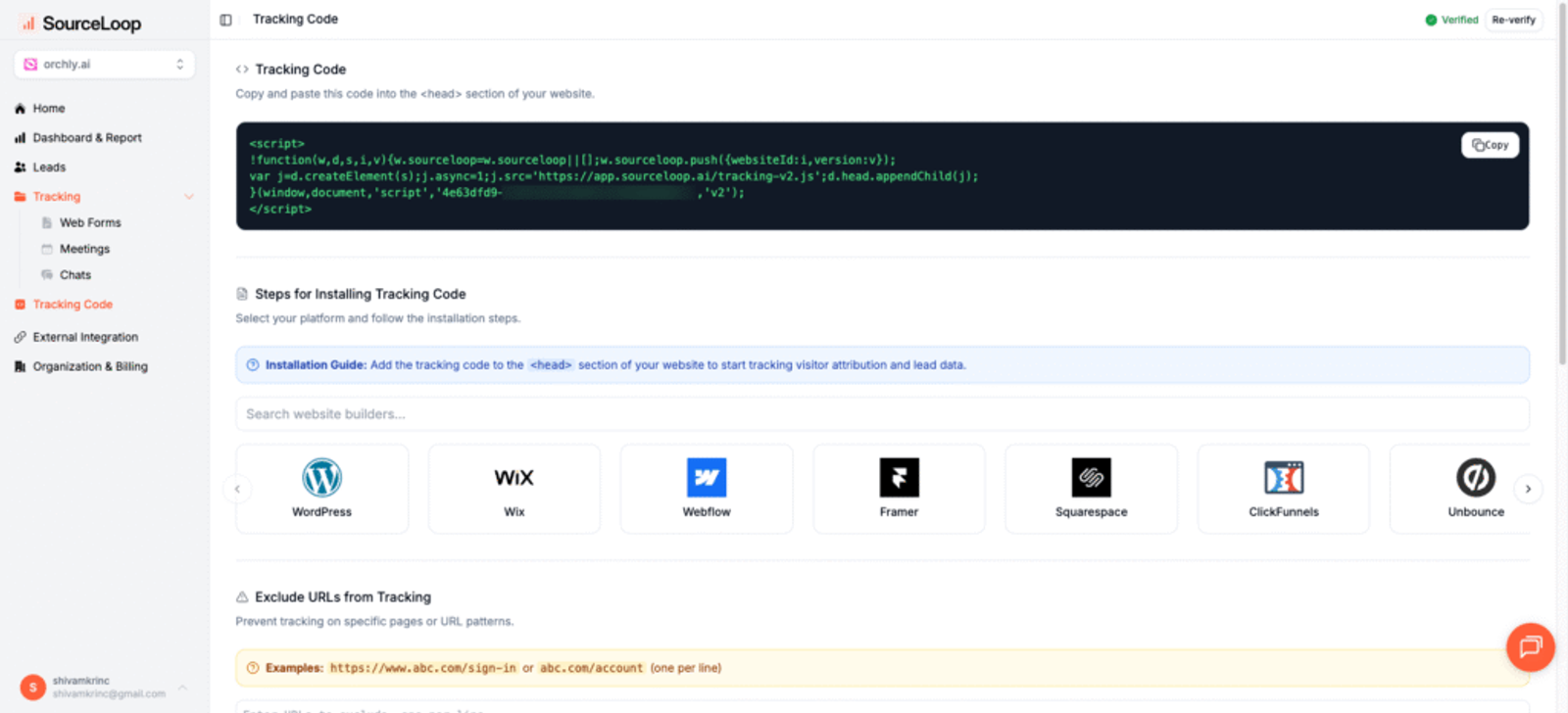
The tracking code captures every page view, referrer, UTM parameter, and session. It assigns each visitor a unique ID and stitches sessions together across visits, even if they return days later from a different source.
What gets tracked automatically:
- Traffic source (Google Ads, Meta, LinkedIn, organic search, direct, referral)
- Campaign parameters (utm_source, utm_medium, utm_campaign, utm_term, utm_content)
- Landing pages and navigation paths
- Device type, browser, and location
- Click IDs from ad platforms (gclid, fbclid, li_fat_id) for precise attribution
If you're using WordPress, install the Sourceloop plugin from your dashboard. For Shopify, enable the app from the Shopify App Store. Custom implementations work with Google Tag Manager, Segment, or direct JavaScript.
Step 2: Define and Capture Conversion Events
A conversion is any action that reveals visitor identity or intent. In 2026, that means more than form submissions.
Forms:
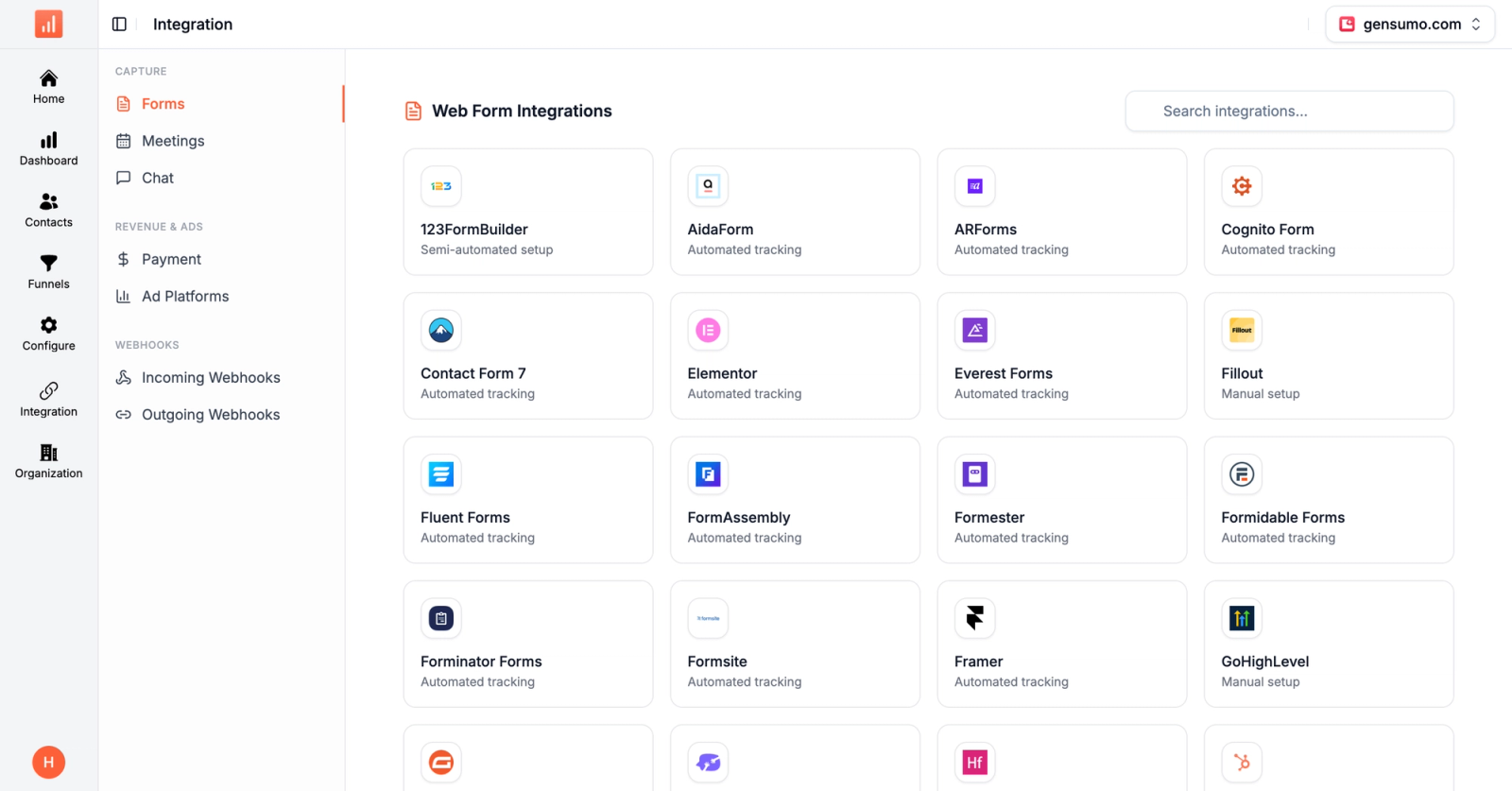
When someone fills out a contact form, demo request, or quote form, the tracking script captures the submission and associates it with their full journey—first touch source, latest touch source, and every page they visited. Sourceloop integrates with Contact Form 7, Gravity Forms, Typeform, HubSpot Forms, and 40+ form builders. See the full list.
Meeting bookings:
Calendly, Cal.com, and other scheduling tools fire webhooks when someone books a meeting. Sourceloop receives the webhook, matches the email to the visitor's session history, and attributes the meeting to the correct source. This is impossible with GA4 alone—it has no way to connect a Calendly booking back to the ad that started the journey.
Phone calls:
Integrate call tracking platforms like CallRail or CallTrackingMetrics with Sourceloop. When a prospect dials your tracked number, the call is logged as a conversion and attributed to the visitor's session. For service businesses where 40% of leads come through phone calls, this closes a massive attribution gap.
Live chat:
Connect Intercom, Drift, or Tidio. When a visitor starts a chat conversation, Sourceloop captures it as a conversion event and ties it to their traffic source.
Ecommerce purchases:
For Shopify stores, Sourceloop tracks order revenue, product details, and customer lifetime value, then attributes each purchase back to the first and last marketing touchpoint.
Step 3: Sync Attribution Data to Your CRM
This is where lead source tracking becomes revenue attribution. Sourceloop creates custom fields in your CRM and fills them in automatically for every new lead.
For HubSpot:
- First touch source, medium, campaign, term, content, landing page
- Latest touch source, medium, campaign, term, content, landing page
- Lead score (based on engagement and fit)
- Full journey timeline (every session, page, and event)
For Pipedrive and Salesforce: The same fields are created and populated. Your sales reps see the attribution data inside the contact or lead record they're already working in. No switching between tools.
When a deal closes, the revenue syncs back to Sourceloop. Now your dashboard shows revenue by source, not just lead counts. You can answer: "Which campaign produced $200,000 in closed revenue last quarter?" GA4 can't answer that question.
Step 4: Push Offline Conversions Back to Ad Platforms
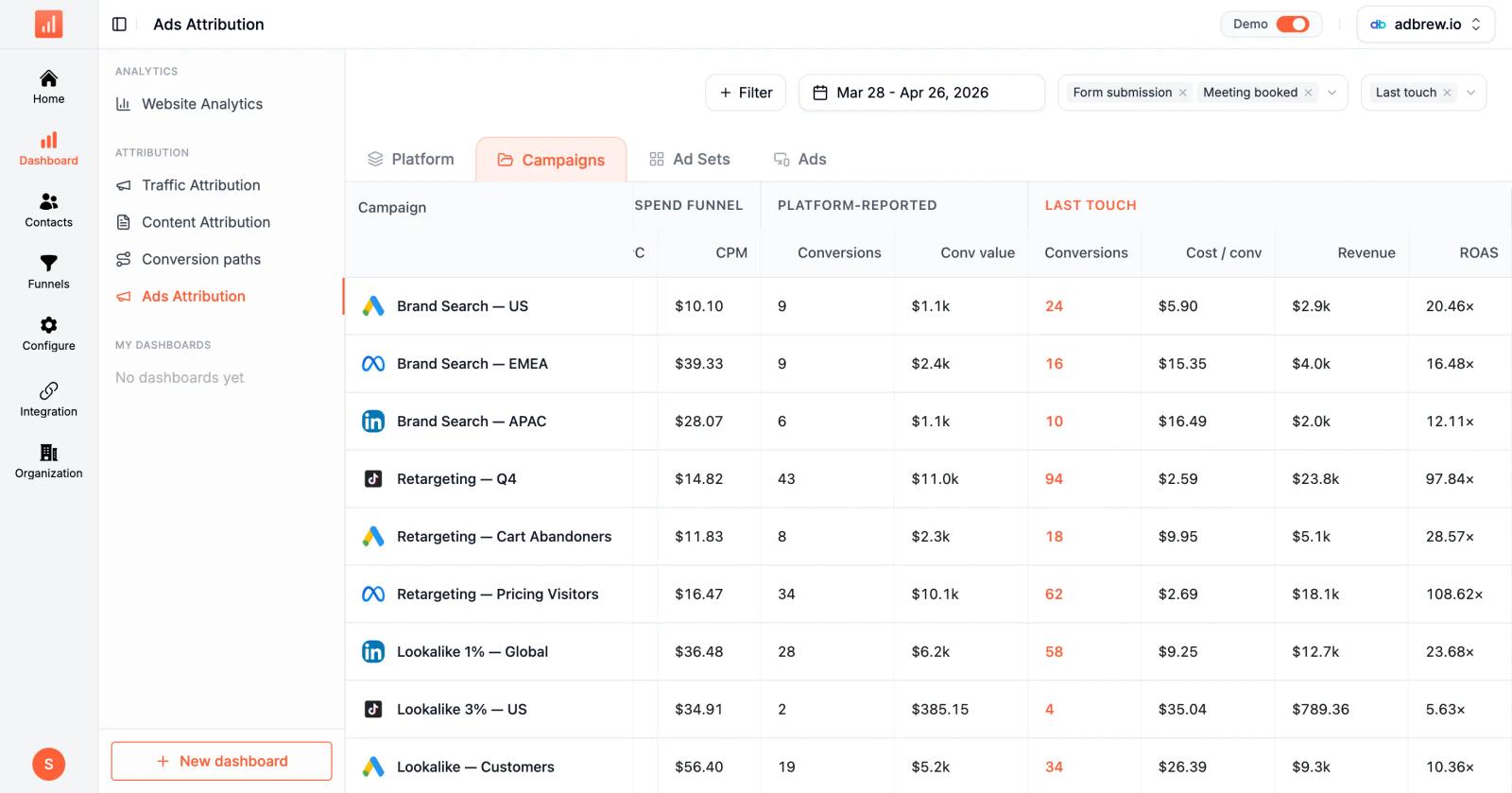
Google Ads and Meta optimize toward the conversions you report. If you only send them form submissions, they'll optimize for form fills—including the junk leads that never convert.
Sourceloop pushes qualified conversions back to Google Ads and Meta as offline conversions:
- When a lead is marked "qualified" in your CRM, that event is sent to the ad platform
- When a deal closes, the revenue is sent back with the original click ID
- The ad platforms use this data to optimize bidding toward real customers, not raw form fills
According to Google's 2026 attribution research, advertisers using offline conversion tracking see 20-35% improvement in cost per acquisition because automated bidding learns what a valuable conversion actually looks like.
What You Can Track with Sourceloop (That GA4 Can't)
Sourceloop is built for businesses that sell through forms, calls, meetings, and demos. Here's what the platform tracks that Google Analytics misses:
Multi-touch attribution:
See the full journey from first visit to closed deal. If a prospect clicked a LinkedIn ad, visited your pricing page, returned three days later via Google search, and booked a demo, you see all of it. GA4's session-based model breaks that journey into disconnected pieces.
Revenue by source:
Connect closed deals back to the campaigns that started them. Your dashboard shows revenue, not just clicks or form fills. Filter by traffic source, content, landing page, or country to see what's actually driving growth.
Conversion tracking across channels:
Forms, meetings, calls, chat, and purchases are all tracked as conversion events and attributed to the visitor's journey. This is impossible with GA4 alone—it requires integrations with Calendly, call tracking platforms, and CRM systems that GA4 doesn't offer.
CRM-native attribution:
Attribution data is written directly into HubSpot, Pipedrive, or Salesforce records. Your sales team sees the source of every lead without leaving the CRM. Your reports show pipeline and revenue by campaign, not just website metrics.
Prebuilt dashboards:
Traffic by source, conversions by campaign, revenue by channel, content performance, and geographic breakdowns are available out of the box. No custom reports or data exports required.
How to Use Visitor Tracking Data to Grow Sales
Tracking visitors is the input. Using the data strategically is the output. Here's how to turn attribution data into growth.
Cut underperforming spend
If a campaign produces 200 clicks, 15 leads, and zero customers, kill it. If another campaign produces 50 clicks, 8 leads, and 3 customers worth $90,000, double the budget. GA4 can't tell you which is which—it only sees clicks and form fills.
Optimize landing pages by source
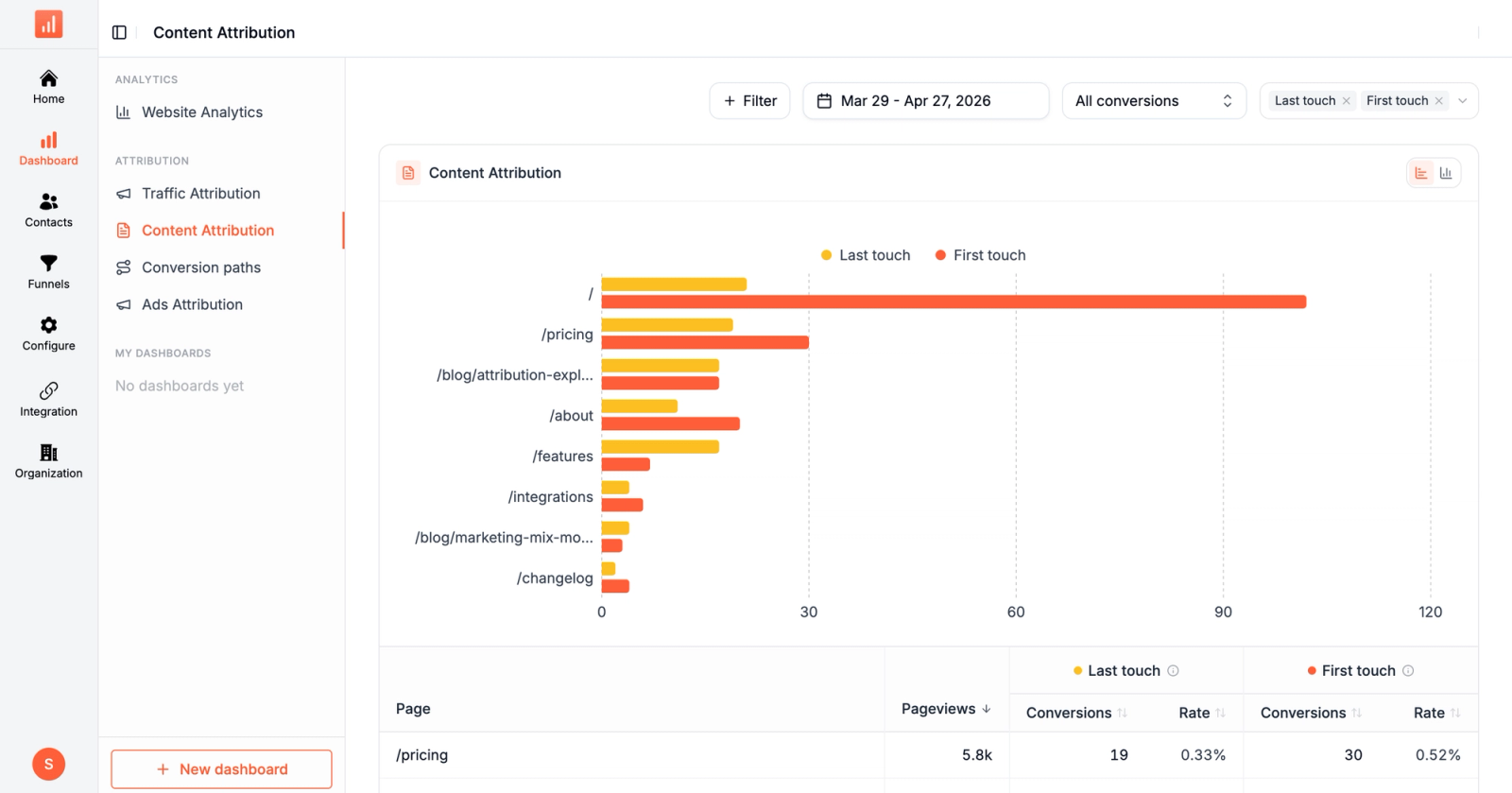
If LinkedIn traffic converts at 8% but Google Ads traffic converts at 2%, the problem isn't the ad—it's the landing page. Build source-specific pages that match the visitor's intent.
Prioritize high-intent leads
When a lead comes in, your CRM shows their full journey: which pages they visited, how many sessions, and whether they viewed pricing or case studies. Reps prioritize leads who visited high-intent pages multiple times over one-time visitors who bounced.
Expand what works geographically
If 60% of your revenue comes from three states or two countries, focus ad spend there. Sourceloop's location dashboard shows conversions and revenue by country, region, and city.
Getting Started with Sourceloop
Sourceloop is built for businesses that sell through forms, meetings, calls, and demos. Here's how to get started:
- Sign up for a 7-day free trial at sourceloop.ai. No credit card required.
- Install the tracking script on your website (WordPress plugin, Shopify app, or manual installation).
- Connect your CRM (HubSpot, Pipedrive, or Salesforce) so attribution data is written into lead records.
- Define conversion events (forms, meetings, calls, chat) and connect the integrations.
- Enable offline conversion sync to Google Ads and Meta so ad platforms optimize toward real customers.
Pricing starts at $49/month for 30,000 page views and unlimited conversions. The Professional plan ($99/month) includes CRM sync and ad platform integration. The Agency plan ($249/month) supports multiple websites and white-labeled reporting.
Within 48 hours, you'll see which campaigns, keywords, and landing pages are producing qualified leads and revenue, not just clicks and form fills.
Conclusion
Tracking website visitors isn't about surveillance—it's about connecting marketing spend to business outcomes. Google Analytics tracks sessions and page views. Lead source tracking platforms like Sourceloop track the full journey from first click to closed deal, across forms, meetings, calls, chat, and purchases.
The businesses that win in 2026 are the ones that know which campaigns produce customers, not just traffic. Install first-party tracking, capture every conversion type, sync attribution data to your CRM, and push qualified conversions back to ad platforms. The setup takes a few hours. The ROI compounds for years.
Start your free trial at sourceloop.ai and see which campaigns are actually driving revenue.
Frequently asked questions
-
Can I track website visitors without cookies?
Yes. Sourceloop supports cookieless tracking mode that uses session-based identifiers instead of cookies. Attribution accuracy is slightly lower (75-85% vs. 90-95%), but you stay compliant with GDPR and CCPA for visitors who decline cookie consent.
-
What's the difference between Google Analytics and lead source tracking software?
Google Analytics tracks website sessions, page views, and on-site behavior. Lead source tracking software like Sourceloop tracks the full journey from first click to closed deal, including offline conversions (calls, meetings, chat), CRM data (pipeline, revenue), and ad platform sync. GA4 stops at the form submission; lead tracking connects marketing to revenue.
-
How long does it take to set up visitor tracking?
Installing the tracking script takes 10-15 minutes. Connecting your CRM and defining conversion events takes another 30-60 minutes. Most businesses see attribution data flowing within 24-48 hours. The initial setup is front-loaded; after that, tracking runs automatically.
-
How accurate is website visitor tracking in 2026?
First-party tracking platforms like Sourceloop achieve 85-95% attribution accuracy by using server-side tracking, first-party cookies, and CRM data sync. This is 15-20% higher than third-party tools that rely on browser cookies, which are increasingly blocked by privacy settings and browser restrictions.




 Paid Social


