











Scheduling tools
Meeting tracking
Meeting attribution for Calendly, Cal.com, and more
SourceLoop attaches UTM parameters, click IDs (GCLID, fbclid, li_fat_id), referrer, and the visitor's full journey to every meeting booked through Calendly, Cal.com, HubSpot Meetings, SavvyCal, TidyCal, Acuity, and 12+ scheduling tools.
Free 7-day trial. No credit card required.
Used by 750+ marketing teams, agencies, and SaaS companies
Why booked meetings lose their source
The booking page is not your website, and that breaks attribution
A booked demo is usually the most valuable conversion on the site. It is also the one most likely to arrive with no source, because the booking happens on a page you do not control.
- 01
The scheduler runs on someone else's domain
Whether it is embedded or a redirect, the booking page is not your site, so the campaign data sitting on your page never travels with the visitor.
Works with CalendlyCal.comChili PiperHubSpot MeetingsSavvyCal - 02
Passing UTMs by hand rarely holds
The documented fix is to append parameters to the scheduling link yourself. It works on one link, then breaks on every path you forgot to tag.
Affects UTM parametersPrefill links - 03
GA4 records the redirect, not the source
Analytics sees the visitor leave for the booking domain and often logs the return as referral traffic, so the original campaign disappears.
Affects GA4Referral traffic - 04
Booked is not the same as held
No-shows and cancellations count as conversions in most reports, so channels that produce unqualified bookings look better than they are.
Affects No-showsCancellations - 05
The meeting never reaches revenue
The demo is booked, the deal closes months later in the CRM, and nothing connects that revenue back to the campaign that produced the booking.
Affects Closed wonSales cycle
With SourceLoop
Every booking with the campaign that earned it
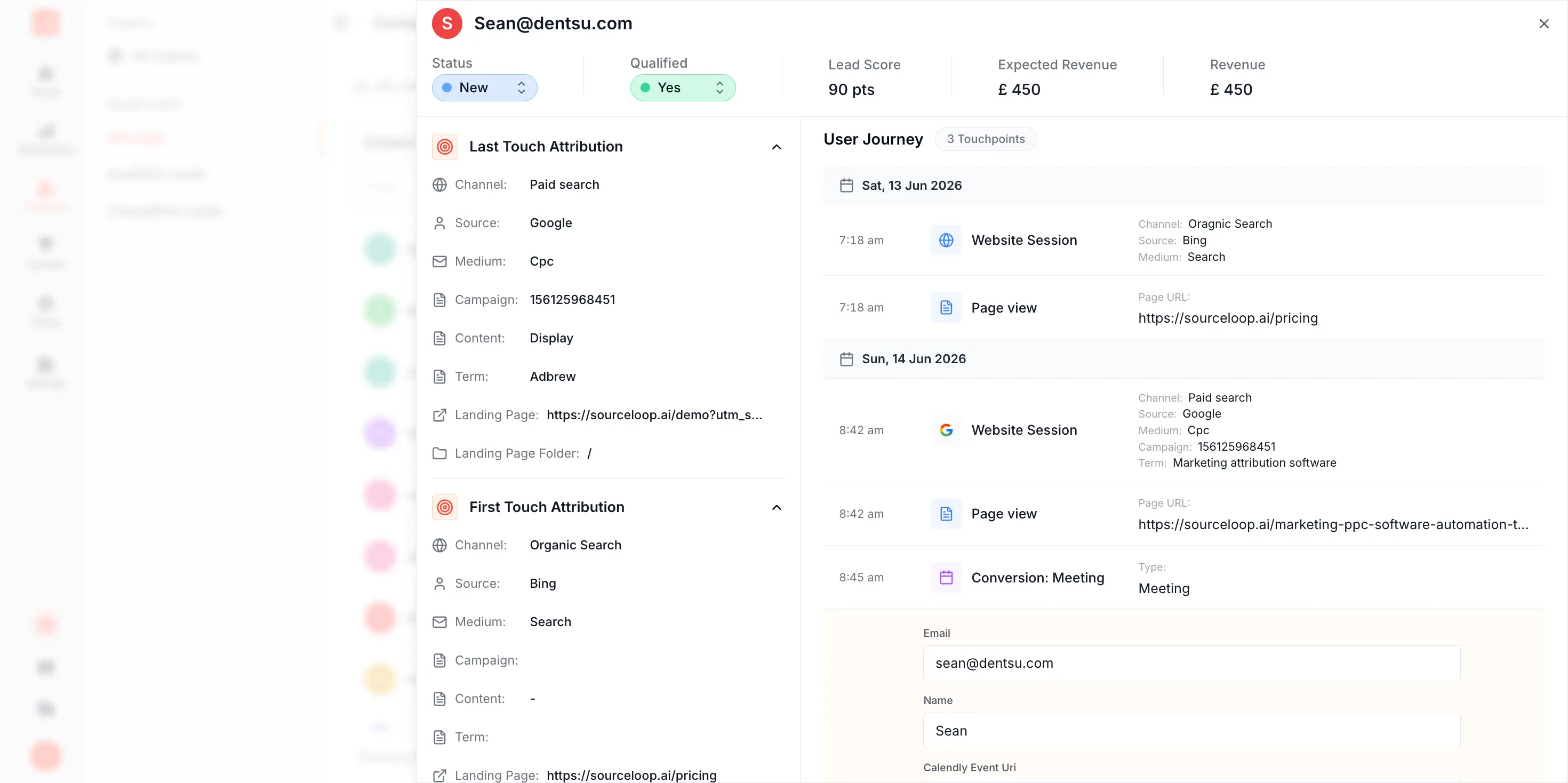
The source is captured before the visitor ever reaches the scheduler, and stays attached through the booking, the meeting, and the deal that follows.
- 01 Source captured on your site before the scheduler ever loads
- 02 No manual UTM appending, and nothing to forget on a new link
- 03 The return from the booking domain never resets the source
- 04 Held, no-show, and cancelled tracked separately from booked
- 05 The closed deal ties back to the campaign that booked it
Attribution stack
Demo booking attribution, end to end
See where every booked meeting came from before the call starts. SourceLoop captures the source on the first visit and keeps it tied to the booking, through to your CRM.



Source capture
Every booking carries the source that drove it.

Analytics
Demos booked by channel, with revenue behind each.
Full journey
See every touch before the meeting was booked.


CRM sync
Booking lands in your CRM, attribution mapped.
How it works
Three steps to attribute every meeting booking
One script tag, runs alongside your scheduling embed.
-
<script src="https://cdn.sourceloop.ai/sl.js" defer></script>
01Install the snippet
Drop one script tag in your <head>. Five minutes, no engineer required.
-


 02
02We listen to every booking
SourceLoop detects bookings on Calendly, Cal.com, HubSpot, SavvyCal, TidyCal, Acuity, and 12+ scheduling tools.
-
- Source LinkedIn / Paid
- Campaign attribution_q2
- First touch Google / Organic
03Lead lands in your CRM tagged
The booking lands in HubSpot, Salesforce, Pipedrive, or your CRM with full attribution and the meeting record linked.
Meeting tracking by platform
Track bookings on Calendly, Cal.com, HubSpot, SavvyCal, and 10+ more
Same snippet, every booking, every platform.
- Calendly
- Cal.com
- HubSpot Meetings
- SavvyCal
-
 TidyCal
 -
 YouCanBook.me
 - Acuity Scheduling
-
 Doodle
 -
 Setmore
 -
 Lemcal
 -
 Sessions
 -
 Calendesk
 -
 Vyte
Vyte -
 Salesloft Meetings
FAQ
Meeting and demo-booking attribution, FAQ
How do I track UTM parameters in Calendly, Cal.com, or HubSpot Meetings?
Install the SourceLoop snippet once on your site. We capture UTM parameters from the URL the visitor first lands on, store them in a first-party cookie, and attach them to every booking, regardless of which scheduling tool you use. Calendly, Cal.com, HubSpot Meetings, SavvyCal, TidyCal, and Acuity all work the same way without per-platform configuration or hidden fields.
Why do my Calendly bookings arrive without source data?
Calendly only sees the URL its embed sits on, or the URL the visitor was on when they followed your scheduling link. By the time someone reads your homepage, browses pricing, and clicks 'Book a demo' on a different page, the original UTM is long gone. SourceLoop captures it on the first page view and persists it across the whole session, so it's still attached when the booking fires.
Can I track GCLID and Google Ads click data on demo bookings?
Yes. We capture GCLID, Wbraid, and Gbraid on landing, persist them through the session, and attach them to the booking. You can then sync those identifiers to Google Ads as offline conversions to feed Smart Bidding with your real demo-book and pipeline events.
How is this different from Calendly's UTM passing or hidden URL parameters?
Calendly's UTM passing requires you to manually thread parameters through every booking link, breaks if the visitor switches pages, and only captures the UTM, not the full journey. SourceLoop captures source, medium, campaign, content, term, click IDs, referrer, landing page, search keyword, and the multi-touch journey, automatically, without any URL gymnastics.
Does this work with inline embeds and pop-up scheduling flows?
Yes. SourceLoop tracks the visitor on your site through to the moment a scheduling embed (inline or pop-up) opens, captures the booking event, and packages the attribution data with the lead handoff payload. Both embedded calendar widgets and modal pop-ups work the same way.
What about meetings booked through email outreach via Outreach or Salesloft?
When the booking link clicks back through your site (or includes a tracking redirect we can read), we capture and attribute that touch. For purely email-to-calendar flows, we attribute the meeting to the original lead's most recent first-party session.
Does this work with consent banners and GDPR?
Yes. We integrate with OneTrust, Cookiebot, Iubenda, Osano, and custom CMPs. When a visitor declines analytics or marketing cookies, we collect only minimal aggregated data in line with GDPR and the ePrivacy Directive. All cookies and local storage are first-party on your domain.
How do I track UTM parameters through Calendly?
Calendly can carry UTM values if you append them to the scheduling link yourself, which works for one campaign and breaks on every route you forget. SourceLoop captures the source when the visitor first lands on your site, so the booking inherits it automatically with nothing appended to the link.
Does this replace Calendly?
No. Calendly, Cal.com, Chili Piper and the rest handle availability, routing, and reminders, and they do it well. SourceLoop measures them. You keep your scheduler and gain the ability to say which campaign produced each booked meeting and how much revenue followed.
Why does Google Analytics show my Calendly bookings as referral traffic?
Because the visitor leaves your domain for the booking page and comes back as a new session from a different host. GA4 treats that as a fresh referral, which overwrites the original campaign. SourceLoop keeps the source on the person rather than the session, so the round trip changes nothing.
Can I tell which campaigns produce meetings that actually happen?
Yes. Bookings, held meetings, no-shows, and cancellations are tracked as separate outcomes, so a channel that fills the calendar with people who never turn up is visible rather than flattering.

 Paid Social
