
How to Track UTM Parameters in ClickUp CRM
ClickUp CRM UTM tracking made easy: 4 easy steps to capture UTM parameters in ClickUp CRM
Table of contents
If you’ve ever looked at a new contact in ClickUp CRM and wondered where they came from, you’ve come to the right place.
While you may be using UTM parameters in your marketing campaigns, tracking the UTM values for contacts inside a CRM can be tricky.
In this post, we’ll show you exactly how to track UTM parameters in ClickUp CRM using SourceLoop.ai.
Let’s dive in.
4 Easy Steps to Track UTM Parameters in
ClickUp CRM
Here are 4 simple steps to capture UTM parameters in ClickUp CRM:
1. Set Up SourceLoop.ai on Your Website

Most CRM tools like ClickUp are not able to capture UTM values of a lead because, while a user may visit your site with UTM in their link, that UTM often gets lost when they finally fill out a lead form.
That’s why you usually need a solution that can capture and store the UTM value of a user while they are navigating through your site, and then pass their UTM value when they finally become a lead.
That’s where tools like SourceLoop.ai come in.
SourceLoop.ai is a lightweight tracking tool you add to your website.
Once installed, it quietly captures where each visitor is coming from and remembers their UTM data.
Let’s walk through what happens:
A visitor clicks your LinkedIn ad:
https://yourcourseplatform.com/seo?utm_source=linkedin&utm_medium=cpc&utm_campaign=seo_launch
SourceLoop.ai captures the following:
- Channel: Paid Social
- Channel Drilldown 1: LinkedIn
- Channel Drilldown 2:Seo_launch
- Channel Drilldown 3: ad_variant_a
- Landing Page: https://yourcourseplatform.com/seo
- Lastseen: May 09, 2025
It saves and stores this data in the user’s browser cookie so that it never gets lost while they navigate through different pages of your website.
2. Tag Your Links with UTM Parameters

For UTM tracking to work, you need to tag your links correctly.
Whether it’s a LinkedIn ad, a newsletter, or a social post, you need to add UTM parameters inside those links to pass campaign information.
Instead of linking to:
https://yourwebsite.com/pricing
Use something like:
https://yourwebsite.com/pricing?utm_source=newsletter&utm_medium=email&utm_campaign=product_launch
You can use free tools like Google’s Campaign URL Builder to generate these links easily.
The key UTMs you should always include:
- utm_source (e.g., Google, LinkedIn, Newsletter)
- utm_medium (e.g., cpc, organic, email)
- utm_campaign (e.g., summer_launch, q3_promo)
Optional:
- utm_term (e.g., keywords for search ads)
- utm_content (e.g., specific ad or link variant)
3. Add Hidden Fields to Your Lead Form
Next, you need to make sure your forms are ready to receive the UTM data that SourceLoop is tracking.
So, add hidden fields to your forms for each attribution element.
These are fields that are invisible to website visitors but are automatically filled in by SourceLoop when someone submits the form.
Here are the recommended fields:
Hidden FieldWhat It CaptureschannelPaid, Organic, Direct, etc.channeldrilldown1Source (e.g., Google, LinkedIn)channeldrilldown2Campaign namechanneldrilldown3Ad group or keyword (optional)landingpageURL of the page they landed onlandingpagefolderThe section/folder of that landing pagelastseenDate and time of their visit
Optional: Capture First-Touch Attribution Data
If you’re in a B2B business where the conversion cycle is typically long, a user may visit your website through multiple marketing campaigns before converting.
Capturing only the UTM values from their final visit tells you just part of the story.
SourceLoop.ai captures and stores the UTM parameters from a user’s very first visit to your website. To pass this data into your form, simply add a few additional hidden fields to capture these values.
Hidden FieldWhat It Capturesfirst_channelOriginal traffic type (Organic, Paid, etc.)first_channeldrilldown1Original source (e.g., LinkedIn, Email)first_channeldrilldown2First campaign they interacted withfirst_channeldrilldown3Initial keyword or ad group (if available)first_landingpageThe first page they ever visitedfirst_landingpagefolderThe folder or section they entered fromfirstseenThe original date of their first visit
4. Send the UTM Data into ClickUp CRM
Depending on how your form is created, you can send the UTM data directly into the CRM or use a connector like Zapier or Make.com.
If you’re using ClickUp’s own forms, just make sure the hidden fields match the field names in ClickUp’s contact, and the data will be captured and stored automatically.
On the other hand, if you’re using a form builder like Typeform, Contact Form 7, Gravity Forms, or WPForms—you can use Zapier to send the form data (including UTM fields) into ClickUp.
What You Can Do With UTM Data in ClickUp CRM?
Once the UTM tracking in ClickUp CRM is in place, you can:
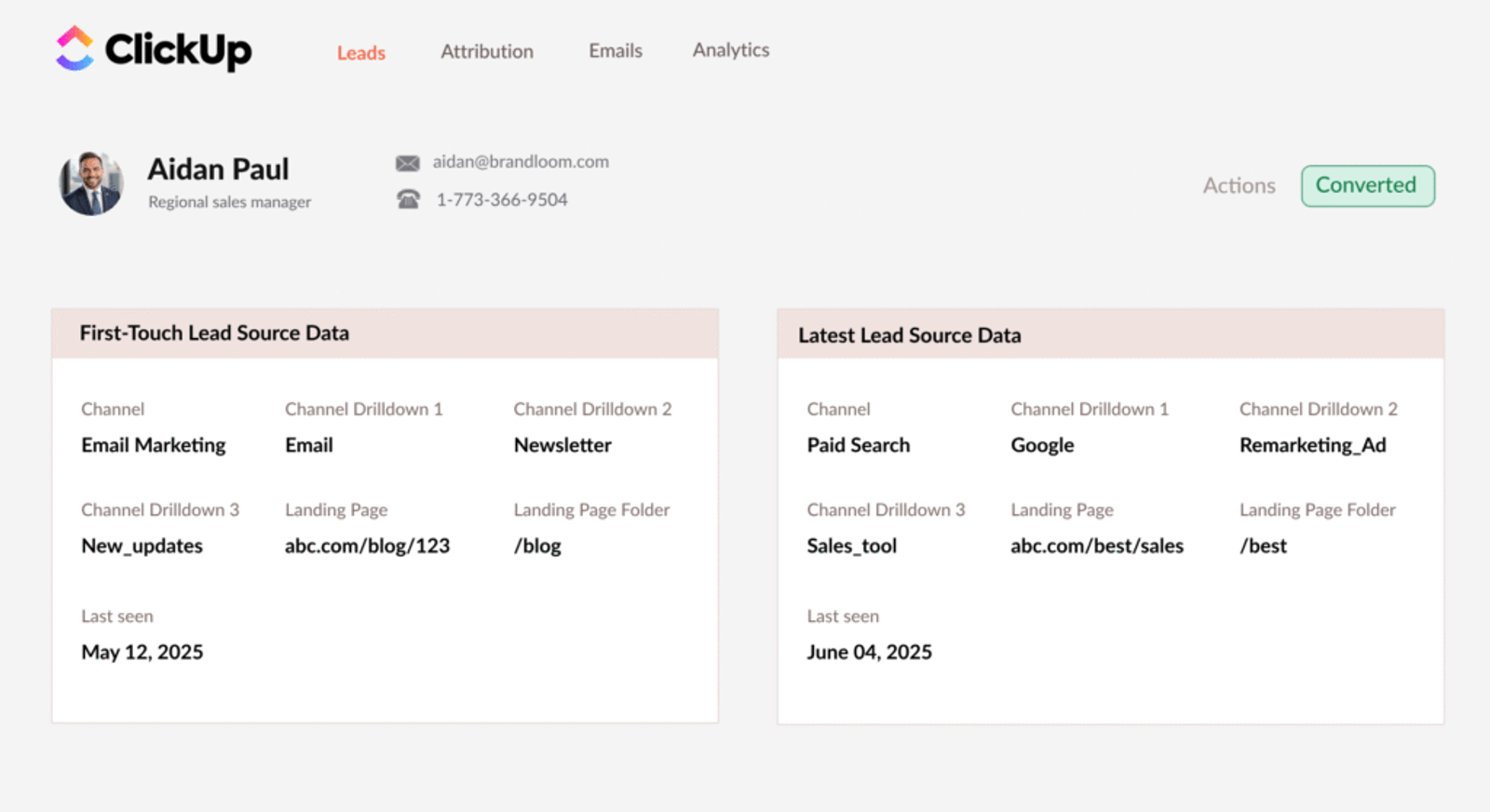
- See exactly which ad, social post, email, or sponsored UGC content brought each lead into your CRM.
- Personalize sales follow-up emails for contacts based on where they came from. For example, you may want to send different emails to a contact that came through a webinar than one that came through a blog post.
- Use the UTM data to improve your landing pages. If certain pages get more leads from a specific source, you can focus your efforts there.
- Track which channels or campaigns bring in leads that don’t convert. That helps you stop running campaigns that only bring traffic but no results.
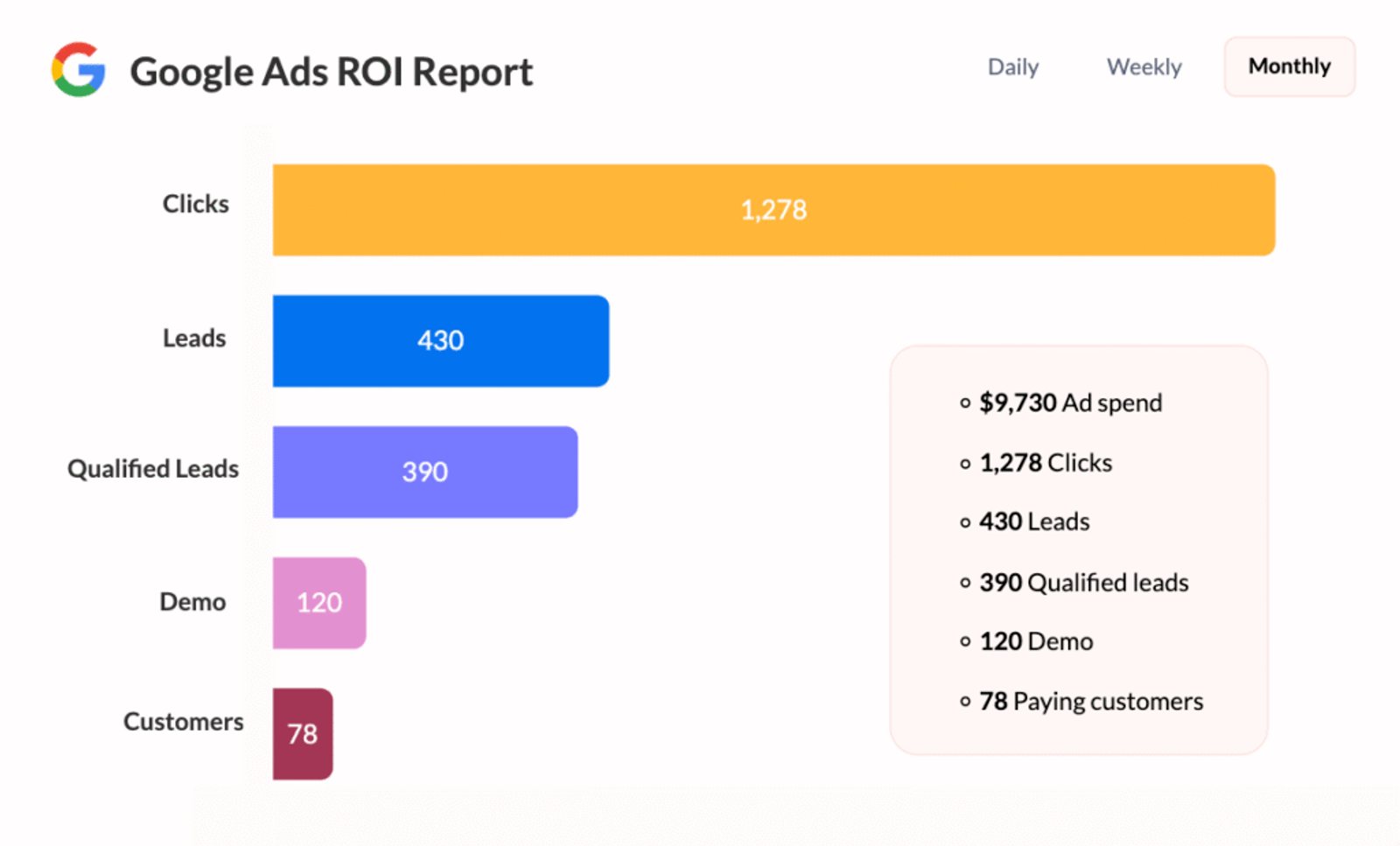
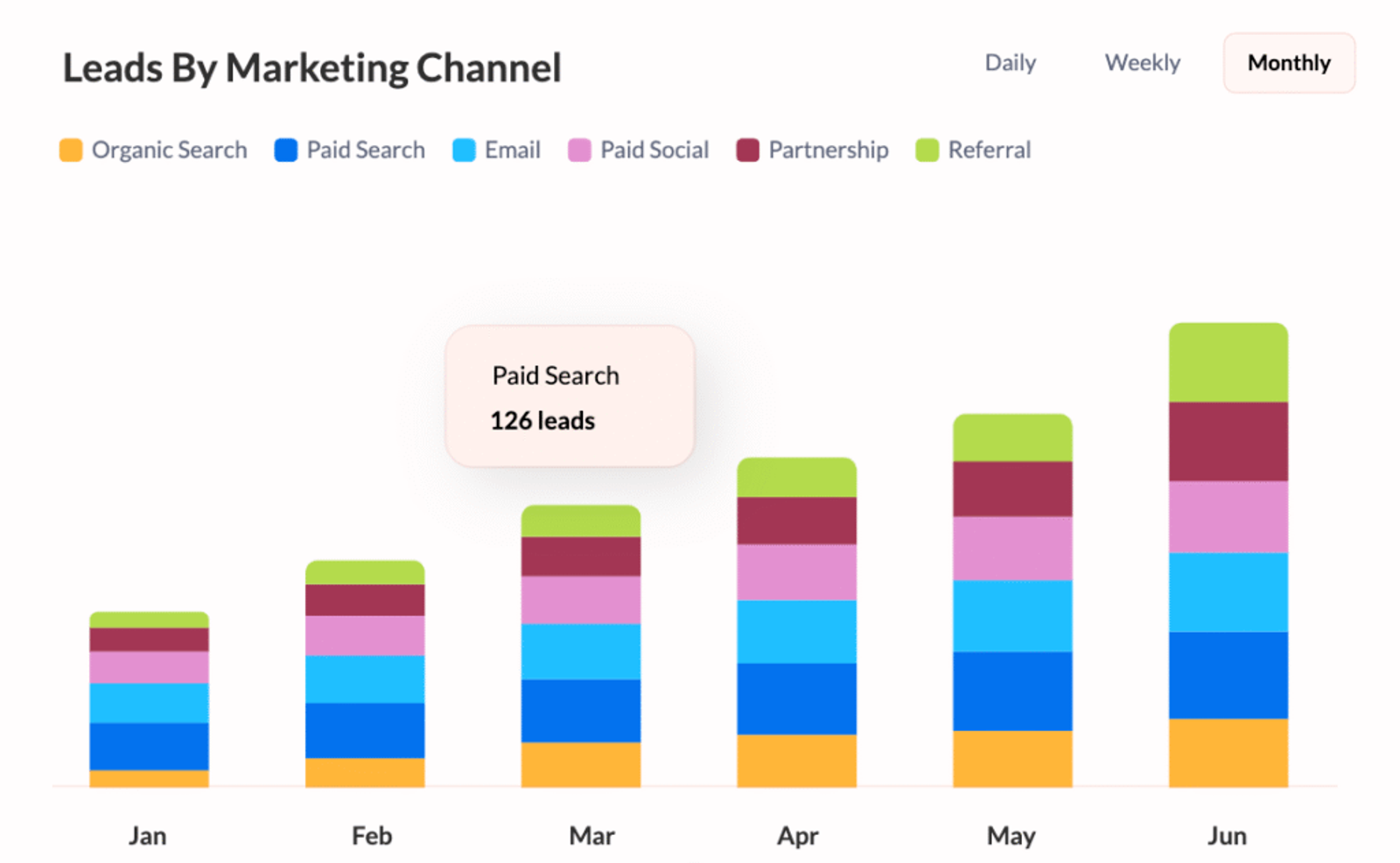
- Track how many leads and sales each marketing channel is actually giving you. This helps you decide where to spend more and where to spend less.




 Paid Social


