
How to Track UTM Parameters in Flowlu CRM (4 Easy Steps)
Capturerack UTM parameters in Flowlu CRM with SourceLoop to measure campaign ROI, and optimize marketing efforts.

Table of contents
- 1. Install SourceLoop.ai on Your Website
- 2. Add UTM Parameters to Every Marketing Link
- 3. SourceLoop Automatically Captures Lead
- 4. Sync UTM Data with Flowlu CRM
- 5. Add Hidden Fields for Enhanced Tracking (Optional)
- What You Can Do with UTM Data in Flowlu CRM
- 1. Identify Your Best Performing Marketing Channels
- 2. Create Targeted Follow-Up Campaigns
- 3. Automate Lead Assignment by Source
- 4. Build Campaign ROI Reports
- 5. Calculate Customer Lifetime Value by Channel
- Conclusion
Not sure where your leads are coming from in Flowlu CRM?
Without proper UTM tracking, you cannot understand which marketing campaigns drive results.Good news?
You can set up comprehensive UTM parameter tracking in Flowlu CRM without any technical expertise.
You can use a tool like SourceLoop to automatically capture lead sources and sync that data with your CRM in four simple steps.
Let’s walk through exactly how to make this happen.
Here’s how to capture UTM parameters and ensure complete lead attribution in your Flowlu CRM:
1. Install SourceLoop.ai on Your Website
The first step to tracking UTM parameters in Flowlu CRM is to install SourceLoop on your website. This tool automatically captures visitor data without any manual effort from your team.
Getting started takes just a few minutes:
- Create a free account at SourceLoop.ai
- Copy the tracking script provided after signup
- Add the script to your website’s
<head>section or through your tag manager
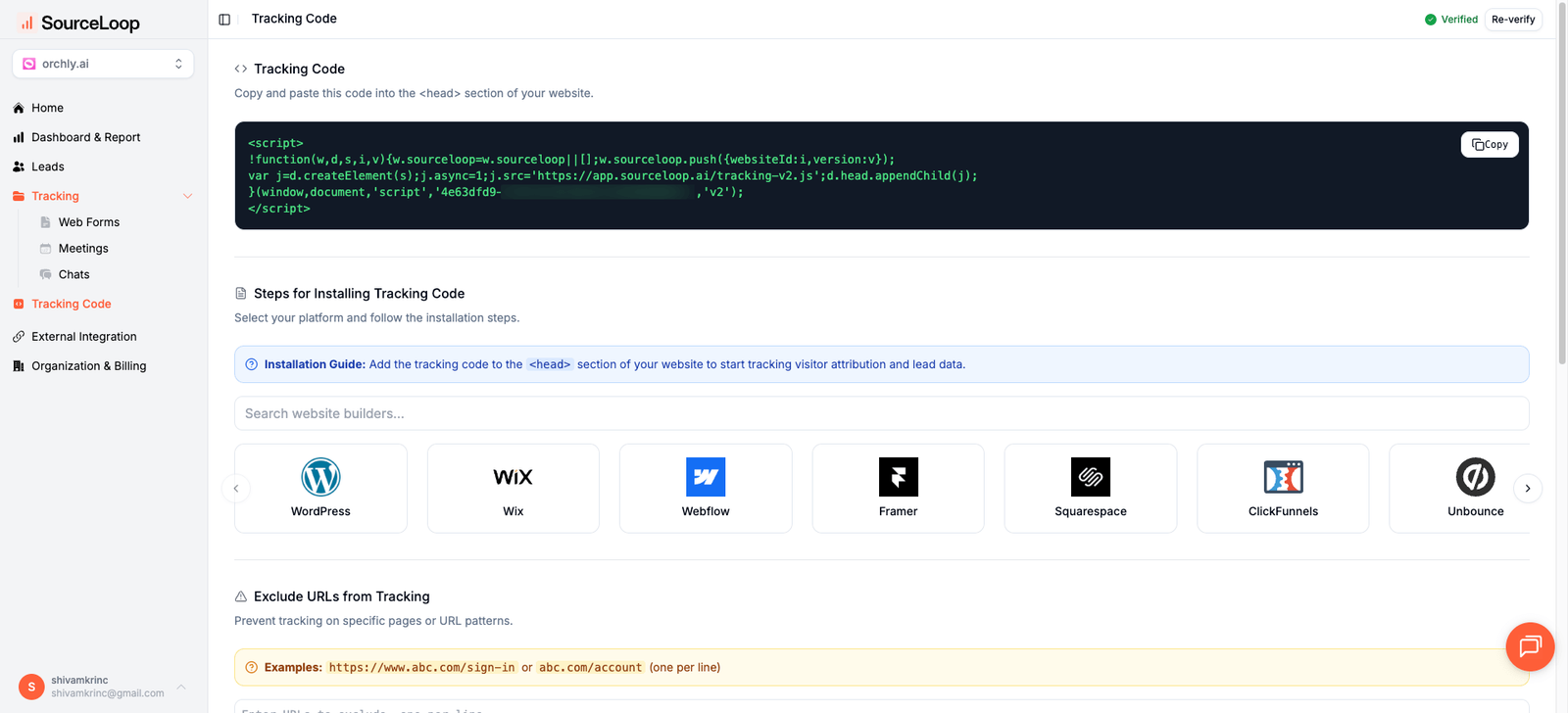
Once installed, SourceLoop captures UTM parameters from every visitor who visits your site. Whether someone clicks a Facebook ad, Google search result, or email newsletter link, the tool records their complete journey.
Example Scenario
Let’s say you run a digital marketing agency promoting a free SEO audit. A potential client searches “improve website ranking” and clicks your Google ad with this URL:
https://youragency.com/seo-audit?utm_source=google&utm_medium=cpc&utm_campaign=seo_audit_q1&utm_term=improve_ranking
SourceLoop automatically captures the following data:
- Channel: Paid Search
- Attribution Source: Google
- Attribution Campaign: seo_audit_q1
- Attribution Term: improve_ranking
- Landing Page: /seo-audit
- Last Seen: Current timestamp
This data is stored in a secure cookie and follows the visitor throughout their journey on your site.
2. Add UTM Parameters to Every Marketing Link
For UTM tracking in Flowlu to work effectively, every marketing link needs proper UTM parameters. These are simple tags that identify the origin of traffic across all your campaigns.
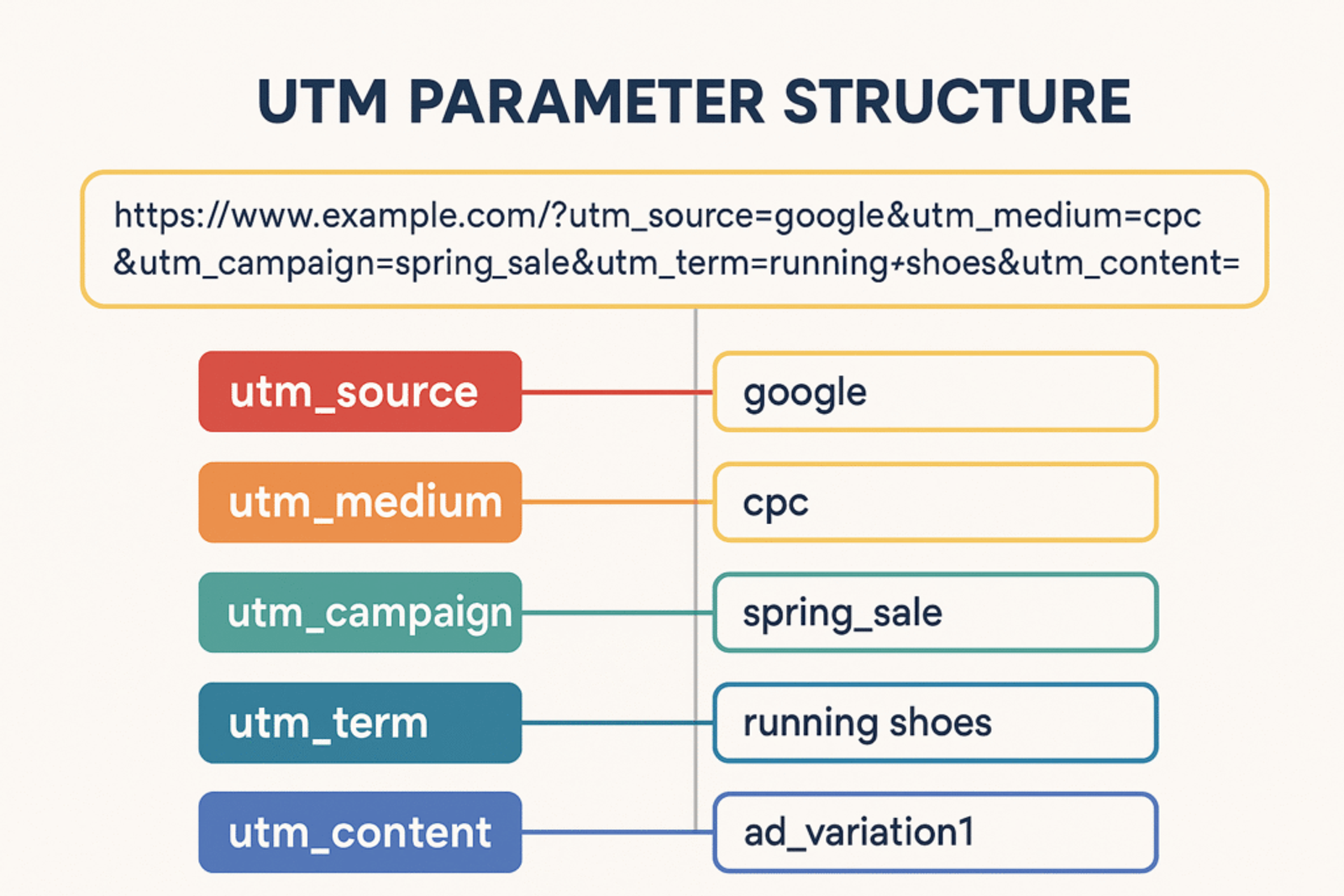
UTM parameters consist of five main components:
- utm_source: The platform sending traffic (e.g., google, facebook, newsletter)
- utm_medium: The marketing medium (e.g., cpc, email, social, organic)
- utm_campaign: Your specific campaign name (e.g., spring_sale, webinar_series)
- utm_term: Keywords for paid search campaigns
- utm_content: For A/B testing different ad versions
Examples of properly tagged URLs:
For a LinkedIn sponsored post promoting a webinar:
https://yoursite.com/webinar?utm_source=linkedin&utm_medium=paid&utm_campaign=lead_generation_webinar
For an email newsletter link to a blog post:
https://yoursite.com/blog/marketing-tips?utm_source=newsletter&utm_medium=email&utm_campaign=weekly_digest
For a retargeting Facebook ad:
https://yoursite.com/demo?utm_source=facebook&utm_medium=retargeting&utm_campaign=demo_signup&utm_content=video_ad
Pro tip: Use Google’s Campaign URL Builder to create consistent, properly formatted UTM links across all your campaigns.
3. SourceLoop Automatically Captures Lead
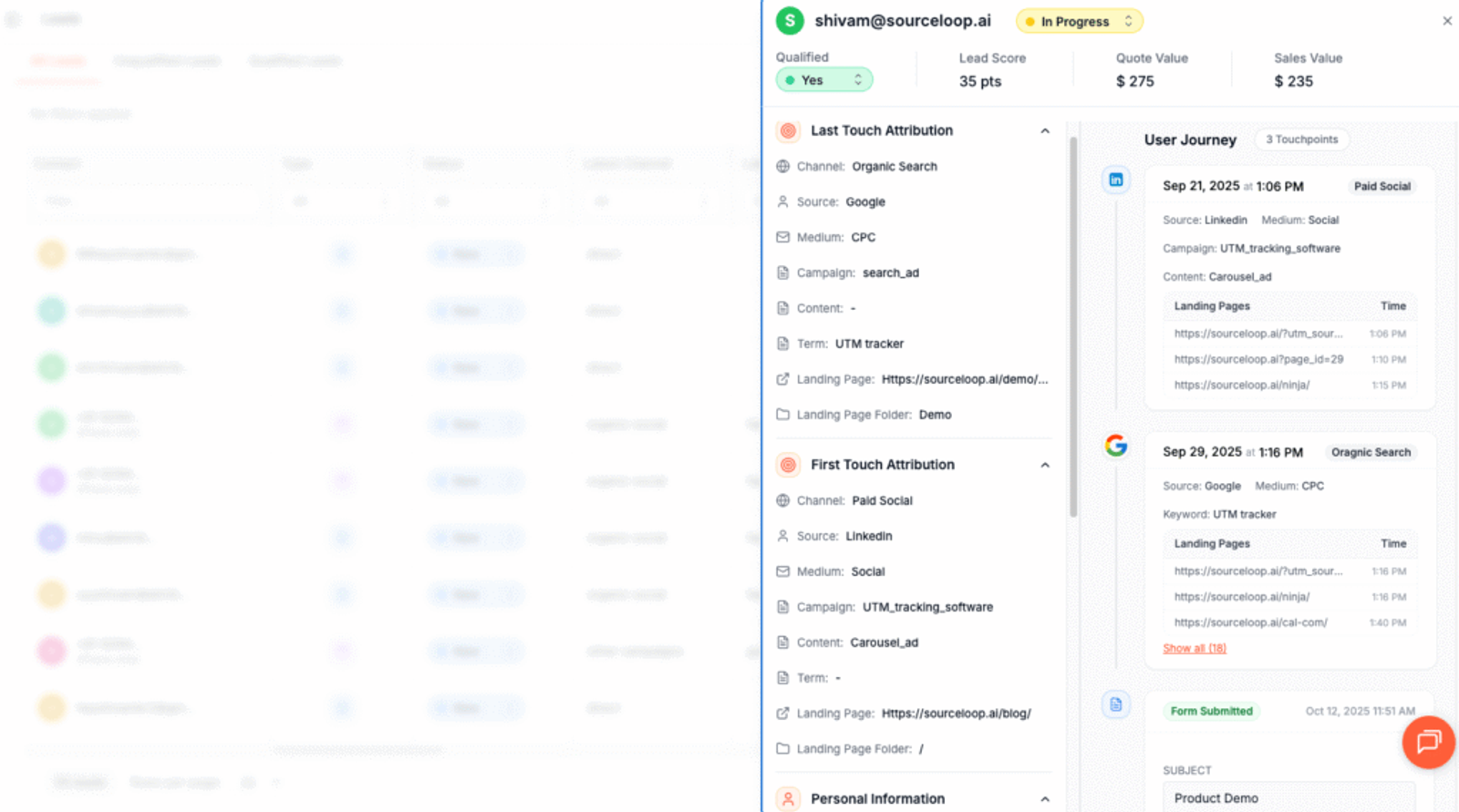
Once your tracking is live and UTM parameters are in place, SourceLoop begins automatically capturing lead information without any additional configuration required.
The platform supports over 100 lead capture tools out of the box, including:
- Contact forms (Gravity Forms, Contact Form 7, Webflow Forms)
- Chat widgets (Intercom, Drift, Zendesk Chat)
- Meeting schedulers (Calendly, Acuity Scheduling)
- Landing page builders (Unbounce, Leadpages, Instapage)
When someone submits a form or books a meeting, SourceLoop automatically detects the form submission. It then:
- Retrieves the stored attribution data from the visitor’s cookie
- Associates the lead with their complete marketing journey
- Displays everything in your SourceLoop dashboard
You’ll see exactly which campaigns are generating the highest quality leads, not just the most form fills. For instance, you might discover that while Facebook ads generate 50 leads per month, your email newsletter only produces 15 leads—but those newsletter leads convert to customers at twice the rate.
4. Sync UTM Data with Flowlu CRM
The final step connects your lead attribution data with Flowlu CRM so your sales team can see exactly where each prospect originated.
SourceLoop offers multiple integration options:
Option 1: Webhook IntegrationSet up a webhook in SourceLoop that automatically sends lead data to Flowlu CRM whenever someone converts. This creates new lead records with complete attribution information in real-time.
Option 2: Zapier/Make IntegrationUse automation platforms like Zapier or Make to connect SourceLoop with Flowlu CRM. These platforms provide pre-built templates that sync lead data between the two systems automatically.
Option 3: CSV ExportFor smaller volumes, export lead data from SourceLoop as CSV files and import them into Flowlu CRM on a weekly or monthly basis.
The webhook approach typically provides the fastest setup and most seamless experience for tracking UTM parameters in Flowlu CRM.
5. Add Hidden Fields for Enhanced Tracking (Optional)
To capture attribution data directly within your existing forms, add hidden fields that SourceLoop can populate automatically.
Recommended hidden field names:
channelattribution_sourceattribution_mediumattribution_campaignattribution_termlandingpagelandingpagefolderlastseen
For first-touch attribution tracking, add these additional fields:
firstseenfirst_channelfirst_sourcefirst_mediumfirst_campaignfirst_termfirst_landingpage
First-touch attribution helps you understand how leads initially discovered your business, even if they convert weeks later through a different channel. According to marketing attribution research, 73% of B2B buyers research solutions for weeks before making contact, making first-touch data crucial for understanding true campaign ROI.
What You Can Do with UTM Data in Flowlu CRM
Once UTM tracking is active in your Flowlu CRM, you unlock powerful insights that transform how you approach marketing and sales.
1. Identify Your Best Performing Marketing Channels
Raw lead numbers tell only part of the story. UTM data reveals which channels generate the highest quality prospects.
Example analysis from a software company:
- Google Ads: 120 leads/month, 8% conversion rate, $45 cost per lead
- LinkedIn Ads: 45 leads/month, 22% conversion rate, $78 cost per lead
- Organic Search: 85 leads/month, 15% conversion rate, $0 direct cost
While Google Ads generated the most volume, LinkedIn proved most efficient for actual sales. This insight led them to shift 40% of their Google budget to LinkedIn, increasing overall conversion rates by 31%.
Read more:
- How to Track UTM Parameters in Agile CRM
- How to Track UTM Parameters in Freshsales
- How to Track UTM Parameters in Creatio CRM
- How to Track UTM Parameters in Insightly CRM
- How to Track UTM Parameters in Copper CRM
2. Create Targeted Follow-Up Campaigns
UTM data enables hyper-personalized outreach based on exactly how prospects discovered your business.
Instead of generic follow-up emails, your sales team can reference:
- The specific webinar someone attended
- The particular blog post that caught their interest
- The exact product demo they downloaded
Example: “Hi Sarah, I noticed you downloaded our ROI calculator from our Google ad about marketing automation. Based on the scenarios you explored, here are three strategies that could work well for your agency…”
This level of personalization, supported by sales research, can increase response rates by up to 142% compared to generic outreach.
3. Automate Lead Assignment by Source
Use UTM data to route leads automatically to the most appropriate sales representatives or teams.
Smart routing examples:
- Enterprise-focused campaigns → Senior sales reps
- Local Google Ads → Regional territory managers
- Technical product demos → Solutions engineers
- Pricing page visitors → Inside sales team
This ensures leads receive relevant, timely follow-up while maximizing your team’s expertise.
4. Build Campaign ROI Reports
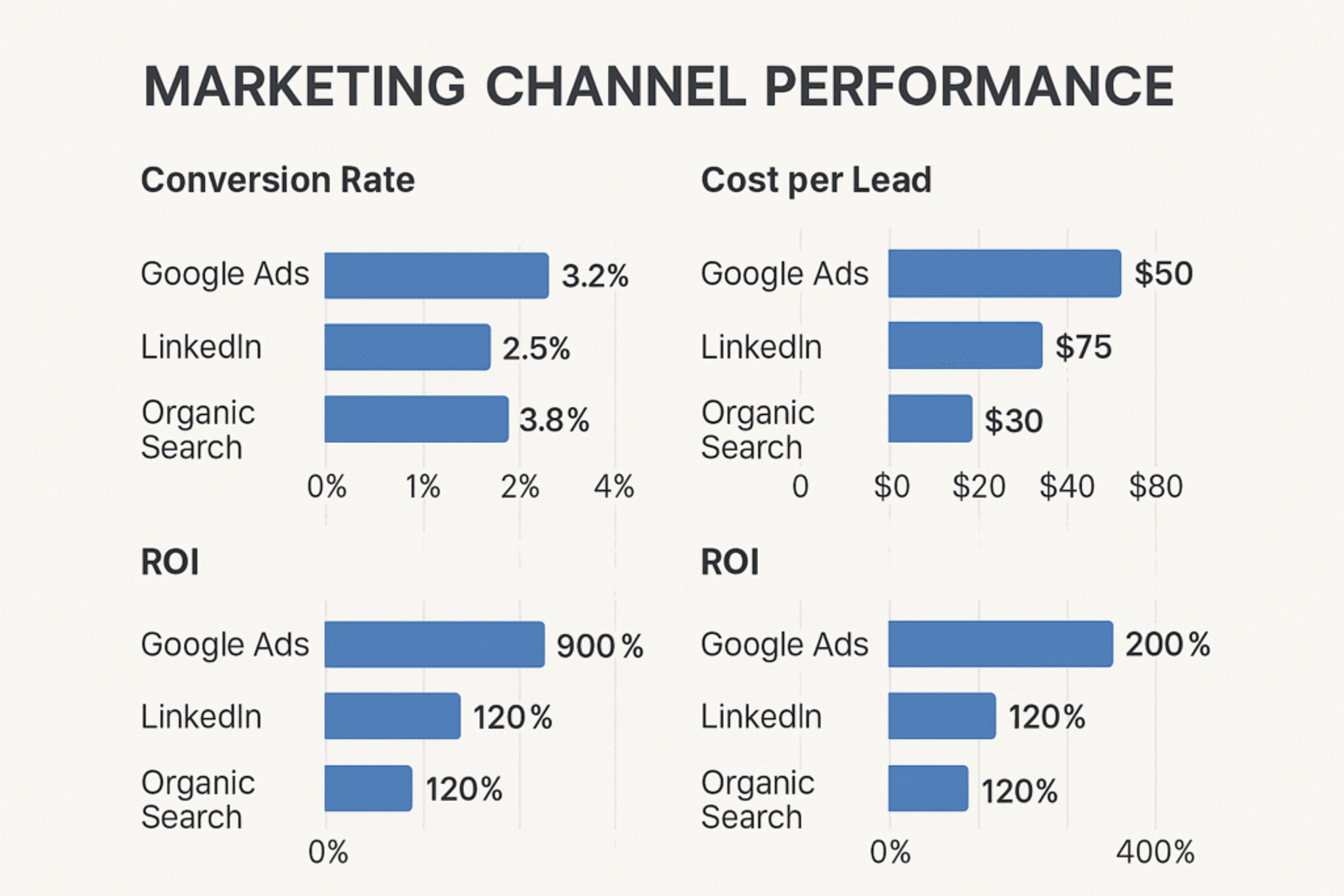
Transform your Flowlu CRM data into actionable marketing insights with UTM-powered reporting.
Key metrics to track:
- Cost per lead by campaign
- Lead-to-customer conversion rates by source
- Average deal size by marketing channel
- Time to close by acquisition method
- Customer lifetime value by original campaign
Create monthly reports showing which campaigns generated the highest ROI. For instance, you might discover that while paid search costs more per lead, those leads close 40% faster and spend 25% more than social media leads.
5. Calculate Customer Lifetime Value by Channel
The most valuable insight from tracking UTM parameters in Flowlu CRM comes from understanding long-term customer value by acquisition source.
Example analysis:
- Webinar attendees: $12,000 average lifetime value, 18-month retention
- Content downloads: $8,500 average lifetime value, 14-month retention
- Paid social: $6,200 average lifetime value, 11-month retention
This data helps you allocate marketing budget toward channels that attract the most valuable long-term customers, not just the cheapest leads.
Conclusion
Setting up UTM parameter tracking in Flowlu CRM doesn’t have to be complicated. With SourceLoop’s no-code approach, you can have complete lead attribution running in under an hour.
The four-step process—installing SourceLoop, adding UTM parameters to your links, letting the tool capture lead data automatically, and syncing with Flowlu CRM—gives you immediate visibility into which marketing efforts actually drive results.
Stop guessing where your best leads come from. Try SourceLoop free for 14 days and start making data-driven marketing decisions that improve your ROI and help your sales team close more deals.




 Paid Social


