
How to Track UTM Parameters in Involve.me Form
Involve.me UTM tracking made easy, follow these 4 easy steps to know the source of every lead.
Table of contents
Running multiple marketing campaigns to drive traffic to your site but not sure what’s actually bringing in leads?
If you’re using Involve.me to collect leads on your website, you might’ve noticed one big limitation:
Tracking UTM parameters is… tricky.
However, there are plug-and-play solutions like SourceLoop that make it easy to capture UTM parameters with any form.
In this guide, we’ll go through the exact steps you need to take to track UTM parameters in an Involve.me form.
Let’s get started.
4 Easy Steps to Track UTM Parameters in Involve.me Form
Here are 4 simple steps to capture UTM parameters in Involve.me Form:
1. Add SourceLoop on Your Website

Start by signing up for a SourceLoop.ai account.
Once signed in, copy your unique tracking script and to paste it in the <head> section of your website.
Quick Tip:
Every website CMS offers quick ways to add extra snippet of code in header of website.
Once done, SourceLoop.ai will start tracking each visitor’s UTM parameters (and more) and store that information in their browser cookies.
The best part? Instead of just saving the raw UTM string, SourceLoop.ai uses organizes them into clean, usable data like this:
Example:
Let’s say Airbnb is using SourceLoop.ai, and a user clicks on one of their Google Search ads while looking for vacation rentals in Italy.
SourceLoop.ai will capture and organize the user’s visit information like this:
- Channel = Paid Search
- Channel Drilldown 1 = Google
- Channel Drilldown 2 = Search Ad
- Channel Drilldown 3 = Italy Summer Rentals
- Landing Page = www.airbnb.com/s/italy
- Landing Page Folder = search
- Last Seen = Apr 14, 2025
2. Add UTM Parameters to Your Links

Now, SourceLoop.ai is ready to read the UTM data of users visiting your website.
So, you need to make sure that every link you use to drive traffic to your site includes UTM tags.
Platforms like Google Ads, LinkedIn Ads, Meta Ads, TikTok Ads, etc., allow you to dynamically configure UTM links for all your campaigns.
Example of a link with UTM parameters:
https://yoursite.com/quiz?utm_source=facebook&utm_medium=paid&utm_campaign=summer_sale
TIP:
UTM tags aren’t just meant for ads. You can use them in any link you share online to drive traffic to your website, such as links in emails, social media posts, newsletters, social profile bios, podcasts, and more.
Resources:
- How to add UTM parameters in Google Ads
- How to add URL parameters to Meta ads
- How to setup UTM Codes for LinkedIn Ads
- How to add UTMs to your TikTok ads
3. Add Hidden Fields to Your Form
Next, you need to add a few hidden fields in your form with parameter value that SourceLoop can identify.
These fields won’t be visible to your website visitors, but SourceLoop can see them and pass real UTM data when a user submits a form.
Adding hidden fields in Involve.me form is easy:
- Open your Invovle.me form.
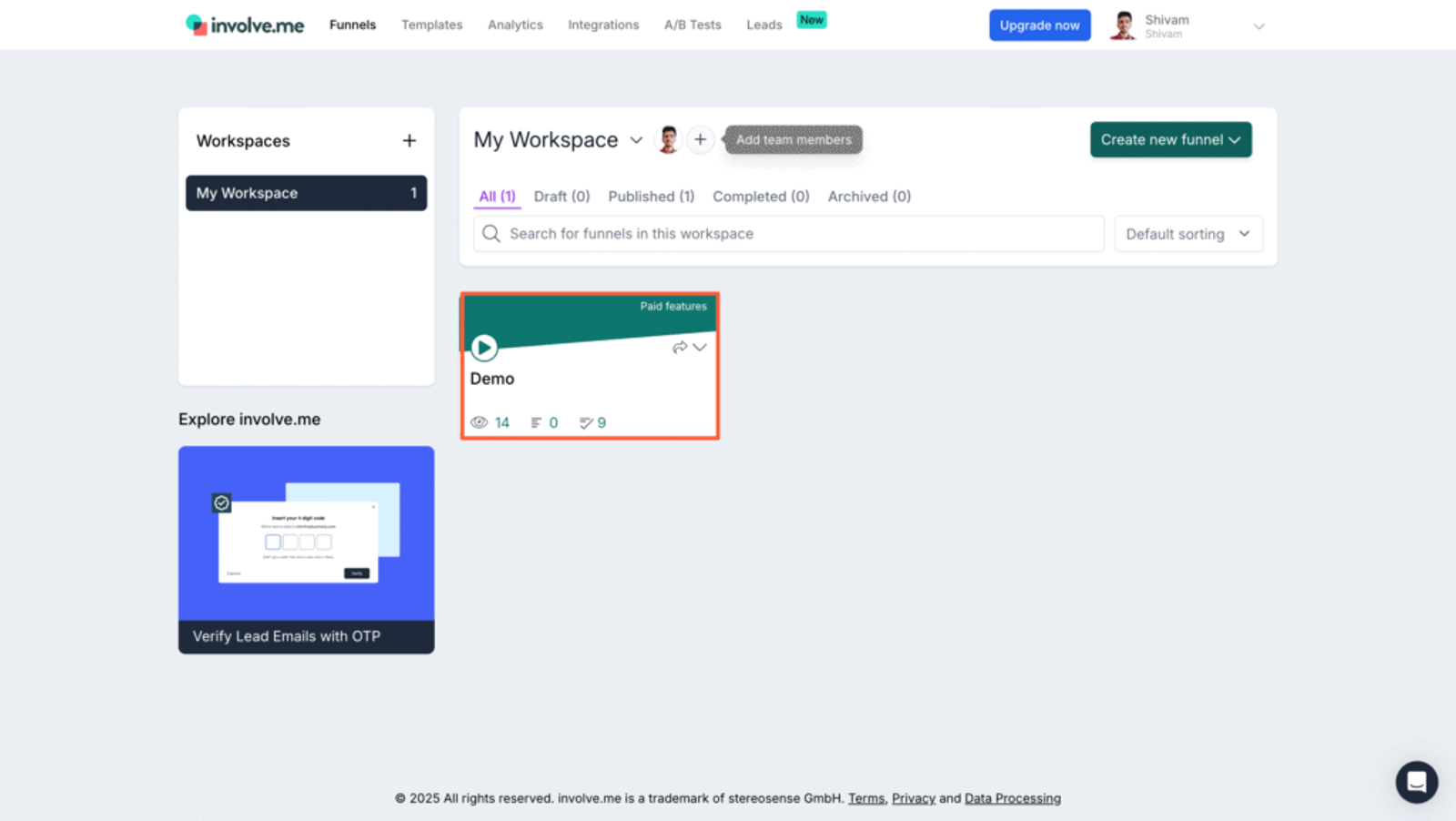
- Click the Settings icon in the top-right corner and select “Hidden Fields.”
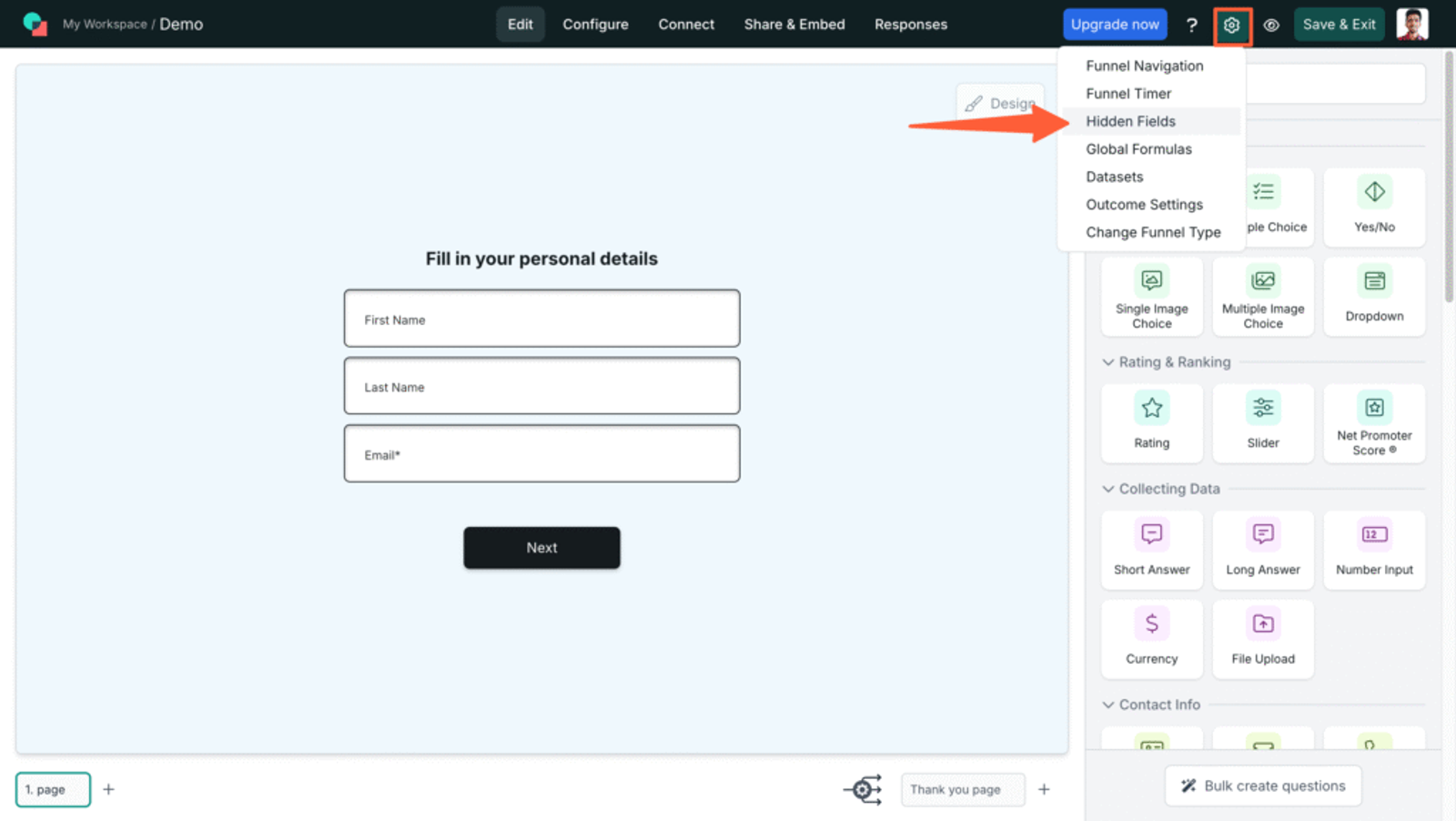
- Then, click the “Add Hidden Field” button and choose the Custom Hidden Field option from the dropdown.
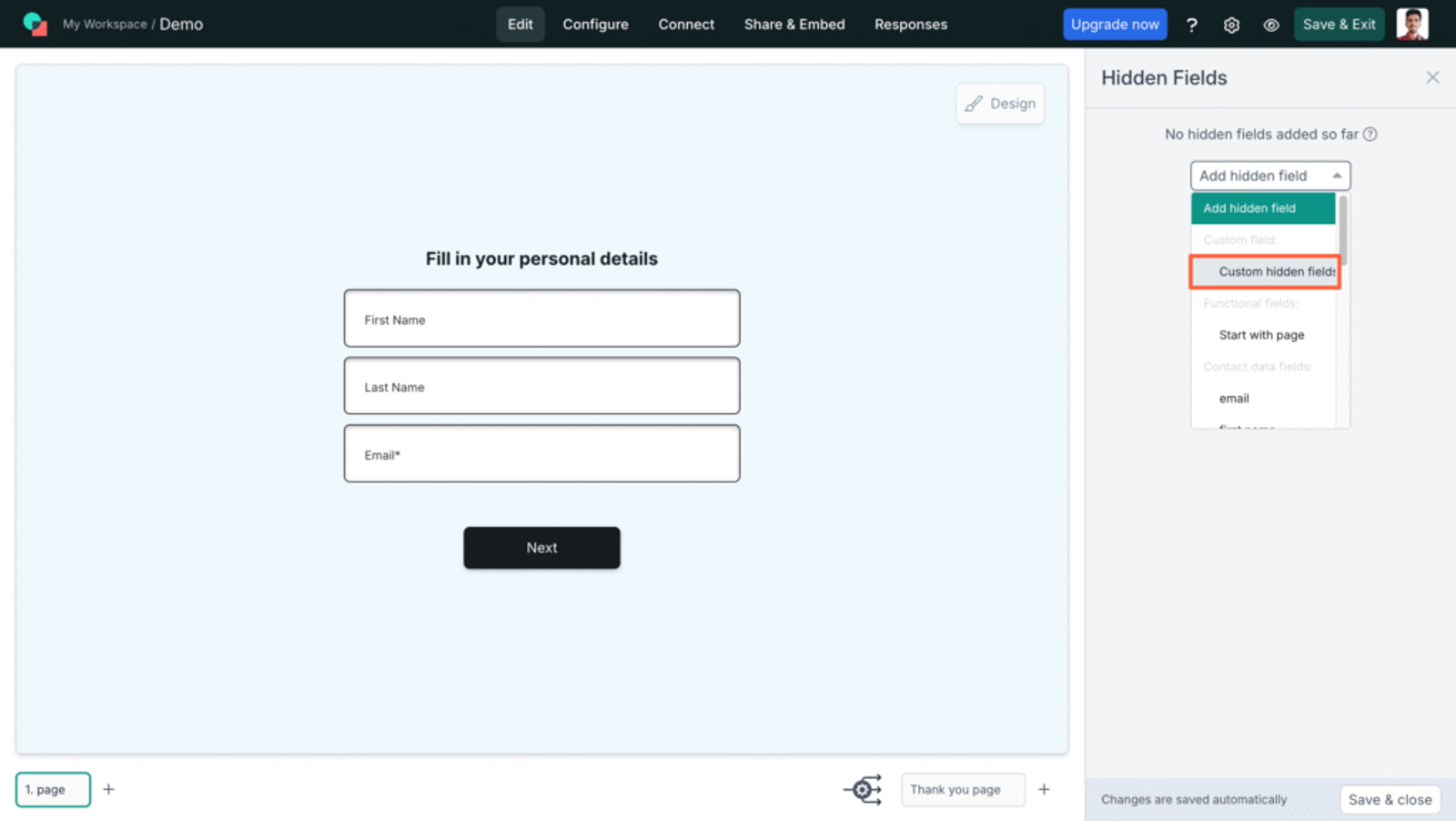
- In the Parameter input of each hidden field, enter the values recommended by SourceLoop.ai below.
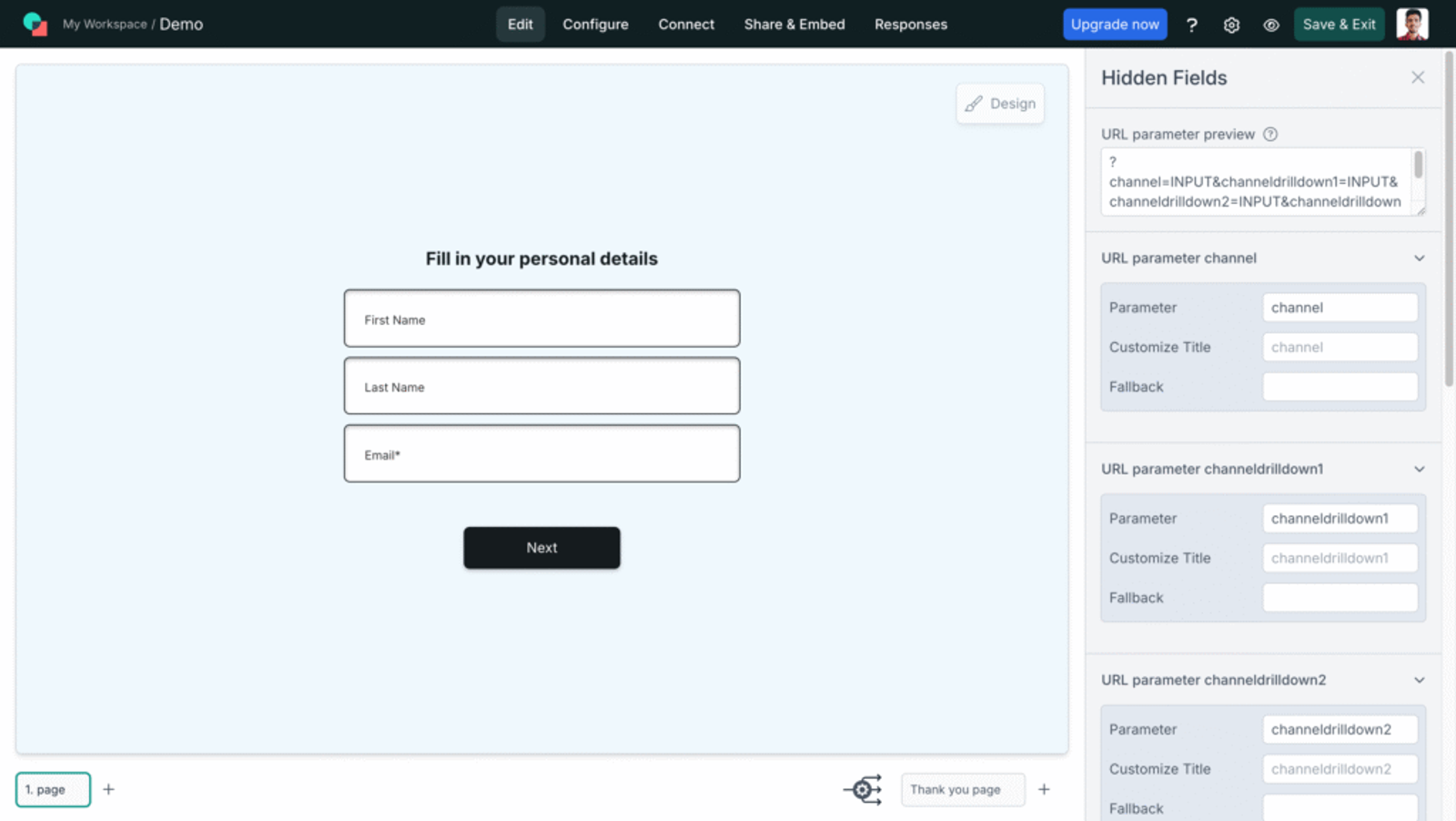
You need to add 7 hidden fields with following parameter value:
- [channel]
- [attribution_source]
- [attribution_medium]
- [attribution_campaign]
- [attribution_term]
- [landingpage]
- [landingpagefolder]
- [lastseen]
Optional: Track First-Touch Attribution (Highly Recommended for B2B)
If you sell B2B software, agency retainers, or any offer that requires multiple visits before a prospect fill a lead form or book meeting, then you may want to know how a lead first discovered your website.
Here are 7 additional hidden fields you can configure to get the attribution data of the user’s first visit to your website in the past 6 months.
- [first_channel]
- [first_source]
- [first_medium]
- [first_campaign]
- [first_term]
- [first_landingpage]
- [first_landingpagefolder]
- [first_seen]
Additional Tutorials:
5. UTM Parameters Are Automatically Collected in Involve.me Forms Submission
That’s it.
Now, whenever a user submits the form, SourceLoop passes their UTM data into the hidden fields—capturing details like the traffic source, campaign, landing page, and more.
To view this data:
- Open your involve.me form
- Navigate to Responses tab.
- Open any entry to see the attribution data saved with each lead
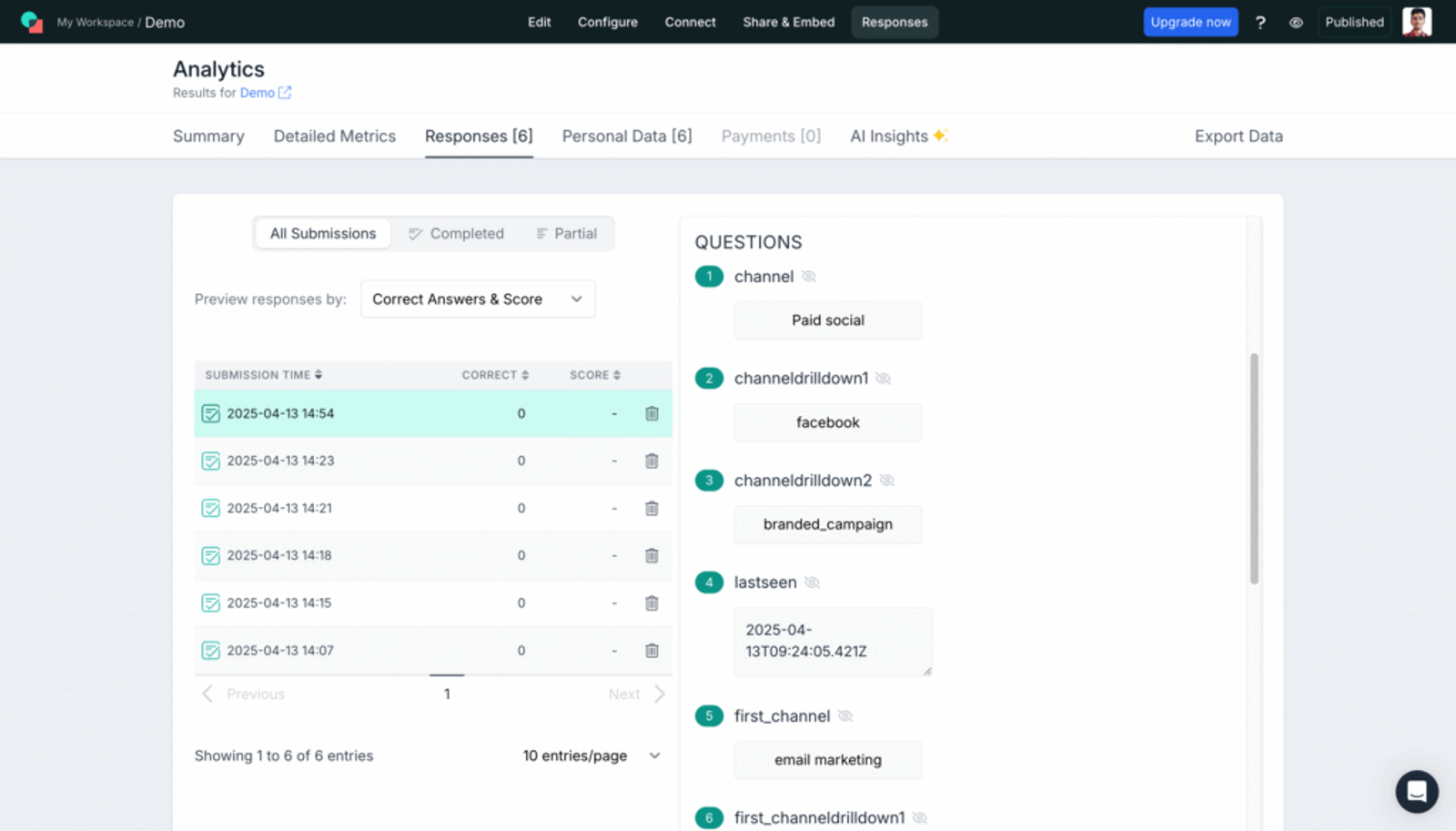
Involve.me integrates with 100+ CRM, analytics, and marketing tools. If you’ve set up any integrations, the attribution data can be synced with your CRM and marketing platforms as well.
You can also use this data to generate reports showing exactly where each of your leads is coming from—whether it’s Google Ads, TikTok Ads, social media, organic search, or any other source.
Instead of relying on guesswork, you’ll get a clear view of which channels, campaigns, or even individual ads are driving high-quality leads.
This helps you:
- Double down on marketing activities that are performing well
- Cut back or optimize campaigns that aren’t delivering results
- Share attribution insights with your team or clients
- Make smarter decisions about where to allocate your budget
More Guides:




 Paid Social


