
How Google Analytics 4 Uses Cookies [2026 Guide]
Learn how GA4 uses cookies to track users and sessions. Discover the _ga and _ga_<container-id> cookies, privacy compliance, and how to configure cookie settings.
Table of contents
- What Are GA4 Cookies and Why They Matter
- The Two Main GA4 Cookies Explained
- 1. \_ga Cookie: User Identification
- 2. ga Cookie: Session State
- How GA4 Cookies Work
- 1. First-Party vs Third-Party Cookies
- 2. Cookie Lifespan and Browser Limitations
- Cookie Consent and Privacy Compliance
- GDPR and Cookie Requirements
- Cookieless Tracking Options
- Server-Side Tracking for Reliable Attribution
- How to Change GA4 Cookie Settings
- Additional Cookies When Linked to Google Ads
- FAQ
- Do I need user consent to set GA4 cookies?
- What's the difference between \_ga and ga cookies?
- Can GA4 track users without cookies?
- How do Safari's privacy features affect GA4 cookies?
- Should I use server-side tracking instead of cookies?
- How often do GA4 cookies update?
- What happens to GA4 data if cookies are deleted?
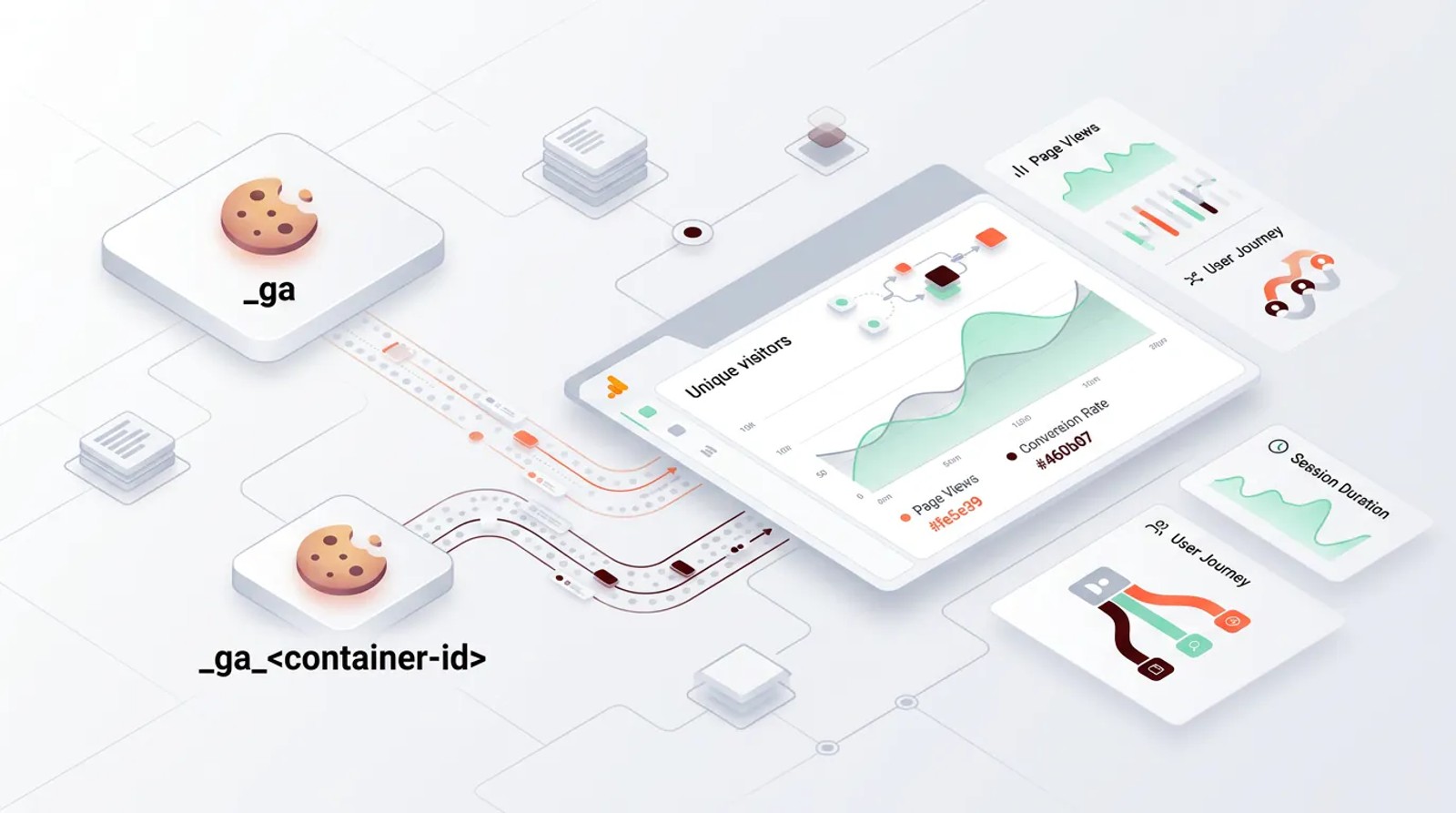
Google Analytics 4 uses two primary first-party cookies to track website visitors: \_ga (which identifies unique users) and ga (which tracks session state). Both cookies have a default lifespan of two years and operate without requiring third-party cookies, making them more privacy-friendly than previous tracking methods.
What Are GA4 Cookies and Why They Matter
GA4 cookies are small text files stored on a visitor's browser that help Google Analytics 4 recognize unique users and track their behavior across sessions. According to W3Techs, 42.4% of websites globally use cookies, making them a fundamental component of modern web analytics.
Unlike Universal Analytics, which relied on multiple cookies and third-party tracking, GA4 uses a simplified, privacy-focused cookie structure. These cookies enable GA4 to answer critical questions: Is this a new visitor or a returning user? How long did they stay on your site? Which pages did they visit during this session?
Without cookies, GA4 cannot distinguish one visitor from another or connect multiple page views into a cohesive session. The shift to first-party cookies means data is stored on your domain rather than Google's, which helps with privacy compliance and reduces tracking limitations imposed by browsers like Safari and Firefox.
The Two Main GA4 Cookies Explained
1. \_ga Cookie: User Identification
The \_ga cookie is GA4's primary user identifier. When someone visits your website for the first time, GA4 generates a unique client ID and stores it in this cookie. This client ID follows the format GA1.1.XXXXXXXXXX.YYYYYYYYYY, where the X's represent a random identifier and the Y's indicate a timestamp.
This cookie has a 2-year default expiration but is subject to browser-imposed limitations. According to Google's official documentation, browsers enforce their own restrictions: Chrome caps first-party cookies at 400 days maximum without a return visit, while Safari's Intelligent Tracking Prevention (ITP) expires the cookie after just 7 days if the user doesn't come back.
The \_ga cookie enables GA4 to distinguish new users from returning visitors, calculate user counts, and track long-term engagement patterns. It's shared across all GA4 properties on the same domain, which means if you run multiple GA4 properties, they'll reference the same \_ga cookie value.
2. ga Cookie: Session State
The ga cookie (where matches your specific GA4 measurement ID) tracks session-specific information. This cookie stores data about the current session, including session start time, session count, and engagement metrics.
Like the \_ga cookie, it defaults to a 2-year expiration and is subject to the same browser limitations. The container-id component makes this cookie unique to each GA4 property, allowing multiple properties to operate independently on the same domain.
This cookie helps GA4 understand session duration, navigation paths within a single visit, and when to start a new session. According to Google's developer documentation, sessions expire after 30 minutes of inactivity by default, but the cookie itself persists to track session counts across multiple visits.
How GA4 Cookies Work
1. First-Party vs Third-Party Cookies
GA4 exclusively uses first-party cookies, which means they're set by your domain and can only be read by your website. This is a significant privacy improvement over third-party tracking cookies, which can follow users across multiple websites.
First-party cookies face fewer restrictions from browsers. While Safari's ITP and Firefox's Enhanced Tracking Protection aggressively block third-party cookies, they allow first-party cookies (with limitations).
According to a 2023 survey, 75% of marketing and customer experience leaders relied on third-party cookies, but the industry is rapidly shifting toward first-party solutions as browser support declines.
When a visitor lands on your site, the GA4 JavaScript tag checks for existing \_ga and ga cookies. If found, it reads the stored IDs to recognize the user and continue their session. If not found, it generates new IDs and creates the cookies.
2. Cookie Lifespan and Browser Limitations
While GA4 sets cookies with a 2-year default expiration, modern browsers impose their own restrictions that can override these settings:
Chrome: Caps first-party cookies at 400 days if the user doesn't return to your site. Each visit resets this timer.
Safari: Under ITP, first-party cookies from sites classified as having cross-site tracking capabilities expire after 7 days. Full third-party cookie blocking is now enabled by default.
Firefox: Enhanced Tracking Protection blocks known tracking cookies but generally respects first-party cookies set by the visited domain.
These browser limitations mean your actual cookie lifespan may be shorter than your GA4 settings indicate. If your audience skews heavily toward Safari users and they don't return weekly, you'll see more new users and fewer returning users in your reports than you would with Chrome users.
Cookie Consent and Privacy Compliance
GDPR and Cookie Requirements
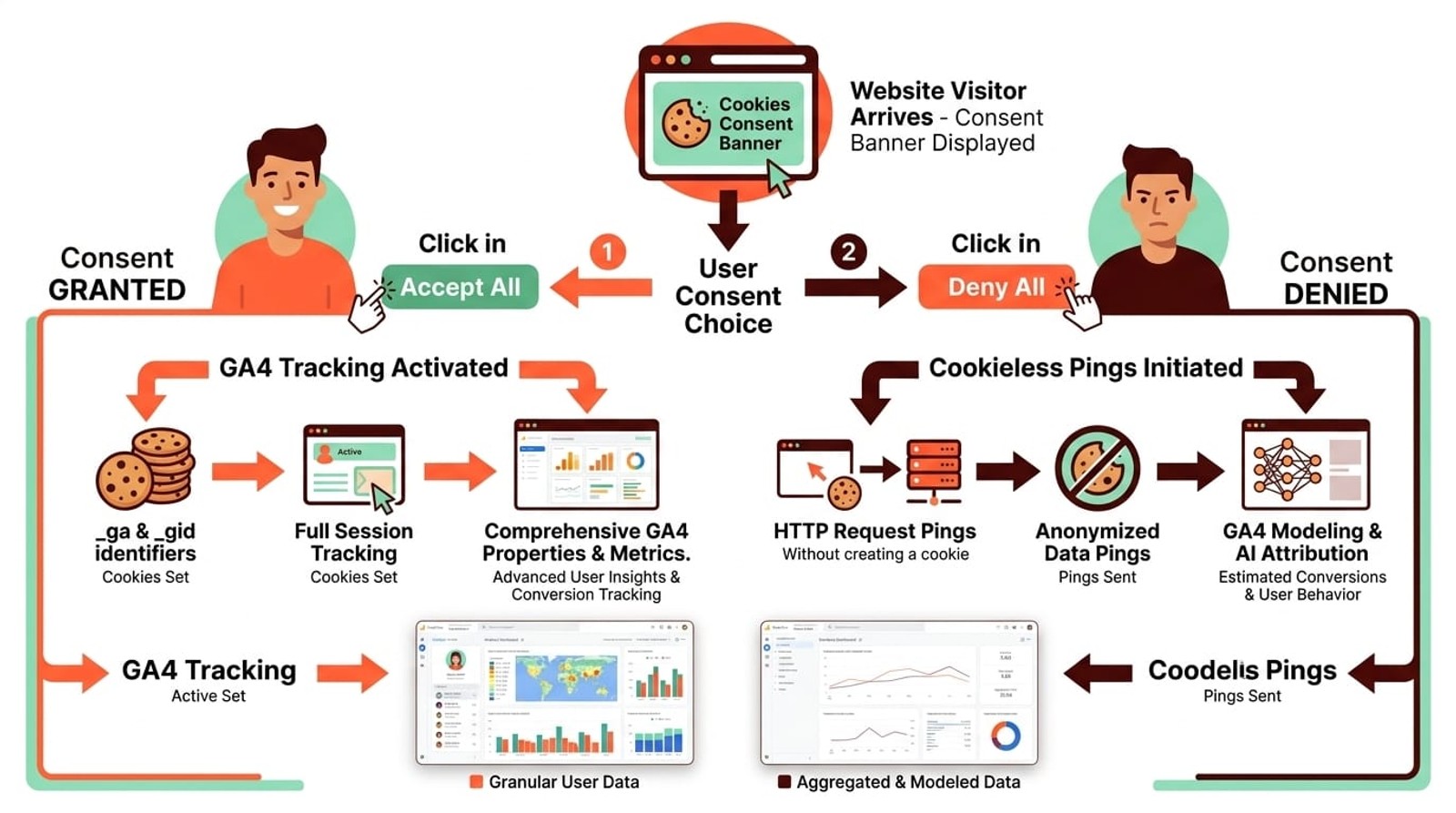
Under GDPR and similar privacy regulations, websites must obtain explicit consent before setting non-essential cookies, including analytics cookies. GA4 cookies are typically classified as non-essential because they serve marketing and analytics purposes rather than core website functionality.
According to a Deloitte survey, 65% of respondents express concerns about excessive cookie use and its impact on personal data. Research shows that only 28% of adults in the United States claim to fully understand internet cookies, highlighting the importance of clear communication.
This means you need a cookie consent management platform (CMP) that:
- Blocks GA4 from loading until users accept analytics cookies
- Sends consent signals to GA4 through Google Consent Mode
- Documents user consent choices for compliance auditing
Data from a 2021 survey shows significant regional variations: Poland leads with a 64% consent rate, while the United States has the lowest at 32%. When users deny cookie consent, traditional GA4 tracking won't function properly, but Google provides solutions to maintain some analytics capability.
Cookieless Tracking Options
GA4 supports cookieless tracking through Google Consent Mode v2, which sends "cookieless pings" when users deny consent. These pings provide anonymized, aggregate data that GA4 uses to model conversions and fill reporting gaps.
Cookieless tracking captures:
- Page views without user identification
- Basic session information (but sessions aren't accurately connected)
- Conversion events (though attribution is limited)
GA4 uses machine learning to model the behavior of non-consenting users based on patterns from users who did consent. According to Google, this modeling can recover up to 70% of conversions in reporting while maintaining privacy compliance.
Server-Side Tracking for Reliable Attribution
For businesses that need more reliable lead source attribution regardless of cookie consent, SourceLoop offers server-side tracking that captures marketing source data before cookies are even involved.
By tracking UTM parameters, referrers, and campaign data at the server level and syncing directly to your CRM, you maintain accurate lead attribution even when users delete cookies or deny consent—filling the gaps that cookieless GA4 pings can't fully address.
How to Change GA4 Cookie Settings
GA4 allows you to customize cookie behavior to meet your specific privacy and business requirements. Here's how to modify the default settings:
- Navigate to Admin in your GA4 property
- Under "Data collection and modification," click Data streams
- Select your website data stream
- Under "Google tag," click Configure tag settings
- Under "Settings," click Show all
- Click Override cookie settings
- Select the Override default cookie settings checkbox
Once enabled, you can adjust:
Cookie expiration: Choose from immediate expiration up to 25 months. Shorter durations improve privacy compliance but reduce your ability to track returning users over time. If you operate in heavily regulated industries, consider 6-12 month expirations.
Cookie update behavior:
- Set cookie expiration time relative to most recent visit: Extends the cookie lifespan with each new session (standard approach)
- Set cookie expiration time relative to first visit: Cookie expires on a fixed date regardless of return visits (stricter privacy approach)
According to Google's configuration guide, settings made in Google Tag Manager or via the gtag.js code will override any settings you configure in the GA4 interface. Make sure your entire team knows where cookie settings are managed to avoid conflicts.
Additional Cookies When Linked to Google Ads
When you link your GA4 property to Google Ads, GA4 sets additional advertising cookies to improve conversion tracking and campaign optimization. These cookies help Google Ads:
- Attribute conversions more accurately to specific ad clicks
- Optimize automated bidding strategies with better conversion data
- Enable remarketing audiences based on GA4 user segments
- Track cross-device conversions when users are signed into Google
The primary advertising cookies include \_gcl_au (Google Ads user tracking) and potentially gac cookies for campaign-specific parameters. These cookies follow the same first-party model as the core GA4 cookies.
For a complete list of advertising cookies and their purposes, refer to Google's advertising cookie reference. If you don't use Google Ads or don't want advertising cookies, simply don't link your accounts, and these additional cookies won't be set.
FAQ
Do I need user consent to set GA4 cookies?
Yes, in most jurisdictions (EU, UK, California, etc.), you need explicit user consent before setting GA4 cookies because they're classified as non-essential analytics cookies. Implement a compliant cookie consent banner that blocks GA4 until users accept.
What's the difference between \_ga and ga cookies?
The \_ga cookie identifies unique users across all your GA4 properties on a domain, while ga tracks session state for a specific GA4 property. Both work together: \_ga determines who the user is, and ga tracks what they're doing in the current session.
Can GA4 track users without cookies?
Yes, through Google Consent Mode v2 and cookieless pings. When users deny consent, GA4 sends anonymized data that's used for conversion modeling. You'll get aggregate insights but lose individual user tracking, session stitching, and detailed behavior flows.
How do Safari's privacy features affect GA4 cookies?
Safari's Intelligent Tracking Prevention (ITP) limits first-party cookies from analytics tools to 7 days of inactivity. This means Safari users who don't return within a week appear as new users instead of returning users, which inflates your new user count and deflates returning user metrics.
Should I use server-side tracking instead of cookies?
Server-side tracking via Google Tag Manager Server can improve data accuracy and privacy control, but it doesn't eliminate cookies entirely. It changes where cookies are set and processed. For lead tracking and attribution, tools like SourceLoop capture source data server-side and sync to your CRM without relying solely on browser cookies.
How often do GA4 cookies update?
The \_ga cookie updates (renews its expiration) with each session if you're using the default "relative to most recent visit" setting. The ga cookie updates with each hit (page view, event) during an active session. This means engaged users who visit regularly maintain their cookies indefinitely (subject to browser caps).
What happens to GA4 data if cookies are deleted?
When a user deletes cookies, GA4 treats them as a completely new user on their next visit. All historical session data remains in GA4, but it won't be connected to the new session. This breaks the user journey and makes it impossible to track returning user behavior accurately.



 Paid Social


