
Track Marketing Attribution in Piepdrive Crm: 2026 Guide
Track marketing attribution in Piepdrive crm with multi-touch accuracy and closed-loop sync to connect ads, forms, and revenue in 2026.

Table of contents
- Step 1: Create Your SourceLoop Account
- Step 2: Install SourceLoop on Your Website
- Step 3: Connect Pipedrive to SourceLoop
- Step 4: Set Up Your Pipedrive Fields
- Step 5: Capture Your Marketing Sources
- Step 6: Track Your Conversions
- Step 7: Track Phone Calls and Other Offline Leads
- Step 8: Push Attribution Into Pipedrive
- Step 9: Track Attribution at the Deal Level
- Step 10: Compare First-Touch and Last-Touch Attribution
- Step 11: Connect Deal Revenue Back to Marketing
- Step 12: Verify the Pipedrive Attribution
- What Your Final Setup Looks Like
- Why Use SourceLoop With Pipedrive?
Pipedrive shows you your leads and deals, but it does not automatically give you the full marketing journey behind each one.
SourceLoop connects your website, marketing channels, and Pipedrive so you can see where leads came from and which campaigns influenced your pipeline and revenue.
Here is how to set it up.
Step 1: Create Your SourceLoop Account
Start by creating a SourceLoop account and adding your website.
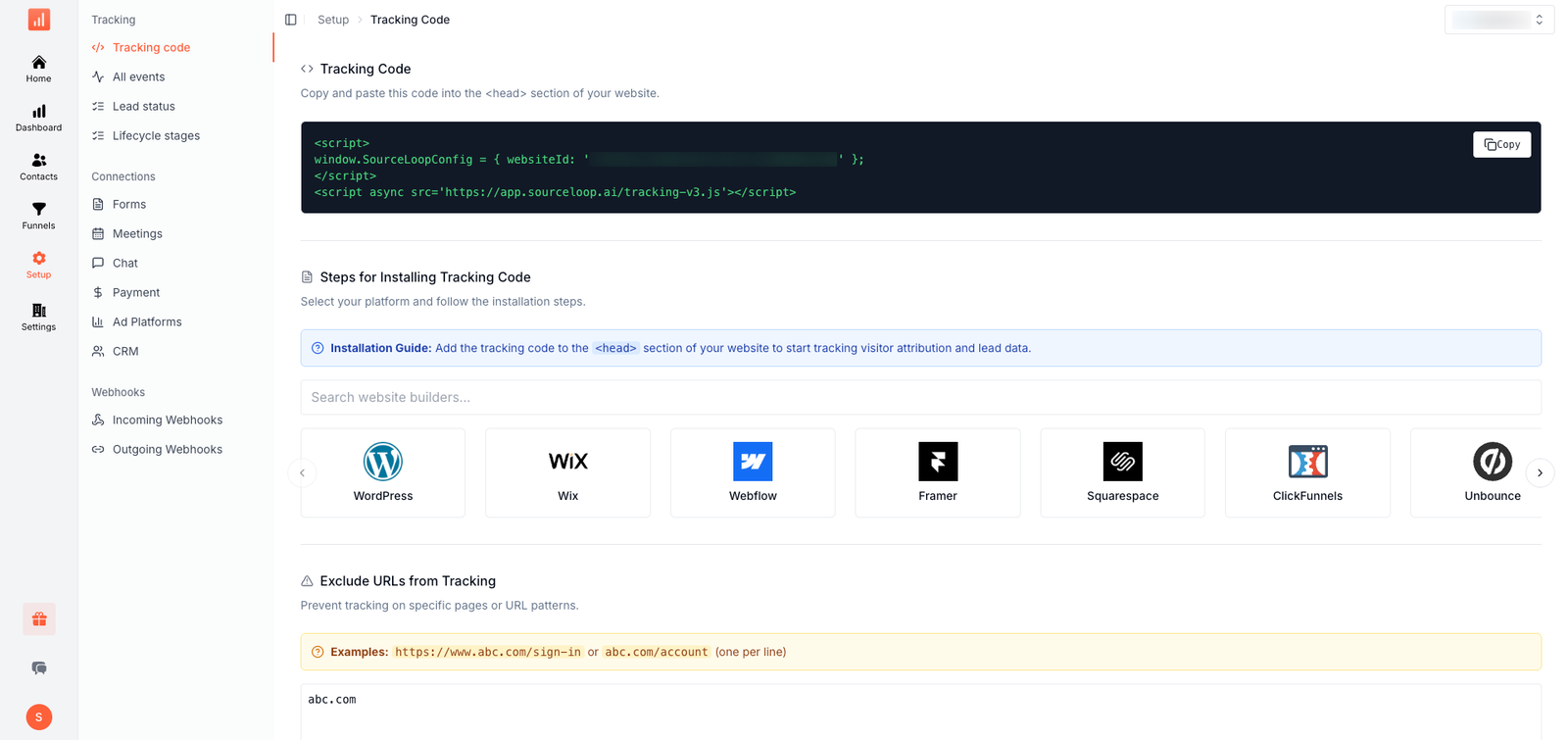
Once your website is added, SourceLoop gives you a tracking code that collects website visits, traffic sources, UTM parameters, and conversion activity.
You can find the tracking code under Settings → Tracking Code in SourceLoop.
Step 2: Install SourceLoop on Your Website
Add the SourceLoop tracking script to your website.
If you use a platform such as WordPress, Webflow, Framer, or Squarespace, you can add the script without writing custom code. SourceLoop can automatically track page views, attribution, and supported conversions.
Once installed, SourceLoop starts building the visitor journey.
For example:
Google Ads → Pricing page → Blog → Demo page → Form submission
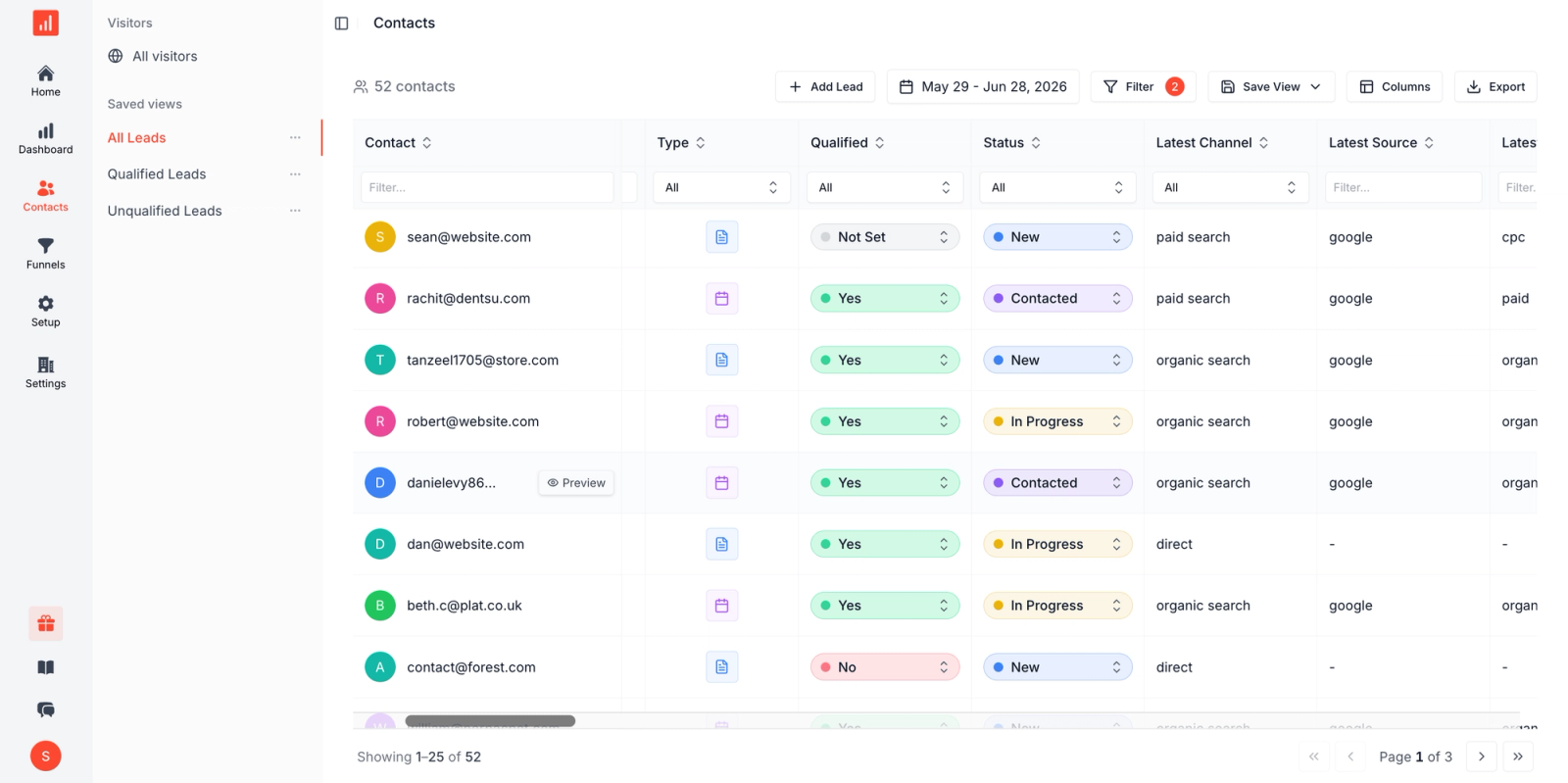
This journey can later be connected to the person's Pipedrive record.
Step 3: Connect Pipedrive to SourceLoop
Go to the CRM integrations section in SourceLoop and select Pipedrive.
SourceLoop uses an OAuth connection for Pipedrive, so you can authorize the connection without building your own API integration. Pipedrive is one of SourceLoop's native CRM integrations alongside HubSpot and Salesforce.
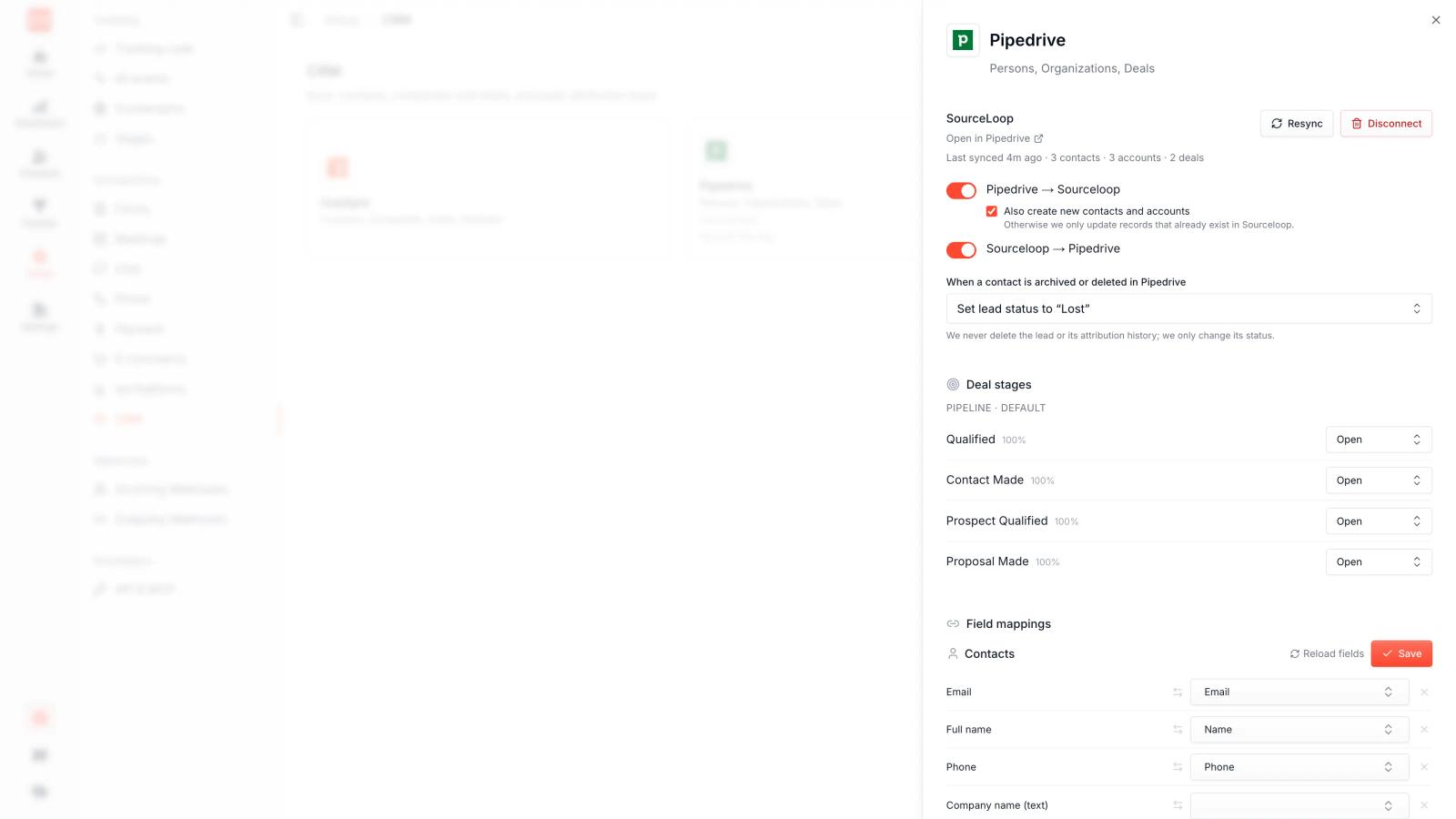
Once connected, SourceLoop can sync attribution information into Pipedrive.
Step 4: Set Up Your Pipedrive Fields
SourceLoop can write attribution information into Pipedrive Person, Organization, and Deal fields.
The default mapping includes fields such as:
- First source
- First medium
- First campaign
- First landing page
- Latest source
- Latest medium
- Latest campaign
- Latest landing page
- Lead status
- Lead score
- Lifecycle stage
- Qualified status
- Expected deal value
- Realized sales value
SourceLoop can automatically create its standard sourceloop_* fields in Pipedrive when the first sync runs.
This means a Pipedrive contact can show information such as:
First source: Google
First medium: CPC
First campaign: Brand Search
Latest source: LinkedIn
Latest campaign: ABM Q3
Step 5: Capture Your Marketing Sources
SourceLoop captures the information needed to identify where a visitor came from.
This includes UTM parameters and advertising click IDs where available.
For example, someone may arrive through:
LinkedIn → Paid Social → ABM Campaign
Another visitor may come through:
Google → CPC → Demo Campaign
SourceLoop stores this information with the visitor and later connects it to the conversion and CRM record.
This gives you a much better picture than simply seeing "Website" as the lead source in Pipedrive.
Step 6: Track Your Conversions
Next, make sure SourceLoop knows what counts as a conversion for your business.
You can track actions such as:
- Form submissions
- Demo bookings
- Meetings
- Chat conversations
- Phone calls
- Payments
- Signups
SourceLoop supports common form and meeting tools and can connect conversion activity with the visitor's previous marketing journey.
For example:
Google Ads → Website → Pricing → Demo booking → Pipedrive lead
SourceLoop can connect those steps together.
Step 7: Track Phone Calls and Other Offline Leads
If your business gets leads through phone calls, SourceLoop can connect call activity with the marketing journey.
It supports call tracking platforms such as CallRail, CallTrackingMetrics, and Invoca. SourceLoop matches the call with the visitor's session and can send the attributed lead into Pipedrive.
This is important for businesses where a large percentage of conversions happen through sales calls instead of website forms.
Step 8: Push Attribution Into Pipedrive
Once your tracking and CRM connection are working, SourceLoop can write attribution data into Pipedrive.
You can choose the fields where you want information such as first-touch and last-touch source, campaign, medium, landing page, lead status, and revenue to appear.
You can also customize the mapping if you already have your own Pipedrive fields.
This gives your sales team marketing context directly inside Pipedrive.
Instead of seeing:
John Smith
Deal: $15,000
They can also see:
First source: Google Ads
Campaign: Enterprise Search
Landing page: /enterprise
Latest source: LinkedIn
Lead status: Qualified
Step 9: Track Attribution at the Deal Level
The real value comes when a lead becomes a deal.
SourceLoop can sync CRM deal information and connect it with the marketing touchpoints that influenced that deal. Its CRM integration is designed to write attribution information into contact, lead, and deal records.
You can then answer questions such as:
- Which campaigns are generating Pipedrive deals?
- Which channels create the most pipeline?
- Which campaigns generate the highest-value opportunities?
- Which marketing sources are associated with closed-won revenue?
- How much revenue came from paid search, paid social, organic, or other channels?
Step 10: Compare First-Touch and Last-Touch Attribution
A customer can interact with your company many times before becoming a customer.
For example:
Google Ads → Blog → LinkedIn → Pricing Page → Demo → Pipedrive Deal
If you only use last-touch attribution, LinkedIn or the pricing page may receive most of the credit.
SourceLoop lets you compare different attribution models, including first-touch, last-touch, linear, time-decay, U-shaped, and W-shaped models.
This helps you understand both:
Who introduced the customer?
and
What helped convert the customer?
Step 11: Connect Deal Revenue Back to Marketing
The final step is connecting Pipedrive deal value with the marketing source.
Once revenue is available, you can move beyond lead counts and start looking at pipeline and revenue by channel and campaign.
For example:
ChannelLeadsOpportunitiesRevenueGoogle Ads12032$85,000LinkedIn7528$72,000Organic11021$61,000
This gives your marketing team a much clearer picture of what is actually producing business results.
SourceLoop's attribution dashboards can also compare metrics such as pipeline, ROAS, and CAC by channel and campaign.
Step 12: Verify the Pipedrive Attribution
Before relying on the data, test the complete journey.
Visit your website through a tracked campaign and submit a test form or book a meeting.
Then check:
- Did SourceLoop record the visit?
- Was the source and campaign captured?
- Was the conversion recorded?
- Was the contact created or updated in Pipedrive?
- Did the attribution fields populate?
- Did the deal receive the correct marketing information?
SourceLoop also provides attribution coverage reporting to help identify revenue that could not be tied back to a usable visitor journey.
What Your Final Setup Looks Like
Once everything is connected, your marketing attribution setup can look like this:
Google Ads / Meta / LinkedIn / Organic
↓
Website
↓
SourceLoop
↓
Form / Call / Meeting / Chat
↓
Pipedrive Contact
↓
Pipedrive Deal
↓
Closed-Won Revenue
SourceLoop acts as the attribution layer between your marketing activity and Pipedrive. Pipedrive remains your CRM and sales system, while SourceLoop adds the marketing source, journey, and attribution data around each lead and deal.
Why Use SourceLoop With Pipedrive?
Pipedrive is excellent for managing leads, contacts, activities, and deals. The missing piece for many marketing teams is understanding where those deals actually came from.
SourceLoop fills that gap by connecting the marketing journey with Pipedrive records.
Instead of reporting:
"We generated 200 leads this month."
you can get closer to:
"Google Ads generated 70 leads, 24 opportunities, and $85,000 in attributed revenue."
That is the difference between basic lead-source tracking and full marketing attribution.
Frequently asked questions
-
FAQs
-
Can I track marketing attribution in Pipedrive?
Yes. SourceLoop connects with Pipedrive and can add first-touch, last-touch, journey, and lead score data to your CRM records.
-
How do I connect SourceLoop to Pipedrive?
Install SourceLoop on your website, open the Pipedrive integration in SourceLoop, and authorize the connection. You can then map the attribution data to your Pipedrive records.
-
What attribution data can SourceLoop send to Pipedrive?
You can send information such as first source, last source, campaign, medium, landing page, full customer journey, and lead score to Pipedrive.
-
Can SourceLoop track first-touch and last-touch attribution?
Yes. SourceLoop keeps both first-touch and last-touch attribution instead of allowing the latest interaction to overwrite the original source.
-
Can I track revenue from Pipedrive?
Yes. With two-way sync, Pipedrive deal stages and revenue can flow back to SourceLoop, allowing revenue to be connected to the original marketing source and campaign.
-
Can SourceLoop track Google Ads leads in Pipedrive?
Yes. SourceLoop can capture advertising attribution and pass it into Pipedrive, helping you see which Google Ads campaigns generated leads and deals.
-
Can I track leads from LinkedIn and Meta Ads?
Yes. SourceLoop can capture attribution from channels such as LinkedIn and Meta and connect those leads with your Pipedrive records.
-
Does SourceLoop replace Pipedrive?
No. Pipedrive remains your CRM and sales system. SourceLoop acts as the marketing attribution layer that adds source, journey, and revenue context to your CRM.
-
Can I track phone calls with Pipedrive?
Yes. SourceLoop can connect call tracking data with marketing attribution and pass the resulting lead information into your CRM.
-
Does SourceLoop support multi-touch attribution with Pipedrive?
Yes. You can use multiple attribution models and connect the full customer journey with Pipedrive contacts and deals.



 Paid Social


