
Track Stripe Payments as Meta Ads Conversions
Learn how to track Stripe payments as Meta Ads conversions. Set up server-side CAPI integration for accurate revenue attribution and better ad optimization.

The fastest way to track Stripe payments as Meta Ads conversions is to wire Stripe into Meta through the Conversions API, so payment events reach Meta from your server instead of depending on a browser pixel alone.
Table of Contents
- Why Browser Tracking Misses Stripe Revenue
- What Changes with Server-Side Events
- Complete the Connection
- Check Your Event Data
- Connect Attribution to Revenue
- Why Missing Payments Distort Optimization
- Turn Payment Data Into Better Decisions
- Compare Attribution Models
- Connect Stripe Revenue to the Journey
- Choose a Practical Attribution Approach
- Build Audiences Around Payment Value
- Choose Attribution for Better Decisions
- Prevent Duplicate Purchase Events
- Check Values, Currency, and Customer Data
- Audit the Pipeline Regularly
- When Data Appears
- Handling Chargebacks
Why Browser Tracking Misses Stripe Revenue
Stripe Checkout and Payment Links create a stubborn measurement gap, because the payment itself happens on Stripe's domain. Your pixel might catch the click or the start of checkout, but the completed payment — its value, the customer behind it, whether it succeeded or failed — usually stays invisible. As Stape's Stripe purchase tracking guide notes, a thank-you page sometimes receives nothing more than a session ID after checkout.
Privacy settings, script blockers, and browser restrictions only widen that gap. It's a bit like driving while checking only the rearview mirror: you can see where traffic came from, but not whether it ever arrived.
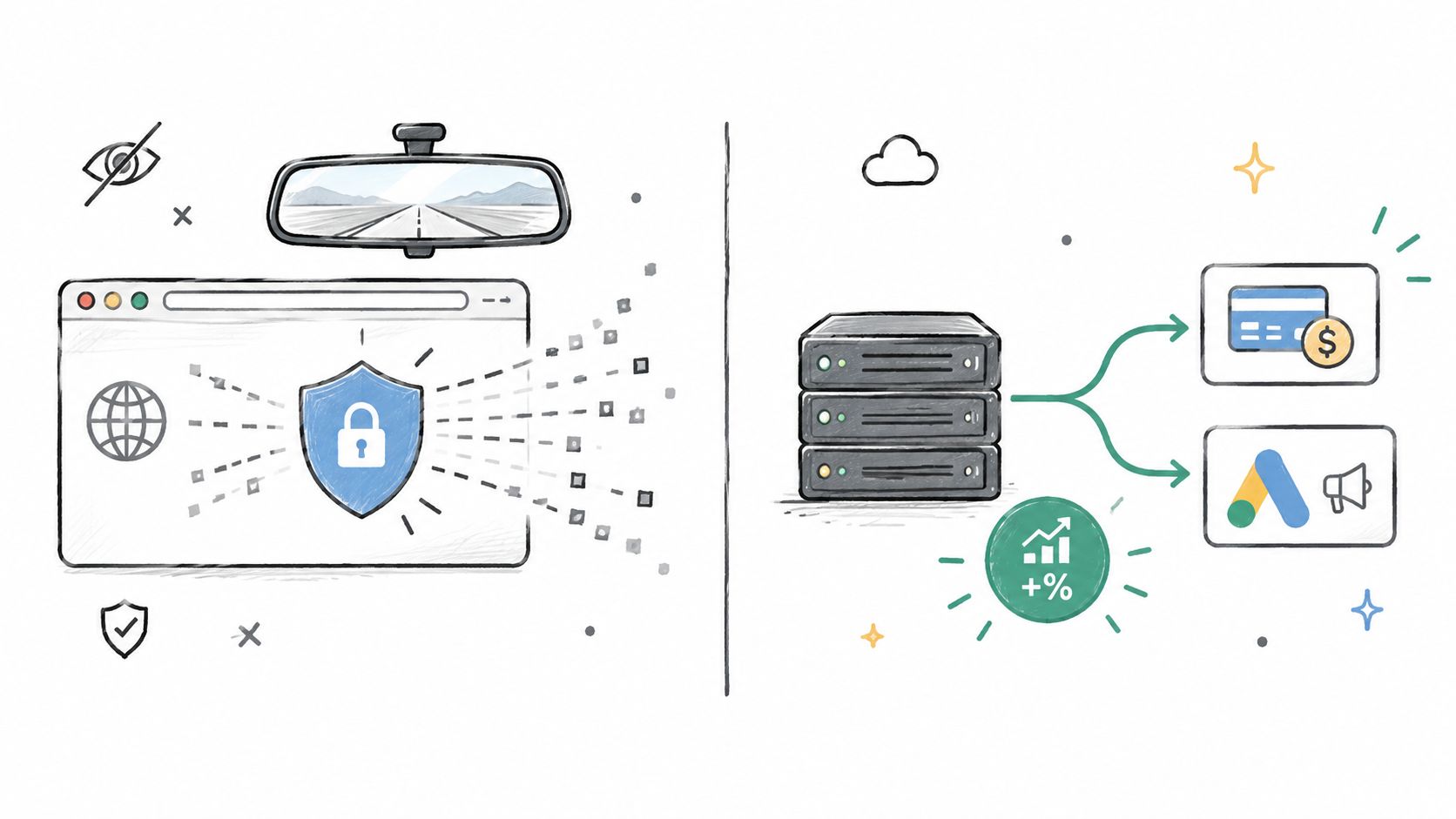
| Tracking method | Accuracy | Resilience | Optimization signal |
|---|---|---|---|
| Pixel only | Misses blocked browser events | Low | Clicks and partial conversions |
| Stripe plus Meta CAPI | Uses confirmed payment data | Higher | Purchases and revenue |
What Changes with Server-Side Events
With the Conversions API, Stripe can send a confirmed payment event straight to Meta. That event can carry the transaction ID, value, currency, payment status, and customer matching data — subject to consent and how you've built the integration.
This matters more than it sounds for campaign learning. Feed Meta form fills but no purchases, and it goes looking for more people who submit forms rather than people who actually pay. Verified Stripe revenue gives the algorithm a real destination to aim for.
Browser tracking describes intent. Server-side payment tracking confirms business results.
None of this cancels your privacy obligations. Server-side tracking still needs proper consent controls, data minimization, secure handling, and deduplication whenever the pixel and CAPI run side by side. Skip that part, and Meta may count a single payment twice or log conflicting values.
If you're designing a broader measurement setup, learn more about cookie deprecation strategies before committing to an implementation. The strongest setups pair reliable Stripe payment events with journey data, which is how SourceLoop connects revenue back to the channels and interactions that actually influenced the sale.
To track Stripe payments as Meta Ads conversions, you need to pipe Stripe data directly into Meta's Conversions API instead of leaning solely on a browser pixel. The setup lives in Meta's App Center, where you install the Stripe app, connect your business account, pick a dataset, choose which events to share, and confirm the connection.
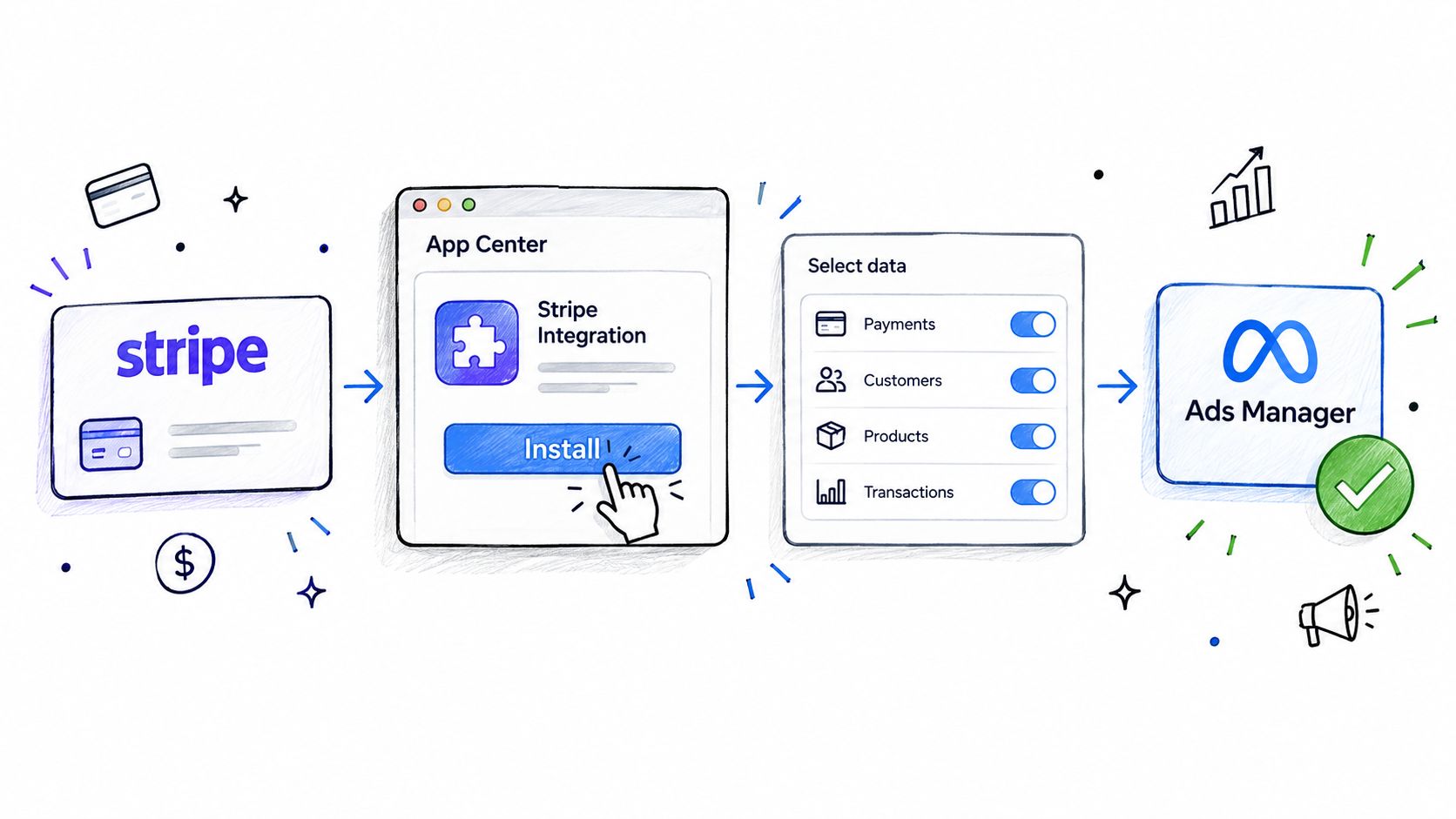
Meta's official Stripe integration lets Stripe transmit web and offline events straight to Meta, which helps advertisers sharpen measurement and campaign optimization. The whole flow revolves around installing the app, linking a Meta business, selecting a dataset, and confirming the shared data.
Complete the Connection
Before you start, make sure you have admin access to both your Stripe account and Meta Business Manager. You'll also need a Meta dataset ready to receive purchase events.
Here's the sequence:
- Open Meta's Events Manager and head to the App Center.
- Find and install the official Stripe integration.
- Select the Meta business account you want to link.
- Authorize Stripe to share approved payment events.
- Pick the relevant dataset and review the permissions.
- Confirm the connection, then run a test payment.
Once a customer pays, Stripe fires the event from its servers to Meta's servers. Because the payment doesn't hinge on a script loading in the customer's browser, ad blockers and browser restrictions are far less likely to break the conversion signal.
The browser might signal intent, but Stripe is the one that confirms whether money actually changed hands.
Check Your Event Data
After setup, open Meta Events Manager and confirm that purchase events are showing up with the right value, currency, event name, and transaction details. Run a few test payments and cross-check them against Stripe's records, including successful, failed, refunded, and recurring transactions.
A solid validation checklist:
- Match Stripe payment IDs to Meta event IDs.
- Verify the correct currency for every transaction.
- Make sure only paid transactions count as purchases.
- Review event match quality and how customer data is handled.
- Watch for duplicate browser and server events.
If your website still fires a pixel purchase event, use a shared event ID so Meta can deduplicate it. Without that, one payment could show up twice, inflating your revenue numbers and skewing campaign optimization.
Connect Attribution to Revenue
The official integration confirms that a payment went through, but it doesn't always paint the full picture of the customer journey. SourceLoop fills in that missing context by tying Stripe revenue back to the original acquisition source, the campaign, and earlier touchpoints along the way. Read our guide to conversion tracking for Facebook Ads for a broader view on implementation.
Start with one dataset and a modest test budget. Once the numbers reconcile consistently, use those purchase events to evaluate campaigns based on paid revenue, not clicks or checkout starts. That shift gives Meta a cleaner signal and gives your team a more reliable foundation for budget decisions.
Browser pixels rely on JavaScript executing in the customer's browser. That path breaks down when someone blocks ads, opts out of tracking, browses in private mode, or abandons Stripe Checkout before landing back on your site. When that happens, Meta registers the interest but never sees the actual payment.
Server-side tracking takes a completely different approach. Stripe pushes confirmed payment data directly from its own infrastructure to Meta through the Conversions API, so the conversion no longer hinges on whether a page script loads properly. Think of it as swapping a witness's recollection for the payment processor's actual receipt.
Browser events suggest intent. Server-side events confirm revenue.
This difference hits hardest when you're tracking Stripe payments as Meta Ads conversions. A missing purchase isn't just a reporting headache. It trains Meta's optimization engine on an incomplete picture, which can steer delivery toward people who click or fill out forms rather than people who actually open their wallets.
Why Missing Payments Distort Optimization
Say a subscription business processes 100 paid signups, but browser tracking only catches 70. Meta treats those 70 as the full outcome and starts looking for more users who match that profile. The other 30 customers are still generating revenue, but their behavioral patterns are invisible to the campaign's learning phase.
Left unchecked, that gap erodes audience quality, inflates reported acquisition costs, and skews budget decisions. The problem gets worse when renewals, payment links, or hosted checkout pages introduce even more places where browser events can silently drop off.
| Pixel-only tracking | Server-side Stripe tracking |
|---|---|
| Relies on browser JavaScript | Uses confirmed server events |
| Vulnerable to blocked or restricted events | Largely unaffected by browser-level obstacles |
| Typically captures clicks or checkout initiations | Captures completed transactions with actual value |
| Feeds Meta a partial signal | Feeds Meta a stronger, revenue-backed signal |
That said, server-side tracking doesn't give you a free pass on privacy. Your setup still requires consent controls, data minimization, secure credential management, and event deduplication when pixel and Conversions API events fire together. It also needs regular reconciliation against Stripe's payment records, because a trustworthy pipeline must distinguish between paid, failed, refunded, and duplicate transactions.
For a deeper look at the broader picture, Tagada on server-side tracking breaks down why Meta tends to underreport purchases relative to payment processors and how server-side events help close that gap.
Turn Payment Data Into Better Decisions
The strongest setup pairs Stripe's ground-truth revenue data with full campaign context. SourceLoop connects revenue to acquisition sources and customer journeys, so teams can see which interactions actually influenced each conversion instead of judging performance based on clicks alone.
Follow this workflow:
- Send successful Stripe payments to Meta through the Conversions API.
- Match events using consistent identifiers and permitted customer data.
- Reconcile Meta totals against Stripe on a regular cadence.
- Optimize campaigns toward paid revenue, not just lead volume.
Once Meta starts receiving reliable payment signals, your campaigns can pursue customers who actually generate revenue. That shifts tracking from a technical patch to the foundation for sharper targeting, cleaner reporting, and more disciplined ad spend decisions.
Sending Stripe payments to Meta confirms what was purchased. Attribution explains why the purchase happened. That distinction matters more than most teams realize.
Meta's last-click model tends to hand all the credit to the final touchpoint — usually a retargeting ad. So that retargeting ad looks like the hero, even when the sale started weeks earlier through a completely different channel.
Picture this: a customer discovers your SaaS product through a YouTube review, comes back via organic search, reads a comparison post on your blog, then finally clicks a Meta retargeting ad before completing payment in Stripe. Last-click reporting pins the entire win on Meta. The earlier steps — the ones that actually built awareness and trust — get erased.
A conversion is the finish line, not the entire race.
Compare Attribution Models
Each model handles credit differently. Which one fits your business depends on your sales cycle, your channel mix, and how much data you actually have to work with.
| Model | How Credit Is Assigned | Best Use |
|---|---|---|
| Last click | Final touch gets everything | Short, straightforward buying journeys |
| First click | Discovery moment gets everything | Measuring awareness efforts |
| Linear | Split evenly across every touchpoint | Balanced journey reporting |
| Time decay | Recent touches earn more weight | Longer consideration cycles |
| Algorithmic | Credit reflects actual conversion patterns | Larger datasets and experienced teams |
Rule-based models are simple to explain to stakeholders, which is their main advantage. But those neat assumptions often flatten reality in ways that matter.
Algorithmic attribution gets closer to the truth because it learns from observed patterns rather than applying fixed rules. The catch? It needs clean event data and a solid volume of conversions before you should trust its output.
Connect Stripe Revenue to the Journey
Stripe payment data on the surface tells you very little about what actually drove the sale. That changes once you connect it to acquisition source, campaign, landing page, and the interactions that happened before checkout.
This is where SourceLoop stitches things together — linking those earlier touchpoints to forms, signups, bookings, and eventually the payment itself. Teams can then compare influenced revenue across channels rather than arguing about which platform gets to claim the win.
A first-click view might show YouTube driving demand. A multi-touch view could reveal that organic content and Meta retargeting both played a role in closing the deal. Neither channel deserves all the credit, and neither should be written off.
The Shopify attribution tool guide covers a similar problem founders run into constantly: Meta Ads, Google Analytics, and Shopify all claiming the same sale as their own.
Choose a Practical Attribution Approach
Start with a model your team can actually understand and apply consistently without friction. A small ecommerce brand with quick purchase cycles might get plenty of mileage out of comparing last-click and first-click views. A subscription company dealing with multiple visits, sales calls, and renewals will almost always benefit from multi-touch reporting.
Before you shift any budget based on attribution data, run through these checks:
- Use Stripe as the payment source of truth for confirmed revenue.
- Keep transaction IDs consistent across Stripe, SourceLoop, and Meta.
- Separate new purchases, renewals, refunds, and chargebacks wherever possible.
- Compare models over a fixed time period rather than reacting to a single campaign's numbers.
- Watch for double counting when browser-side and server-side events overlap.
Once that foundation is solid, SourceLoop can sync qualified offline conversions back to Meta through CAPI. Campaigns get clean revenue signals for optimization, while your internal reports keep the full customer journey intact.
That combination lets you track Stripe payments as Meta Ads conversions without confusing Meta's reporting window for the whole story.
Reliable Stripe events shift the question from "Who filled out that form?" to "Who actually paid?" That gap matters when a flood of cheap leads never converts, while a smaller group generates real revenue.
Meta can start optimizing toward confirmed purchases and their actual dollar values instead of treating every signup as identical. But the conversion event needs to be accurate, deduplicated, and linked to the right campaign context before you touch bidding or budgets.
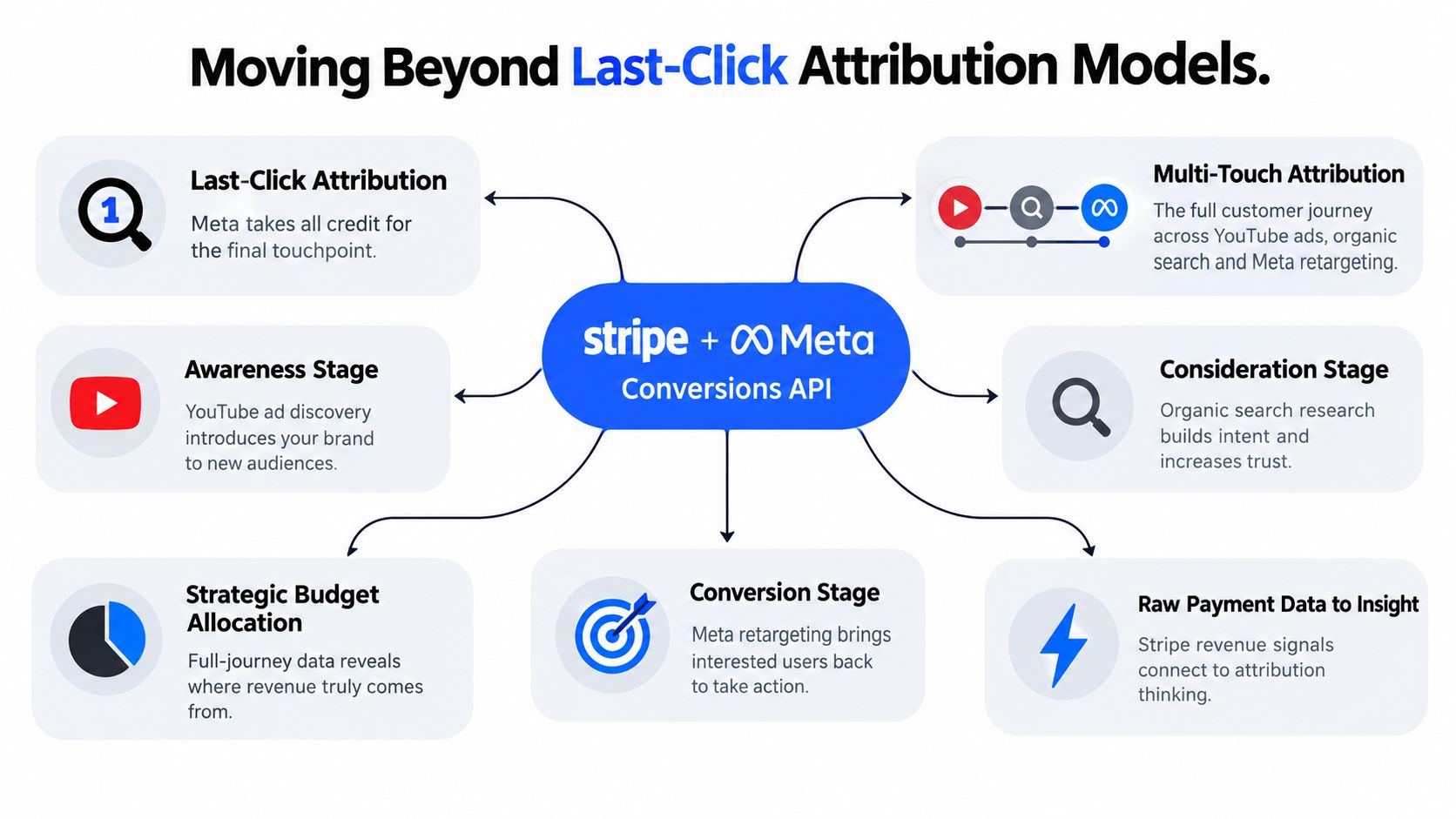
This diagram shows how Stripe payment signals connect with Meta Conversions API to expose the full path from awareness through retargeting and into actual revenue.
The core idea here: Meta might get credit for the conversion, but earlier channels built the demand that made it possible. Revenue optimization works best when you look at campaign delivery and broader attribution side by side, not in isolation.
Build Audiences Around Payment Value
Start by splitting customers into segments that reflect what they're actually worth. A single "Purchase" audience masks the difference between someone who buys a $10 plan and someone who signs up for a $500 monthly subscription.
Try segments like:
- First-time purchasers — gives Meta a signal for finding genuinely new customers
- High-value buyers — filtered by payment thresholds or average order value
- Repeat customers — flagged through renewals or additional Stripe payments
- Refunded or canceled customers — worth excluding from acquisition audiences once you've confirmed the churn
For example, a SaaS company might set up separate conversion rules for payments below $100 versus above $100. That way the algorithm gets a clearer signal about which prospects look like profitable accounts, not just people who signed up for a trial.
SourceLoop ties Stripe revenue data back to acquisition sources, customer records, and campaign touchpoints. That makes lifetime value analysis actually practical instead of judging everything off the first transaction.
Choose Attribution for Better Decisions
Meta's last-click reporting is fine for measuring the final step, but it tends to over-credit retargeting. Someone might discover a brand on YouTube, research through organic search, and finally convert after a Meta ad brings them back to the site.
Multi-touch attribution spreads credit across that whole journey. SourceLoop connects visits, forms, bookings, signups, and Stripe payments into one timeline, then can sync qualified offline conversions back to Meta through Conversions API.
Optimize campaigns with confirmed revenue, then use multi-touch attribution to figure out where the next wave of demand should come from.
Before you shift any budgets, run a comparison over a fixed window and verify:
- Purchase values and currencies match what's in Stripe
- New purchases, renewals, refunds, and chargebacks are kept separate
- Browser and server events are deduplicated
- Attribution windows stay consistent across platforms
- Revenue gets evaluated alongside margin and customer quality
This stops a common mistake: optimizing for reported conversions while ignoring whether those conversions actually produce sustainable profit. Track Stripe payments as Meta Ads conversions, stitch them into the full customer journey, and let evidence — not just lead volume — drive your next campaign decision.
Reliable payment data can still lead to unreliable decisions when small implementation errors slip through. If you want to track Stripe payments as Meta Ads conversions, treat quality control as part of the setup itself — not a maintenance task you'll get to eventually.
Prevent Duplicate Purchase Events
The most common mistake here is firing the same purchase through both the browser pixel and the Conversions API without a shared event ID. Meta registers two payments where there was one. Revenue gets overstated, and your campaigns learn to chase inflated results that don't exist.
The fix is straightforward: pass the same unique transaction or event ID in both requests. Then run test payments — successful ones, page refreshes, retries, thank-you-page revisits — and confirm each Stripe payment appears exactly once.
One payment should create one conversion, no matter how many tracking routes carry it.
Check Values, Currency, and Customer Data
A currency mismatch can quietly wreck otherwise valid reports. Stripe records the charge in EUR, the Meta event goes out as USD, and suddenly your purchase values and return on ad spend calculations are wrong in both directions.
Before launch, verify:
- Transaction IDs match between systems.
- Payment values exclude failed or pending transactions.
- Currency codes are passed consistently.
- Refunds and renewals use distinct event logic.
Email matching is the other quiet failure point. Send permitted customer information in the format Meta expects, hashed properly, with consent in place. Bad formatting, unnormalized addresses, or missing permission all reduce match quality — and weak matching means weak attribution.
For a fuller picture of where revenue actually comes from, learn how to connect Stripe revenue to lead sources and keep the campaign context Meta alone can't show you.
Audit the Pipeline Regularly
A server-side connection is not a "set it and forget it" system. Put a recurring check on the calendar: compare Stripe's successful-payment totals against Meta's purchase reports, then chase down any gaps by transaction ID rather than trusting aggregate numbers alone.
Document your consent rules before any customer data leaves your systems. Server-side tracking doesn't dissolve GDPR obligations — collect only permitted fields, respect consent choices, and keep your retention practices clear.
A practical audit looks like this:
- Test one paid transaction.
- Confirm its value and currency.
- Check deduplication status.
- Compare reporting windows.
- Record any unexplained difference.
These checks keep optimization anchored to real revenue. And if discrepancies persist, hold off on major budget changes until the payment pipeline and your attribution logic agree with each other.
Subscription renewals pass through the same integration as one-time charges. Recurring Stripe payments can keep feeding Meta purchase data, as long as your event rules separate renewals from genuinely new customers.
When Data Appears
Payment data typically shows up in Meta Ads Manager within 24 hours. The initial sync can take up to 48 hours, so hold off on judging the connection right after testing.
Give the first sync some breathing room before you start troubleshooting a reporting delay.
Partial refunds can be sent as dedicated refund events, but Meta displays them separately from the original purchase rather than netting them out automatically.
Handling Chargebacks
Chargebacks aren't supported as native conversion events. If you want proper reporting, import them as offline conversions and reconcile the adjustments against Stripe's transaction records.
Before you make any budget decisions, cross-check these items:
- Successful payments and renewals
- Refund events and their amounts
- Chargeback imports
- Matching transaction identifiers
SourceLoop ties these payment outcomes back to the original customer journey, so you can compare acquisition sources against actual retained revenue rather than incomplete purchase totals. This keeps Meta's optimization trained on real business results.




 Paid Social


