
Track Stripe Payments as Google Ads Conversions
Learn how to track Stripe payments as Google Ads conversions with enhanced and offline imports. Step-by-step setup, troubleshooting, and attribution tips.

A Google Search ad sends a prospect to your site. The prospect starts checkout, moves to Stripe Checkout, pays successfully, and returns to a thank-you page. Your analytics shows a purchase, Stripe shows the money, but Google Ads still reports a lead, an unattributed conversion, or nothing at all.
That gap exists because a Stripe payment is a server-side revenue event, not just a browser event. The click identifier must survive the journey, the payment must be reconciled with its original customer and order, and the resulting conversion must reach Google Ads while its matching window is still open. A thank-you page can help, but it can't reconstruct missing identity, delayed renewals, or refunds by itself.
Table of Contents
- Why Stripe Payments Break Standard Conversion Tracking
- What Google Ads Actually Accepts From Stripe
- Capturing the Click ID Before the Payment Happens
- Uploading Stripe Events as Offline Conversions
- Sending Raw Payments Versus Qualified Downstream Events
- Troubleshooting Silent Upload Failures
- Auto-Sync With Attribution Platforms and a Rollout Checklist
Why Stripe Payments Break Standard Conversion Tracking
A standard web conversion assumes that the important event happens while the browser is still on your site. The tag sees the page, reads its stored identifiers, and sends a conversion request. Stripe Checkout changes that sequence. The customer leaves your domain, completes payment elsewhere, and may return only after Stripe has processed the transaction.
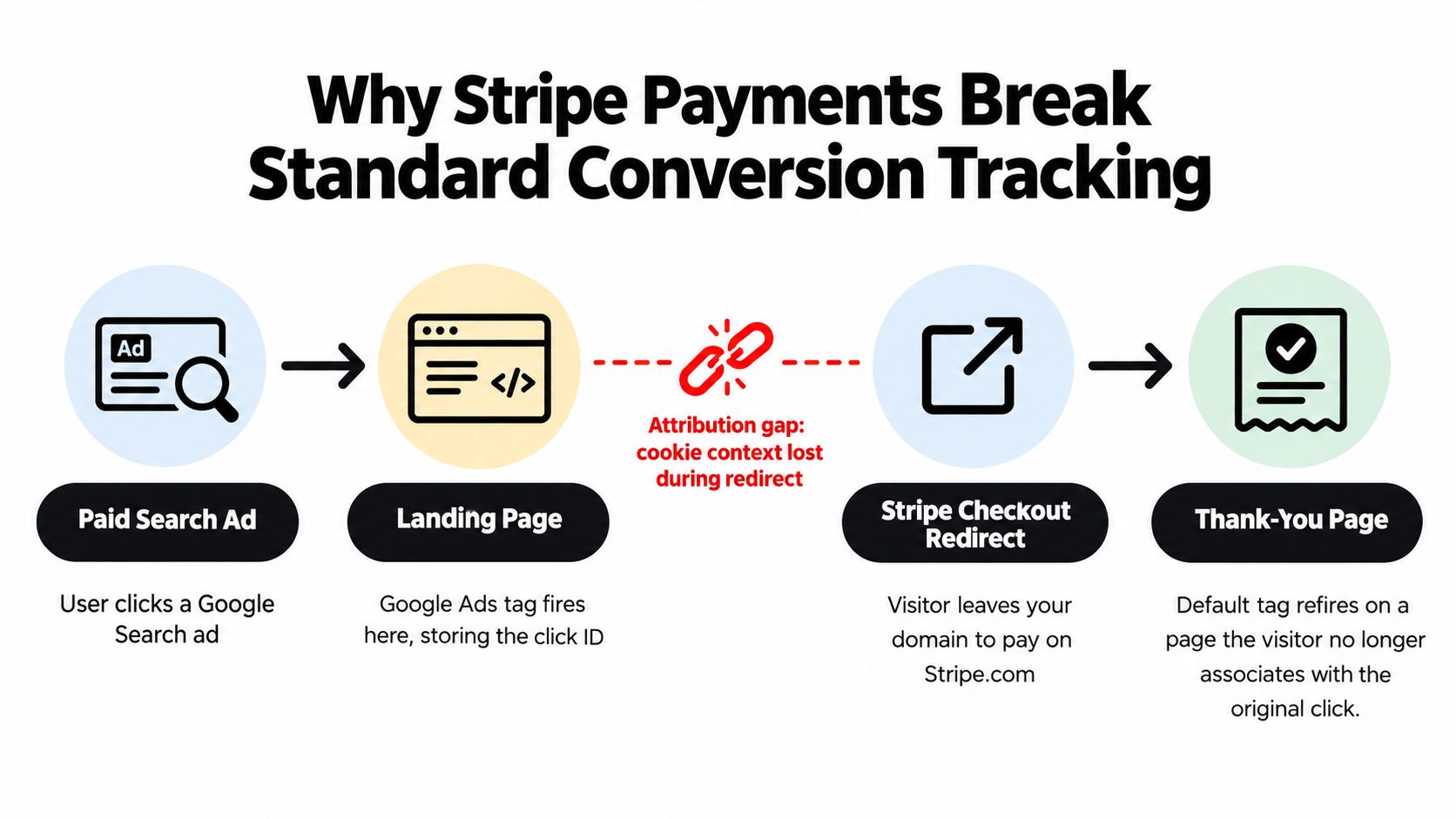
The return page can fire a Google Ads tag, but that doesn't prove it can identify the original ad click. The browser may have lost cookie context during the redirect, the visitor may complete payment in a different browser or device, or payment may finish asynchronously after the page has already loaded. A webhook gives you authoritative Stripe data, but it doesn't automatically contain the original Google click identity.
Three failure shapes that appear in production
The post-checkout identifier disappears. A visitor clicks an ad, reaches your landing page, and begins checkout. The thank-you page loads without a usable GCLID, so the tag records an unattributed purchase or falls back to weaker matching.
The subscription changes identity. The person who clicked the ad uses one email during the initial journey, while Stripe later records an invoice against a customer record with a different address. Email matching can't repair a missing click ID reliably.
The refund leaves the conversion untouched. Google Ads receives the original purchase, but the later refund or dispute remains inside Stripe. Campaign reports continue to treat the transaction as successful revenue unless you send an adjustment.
Google Ads supports offline conversion imports for real-world transactions, including payments made outside the browser. Its current documentation says offline data sources are configured from the Goals menu, and GCLID-based imports can be accepted for up to 90 days after the click, while enhanced conversion uploads using personally identifiable information can be accepted for up to 63 days. Google's offline conversion documentation also describes Data Manager imports from 90 days ago for certain sources.
Practical rule: Treat the Stripe webhook as the revenue source and the stored click ID as the attribution source. You need both.
The operational consequence is straightforward. If you feed Google Ads incomplete or duplicated payment signals, Smart Bidding learns from polluted data. The fix isn't another thank-you-page tag. It's a lifecycle pipeline that captures identity before checkout, carries it into Stripe, uploads the right event, and handles subsequent financial changes.
What Google Ads Actually Accepts From Stripe
Google Ads doesn't accept an arbitrary Stripe webhook and infer the rest. An offline conversion upload needs a structured record that connects a completed transaction to an ad interaction. Google's guidance identifies the required offline click-upload fields as the click ID, conversion date and time, conversion action resource name, conversion value, and currency code. The Google Ads API offline conversion guide explains that this framework is intended for real-world events such as qualified phone leads and in-office payments, not only browser form submissions.
The two practical intake patterns serve different situations. Enhanced Conversions for Web can use hashed first-party data collected around a web conversion. Offline Conversion Import is the cleaner model when Stripe is the authoritative system for a delayed payment, subscription event, or invoiced transaction.
| Attribute | Enhanced Conversions for Web | Offline Conversion Upload |
|---|---|---|
| Primary use | Improve matching for a web conversion | Import a transaction that occurs outside the browser |
| Core identity | Hashed first-party customer data | Click ID, with supported first-party identifiers where applicable |
| Revenue fields | Conversion value and currency can accompany the web event | Conversion value and currency are required |
| Event source | Website or server-assisted web callback | Stripe payment, invoice, or other backend event |
| Main dependency | Consent, normalization, and correct hashing | Preserved click identity and a valid conversion action |
| Best fit | Payment completed while a reliable web session remains available | Delayed or asynchronous payment lifecycle events |
Design around the fields, not the webhook name
Stripe already holds useful facts: the amount paid, currency, payment timestamp, customer record, and transaction identifiers. Your integration must map those facts to Google's conversion action and retain the original click identity. A stable order or transaction ID is also essential for preventing retries from creating duplicate conversions.
Google distinguishes click-ID uploads from broader offline conversion data sources managed through the Goals menu. That distinction matters because a basic webhook connector may successfully transmit a payment while failing to provide the identifier Google needs for attribution. A successful HTTP request isn't the same thing as a matched conversion.
For teams reviewing their wider measurement setup, this ecommerce conversion tracking setup provides useful context on how purchase events, values, and identifiers fit into a broader Google Ads implementation. Use it as a reference for the surrounding web layer, not as a substitute for preserving Stripe's server-side payment identity.
The constraint that shapes the architecture: A payment has value and time, but Google Ads still needs a trustworthy relationship between that payment and the original ad interaction.
Capturing the Click ID Before the Payment Happens
The most important moment in this integration is usually not payment completion. It's the first landing-page request, when Google appends identifiers to the URL and your site still has access to the visitor's browser context.
Capture the available identifiers immediately, including GCLID, GBRAID, and WBRAID where relevant to the campaign and journey. Store them in first-party storage and on the server, tied to an anonymous visitor or checkout record. Browser storage alone is fragile, while server storage alone can't capture a value the browser never sends.
Build a durable identity chain
A reliable flow has several handoffs:
The landing page reads the click parameters and sends them to your backend with the anonymous visitor ID.
Your checkout-session creation request writes those identifiers into Stripe metadata. Keep the same values on the Checkout Session and the related PaymentIntent where your implementation permits it.
The payment webhook reads metadata directly, instead of performing a late lookup that can race against customer or subscription updates.
The backend stores the customer email and transaction ID associated with the payment. Resolve the email from Stripe's completed checkout data, not only from a thank-you-page render.
Stripe-hosted checkout is useful here because it collects customer details as part of the payment flow. The important engineering decision is to copy the attribution fields into Stripe before the visitor leaves your domain. A return URL can confirm that the customer came back, but it shouldn't be the only place where your system expects to find campaign identity.
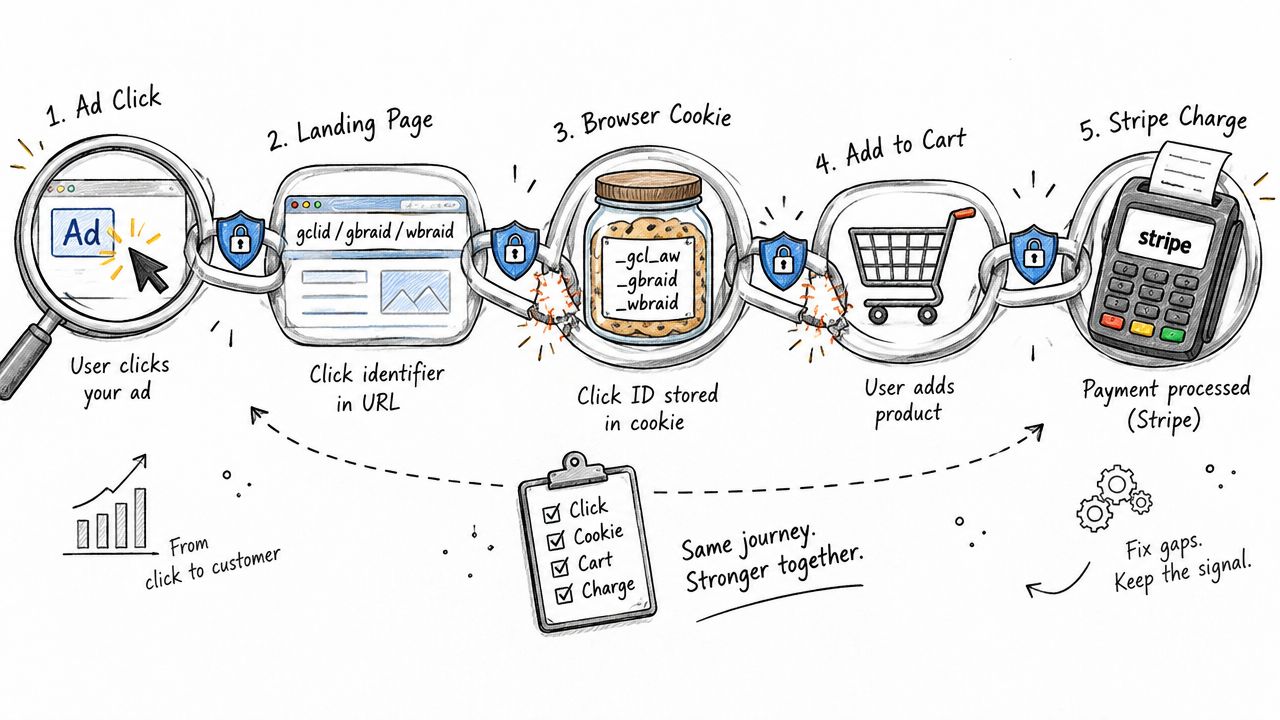
For a plain-language explanation of how these identifiers travel through a conversion journey, keep this guide to click IDs close to the implementation notes. The terminology is less important than the invariant: the value captured on the landing page must be the same value available when the backend receives the payment.
Normalize customer data before hashing
If you use first-party identifiers for enhanced matching, normalize them first. Trim whitespace, lowercase email addresses, and apply the format required by Google's matching rules before SHA-256 hashing. Don't hash inconsistent representations of the same customer and assume Google will reconcile them.
The durability test should be automated. For a test purchase, confirm that the GCLID or relevant identifier appears identically in the landing-page capture, Checkout Session metadata, PaymentIntent metadata, checkout.session.completed, and the final upload payload. If any handoff changes the value or drops it, stop there. Upload code can't repair a broken chain.
Uploading Stripe Events as Offline Conversions
Start in Google Ads, not in Stripe. Create or identify the offline conversion action that will receive the event, then define its category, counting behavior, value treatment, and attribution settings according to the business decision you're trying to optimize. A first purchase, a qualified subscription, and a renewal usually shouldn't share one undifferentiated action.
Google's required offline click-upload fields are concrete:
- Conversion action: The resource name that identifies the action in Google Ads.
- Conversion time: The actual payment or qualification timestamp, formatted in the advertiser's timezone.
- Conversion value: The Stripe amount you want bidding to learn from.
- Currency code: The currency associated with that value.
- Click identity: The preserved click ID that connects the event to the ad interaction.
- Order or transaction identity: A stable ID used by your own system to make retries idempotent.
The offline conversion configuration workflow is easiest to reason about as a queue. Stripe emits an event, your worker validates it, your database records whether it has already been processed, and the uploader sends only a clean payload to Google Ads.
Choose the Stripe trigger carefully
For one-one purchases, a successful charge or confirmed checkout event can be the canonical business trigger. For subscriptions, the correct trigger depends on what you want Google Ads to optimize. A payment-intent event may indicate an attempted payment, while a later confirmed payment event represents money received. Your code must filter test-mode events, failed payments, unpaid invoices, zero-value authorizations, and events that don't represent the conversion action's intended business meaning.
The standard offline matching window is a hard operational boundary. Google says uploads more than 90 days after the last click aren't imported, and imported statistics typically appear after about 3 hours. Google's conversion tracking troubleshooting guidance makes the freshness requirement explicit. Schedule uploads continuously rather than waiting for a monthly finance export.
Pick the transport that preserves control
The Google Ads API gives engineering teams the strongest control over validation, retries, deduplication, and adjustments. UI imports can work for low-volume testing or operational backfills, but they become cumbersome when Stripe produces recurring events and refund changes. SFTP, CMS, Zapier, and Make connectors can reduce implementation effort, but inspect their field mapping, retry behavior, timezone handling, and support for conversion adjustments before trusting them with bidding data.
Dynamic values are appropriate when each payment should teach Google the actual transaction value. Static values are defensible when every conversion has a consistent commercial value, but they shouldn't disguise a varied revenue model. Record the order ID before upload, enforce idempotency on Stripe event IDs and your transaction key, and keep a reconciliation record for every accepted, rejected, or adjusted conversion.
Sending Raw Payments Versus Qualified Downstream Events
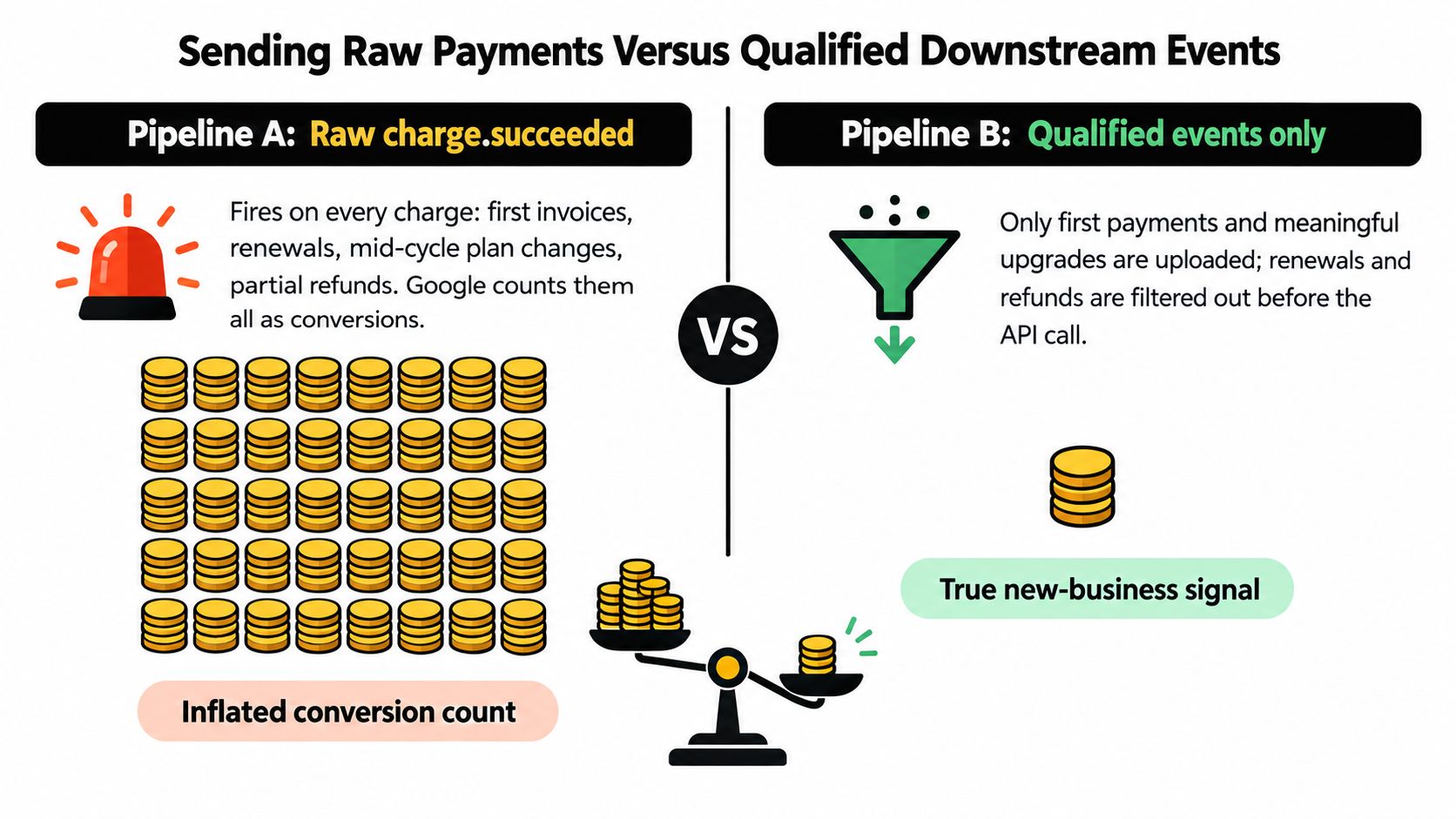
A SaaS company selling subscriptions can connect charge.succeeded directly to Google Ads. The first invoice uploads, then renewals, plan changes, and other qualifying Stripe events arrive through the same path. Google Ads sees a steady stream of conversions, but the stream may represent very different levels of customer value.
That approach is simple and can be appropriate for a low-friction, one-shot purchase. It becomes misleading when a trial converts briefly, a customer changes plans, or a payment is later refunded. If every successful charge uses the same conversion action, Google may count revenue events that your finance or RevOps team would classify as retention, expansion, reversal, or noise.
The raw-payment pipeline
Pipeline A uploads each eligible payment event as soon as Stripe confirms it. The advantages are speed, straightforward implementation, and a close relationship between Stripe's payment ledger and Google's conversion feed.
The trade-off is signal quality. Renewals can overwhelm the acquisition signal, partial refunds can leave the original value intact, and mid-cycle changes can make a campaign appear more valuable than the acquired customer became. Maximize Conversions, target CPA, and target ROAS all depend on the conversion stream you designate as primary, so an action that mixes first purchases with lifecycle events can train bidding toward the wrong outcome.
The qualified-event pipeline
Pipeline B keeps the payment in your internal event store first. It uploads only after a business qualification rule is satisfied, such as a subscription remaining active through a defined checkpoint, the absence of a pending refund, or a customer reaching an approved value threshold.
That delay improves business meaning, but it adds coordination. The system needs a clear qualification state, a stable conversion value, a deadline monitor, and an adjustment process when the customer later cancels or receives credit. It also needs a documented answer to a difficult question: is the goal to acquire a paying customer, generate immediate cash, or maximize durable revenue?
Choose the conversion event that reflects the decision you want bidding to make, not the event that's easiest to emit.
Google Ads records conversion value inside its own conversion model and window. A payment report can apply refunds and credits differently, so Google Ads and Stripe won't automatically produce identical revenue totals. Industry guidance on Stripe marketing attribution highlights this distinction and the need to decide whether renewals belong to the acquisition journey or a separate reporting layer.
For DTC or one-time purchases, raw confirmed payments are often a sensible primary signal, with refund adjustments handled separately. For subscriptions, high-value contracts, and long qualification cycles, upload a qualified downstream event or split first purchase and qualified revenue into separate conversion actions. Don't make Google Ads optimize for a number that your own business doesn't trust.
Troubleshooting Silent Upload Failures
The most dangerous failures don't always stop the pipeline. A request can be accepted while the conversion remains unmatched, arrives outside the allowed window, duplicates an earlier transaction, or carries a value that finance can't reconcile.
Start with identity. If the email never reaches the user data field, or if your normalization and hashing process is inconsistent, enhanced matching weakens. The backend should log the normalized input state without exposing raw personal data in operational logs, then record the payload's identifier type, hash status, and match result where available.
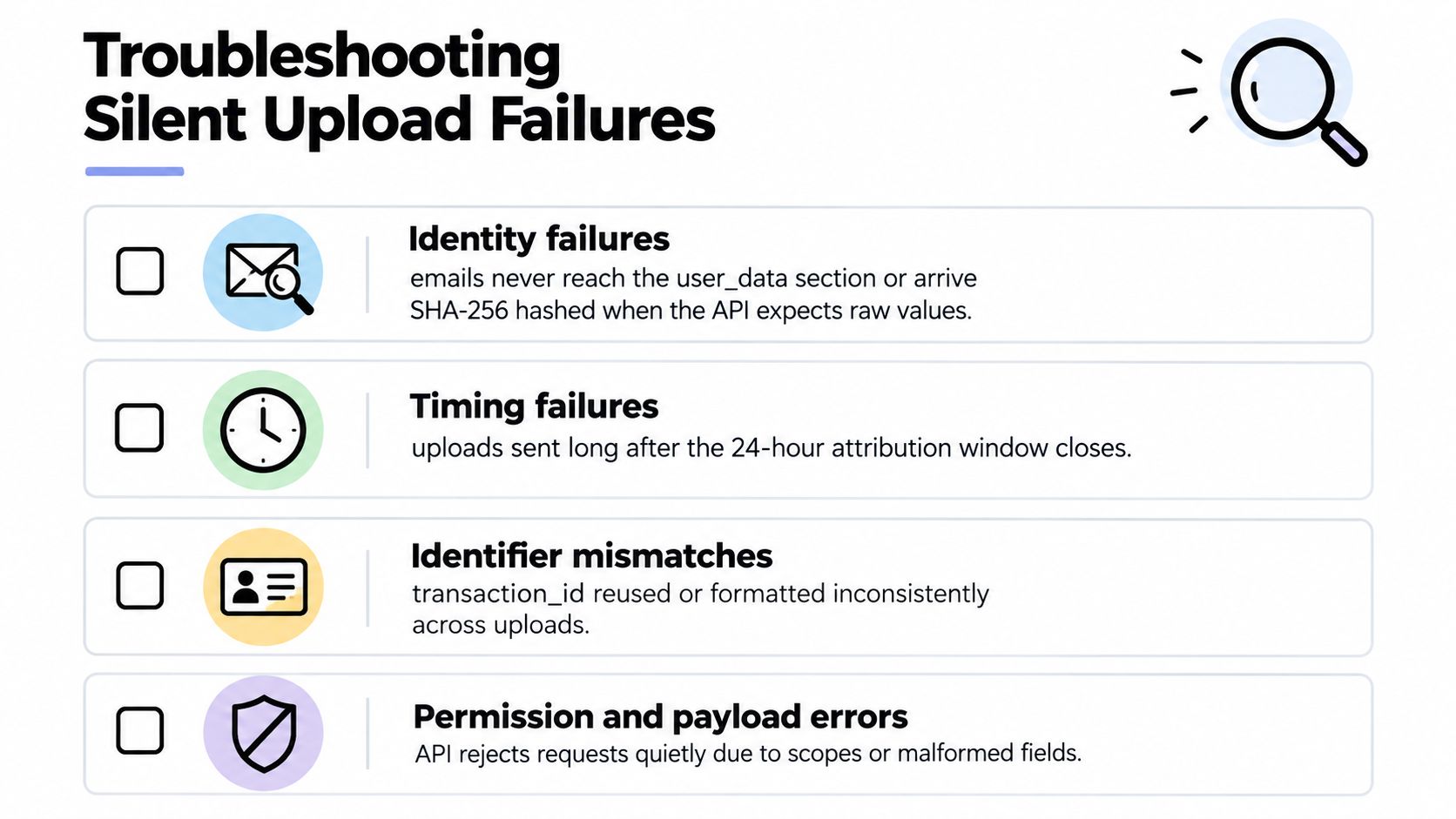
Four failure classes to isolate
Identity failures: The landing page captured a click ID, but the webhook record doesn't contain it. Or the email was hashed before trimming and lowercasing, producing a different value from the expected normalized form.
Timing failures: Stripe timestamps arrive in Unix time, your worker interprets them in the wrong timezone, and Google places the conversion outside the relevant attribution window. The API may accept the request while the event fails to contribute as expected.
Deduplication failures: A retry processes the same Stripe event again because the worker has no idempotency key. Google then receives duplicate purchase records, while your finance system retains one transaction.
Value failures: A refund or chargeback changes the economic outcome, but the original conversion remains untouched. Campaign reporting then overstates the value associated with the ad.
Google provides diagnostics for offline data through its API, including monitoring for conversion imports and adjustments. The conversion upload summaries documentation is the right reference for building an observability layer instead of relying on campaign totals alone.
Reconcile three systems, not one
Your monitoring should compare Stripe's eligible payment records, your internal upload ledger, and Google's accepted or matched conversion data. Track event age, upload status, partial failures, duplicate suppression, conversion action, value, and adjustment status.
Use API error details and conversion diagnostics to separate a malformed request from a valid request that didn't match. Then run reconciliation queries over the same conversion period, currency, and transaction set. A dashboard showing “webhook received” only proves that Stripe sent an event. It doesn't prove that Google attributed it.
If you can't explain every missing or changed transaction ID, the pipeline isn't ready to influence bidding.
Auto-Sync With Attribution Platforms and a Rollout Checklist
Manual uploads are useful for proving the mapping. They aren't a durable operating model once Stripe events include subscriptions, cancellations, refunds, and delayed qualification decisions.
Attribution platforms such as Triple Whale, Northbeam, Rockerbox, Hyros, and similar systems can act as an operational layer between Stripe and Google Ads. The meaningful capabilities to evaluate aren't attractive dashboards. Look for customer matching, identifier normalization, conversion-action splitting, deduplication, and support for refund or value adjustments. Some platforms can also connect Stripe revenue to the original visitor journey and sync qualified offline conversions to advertising platforms.
SourceLoop is one option that connects Stripe revenue events with attribution records and can sync selected revenue conversions to Google Ads using identifiers such as GCLID, WBRAID, and GBRAID. The same architectural standard applies whether you build internally or use a platform: the tool must preserve identity before checkout and expose enough diagnostics to audit each upload. For background on the server-side layer, see this explanation of server-side tracking.
Production rollout checklist
- Enable the intended conversion action: Confirm the action, category, counting rule, value logic, and primary status.
- Test metadata persistence: Verify the click identifier on the Checkout Session and PaymentIntent.
- Select the confirmed event: Make sure your handler uses a paid, business-valid Stripe event rather than an attempted payment.
- Hash identifiers correctly: Normalize first-party data before SHA-256 hashing and sending.
- Enforce idempotency: Store Stripe event IDs and transaction IDs before retrying uploads.
- Query diagnostics: Monitor import health and partial failures through the Google Ads API.
- Run a controlled test: Send a small test conversion, validate its fields and attribution, then scale the event flow.
Auto-sync isn't a reporting veneer. It earns its place by keeping clean, qualified revenue signals moving within Google's matching window while giving engineering and finance a shared audit trail.
If your current setup stops at the Stripe thank-you page, map the full journey before changing tags. Capture the click identifiers on the landing page, persist them into Stripe metadata, connect confirmed webhook events to a deliberate conversion action, and reconcile uploads against Stripe. Then test one controlled transaction and inspect every handoff before allowing the resulting signal to drive Google Ads bidding.




 Paid Social


