
How to Track Lead Source Across Every Channel in 2026
Learn how to track lead source across every channel with UTM parameters, CRM sync, and multi-touch attribution. Proven methods to connect marketing spend to revenue.
Table of contents
- What Is Lead Source Tracking?
- Why Tracking Lead Source Matters More Than Volume
- 1. Use UTM parameters for trackable campaigns
- 2. Capture the source on the landing page
- 3. Preserve the original source
- 4. Track channels that don't have UTMs
- 1. Phone Calls
- 2. Live Chat Conversations
- 3. Events and Offline Conversions
- 4. Outbound Sequences
- 5. Referrals
- 5. Connect marketing → CRM → revenue
- 6. Don't rely on last-click alone
- 7. Build a channel-to-revenue dashboard
- Keeping Attribution Working When Cookies and Devices Break
- 1. Shift to First-Party Tracking
- 2. Implement Server-Side Tracking
- 3. Use Authenticated User Tracking
- 4. Sync Conversion Data Back to Ad Platforms
- FAQ
- What is Lead Source Tracking?
- Why lead sources matter for revenue teams?
- How lead sources power your sales pipeline?
- How to track lead sources in your CRM system?
- How AI and automation revolutionize lead source management?
- Why Tracking Lead Source Matters More Than Volume?
- What good tracking actually does?
Track lead source across every channel by implementing first-party tracking with UTM parameters, syncing attribution data to your CRM, and applying multi-touch attribution models that credit all touchpoints in the customer journey.
This approach connects every lead back to the specific campaign, keyword, and landing page that generated it, rather than relying on last-click guesswork.
What Is Lead Source Tracking?
Lead source tracking identifies where each lead originates in your marketing ecosystem. It captures the channel (paid search, organic, social media), the specific campaign, the landing page, and the entire journey from first visit to conversion.
The alternative is last-click attribution, which credits only the final touchpoint before conversion. Research from Ruler Analytics found that 53.5% of marketers consider last-touch "somewhat effective," but only 9.3% call it truly effective. The problem? It ignores every touchpoint that built awareness and intent before the final click.
When someone converts after five different campaign interactions, last-click gives 100% credit to whichever happened last. Everything else disappears. That's why 81% of the B2B buyer journey happens before a lead enters your sales pipeline, yet most attribution models never see it.
Lead source tracking captures the full story. It records the original source (the very first touchpoint), the latest source (what drove the conversion), and every interaction in between. That visibility changes how you allocate budget, because you can finally see which channels start relationships and which channels close them.
Why Tracking Lead Source Matters More Than Volume
Getting 500 leads sounds better than 200. But if those 500 convert at 2% and the 200 convert at 15%, you've optimized for the wrong metric.
Attribution data shows you lead quality, not just lead quantity. 59.6% of marketers say generating qualified leads is their top challenge, while 37.1% struggle specifically with lead quality. Volume without attribution context means you're spending on channels that fill your pipeline with leads your sales team can't close.
Here's what proper lead source tracking reveals:
Revenue per channel, not just conversions. You might discover that LinkedIn drives 15% of conversions but 25% of revenue. That means LinkedIn customers are worth more, and your budget should reflect it.
Conversion rates by source. A Facebook campaign generating high traffic and low conversion rates wastes spend. A referral source with low volume but 8% conversion rates deserves more attention.
Customer lifetime value by original source. Some channels attract buyers who stick around. Others bring one-time purchasers. Attribution tracking tied to your CRM shows which sources produce the highest lifetime value, not just the quickest sale.
Sales cycle length by channel. Leads from organic search might take 60 days to close, while paid search converts in 30. Knowing this shapes your nurturing strategy and helps sales prioritize follow-up.
Without lead source data, every lead looks the same in your CRM. With it, you can score leads based on their original source, route high-value sources to your best reps, and cut spend on channels that generate noise instead of revenue.
1. Use UTM parameters for trackable campaigns
Every marketing link you publish should include UTM parameters. These are query strings appended to URLs that tell your analytics platform where traffic came from.
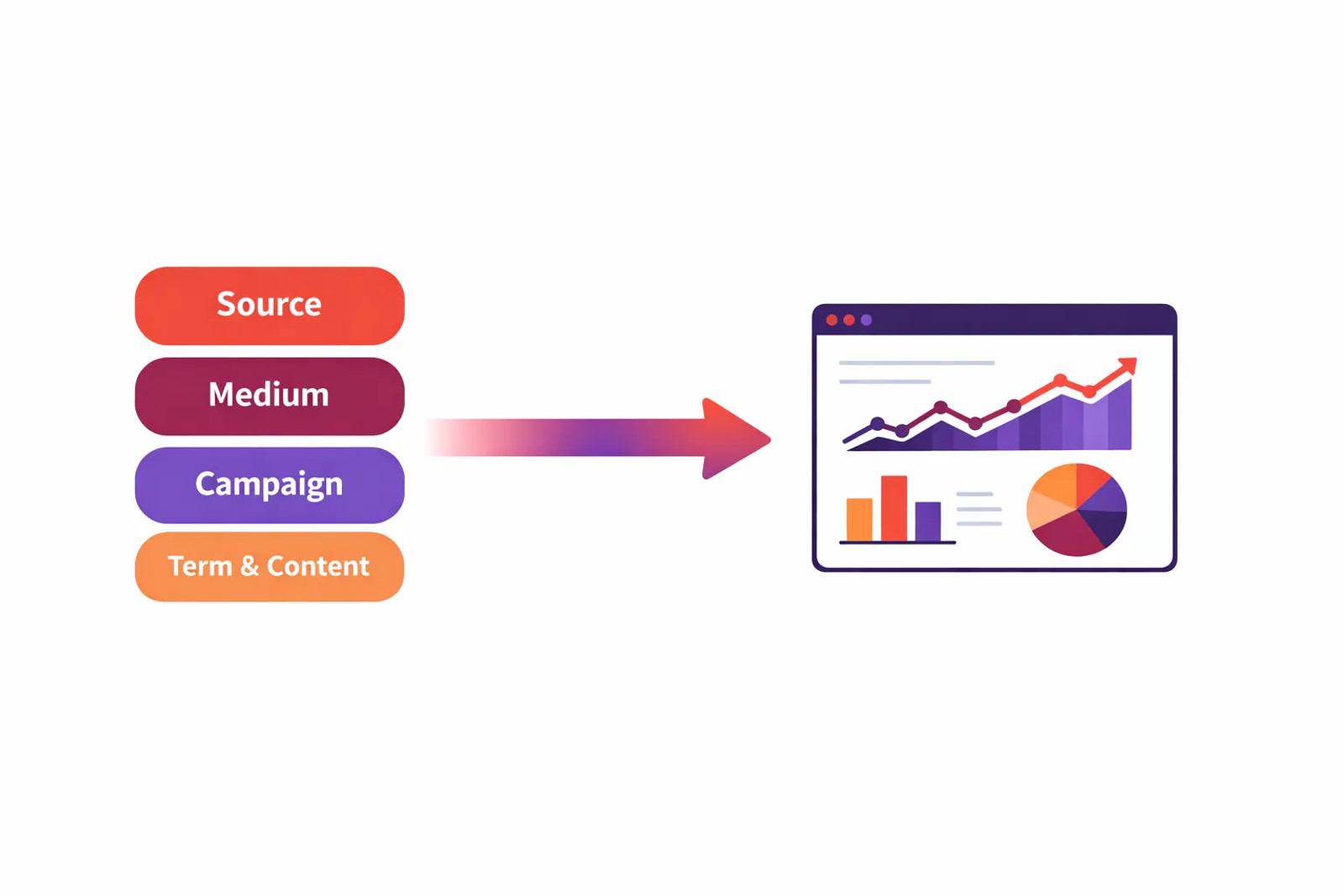
A properly tagged URL looks like this:
https://yoursite.com/landing-page?utm_source=linkedin&utm_medium=paid_social&utm_campaign=q3_webinar&utm_term=marketing_attribution&utm_content=carousel_ad_v2
The five standard UTM parameters are:
- utm_source, the platform sending traffic (google, facebook, linkedin, newsletter, referral_partner_name)
- utm_medium, the channel type (cpc, paid_social, organic_social, email, referral, display)
- utm_campaign, the specific campaign or promotion (spring_sale, product_launch_2026, case_study_campaign)
- utm_term, the paid search keyword (optional, auto-filled by Google Ads when using auto-tagging)
- utm_content, the specific ad or link variation (text_ad_a, banner_300x250, footer_link)
Consistency is everything. If you tag LinkedIn ads as "LinkedIn" one week and "linkedin" the next, your reports split the same source into two rows. According to Salesforce, inconsistent naming is one of the top reasons attribution breaks down.
2. Capture the source on the landing page
The moment someone lands on your site, you have one chance to capture where they came from. Miss it, and attribution breaks before it starts.
SourceLoop's tracking script captures five critical data points the instant a visitor arrives:
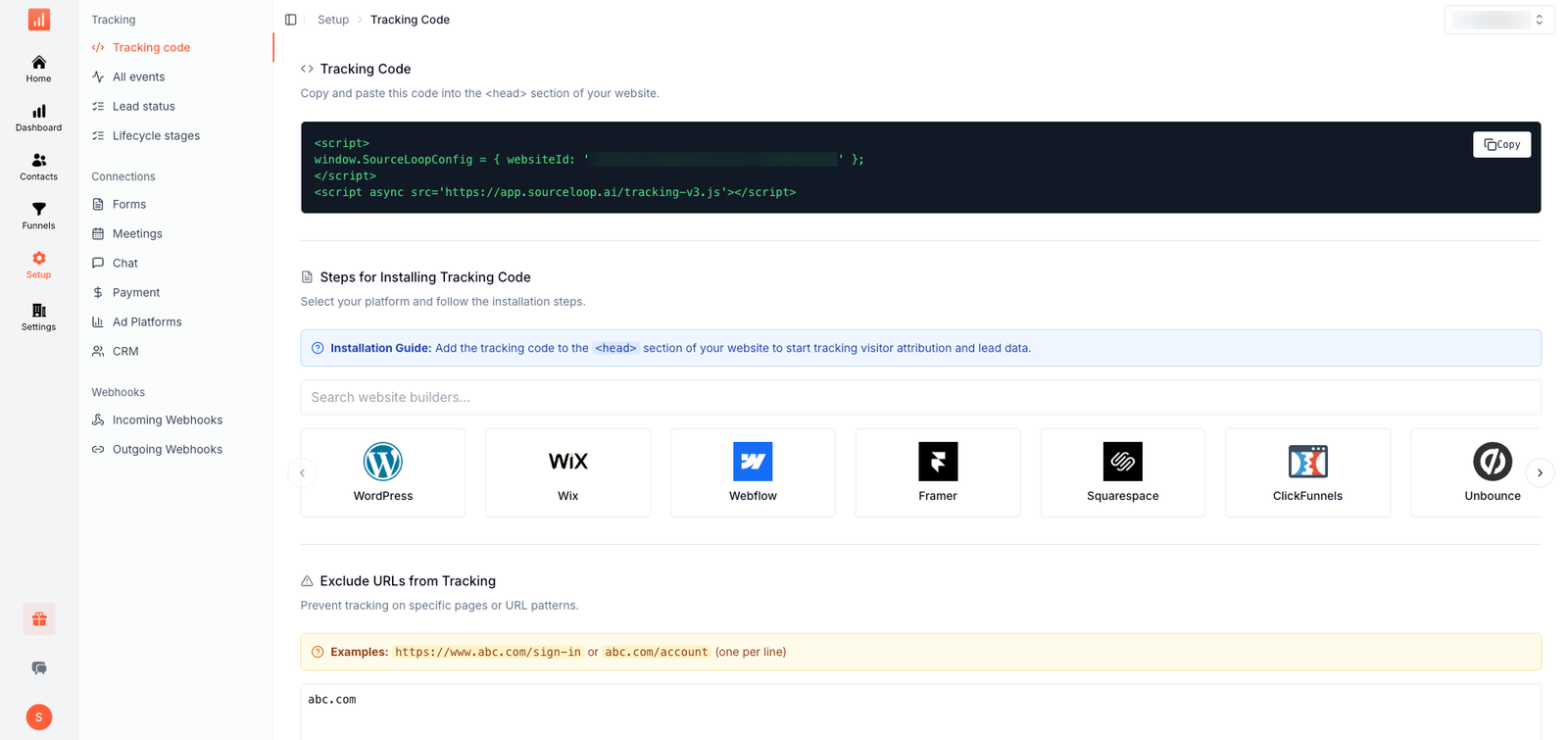
- UTM parameters from the URL (source, medium, campaign, term, content)
- Referrer (the page that sent them, if any)
- Landing page (the first page they visited on your site)
- Timestamp (when the session started)
- Anonymous visitor ID (a first-party identifier that persists across sessions)
This data gets stored in a first-party cookie on your domain. That means it survives page navigation, form abandonment, and return visits. When someone browses three blog posts, leaves, and comes back two days later to fill out a form, SourceLoop still knows they originally came from that LinkedIn ad.
Most tracking scripts capture the referrer but lose UTM parameters after the first page load. SourceLoop preserves them for the entire session and ties them to the eventual conversion, whether that's a form submission, phone call, or chat conversation.
The tracking runs entirely on your domain (e.g., tracking.yourdomain.com), so it's not affected by third-party cookie restrictions or browser privacy features. It's first-party tracking built to survive iOS updates, Safari restrictions, and Chrome's cookie deprecation.
3. Preserve the original source
This is where most attribution systems fail.
Imagine someone follows this path:
- Clicks a Google organic result → reads a blog post → leaves
- Sees a LinkedIn ad three days later → clicks through → fills out a demo form
If your tracking only captures the latest source, you'll credit LinkedIn with 100% of that conversion. But Google started the relationship. LinkedIn closed it. Both deserve credit, and you need both data points to understand your funnel.
SourceLoop maintains both first-touch and latest-touch attribution automatically. When a visitor converts, your CRM receives:
- First-touch source: Google Organic
- First-touch landing page:
/blog/marketing-attribution-guide - First-touch timestamp: 2026-08-15 14:32:18
- Latest-touch source: LinkedIn Paid Social
- Latest-touch campaign:
q3_enterprise_demo - Latest-touch landing page:
/demo
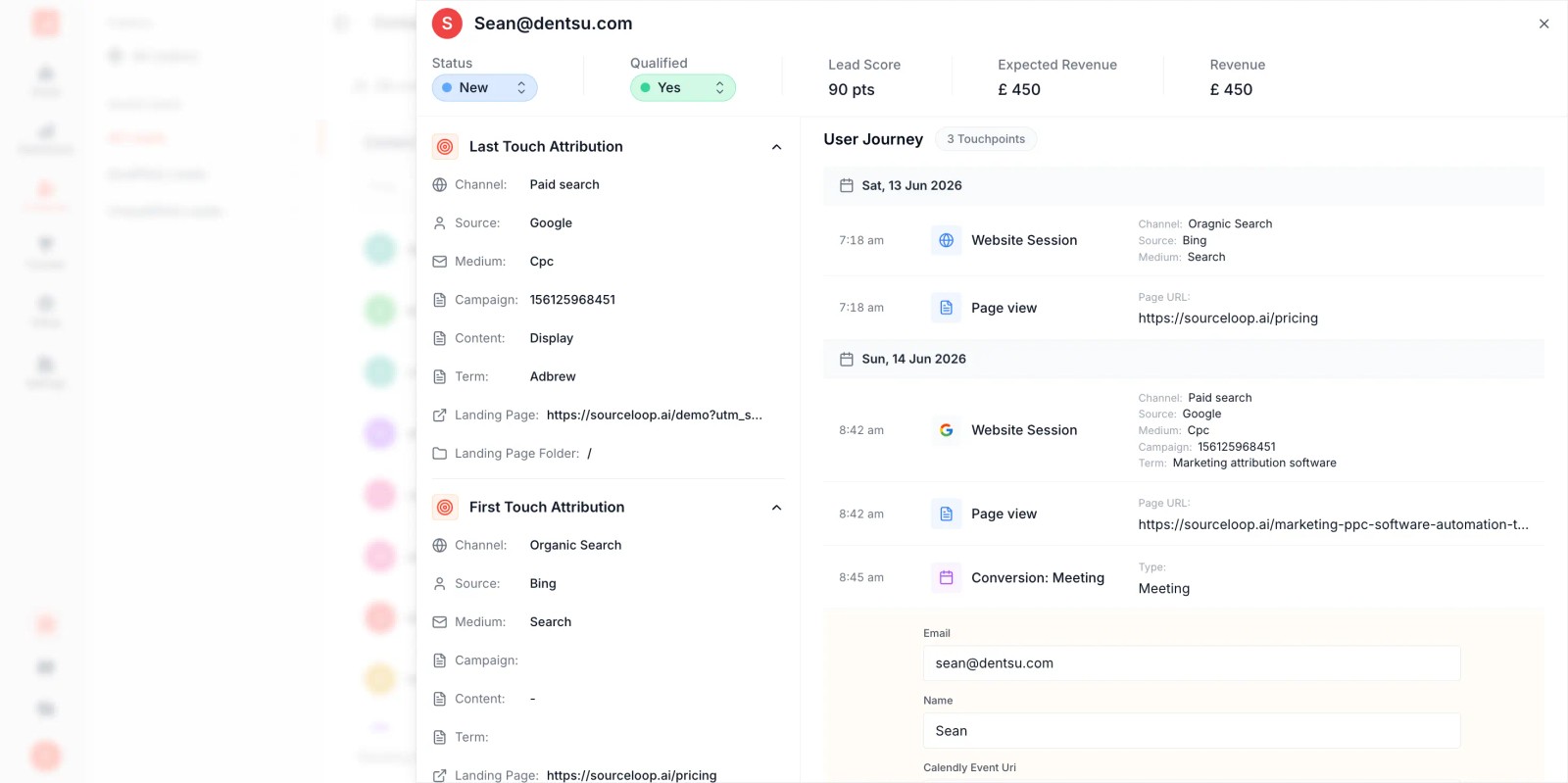
For businesses with longer sales cycles, SourceLoop also tracks the full touchpoint history—every session, referrer, and campaign interaction between first and latest touch. That history feeds multi-touch attribution models, so you can see which combinations of channels produce the highest conversion rates.
Without this dual-source tracking, you're forced to choose between crediting the channel that started the relationship or the one that closed it. With SourceLoop, you get both, plus everything in between.
4. Track channels that don't have UTMs
Not every lead comes through a clickable link with UTM parameters. Phone calls, live chat, events, outbound sequences, and referrals all generate conversions, but they don't carry UTM tags.
SourceLoop tracks these channels by connecting session data to conversion events, even when there's no URL to tag.
1. Phone Calls
When someone calls your business, SourceLoop integrates with call tracking platforms like CallRail, CallTrackingMetrics, and Invoca to match the call to the visitor's session.
If they clicked a Google Ad, browsed your pricing page, and then called, SourceLoop attributes that call to Google Ads and records the full journey.
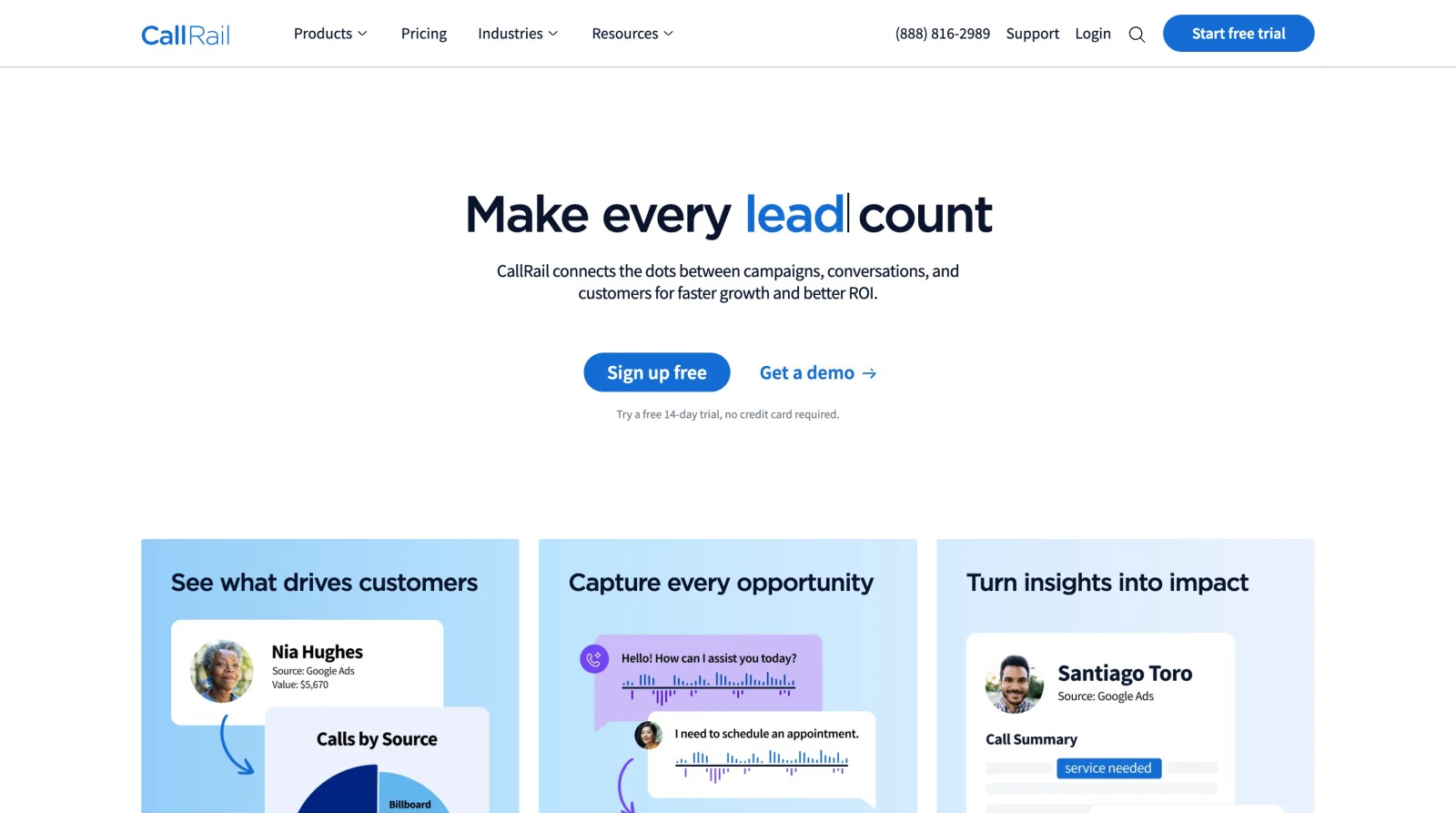
The call data syncs to your CRM with complete attribution: original source, latest source, landing page, and campaign. You see phone conversions alongside form submissions in the same unified dashboard.
2. Live Chat Conversations
SourceLoop tracks live chat sessions from platforms like Intercom, Tidio, and HubSpot Chat by passing the visitor's attribution data into the chat platform when the conversation starts. When the chat syncs to your CRM, the source, campaign, and landing page come with it.
That means a chat conversation that starts with "I saw your LinkedIn ad" is automatically tagged with the LinkedIn campaign that brought them to your site, even if they don't mention it.
3. Events and Offline Conversions
For event attendees, trade show leads, and other offline conversions, SourceLoop lets you manually tag leads with a specific source and campaign when you import them. Upload a CSV of event attendees, assign utm_source=event&utm_campaign=q3_trade_show, and those leads appear in your attribution reports with the same structure as digital conversions.
4. Outbound Sequences
When your sales team creates an outbound sequence in your CRM, SourceLoop tags those prospects with utm_source=outbound&utm_campaign=enterprise_q3 at the moment the sequence is created. If they later convert, you can see that the relationship started with outbound, even if they clicked a retargeting ad before booking the demo.
5. Referrals
SourceLoop captures referral sources by tagging referral links with utm_source=referral&utm_campaign=partner_name. When a referred lead converts, your CRM shows which partner or customer sent them, and you can calculate referral ROI by partner.
The result is complete attribution across every channel, not just the ones with clickable links.
5. Connect marketing → CRM → revenue
Lead source tracking only matters if it connects to revenue. A lead without source data is just a name in your CRM. A lead with source data becomes a data point that tells you which campaigns produce customers and which ones waste budget.
SourceLoop writes attribution data directly into your CRM as structured fields. When a lead converts, your CRM receives:
Contact/Lead Fields:
- Original Source (e.g., Google Organic)
- Original Campaign (e.g.,
content_marketing_q3) - First Touch Landing Page (e.g.,
/blog/attribution-guide) - First Touch Timestamp
- Latest Source (e.g., LinkedIn Paid Social)
- Latest Campaign (e.g.,
q3_enterprise_demo) - Latest Landing Page (e.g.,
/demo) - Touchpoint History (full session log)
When that lead becomes an opportunity, the attribution data stays attached. When the opportunity closes, SourceLoop ties the revenue back to the original source, the latest source, and every touchpoint in between.
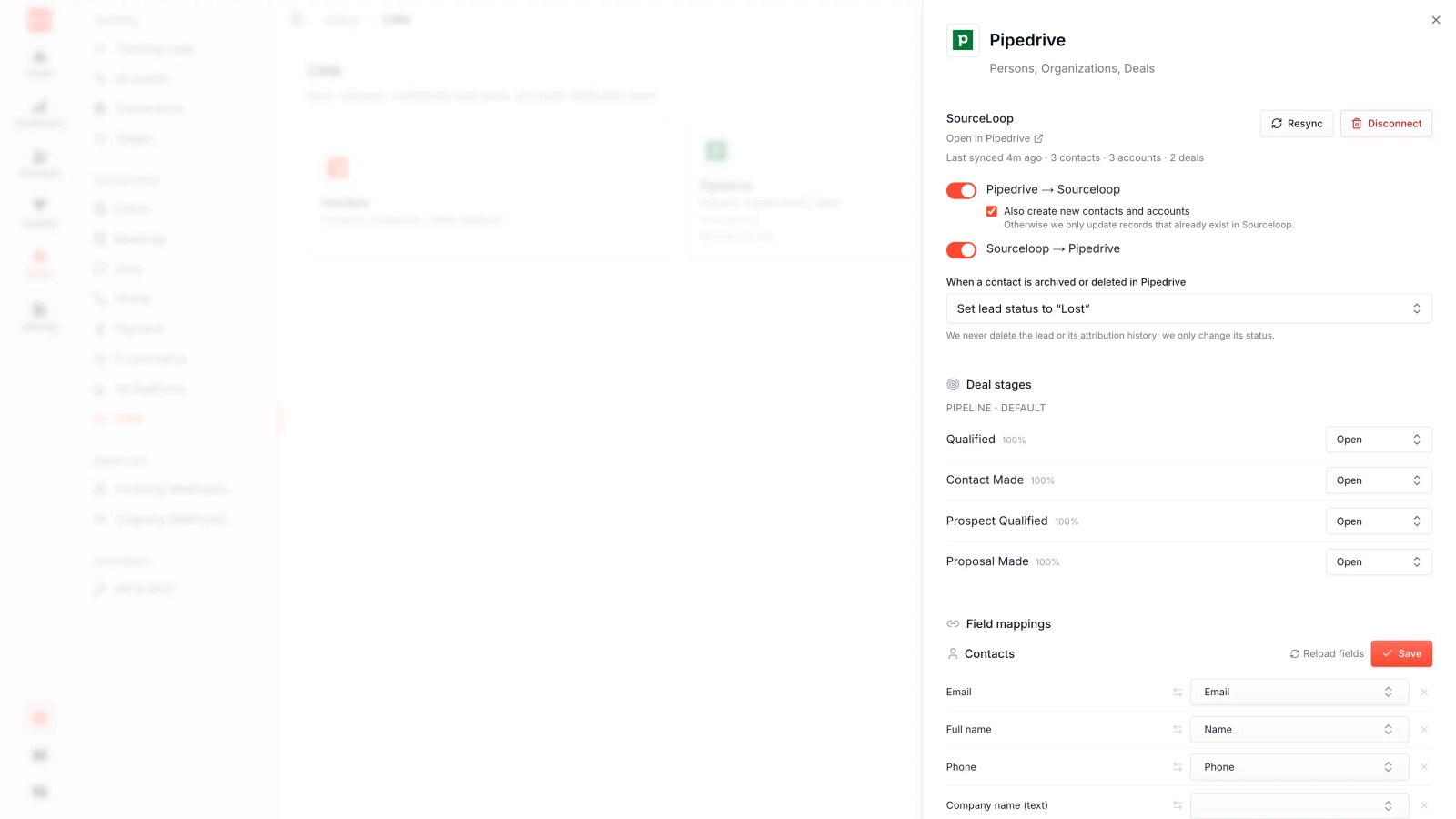
That means you can report on:
- Cost per lead vs. cost per customer by channel
- Lead volume vs. revenue generated by campaign
- Customer lifetime value by original source
- Return on ad spend (ROAS) calculated on closed revenue, not just conversions
SourceLoop integrates with HubSpot, Salesforce, Pipedrive, and other CRMs to ensure attribution data flows through every stage of your pipeline. When a lead converts to a contact, the source fields map automatically. When an opportunity closes, the revenue attribution updates in real time.
For ecommerce businesses on Shopify, SourceLoop syncs order revenue and product data back to your attribution dashboard via webhook. For B2B businesses, CRM revenue fields (opportunity amount, closed won date) provide the same insights.
The result is a closed loop: marketing spend → leads → opportunities → customers → revenue, all tracked by source.
6. Don't rely on last-click alone
Last-click attribution gives 100% credit to the final touchpoint before conversion. For a $20,000 customer who followed this path:
- Google organic search → blog post
- Downloaded your guide
- Received a nurture email
- Attended a webinar
- Clicked a LinkedIn ad
- Requested a demo
- Purchased
Last-click credits LinkedIn with $20,000 in revenue. Everything else—the blog post that built trust, the guide that captured the lead, the webinar that demonstrated value—gets zero credit.
That's why only 9.3% of marketers call last-touch effective, yet 53.5% still use it because it's the default in most analytics platforms.
SourceLoop supports multiple attribution models and lets you compare them side by side:
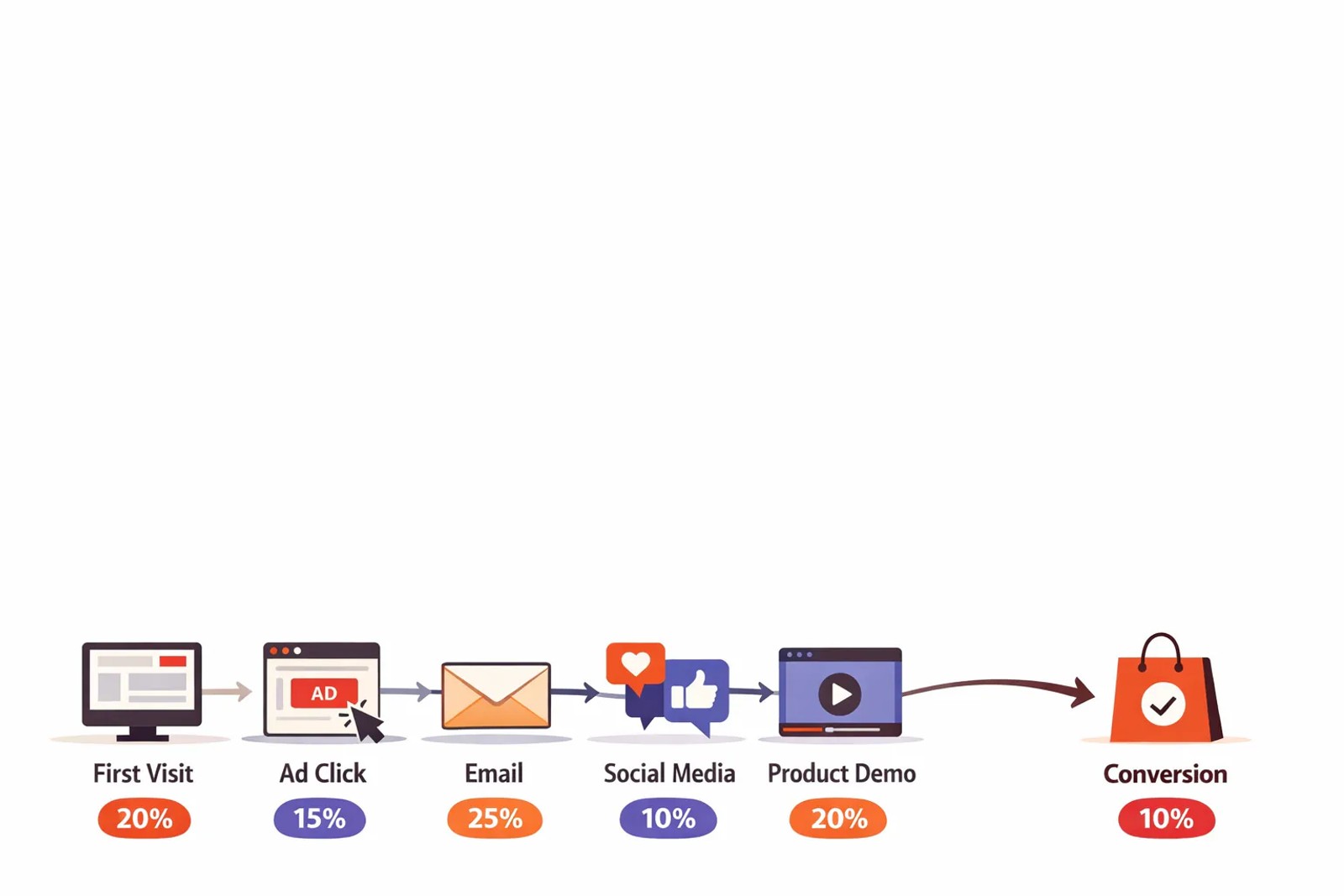
First-touch attribution shows which channels start relationships. If Google Organic consistently appears as the first touch for your highest-value customers, you know content marketing is driving top-of-funnel awareness.
Last-touch attribution shows which channels close deals. If LinkedIn Paid Social appears as the latest source for most conversions, you know retargeting and paid social are effective at the bottom of the funnel.
Linear attribution distributes credit equally across all touchpoints. If someone interacted with five campaigns before converting, each campaign gets 20% of the revenue.
Time-decay attribution gives more credit to recent touchpoints. An ad clicked yesterday receives more weight than an ad clicked 30 days ago.
U-shaped (position-based) attribution gives 40% credit to the first touch, 40% to the latest source, and splits the remaining 20% across everything in between.
W-shaped attribution adds a third milestone—usually the lead creation event—alongside first and latest source, giving equal weight to all three.
SourceLoop calculates all of these models automatically from the same touchpoint data. You can switch between models in your dashboard to see how revenue attribution changes, then choose the model that best reflects your customer journey.
For B2B businesses with sales cycles over a month, multi-touch attribution consistently outperforms single-touch models. 52.3% of businesses report sales cycles lasting up to three months, and at that length, a single touchpoint rarely tells the full story.
7. Build a channel-to-revenue dashboard
Lead volume is a vanity metric. Revenue per channel is what matters.
SourceLoop's attribution dashboard shows you exactly which channels generate profitable customers, not just form fills. Instead of reporting "we generated 500 leads," you can report:
Channel | Leads | MQLs | Opportunities | Customers | Revenue | Cost per Customer
Organic | 500 | 150 | 40 | 15 | $120K | —
Paid Search | 300 | 100 | 35 | 12 | $90K | $1,250
Paid Social | 400 | 80 | 20 | 6 | $45K | $2,500
Events | 150 | 70 | 30 | 14 | $140K | $1,785
Referral | 100 | 60 | 25 | 13 | $130K | —
This table answers the question that actually matters: Which channels generate profitable customers, not just leads?
In this example, Paid Social generated 400 leads but only $45K in revenue. Events generated 150 leads but $140K in revenue. Without attribution, you'd scale Paid Social because it has higher volume. With attribution, you scale Events because it has higher revenue per lead.
SourceLoop builds this dashboard automatically by syncing lead, opportunity, and revenue data from your CRM. You can filter by date range, attribution model, campaign, and landing page to see exactly which marketing efforts produce the highest ROI.
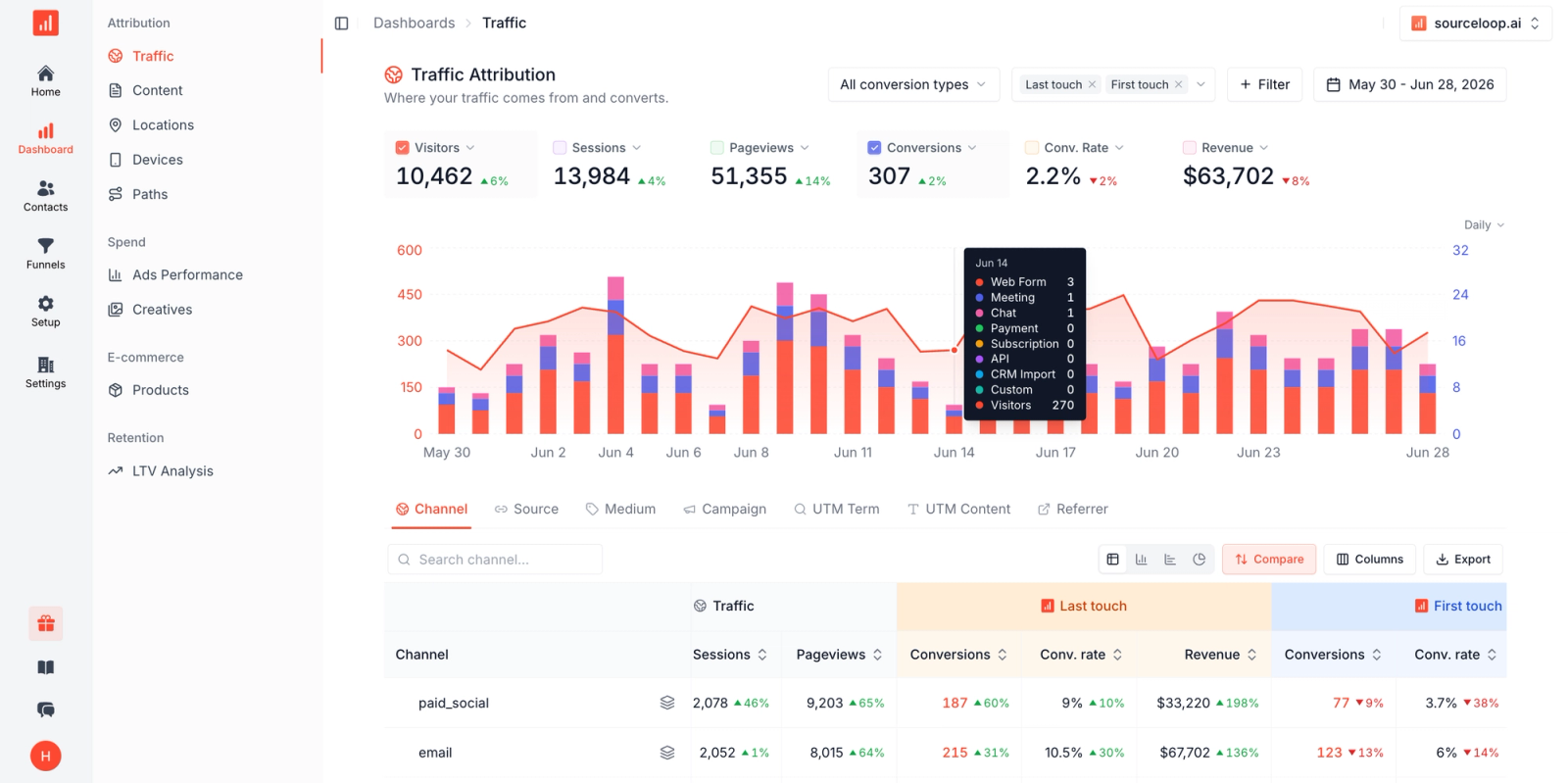
The dashboard also shows:
- Conversion rates by channel (lead → MQL → opportunity → customer)
- Average deal size by source (which channels attract higher-value customers)
- Sales cycle length by channel (which sources close faster)
- Customer lifetime value by original source (which channels produce customers who stick around)
For paid channels, SourceLoop pulls ad spend data from Google Ads, Meta, and LinkedIn to calculate cost per lead, cost per customer, and ROAS (return on ad spend) by campaign.
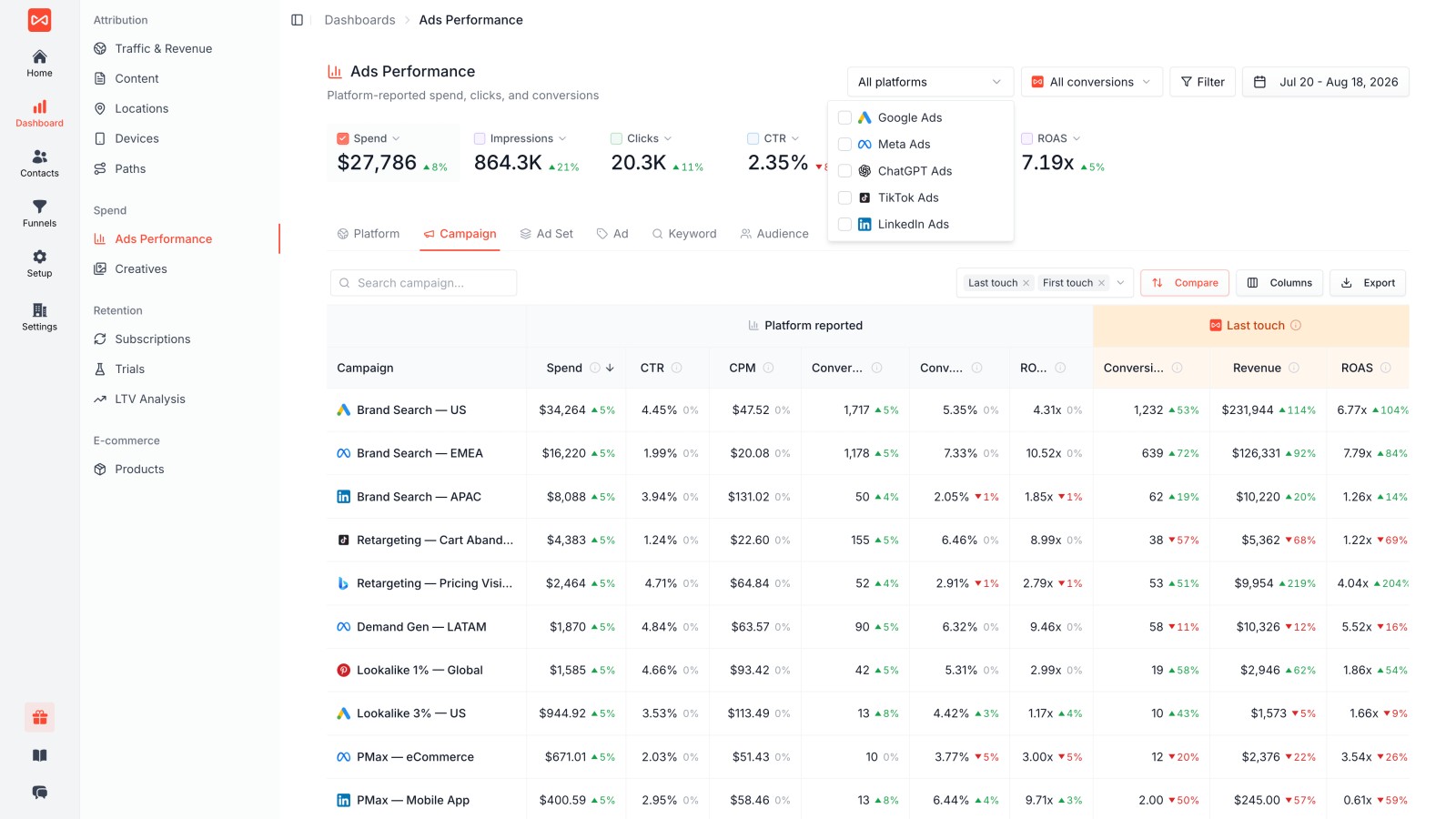
The result is a single source of truth for marketing performance. No more spreadsheets. No more manual data pulls. Just a real-time dashboard that shows which channels drive revenue and which ones waste budget.
Keeping Attribution Working When Cookies and Devices Break
Third-party cookies are disappearing. Safari and Firefox already block them. Chrome's full deprecation is underway. That means many attribution tools that relied on cross-site tracking are losing accuracy.
Research from Cometly shows that tracking methods from three years ago now capture only 60-70% of actual conversions. The gap is iOS changes, cookie blocks, ad blockers, and users moving between devices.
Here's how to maintain attribution accuracy in 2026:
1. Shift to First-Party Tracking
First-party tracking runs on your own domain and stores data in cookies you control. It doesn't rely on cross-site tracking or third-party cookies, so privacy changes don't break it.
Sourceloop uses first-party tracking exclusively. The tracking script runs on your domain (e.g., tracking.yourdomain.com), and visitor data is stored in first-party cookies that persist across sessions. That means attribution remains accurate even after iOS updates or browser restrictions.
2. Implement Server-Side Tracking
Server-side tracking sends data from your server directly to analytics platforms, bypassing the browser entirely. It's immune to ad blockers, cookie restrictions, and client-side script failures.
Platforms like Google Tag Manager Server-Side and Segment enable server-side tracking, but they require additional infrastructure. The trade-off is accuracy. Server-side setups capture 90%+ of events compared to 60-70% for client-side tracking in 2026.
3. Use Authenticated User Tracking
When someone creates an account or logs in, you can track them by user ID instead of cookies. That works across devices and browsers, because the identifier is tied to their account, not their cookie.
For subscription businesses, SaaS platforms, and membership sites, authenticated tracking is the most reliable attribution method available.
4. Sync Conversion Data Back to Ad Platforms
Even if you can't track every click, you can send conversion data back to Google Ads, Meta, and LinkedIn once someone fills out a form or becomes a customer. That's called enhanced conversions or offline conversion tracking.
By passing a hashed email address or phone number from your CRM back to the ad platform, the platform can match it to the user who clicked your ad, even if cookies were blocked. That closes the attribution loop and helps automated bidding optimize toward real customers.
FAQ
What is Lead Source Tracking?
Lead source tracking identifies where each lead originates by capturing the channel, campaign, landing page, and full customer journey from first visit to conversion. It connects marketing activity to specific leads in your CRM.
Why lead sources matter for revenue teams?
Lead sources show which marketing channels generate the highest quality leads and revenue, not just volume. Without source data, you can't optimize spend, prioritize high-value channels, or prove marketing ROI.
How lead sources power your sales pipeline?
Lead source data helps sales teams prioritize follow-up based on conversion likelihood, understand context before the first call, and see which campaigns generate the best customers. It closes the loop between marketing spend and closed revenue.
How to track lead sources in your CRM system?
Track lead sources by capturing UTM parameters and attribution data at the point of conversion (form submission, phone call, chat), then syncing that data to custom fields in your CRM like HubSpot, Salesforce, or Pipedrive.
How AI and automation revolutionize lead source management?
AI-powered attribution models analyze thousands of conversion paths to identify which touchpoints statistically increase conversion likelihood. Automation ensures attribution data flows from tracking scripts to forms to CRMs without manual work.
Why Tracking Lead Source Matters More Than Volume?
Tracking lead source reveals lead quality, conversion rates, customer lifetime value, and revenue per channel. High volume means nothing if those leads don't convert. Attribution shows you which channels deliver profitable growth, not just traffic.
What good tracking actually does?
Good lead source tracking connects every lead to the campaign, keyword, ad, and landing page that generated it. It shows you the full customer journey, proves marketing ROI, and helps you cut spend on low-performing channels while scaling what works.


 Paid Social


