
Server Side Tracking Explained: What It Is and How It Works
Learn what server side tracking is, how it compares to client-side tracking, and why it matters for privacy, accuracy, and ad platform integrations.
You've probably opened Google Ads, Meta, and your analytics dashboard on the same morning and found three different answers to the same question: how many conversions did the campaign generate? The platforms may each claim credit, while your CRM or payment records show fewer actual sales. You need a way to understand not only what the dashboards report, but how each event traveled from a visitor's browser to your reporting tools.
That gap often starts with where tracking runs. Traditional pixels depend on scripts and requests in a visitor's browser, where consent choices, browser protections, and ad blockers can interrupt collection. Server side tracking changes where event data is processed. It can give your team more control over routing and data handling, but it doesn't change your obligations to users.
Table of Contents
- Why Your Conversion Numbers Don't Add Up
- Client-Side vs Server-Side Tracking
- Key Benefits of Server-Side Tracking
- How the Technical Architecture Works
- Common Platforms and Implementation Patterns
- Privacy and Compliance Misconceptions
- Migration Considerations and Measuring the Gap
- Putting It All Together
Why Your Conversion Numbers Don't Add Up
Suppose Google Ads reports 40 conversions, Meta claims 32, and TikTok credits itself with 18 more. Your CRM shows considerably fewer completed sales. Those figures don't necessarily mean one platform is broken. Each system can apply its own attribution rules, count different actions, and connect a conversion to an earlier interaction in a different way.
The browser can add another layer of disagreement. Client-side pixels run on a visitor's device, and their requests may be blocked, limited by browser settings, or withheld when someone refuses consent. If the browser never sends an event, the ad platform may not receive it. If your checkout and analytics use different event definitions, even successfully collected data may not line up.
A useful first step is to decide which record answers which question. Your payment processor may be the source for completed transactions; your CRM may define qualified leads; and an ad platform may report the conversions it can attribute to its campaigns. Teams trying to make these records agree may benefit from digna's practical guide to data systems, which helps clarify the difference between a system of record and a source of truth.
Server side tracking changes the route an event takes. Instead of relying entirely on a browser to send information directly to each vendor, your site can send an event to a server-side container that you control. That container can check and route the event before sending it onward. It can improve delivery control, but it won't make every platform use the same attribution rules or recover interactions that were never collected.
A useful distinction: Your sales records answer what happened in your business. Attribution tools estimate which marketing interactions deserve credit.
Before changing your architecture, compare how your ad platforms and analytics tool define conversions. This guide to why Google Ads and Google Analytics don't match can help identify differences in attribution and reporting before you treat a tracking migration as the solution.
Client-Side vs Server-Side Tracking
With client-side tracking, code runs in the visitor's browser. A page loads scripts or pixels, those scripts respond to actions such as a form submission or purchase, and the browser sends data to analytics or advertising vendors. It's like having several store clerks each note a customer's purchase and send their own report to a different department. Each vendor gets a direct view of the data sent to it, but browser settings and extensions can interrupt those requests.
Server-side tracking changes the handoff. The browser or app sends a first-party request to a server-side container, often hosted in a cloud environment controlled by the business. The container can validate, transform, enrich, redact, and route the event to selected destinations. Think of it as a back-office desk that receives a structured report, applies rules, and sends each department only the information it needs.
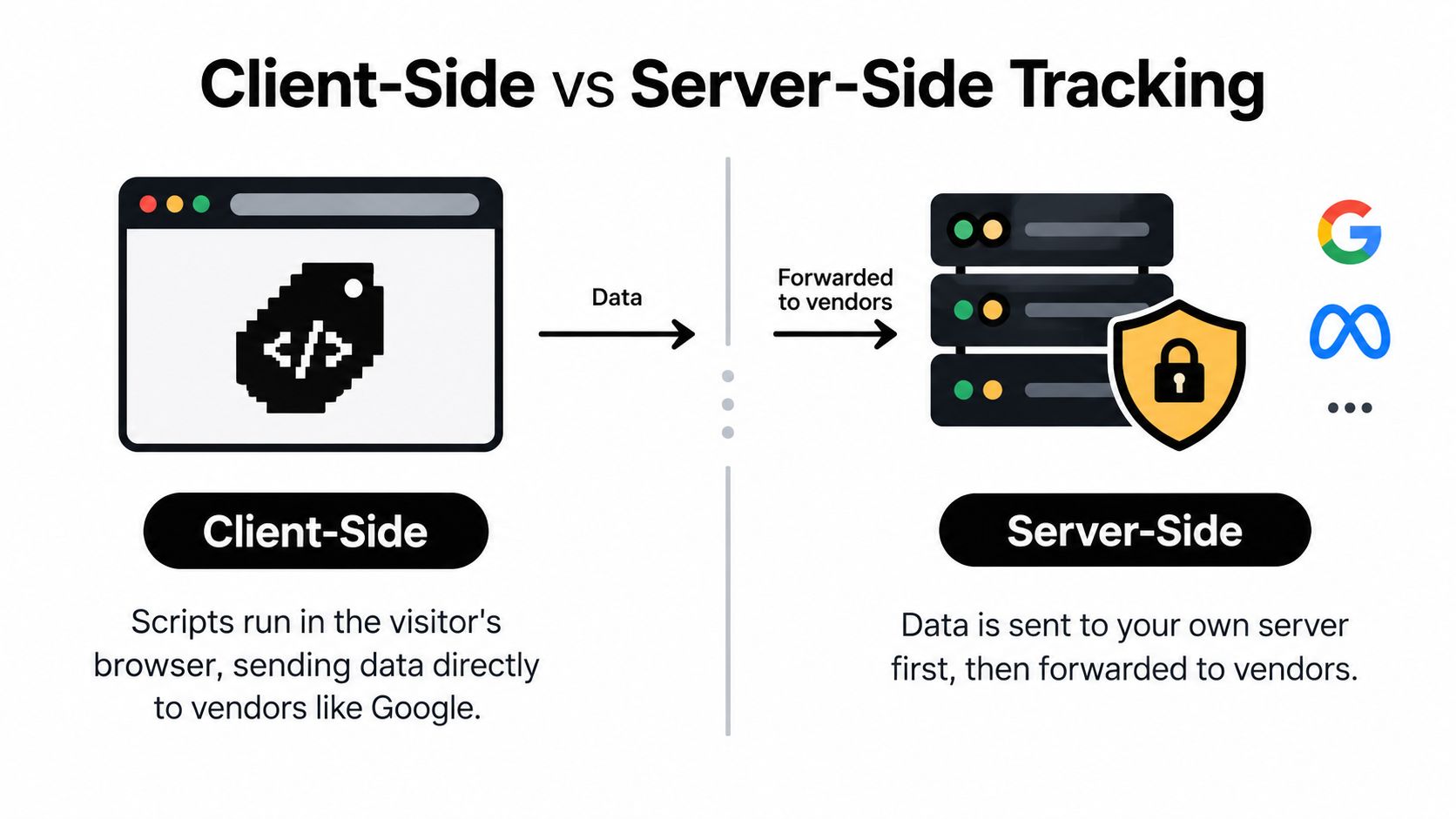
That extra processing point can make data handling more deliberate. For example, the container might remove an unnecessary field before forwarding an event to an ad platform. A first-party tagging subdomain can also let a server set cookies with attributes such as HttpOnly, which prevents page JavaScript from reading them. Those cookie settings affect access to a cookie, not whether the tracking itself complies with privacy requirements.
The distinction isn't that client-side tracking is always wrong or server-side tracking is always better. Client-side collection is familiar and direct; server-side collection adds a control point but also requires configuration and oversight. Google's overview of server-side tagging describes how a server-side container can receive requests and route event data onward.
The key question is what happens to an event after a person takes an action. Where does it go first? What checks occur before it reaches a vendor? Which fields does each destination receive? Those answers, rather than the label on your tracking setup, determine whether the architecture serves your measurement and governance needs.
Key Benefits of Server-Side Tracking
The clearest advantage of server side tracking is control over the event pipeline. A server-side container can act as a checkpoint between your site and the vendors that receive its data. Your team can validate event fields, apply transformations, redact information, and route different versions of an event to different destinations.
It can also improve resilience against some browser-side blocking. Filter lists and ad blockers generally act on requests made by the client, rather than requests generated by a publisher-controlled server. In experimental research comparing Meta's client-side and server-side tracking, server-side tracking was comparable to client-side tracking when no restrictions were present and was less exposed to client-side filter-list blocking (research published in the Proceedings on Privacy Enhancing Technologies).
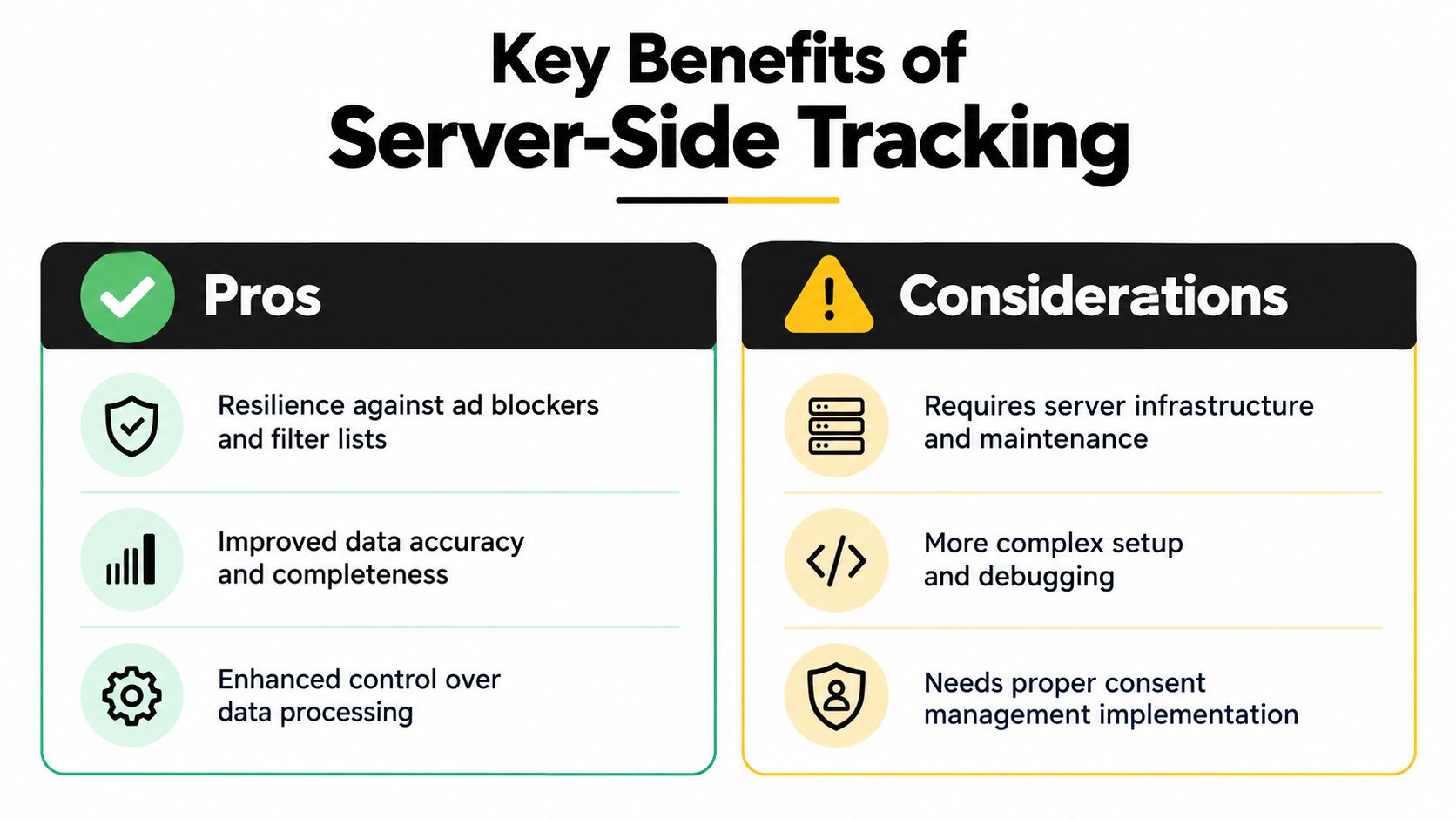
But a server doesn't automatically make an event more accurate. The same research found that Meta server-side implementations could produce substantial false matches when they relied only on minimal identifiers such as an IP address, user agent, and location derived from an IP address. A request that gets through is not necessarily a request that identifies the right person or belongs to the right conversion.
That distinction matters for marketing teams. Better delivery control can help a qualified conversion reach a platform, but weak identity inputs can lead to incorrect matching. Server-side routing won't fix duplicate events, unclear definitions, or inconsistent identifiers by itself.
What the architecture improves, and what it doesn't
- More deliberate data sharing: A central container gives your team a place to check what leaves your environment and what each destination receives.
- More resilient delivery: Server-generated requests can be less exposed to some client-side filters, but that doesn't guarantee every event will be accepted or attributed.
- No automatic identity repair: Reliable matching still depends on appropriately collected identifiers and sound event design.
- No substitute for governance: The same control point that helps limit data sharing can increase risk if it forwards too much information without clear rules.
Practical rule: Treat server-side tracking as a controlled delivery layer, not as a promise of complete attribution.
How the Technical Architecture Works
A reliable setup starts with the event, not the vendor tag. Decide what action matters, what fields are necessary to describe it, and which destinations are permitted to receive it. Then build a pipeline that checks those choices before forwarding data.
From browser request to routed event
A typical flow looks like this:
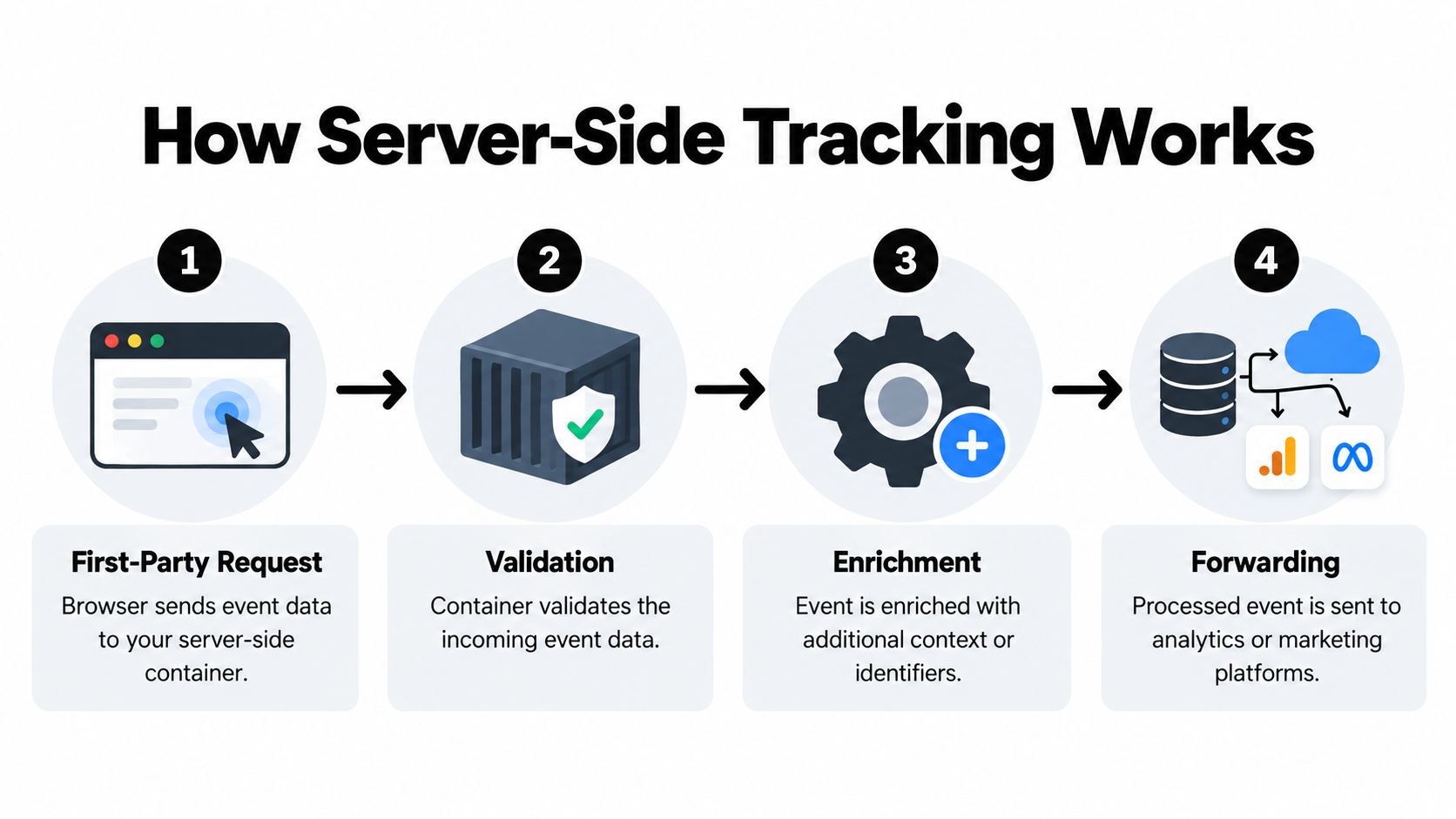
- The browser or app sends a first-party request. A form submission, booking, or purchase generates an event and sends it to your server-side container.
- The container validates the event. It checks whether required fields are present and whether values follow the expected format. A purchase event without a usable event name, for example, shouldn't be treated as a valid purchase because a request arrived.
- The event is enriched and filtered. The container can add appropriate context, remove fields that aren't needed, and apply field-level allowlists. An allowlist makes the rule concrete: only approved fields can pass through.
- The container routes the event. After validation and filtering, it sends the event to destinations allowed to receive it. The event sent to analytics doesn't have to contain every field sent to another system.
A practical event contract defines the information the pipeline expects. It can include the event name, timestamp, pseudonymous visitor or lead ID, consent state, source identifiers, and conversion value. When a CRM or payment system later confirms an outcome, a shared event ID can help connect that backend conversion to a browser event without counting it twice.
Stable, consented first-party identifiers matter because the container needs a responsible way to join relevant events. Minimal signals such as an IP address or user agent shouldn't be mistaken for reliable identity. Preserve timestamps, source parameters, and lifecycle state so a delayed payment or CRM update can be reconciled without creating a duplicate conversion.
An integration guide for CTOs can help technical and marketing teams think through how this pipeline connects with existing systems. The implementation question isn't only how to send an event. It's how to define, validate, govern, and reconcile it across the systems that use it.
Common Platforms and Implementation Patterns
There's no single server-side setup that suits every organization. The right pattern depends on who will maintain it, how much control the team needs, and how events move between the website, CRM, and payment systems.
Google Tag Manager Server-Side is a familiar starting point for teams already using Google Tag Manager. It provides a server-side container for receiving and routing events. The team still needs to configure hosting, data handling, tags, and consent behavior. A managed service can reduce infrastructure work, while a custom build can provide greater control at the cost of more engineering and maintenance.
A hybrid setup keeps browser collection while adding a server-side route. For example, the browser can send a first-party event to the server container, while backend systems provide authoritative updates such as a confirmed payment or a qualified lead. This pattern can help teams connect marketing interactions with business outcomes, but only if they define event IDs and prevent duplicate counting.
Some teams use a dedicated attribution platform to connect conversion events with advertising destinations. SourceLoop is one option; it supports server-side conversion sync with Google Ads, Meta, and LinkedIn, alongside attribution across lead, booking, and payment data.
For teams comparing ad-platform setup choices, this guide to conversion tracking for Facebook Ads offers another practical reference. The table below focuses on the trade-offs rather than assuming one approach is universally preferable.
| Pattern | Control | Setup Effort | Best Fit |
|---|---|---|---|
| Google Tag Manager Server-Side | Central routing and field rules, with configuration determined by the team | Requires container setup, hosting, and ongoing review | Teams already working with GTM and technical support |
| Custom server-side container | High control over event handling and integrations | Greater engineering and maintenance responsibility | Organizations with specific data or infrastructure requirements |
| Managed attribution platform | Controls depend on the platform's configuration and integrations | Less infrastructure work, but requires integration and governance decisions | Lean teams that need conversion sync alongside attribution |
| Hybrid browser and backend events | Combines browser context with backend outcome data | Requires event contracts, identity rules, and deduplication | Teams connecting web journeys with CRM, booking, or payment outcomes |
Whatever pattern you choose, ask who owns event definitions, who approves destination permissions, and who investigates discrepancies. A managed setup can reduce implementation burden, but it doesn't remove the need for those decisions.
Privacy and Compliance Misconceptions
The most persistent misconception is that moving tracking from a browser to a server makes it consent-free. It doesn't. The location of processing doesn't erase the purpose of tracking or the rules that apply to the data. Consent requirements may still apply when identifiers are stored on or read from a user's device, or when personal data is processed for marketing.
A study published in the Proceedings on Privacy Enhancing Technologies examined 7,367 websites and found that 389, about 5.3% of the sample, tracked users through a cloaked domain. The researchers also identified 28 websites using server-side tracking in a first-party capacity. The authors argued that this architecture can bypass some protections created by the browser's Same-Origin Policy and may introduce security vulnerabilities. Their legal analysis concluded that moving tracking to a server does not automatically make it compliant with the GDPR or the ePrivacy Directive.

The operational requirement is to carry consent through the pipeline. Capture a person's consent state when the event is collected, attach that state to the event, and check it before sending data to each destination. If a person hasn't consented to a particular use, the server should suppress or appropriately transform the event rather than forwarding it unchanged.
Governance belongs in the design
Consent propagation is only part of the work. Teams also need a process for deletion requests, retention limits, regional routing, and destination-specific permissions. If the same booking or payment event feeds several advertising systems, the pipeline needs to know which systems are permitted to receive which fields.
Centralization can make those decisions easier to enforce, but it can also concentrate sensitive information. A server-side container without access controls, retention rules, or careful field filtering can create a more serious governance problem than a scattered setup.
For an operational perspective on these responsibilities, see this guide to GDPR-compliant conversion tracking. The practical standard is straightforward: make consent visible to the systems that process each event, and make the routing rules honor it.
Migration Considerations and Measuring the Gap
A server-side migration can improve control over events you're able and permitted to collect. It can't reconstruct every anonymous interaction before a conversion or identify journeys that were never lawfully identifiable. Treating the move as a way to recover all missing attribution sets the wrong expectation.
Instead, measure the tracking gap. Choose a consistent period and compare backend records, such as orders, signups, or qualified leads, with analytics and advertising-platform totals. Then break down coverage and discrepancies by device, consent state, geography, and conversion type. That view can reveal whether a mismatch comes from missing events, delayed CRM updates, duplicate counting, missing click identifiers, or a checkout integration that doesn't send the expected signal.
Available coverage describes structural losses from consent refusal, browser restrictions, and device behavior as varying by audience, potentially from roughly 15% to more than half on mobile (discussion of privacy regulation and traffic attribution). Those figures shouldn't be treated as a forecast for your own business. Your actual gap depends on your audience, markets, consent choices, devices, and event implementation.
Reconcile outcomes, not just dashboards. Backend purchases, subscriptions, refunds, and webhook-confirmed conversions can provide stronger records of business outcomes. They still can't fill in every missing pre-conversion interaction.
Before migration, document which system owns each conversion definition and how duplicate events will be identified. During rollout, test that browser and backend events use compatible IDs and that consent state affects destination routing as intended. Afterward, monitor differences between platform reports and business records rather than celebrating a sudden rise in attributed conversions.
A sound result isn't necessarily a dashboard that matches every other dashboard. It's an explainable record of what your systems captured, what they were allowed to send, and where remaining discrepancies come from.
Putting It All Together
Server side tracking is an architectural change, not a shortcut around browser limits or privacy responsibilities. It moves event processing to a server-side container, where your team can validate, transform, redact, and route data before it reaches analytics and advertising tools.
The main benefit is a more controlled delivery path. But better control doesn't guarantee correct identity matching, consistent attribution, or complete coverage. Those depend on clear event definitions, appropriate identifiers, consent-aware routing, and careful deduplication.
Start with the events that matter most to the business. Define an event contract for each one, including the consent state and the fields each destination may receive. Then compare backend outcomes with analytics and ad-platform totals over the same period. That baseline tells you whether the change improves event delivery without confusing platform-reported credit with actual revenue.
Teams can implement the architecture with a server-side tag manager, custom infrastructure, a managed attribution platform, or a combination of these. Choose based on your technical resources and governance needs, and assign clear ownership for maintenance and reconciliation.
Your next step is practical: pick a high-value conversion, document how it moves from collection to destination, and identify who can verify the resulting record against your CRM or payment data. A dependable measurement system isn't the one that claims every conversion. It's the one that can explain what it knows, what it doesn't, and how it handled the user's choices.




 Paid Social


