Skip to content New SourceLoop MCP: chat with your attribution data in Claude, ChatGPT & Cursor
SourceLoop

Track Marketing Attribution in Salesforce CRM: A Practical

Learn how to track marketing attribution in Salesforce CRM with practical steps that help you measure campaign ROI and optimize your strategy.

Track Marketing Attribution in Salesforce CRM: A Practical

You're in a budget meeting, and someone asks which campaigns created pipeline. Marketing has click and conversion reports. Sales has opportunities in Salesforce. Finance has closed-won revenue. Yet the numbers don't reconcile because campaign members are incomplete, contact roles are missing, and click identifiers disappeared before the opportunity reached a later stage.

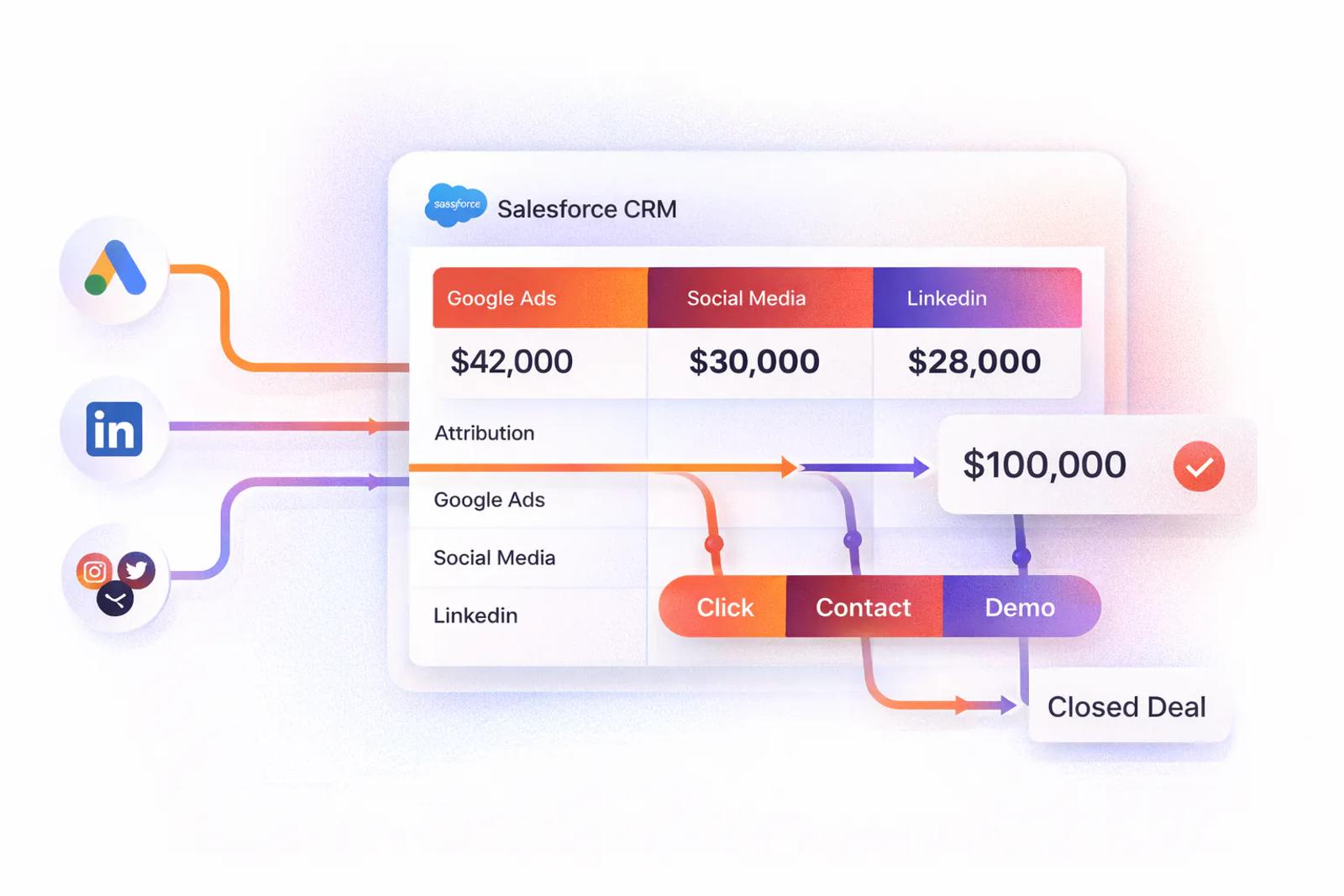
That's the practical reality of trying to track marketing attribution in Salesforce CRM. The reporting interface is rarely the hardest part. The difficult work is building a governed path from campaign engagement to a person, from that person to an opportunity, and from the opportunity to verified revenue. Salesforce can support campaign and journey measurement, but only when the CRM relationships and field mappings are reliable.

Table of Contents

Why Salesforce Attribution Breaks Without the Right Foundation

Ad platforms usually begin with an impression or click. Salesforce begins with CRM records and their relationships. That difference matters. An advertising platform can report that a user clicked an ad, but Salesforce can only connect that interaction to pipeline when the click, person, campaign, and opportunity are represented consistently in the CRM.

Salesforce campaign statistics are designed around campaign measurement rather than a single source tag. The platform can filter statistics by time period, recalculate results after filters change, and separate attribution into view and click types, as described in Salesforce's campaign statistics documentation. Those controls are useful only if campaigns and engagement records have been created correctly.

Start with an attribution readiness audit

Before configuring a dashboard, inspect the pipeline that feeds it:

  • Campaign structure: Check whether channel, program, audience, and initiative names follow a consistent convention.
  • CampaignMember coverage: Confirm that meaningful marketing touches create or map to a CampaignMember record for the right Lead or Contact.
  • Opportunity relationships: Review whether sales users add Opportunity Contact Roles before deals progress through the pipeline.
  • Field persistence: Test whether UTM values and source fields survive redirects, subdomains, form submissions, and lead conversion.
  • Revenue linkage: Confirm that closed-won opportunities can be connected to influenced campaigns and the correct people.

A report can look polished while undercounting influence. Missing records don't necessarily create an error message. They remove the evidence Salesforce needs to assign credit, which makes the output appear more certain than it is.

Practical rule: Treat attribution as a governed data pipeline, not as a dashboard project.

This distinction is especially important for B2B SaaS teams evaluating demand-generation programs. A resource such as the Lead Printer B2B SaaS program can help teams think about acquisition and pipeline generation, but the resulting campaign activity still needs disciplined mapping inside Salesforce. Without that operational layer, no attribution model can recover interactions that were never stored.

The Salesforce Data Model Behind Attribution

Salesforce attribution depends on a chain of objects. Campaigns represent marketing initiatives. CampaignMembers connect Leads or Contacts to those initiatives and record engagement status. Leads represent people who haven't yet been qualified or converted, while Contacts usually represent people associated with an Account after conversion. Opportunities hold the commercial outcome, and Opportunity Contact Roles identify which people are connected to that deal.

A diagram illustrating the Salesforce data model showing how campaigns link to leads, contacts, and opportunities.

The attribution chain breaks when one of those relationships is absent. A person might engage with several campaigns, but if that person isn't connected to the opportunity through an Opportunity Contact Role, Salesforce has no dependable relationship to use for opportunity influence. Campaign activity can exist, the opportunity can close, and the report can still show no meaningful campaign credit.

Map each object to an operational owner

Campaigns need a naming and hierarchy owner, usually marketing operations or RevOps. CampaignMembers need an integration or automation owner because adding people manually doesn't scale reliably across forms, events, email programs, and paid media. Opportunity Contact Roles need a sales-process owner because sellers create or maintain those relationships during deal execution.

The field-level audit should include:

  • Campaign fields: Name, Type, Parent Campaign, Active status, Actual Cost, and the campaign's intended channel.
  • Member fields: Lead or Contact ID, Status, member date, response state, and the source of the membership.
  • Person fields: Lead Source, Contact Source, UTM values, click identifiers, and conversion timestamps where applicable.
  • Opportunity fields: Stage, amount, close status, Primary Campaign Source, and revenue milestone dates.
  • Contact Role fields: Contact, Opportunity, role, and whether the person is the decision-maker or another participant.

The key issue isn't whether every contact at an Account has engaged with marketing. It's whether the people represented in campaign membership are legitimately related to the opportunity. That's why a clean CampaignMember table can't compensate for missing Opportunity Contact Roles.

Test the chain with real records

Choose a small set of opportunities across open and closed stages. Trace each one backward. Identify the Contact Roles, inspect the associated Contact's campaign history, verify the CampaignMember statuses, and compare the stored UTM or source values with the original acquisition record.

If the chain stops at a Lead, conversion mapping is incomplete. If it stops at a Contact, the Opportunity Contact Role process is weak. If it stops at a campaign, the marketing integration isn't creating or mapping membership correctly. This record-level inspection is more useful than starting with an aggregate ROI dashboard because it shows exactly where attribution data disappears.

Setting Up Multi-Touch Attribution in Salesforce

Multi-touch attribution works when campaign definitions, member statuses, touchpoint rules, and revenue scope agree. Start with the data vocabulary, not the dashboard.

1. Establish a campaign naming convention

Use a predictable structure that lets RevOps group campaigns without interpreting free text. A practical convention can include channel, campaign type, audience, initiative, and period. The precise syntax matters less than enforcing one canonical format across Salesforce, advertising platforms, forms, and marketing automation.

Create parent campaigns for broad programs and child campaigns for specific executions. For example, a parent acquisition program might contain separate child campaigns for paid search, paid social, an event, and a nurture stream. Keep channel and campaign type in dedicated fields as well as the name, because reports should group by structured fields rather than string parsing whenever possible.

2. Configure member statuses

Statuses should represent meaningful engagement for the campaign type. A webinar might use invited, registered, attended, and no-show. An event might use invited, registered, attended, and booth visit. A paid campaign may distinguish impression, click, landing-page visit, and form submission.

Don't label every membership as a response. If low-intent activity receives the same status as a high-intent conversion, downstream attribution will overstate the value of weak signals.

3. Define field mappings and persistence rules

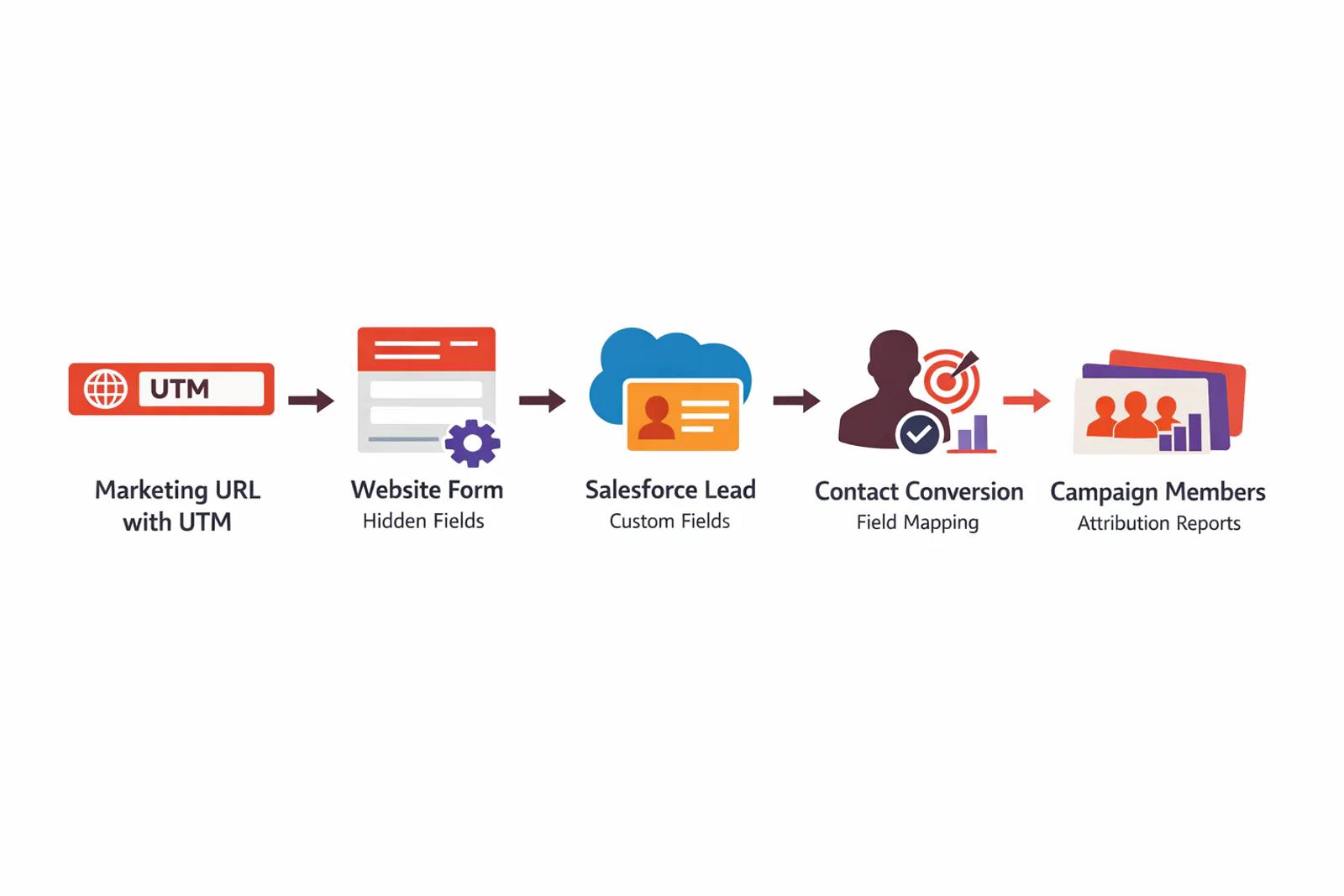
Create a clear mapping for UTM source, medium, campaign, term, and content. Decide where each value lives on Leads, Contacts, and Opportunities, then document the rule for first-touch, latest-touch, and full journey values. Hidden form fields can capture URL parameters, but they must be populated before submission and preserved through redirects and subdomains.

Anonymous-to-known stitching also needs an explicit design. A visitor may interact before Salesforce has a named record, so the tracking layer must retain the journey and associate it with the Lead or Contact when identification occurs. Test duplicate people, multiple forms, and lead conversion rather than assuming the first successful form submission proves the pipeline works.

For a detailed implementation reference, see Salesforce UTM tracking and field mapping guidance.

4. Configure attribution and revenue scope

Salesforce's later attribution documentation describes dashboards that combine Account Engagement and Sales Cloud data, reporting revenue, total value, actual cost, and ROI. The documented ROI formula is (revenue minus actual cost) divided by actual cost, so campaign cost fields must be governed alongside engagement data. Revenue reporting in the Multi-Touch Attribution dashboard is tied to closed-won opportunities, which prevents open pipeline from being confused with realized revenue.

Choose the model based on the decision you're trying to make. First-touch helps assess acquisition. Last-touch helps assess conversion pressure. Even distribution offers a neutral starting point when the team lacks confidence in positional weighting. Compare models, but don't present model output as objective truth. Attribution is a rule for allocating credit, not a replay of causality.

Use the following process as the implementation sequence:

  1. Standardize campaign and source values.
  2. Automate CampaignMember creation or mapping.
  3. Persist UTMs and identity data through conversion.
  4. Require Opportunity Contact Roles.
  5. Configure attribution scope and reports.

The setup is easier to inspect when each step has an owner and a test record.

A five-step infographic showing how to set up multi-touch attribution in the Salesforce CRM platform.

The following walkthrough can supplement the written configuration process:

Syncing Offline Conversions Back to Ad Platforms

Salesforce may contain the sale, but Google Ads, Meta, and LinkedIn won't automatically know which ad interaction led to it. To close that loop, preserve the platform's click identifier from the first form submission through the CRM milestone that matters.

Capture the identifier at the first known conversion

At form submit, capture identifiers such as GCLID or FBCLID and write them to dedicated Salesforce fields on the Lead. Don't bury these values in a general notes field. Use separate fields with documented ownership, validation, and access controls so integrations can find them consistently.

Map the identifier to the Contact during lead conversion and retain it on the Opportunity when the commercial process requires opportunity-level reporting. Preserve the original value unless your attribution policy explicitly stores first and latest identifiers separately. A sync that overwrites the first click ID with a later blank value can make an otherwise valid sale impossible for an ad platform to match.

Trigger a server-side conversion event

When the opportunity reaches the agreed downstream milestone, send the click identifier, conversion timestamp, conversion type, and relevant revenue value to the advertising platform through its server-side endpoint or approved file process. Closed Won is a common milestone, but the right event depends on whether the business wants platforms to optimize toward qualified opportunities, later-stage pipeline, or revenue.

Enable field-history tracking on both the identifier and stage fields. That creates an auditable record of when the identifier was captured and when the opportunity changed stage, which helps isolate delayed syncs, overwritten values, and incorrect conversion timing.

A diagram illustrating the four-step workflow for syncing offline conversions from Salesforce CRM to various ad platforms.

Validate receipt, matching, and business impact

A successful API request doesn't prove that the platform matched the conversion to an original click. Monitor the number of offline conversions received, attributed revenue, and post-integration CPA against the team's own baseline. Investigate mismatches by checking whether the click ID was missing, malformed, overwritten, or delayed by a failed integration.

For teams comparing paid-media outcomes across channels, Google Ads cross-platform ROAS examples can provide a useful framing for how revenue comparisons should be presented. The underlying mechanics still depend on preserving the identifier end to end.

Use a retry queue for temporary failures, log the payload and response status, and alert the integration owner when a conversion lacks a click ID. The Salesforce offline conversion configuration guide is another implementation reference for teams formalizing this workflow.

Reading Salesforce Attribution Dashboards and Reports

Salesforce reports don't all answer the same question. Campaign statistics can be filtered by time period, and Salesforce recalculates the statistics after filter changes. The system also distinguishes view attribution from click attribution, so a report based on impressions shouldn't be interpreted as equivalent to a report based on a direct response.

Opportunity Influence has a defined eligibility window. Salesforce documents a 30-day pre-opportunity window for engagement activities, meaning qualifying interactions can receive credit when they occur within the 30 days before opportunity creation and continue through the Closed Won stage, as documented in the Opportunity Influence and attribution reference. That window is a configuration boundary, not proof that earlier activity had no effect.

Report Type What It Measures Best Used For
Campaign statistics Campaign engagement split by view and click attribution, with filterable periods Reviewing campaign activity and response patterns
Opportunity Influence Eligible engagement connected to opportunities and later revenue stages Examining campaign influence on pipeline and closed-won outcomes
Multi-Touch Attribution dashboard Revenue, total value, actual cost, and ROI tied to the configured scope Comparing campaign economics and revenue contribution
CampaignMember reporting Membership, status, and engagement coverage for Leads and Contacts Auditing whether the attribution pipeline is receiving touch data

Read revenue before activity volume

A campaign with extensive membership may still contribute little closed-won revenue. Start with opportunity count, stage, closed-won amount, actual cost, and influenced campaign relationships. Then inspect member statuses to understand which activities generated those relationships.

Don't mix view and click results in one executive conclusion. A view may indicate exposure, while a click indicates a more direct interaction. They can both matter, but they represent different evidence and should remain visibly separated in dashboards.

Attribution is one input into budget decisions, not a replacement for judgment. RevOps teams can combine CRM outcomes with sales feedback, customer quality, and timing. For teams using automated signal collection alongside CRM reporting, an autonomous AI agent for ICP signals may be considered as a complementary source of account-level context, but it shouldn't be treated as a substitute for governed Salesforce relationships.

Common Attribution Failures and How to Fix Them

The most dangerous errors are silent. Salesforce can generate a plausible report even when the data pipeline has excluded important touches.

The audit table

Failure Symptom Fix
Inconsistent campaign naming Filters split one channel across multiple campaign groups Enforce a documented naming convention and structured Campaign Type values
Missing Opportunity Contact Roles Campaign engagement exists, but opportunity influence is absent Make role creation part of the sales process and inspect roles before close
Lost click identifiers Salesforce shows the sale, but ad platforms can't match it Capture the identifier at form submit, map it through conversion, and log sync failures
Weak sync governance Campaign members or fields stop updating without an obvious error Assign an integration owner, monitor field completeness, and review failed records

Inconsistent names are often dismissed as a reporting nuisance. They're more serious than that because normalization determines whether records can be grouped and reconciled. Missing contact roles create an even larger blind spot because the CRM can't confidently connect campaign engagement to the opportunity.

Fix the process, not only the report

Don't solve a missing CampaignMember record by manually editing a dashboard filter. Fix the integration or automation that should have created the member. Don't solve an absent click ID by importing a guessed source value. Preserve the identifier at the earliest known interaction and make missing values visible to the integration owner.

A useful monitoring report includes opportunities with no Primary Campaign Source, opportunities with no Opportunity Contact Role, Leads with source values outside the approved list, and closed-won opportunities with missing identifier fields where paid acquisition is expected. Review those records regularly so data decay becomes an operational queue rather than a surprise during planning.

Your Attribution Implementation Checklist

Use this checklist in priority order.

Foundation

  • Campaign governance: Define canonical names, types, owners, and parent-child relationships.
  • Member coverage: Verify that each meaningful touch creates or maps to the correct CampaignMember.
  • Role completeness: Require relevant Opportunity Contact Roles before the deal closes.
  • Field persistence: Test UTM and click-ID mappings from first form submission through conversion and opportunity milestones.

Accuracy improvements

  • Status design: Align CampaignMember statuses with real engagement depth.
  • Identity stitching: Preserve known and anonymous journey data across redirects, subdomains, and repeat visits.
  • Monitoring: Create exception reports for missing sources, roles, members, and identifiers.
  • Offline sync: Send qualified CRM milestones back to ad platforms and compare received conversions, attributed revenue, and CPA with baseline results.

Advanced operating model

  • Model comparison: Review more than one attribution model when budget decisions depend on touchpoint position.
  • Governed reporting: Separate view, click, pipeline, and closed-won reporting.
  • Tool evaluation: Consider a dedicated attribution platform when native Salesforce reporting can't represent the required journey or integration volume. For teams evaluating CRM source persistence, this guide to sending lead source data to your CRM covers the underlying mapping problem.

Start with one campaign family and a small set of representative opportunities. Validate every relationship, document the exceptions, then expand the workflow. That approach produces reporting the sales and finance teams can defend.


Audit your Salesforce attribution pipeline this week. Select representative opportunities, trace their CampaignMembers and Opportunity Contact Roles, verify UTM and click-ID persistence, and create an exception report for missing relationships. Once those gaps are visible, assign owners and fix the capture and sync mechanics before investing in more dashboard complexity.

Share this post

Post on X Share on LinkedIn

Keep reading

All posts

Track every conversion to its true source

Capture and send full attribution data from every signup, lead, booking, and sale to your CRM and ad platforms, so you know exactly what's driving revenue.

Without SourceLoop

Untagged

Kayden Floyd

kayden@abc.com

  • SourceUnknown
  • MediumUnknown
  • CampaignUnknown
  • Landing pageUnknown
Journey
No touchpoints captured

With SourceLoop

Auto-tagged

Kayden Floyd

kayden@abc.com · Acme Co.

  • Channel Paid Social
  • CampaignFree_demo
  • Landing page/pricing
Journey
Synced to HubSpot Google Ads Meta