
What Is a Call Tracking Number? Types and ROI Explained
A call tracking number shows which ad or page drove each phone call. Compare static vs dynamic numbers, set up tracking, and measure ROI.

Your campaigns are running, the phone is ringing, and sales says the calls are keeping everyone busy. Then someone asks which campaign brought in the customers who paid. Your ad dashboard shows clicks. Your phone system shows conversations. Neither gives you a clear answer.
A call tracking number helps connect those records. But knowing where a call started is only the beginning. To make better budget decisions, you need to follow that call through qualification, pipeline, and payment.
Table of Contents
- Why Phone Calls Need Their Own Tracking Numbers
- How a Call Tracking Number Routes Each Call
- Static vs Dynamic Call Tracking Numbers Compared
- Setting Up Call Tracking Step by Step
- Key Metrics and ROI Examples for Phone Leads
- Connecting Call Data to Google Ads, Meta and CRMs
- Common Pitfalls and How to Choose a Setup
- Your Next Step to Measure Every Call
Why Phone Calls Need Their Own Tracking Numbers
A prospect sees your paid search ad, later spots your business in a directory, then calls the number on one of those listings. If every placement shows the same main line, the call arrives without a clear record of which source prompted it.
You can ask the caller how they found you. Their answer adds context, but memory is an imperfect record. They may remember searching online without recalling which ad, directory, or page they used.
Forms can carry website session details into a lead record. A call to a shared number needs another way to connect the response to its source. Source-specific phone numbers provide that first link in the revenue trail.
Give Each Source an Identifiable Entrance
A building may have separate entrances for different events, while everyone still reaches the same reception desk. The entrance shows where each visitor came from.
Dedicated numbers work similarly. Assign a number to a source and keep that assignment consistent. Then incoming calls can be tied to that source, giving teams a starting point for following the lead.
- For marketing, the number shows which source generated a call.
- For sales, it adds context before the conversation.
- For RevOps, it creates an identifier to connect call activity with a customer record.
Businesses have long used distinct phone numbers for different ads or listings. A number can show where a call began, but it is only the first step in measurement.
A campaign-specific number identifies the caller's entrance. It does not show whether the call became a customer.
That is why call volume alone can lead teams to optimize the wrong source. A call is evidence of response. To judge its business value, follow the trail from an answered call to a qualified lead, then to pipeline and realized revenue. Each step answers a different question. Was the call handled? Was the caller a fit? Did the opportunity progress, and did it produce revenue? Without those links, a busy phone line can look successful while consuming budget without proving which marketing deserves more.
How a Call Tracking Number Routes Each Call
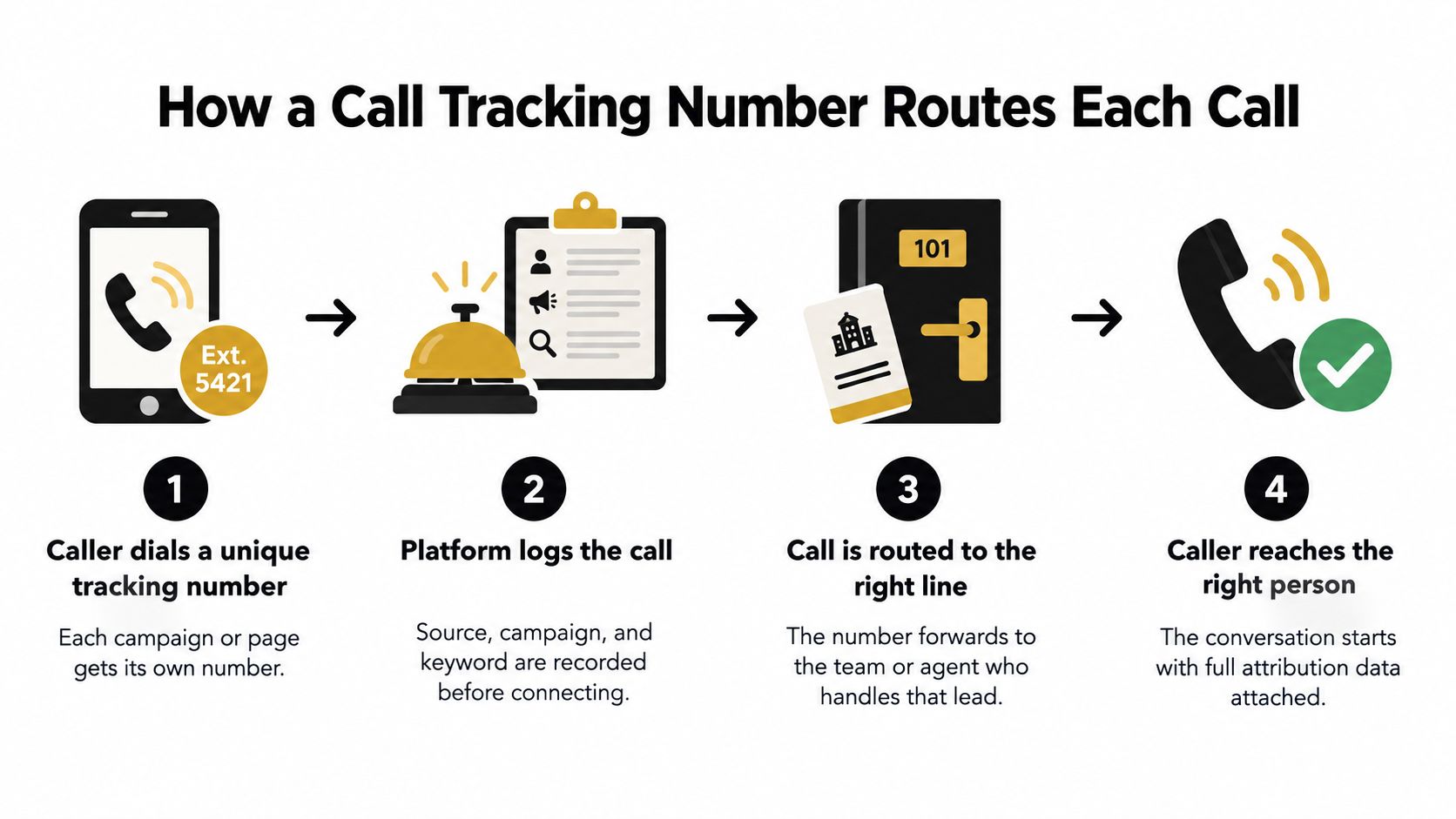
A call tracking number is typically a forwarding number, not a replacement for your underlying business line. The customer dials the displayed number, and the tracking system connects the call to your destination.
Think of a hotel front desk. A guest calls a designated extension. The desk records the request and connects them to the right room. The extension identifies the entry point; the room remains the destination.
The diagram shows that routing path. Campaign or keyword detail depends on the information your implementation captures.
Separate the Displayed Number From the Stored Record
Follow a prospect who arrives on a campaign landing page:
- The visitor sees a number associated with the source or browsing session.
- The visitor calls it, creating a telephone routing event.
- The system connects the call to the configured sales line.
- The stored call record becomes the place where telephone activity and captured marketing context meet.
Don't confuse the number with the attribution record. The number is the address the caller uses. The record holds the evidence you'll need later, such as the source assignment, call identifier, and available session context.
This approach uses established telephone infrastructure. In October 1947, the North American Numbering Plan introduced 86 numbering-plan areas, creating the numbering structure that later supported distinct business and campaign numbers, according to the history of North American numbering administration.
The practical lesson isn't that you need to redesign your phone system. You need to preserve the relationship between the displayed number and its assigned context.
A call can reach the correct salesperson even when that relationship is missing. Successful routing and successful attribution are separate checks. Test both before trusting the report.
Static vs Dynamic Call Tracking Numbers Compared
The choice between static tracking and dynamic number insertion comes down to what you want the number to identify. Are you measuring a fixed placement, or connecting calls to website visits?
A static number stays assigned to a source. Dynamic number insertion changes the number displayed on a website according to the attribution rules you've configured.
Static vs Dynamic Call Tracking Numbers
| Feature | Static Number | Dynamic Number |
|---|---|---|
| Assignment | Dedicated to a defined source or placement | Displayed according to visitor or session context |
| Typical fit | Directory listing, direct mail, billboard | Campaign landing pages and website journeys |
| Website behavior | Remains unchanged | Changes through an installed script |
| Attribution detail | Usually identifies the assigned source | Can connect a call to captured session information |
| Main dependency | Accurate placement and source mapping | Correct script coverage and session mapping |
| Main trade-off | Limited visibility within a shared source | More implementation and testing requirements |
A static number suits a printed flyer because the placement doesn't change when someone reads it. Keep that number assigned for the material's useful life. Reassigning it while flyers remain in circulation would make the resulting source labels unreliable.
Dynamic insertion suits a website receiving visitors from different channels. A paid-search visitor and an organic visitor can see different numbers while reaching the same business line. The implementation determines whether you can distinguish broad channels, individual campaigns, or visitor sessions.
Number Format Isn't the Tracking Method
A toll-free number isn't automatically static, and a local number isn't automatically dynamic. Number format and attribution method are separate decisions. If you're considering toll-free service, this guide to getting an 800 number addresses that choice.
Provider ownership also matters. In Google Ads, forwarding numbers record call details and route callers to the business, but Google owns those numbers and says they may change or be reassigned, according to its forwarding-number and call-reporting documentation.
That makes Google forwarding numbers unsuitable for permanent printed assets or use as your canonical business number. For durable offline placements, choose a provider arrangement that explicitly supports continued assignment and clarify what happens if you leave.
Setting Up Call Tracking Step by Step
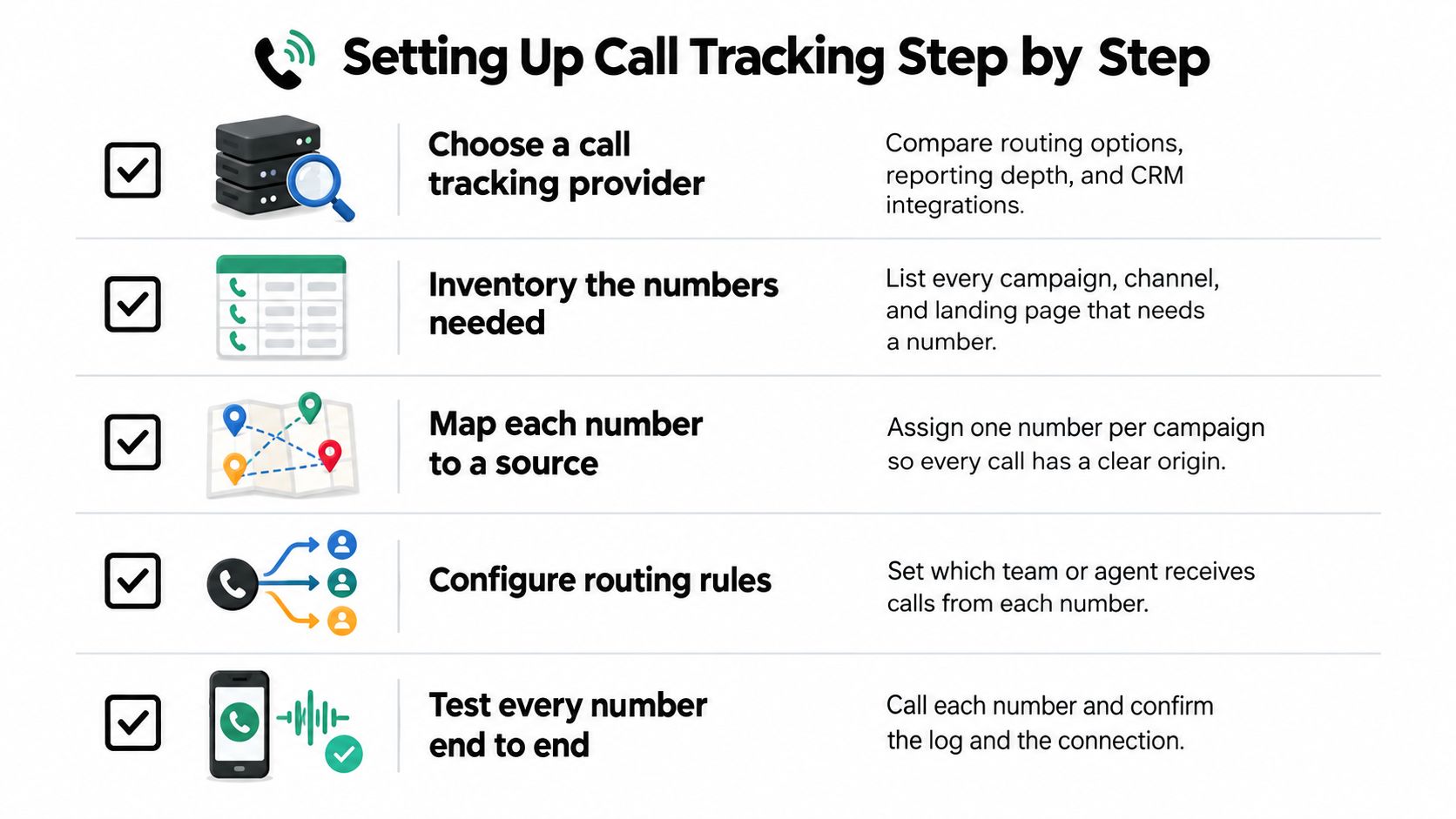
Start with a source inventory, not a phone-number purchase. Write down which campaigns need attribution, where customers encounter their numbers, and which team should answer.
Use this checklist to organize the routing work.
Build and Validate the Measurement Path
- Choose against requirements. Ask providers about number availability, routing, CRM integration, data export, privacy controls, and portability. Request a demonstration using your intended workflow.
- Create a number register. Record each number, source, placement, destination, owner, and reassignment policy. Someone outside marketing should be able to understand it.
- Install dynamic insertion where needed. Cover relevant landing pages and later pages where a prospect might decide to call. Check the visible number and the tap-to-call destination on mobile.
- Define qualification. Use a duration threshold as an initial filter if appropriate, but also define the sales criteria for a qualified conversation.
- Test the full path. Confirm the source assignment, connection, call record, CRM association, and outcome update. Include desktop, mobile, and return visits.
A visual walkthrough can help your implementation owner follow the setup sequence.
Protect the Number and the Data Separately
Treat the number as an identity, not a backup of your configuration. Export routing rules, source mappings, and call logs before a provider change.
U.S. FCC guidance permits customers to retain numbers when switching wireline, wireless, or IP providers within the same geographic area, and says simple ports generally must be processed within one business day, subject to applicable conditions, in its number-portability guidance. Don't interpret that as a guarantee that every migration will be interruption-free.
Document consent requirements, retention periods, and access permissions before collecting caller-level information. Keep identifiable records separate from aggregate campaign reporting wherever practical. Have the appropriate legal or privacy owner review recording and data-sharing decisions for the jurisdictions involved.
Key Metrics and ROI Examples for Phone Leads
An answered call isn't realized revenue. Keep those outcomes separate, even if your advertising dashboard groups them under a conversion label.
Google's call reporting describes activity such as duration, start and end times, and caller area code rather than proving that a caller became a paying customer, as explained in its call-reporting overview. Duration can help screen calls. It can't establish purchasing intent on its own.
Measure Progress Toward Payment
| Stage | Evidence to record |
|---|---|
| Answered call | The caller reached someone |
| Qualified conversation | The need meets your agreed sales criteria |
| Opportunity | Sales accepted a potential deal |
| Closed-won deal | The buyer committed |
| Realized revenue | Payment was received and associated with the deal |
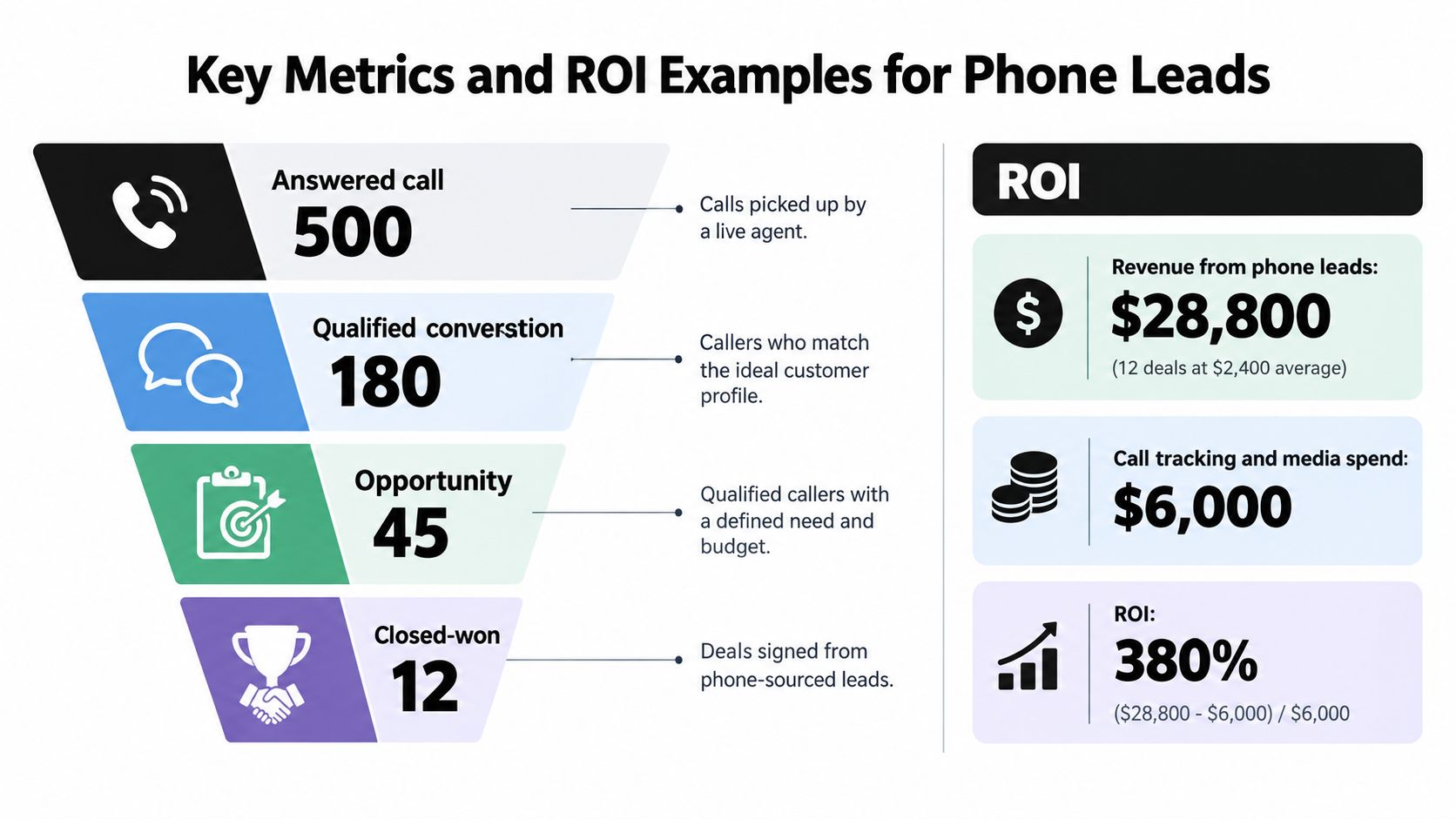
Use the following graphic as an illustrative worksheet, not a benchmark or customer result. Replace its example values with your own records, and distinguish a revenue-based return calculation from profit-based ROI.
Calculate With Your Own Inputs
For a services campaign, begin with actual campaign spend and qualified conversations. Divide spend by qualified conversations to calculate cost per qualified call. Then divide associated opportunities by qualified conversations to calculate the call-to-opportunity rate.
Next, total the payments associated with those deals. Compare that revenue with media, tracking, and other clearly defined acquisition costs. For a profit-based ROI calculation, use attributable contribution after delivery costs rather than treating all collected revenue as profit.
A campaign that generates fewer conversations can still deserve more budget if those conversations produce stronger customer outcomes.
For example, compare a campaign attracting mostly support questions with another attracting relevant quote requests. Volume-only reporting can make the support-heavy campaign look productive. Outcome reporting gives you a reason to investigate targeting rather than reward irrelevant demand.
Use closed-loop attribution to maintain that connection through the sale. Compare consistent acquisition cohorts, and label open pipeline separately so unfinished deals don't look like failed ones.
Connecting Call Data to Google Ads, Meta and CRMs
Your CRM should be the working record of what happened after the conversation. Your advertising platforms need selected outcome signals. Your attribution reporting needs enough context to connect those outcomes to the original journey.
Don't send an undifferentiated call event everywhere and assume the systems will agree. Define the meaning of each event before configuring an integration.
Map the Record Before Moving It
Use a field map that makes identity, attribution, and outcome distinct.
| Field group | Recommended contents | Purpose |
|---|---|---|
| Call identity | Provider call ID, tracking number, timestamp | Identify the telephone interaction |
| Marketing context | Source, campaign, captured UTM values, available click identifiers | Preserve the acquisition evidence |
| Customer identity | CRM lead, contact, account, and deal references | Associate activity with the buyer |
| Outcome | Qualification status, opportunity stage, payment reference | Describe business progress |
| Governance | Consent context, access rules, retention category | Control permitted use |
Preserve an original session identifier in first-party storage where permitted. When a visitor clicks an ad and calls later, that identifier can help retain the connection between the browsing record and the call.
If no click identifier survives, keep the source evidence you do have. Mark the limits rather than manufacturing campaign precision.
Send Outcomes Without Multiplying Customers
For Google Ads, evaluate a supported offline-conversion workflow for qualified outcomes. For Meta, evaluate a server-side Conversions API workflow. Confirm current eligibility, matching requirements, consent handling, and integration support before launch.
- Use defined triggers. Send qualification when qualification occurs, not merely when a call begins.
- Maintain stable identifiers. Keep each call identifiable while linking repeat calls to the existing buyer and deal.
- Check delivery separately. Verify receipt, matching, and reported outcome rather than assuming a successful request means usable attribution.
A shared company phone number can belong to several people. Don't merge their CRM records solely because caller numbers match. Likewise, repeat calls from a buyer shouldn't automatically create new opportunities.
Use the phone call conversion tracking setup guide to organize implementation checks. Reconcile test records across the phone platform, CRM, and ad destination before enabling optimization.
Common Pitfalls and How to Choose a Setup
A dashboard full of attributed calls can still support poor decisions. The critical question is whether your setup preserves enough evidence to explain customer acquisition, not whether it produces an attractive call report.
Start by checking the mistakes that make reports look more certain than they are.
- Shared source numbers. Reusing a number across unrelated placements removes the distinction you wanted to measure.
- Uncontrolled reassignment. Changing a source mapping while old materials remain active mixes responses from different campaigns.
- Activity-only success rules. Treating every connected call as a sales result hides irrelevant inquiries.
- Unsupported precision. Reporting a keyword or session when you only know the channel overstates what you captured.
Choose Around the Decision You Need to Make
| Approach | Appropriate when | What to verify |
|---|---|---|
| Standalone call tracking | Your immediate need is source attribution, routing, and call handling | Whether qualified outcomes reach your CRM |
| Attribution platform | You need to connect web visits, forms, bookings, and customer outcomes | How telephone events enter the journey |
| Paired setup | Calls are part of a broader acquisition process | Identity matching, field ownership, and duplicate handling |
Evaluate call-tracking providers such as CallRail, CallTrackingMetrics, or Invoca against your actual requirements rather than choosing by feature-list length. Ask each vendor to demonstrate a repeat caller, a missed call, and a call that later becomes a paid deal.
SourceLoop is an attribution-platform option for a paired setup, not a seller of tracking numbers; it connects existing call-tracking data to visitor journeys, supports CRM synchronization and qualified offline-conversion sync to Google Ads, Meta, and LinkedIn, and offers Slack, email, or webhook alerts.
Match Complexity to Operational Readiness
A team without consistent sales-stage definitions should settle those definitions before buying elaborate multi-touch reporting. Otherwise, more detailed acquisition data still ends at an unreliable outcome field.
Selection rule: Choose the smallest setup that can answer the budget question you actually face.
If you need to compare directory placements, source-level call attribution may be enough. If you need to understand how paid search, content, and repeat visits contribute to a deal, evaluate journey-level attribution and CRM integration together.
Your Next Step to Measure Every Call
Don't begin by replacing every published phone number. Choose a high-spend source where the gap between marketing activity and sales outcomes is making budget decisions difficult.
Write down the decision you want to improve. It might be whether a paid-search campaign deserves continued investment or whether a directory listing produces relevant prospects. A specific question keeps the implementation focused.
Build a Small, Auditable Pilot
Use a launch checklist that someone else can repeat:
- Assign ownership. Name the marketer responsible for source mapping and the sales owner responsible for qualification.
- Connect the records. Associate the tracking number with its source and the resulting call with the appropriate CRM record.
- Set a usable outcome. Choose an existing sales stage with a clear definition, not a new label nobody maintains.
- Test an exception. Include a repeat caller or an unanswered call so you can see how the system handles imperfect journeys.
- Schedule review. Put a recurring reconciliation meeting on the calendar before launch.
Judge the pilot against cost per qualified call and subsequent business outcomes, not whether the call count increased. Review unmatched records and missing outcomes alongside successful matches. Those exceptions tell you where the measurement process still needs work.
Keep the scope narrow until you can follow a customer record without guessing. Then extend the same approach to other campaigns and placements.
Open your highest-spend campaign report and choose a source to audit with your sales or RevOps counterpart. Assign its tracking number, agree on the CRM qualification stage, and run an end-to-end test before the next budget review. Bring the resulting customer outcomes to that meeting, not just the number of times the phone rang.



 Paid Social


