
First Party Data Explained: What It Is and Why It Matters
First party data explained: how to collect it lawfully under GDPR and CCPA and use it to track which marketing produces paying customers.
First party data comes from direct interactions between a business and its customers or prospects, such as website visits, forms, bookings, purchases and CRM records. It is not bought, rented or inferred from activity on other people's sites.
Your ad platforms may report conversions that your CRM cannot match. The CRM may show deals without a source, while Finance records payments that fit neither report. It is like three maps of the same journey, each showing a different route. The problem is not just how much data you have. It is whether each record is reliable enough for the decision at hand.
Many marketers now prioritize first-party data, as Supermetrics' 2025 survey of more than 200 marketers globally indicates. Priority alone does not make records trustworthy. Treat first party data as a decision-quality problem: decide which records to trust, at what stage, and with what consent evidence before they reach ad platforms or shape budget decisions.
Table of Contents
- What First Party Data Is and Where It Sits
- Where First Party Data Comes From
- Why First Party Data Now Drives Attribution
- Privacy Rules for GDPR and CCPA
- Putting First Party Data to Work Across Ads, CRM and Analytics
- Following One Lead From Ad Click to Paid Invoice
- Audit One Path Before Scaling First Party Data
What First Party Data Is and Where It Sits
First party data is information a business collects directly from its own customers and prospects, through its own website, forms, bookings, purchases and CRM. That's the whole definition. If the interaction happened with you, on your property, it's likely first party.
Think like a shopkeeper. The names, orders and notes in your own customer book are first party data. A mailing list bought from a stranger who gathered names elsewhere is not. One came from a relationship you can point to. The other came from someone else's claim about people you've never met.
What It Looks Like Day to Day
Concrete examples help more than categories. A page visit on your pricing page is first party data. So is a form submission, an account login, an email preference, a support ticket and an order history. In a physical venue, the same logic applies to customer insights from WiFi interactions, where a guest connects on your premises and you record that direct interaction.
The cookie version follows the same test. Google defines a first-party cookie as one created by the site a person is visiting, shown in the browser's address bar. The relationship is visible to the person. They're on your site, and your site sets the cookie.
That direct link matters for money. First party data can tie an ad exposure to a signup, booking, purchase and revenue, provided collection and use comply with privacy requirements. Anonymous cross-site data can't do that reliably, because it never saw your checkout, your calendar or your paid invoice.
Four Data Types Compared
| Data type | Who collects it | Typical example | Main constraint |
|---|---|---|---|
| First-party | The business, from its own site, app and CRM | Page views, form fills, purchase history | Notice and consent rules apply, especially for tracking in the EU |
| Zero-party | The customer, on purpose | Preference center answers, quiz results | Explicit by design, but purpose must still be disclosed |
| Second-party | A partner that shares its own first-party data | Airline shares loyalty sign-ups with a hotel partner | Contract and consent must cover the sharing |
| Third-party | Data brokers and ad networks across unrelated sites | Cross-site profiles bought as audience segments | Declining browser support and tighter consent rules |
Quick test: Did this person give us the information, or did we observe it on our own property? If neither answer is yes, don't call it first party data.
Where First Party Data Comes From
Collection is layered, not a single tool. A visitor's first click creates one record. A form creates another. A booking, a call, a purchase and a sales update each add more. Your job isn't just collecting them. It's joining them later without guessing.
The diagram below shows those layers feeding one shared record.
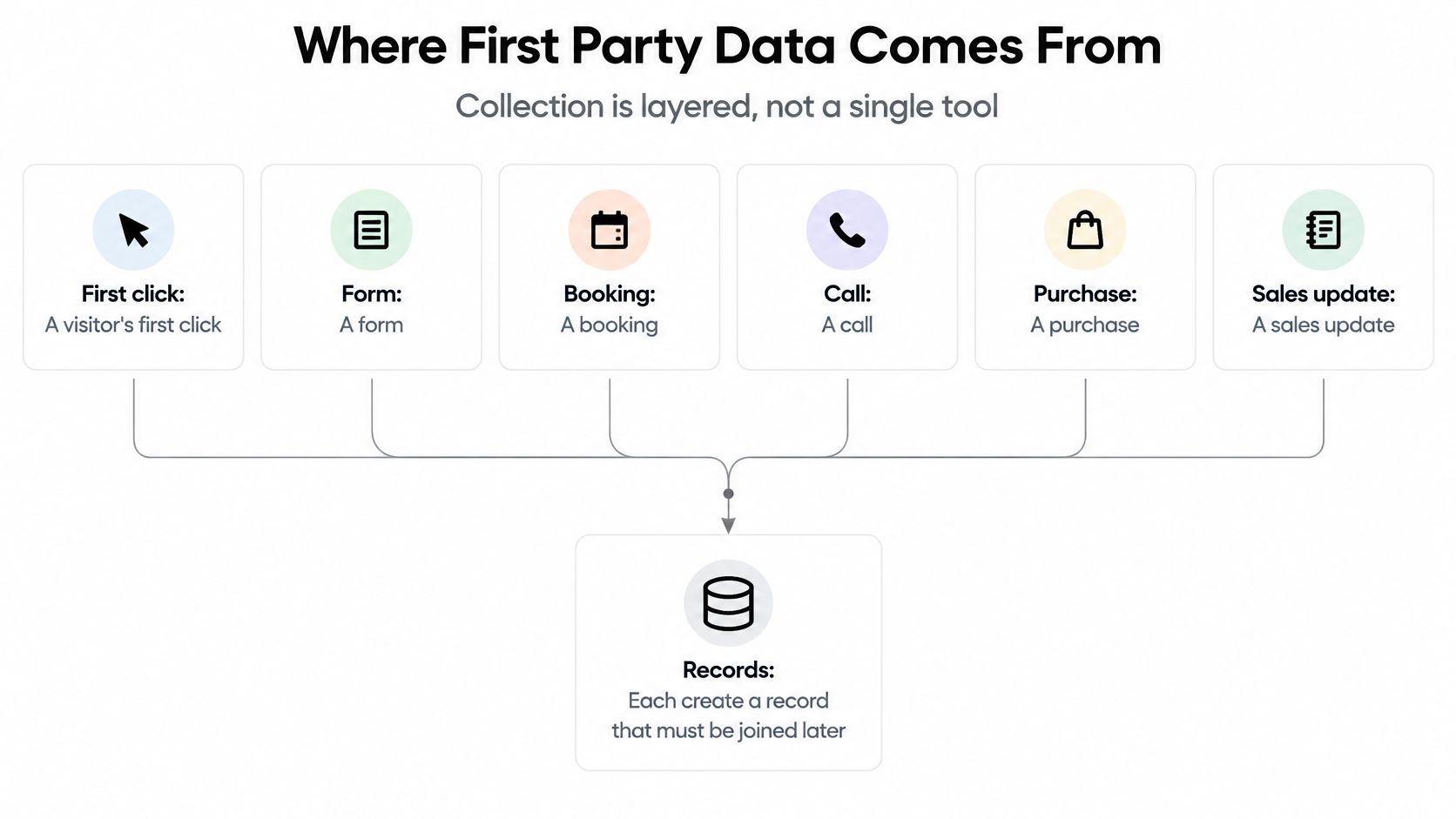
Think of it as a relay race. Each runner carries the baton a short distance. If the first runner drops the click ID, the last runner can't prove where the race started. Payment alone tells you money arrived. It doesn't tell you which ad earned it.
Collection Methods and What They Capture
| Method | Data captured | Where it lives | Example |
|---|---|---|---|
| Website tracking script | Pageviews, referrer, UTM parameters, click IDs | Attribution or analytics database | Visitor arrives from a LinkedIn ad tagged with utm_campaign=q3 |
| Forms and gated content | Name, email, company, consent checkbox | CRM contact record | Whitepaper download with the opt-in box ticked |
| Booking and chat widgets | Meeting time, chat transcript, source page | Scheduler or CRM | Demo booked from the pricing page |
| Calls and call tracking | Call time, duration, tracking number source | Call tracking platform synced to CRM | Phone call from a number shown on a Google Ads landing page |
| Payments and billing | Order value, plan, invoice status | Payment processor, then CRM | Subscription paid 30 days after a trial starts |
| Preference centers and quizzes | Stated goals, role, interests | CRM or customer profile | Onboarding quiz answer, reporting for an agency |
Each method has fields that matter most. On landing pages, preserve UTM parameters and click IDs before anything else. On forms, record the consent checkbox state, not just the email. A service business that wants to turn golfer enquiries into long-term members faces the same need, because an enquiry without source and consent can't support later follow-up or measurement.
Bookings need meeting time and source page. Calls need the tracking number source. Billing needs plan and invoice status, while the CRM needs deal stage changes with timestamps.
Don't overlook zero-party data. Quiz answers and preference centers let customers state their goals or role directly. That's your most accurate source, but also your lowest in volume, because only motivated people complete them.
Start with two sources if you're rebuilding. A form or booking connects a person to a click. Billing connects that person to revenue. Add behavioral signals after those two links work.
Why First Party Data Now Drives Attribution
A lead clicks an ad, fills out a form, and later pays an invoice. If the click ID, contact record, and payment never connect, the marketing team may know a sale happened without knowing which ad brought it in. Attribution depends on the quality of that record chain, not just on collecting more data.
Third-party cookies worked like reports passed between neighbors: they could follow activity across sites, but the business had less control over how the information was gathered or linked. First-party records are collected directly through a business's own interactions with customers. They give teams a clearer basis for decisions, provided the source, timing, and consent evidence are recorded.
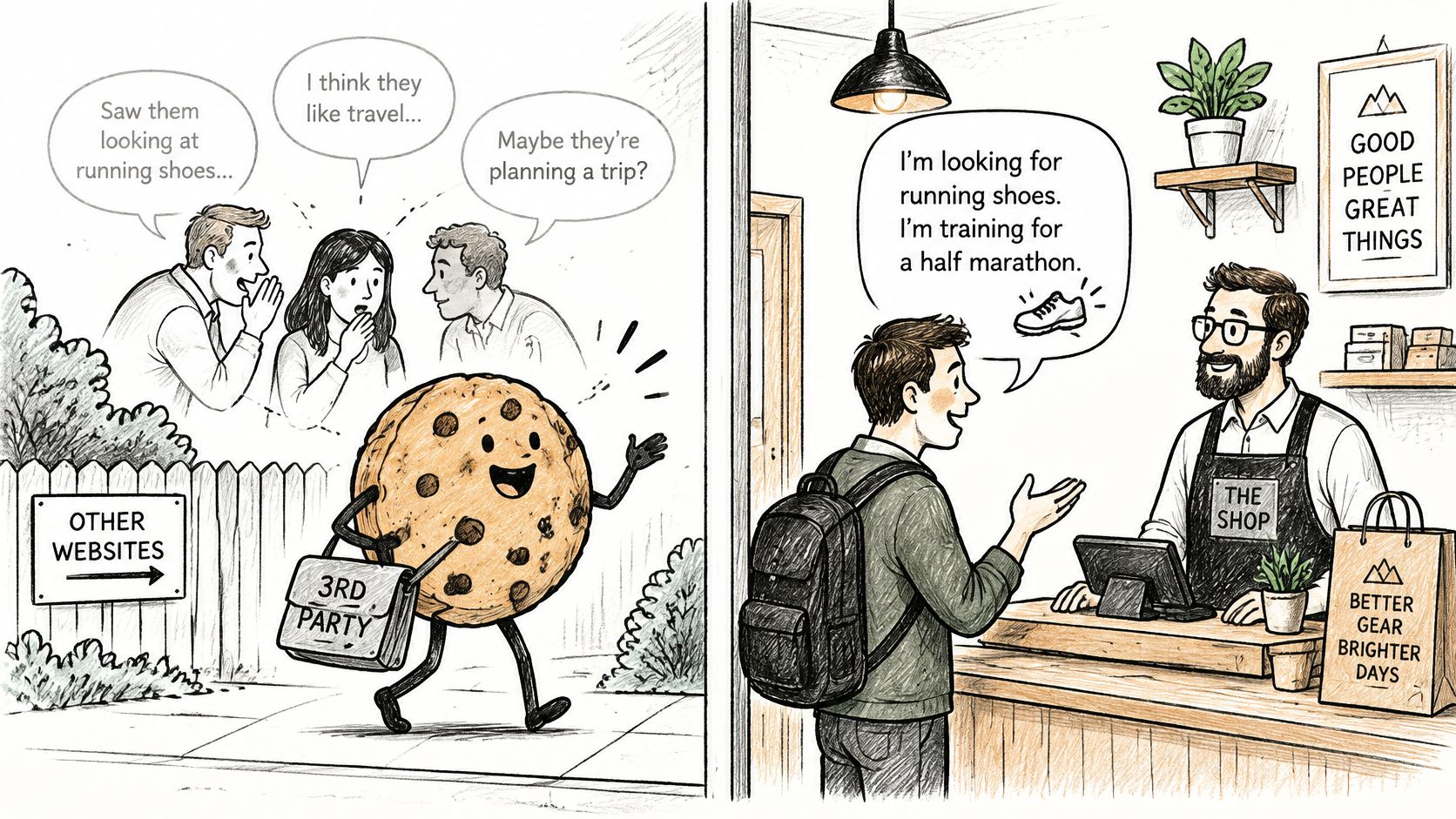
The changes to Chrome's cookie policy show why teams began preparing for less cross-site tracking. The sequence also shows that the policy direction changed over time.
The Cookie Timeline in Three Steps
- 2019 announcement: Google announced plans to phase out third-party cookies in Chrome, as covered in the history of Chrome's third-party cookie changes.
- January 2024 test: Chrome began restricting third-party cookies for 1% of users, with a broader rollout planned for the second half of 2024.
- July 2024 change: Google shifted toward a user-choice experience rather than the previously announced full deprecation path.
Even as the plan changed, teams had reason to improve the records they controlled. First-party data became part of the measurement infrastructure, not just a CRM asset. That shift does not make every record reliable. Teams still need to know when it was collected, what it represents, and whether its consent evidence supports the intended use.
Why Platform Reports Disagree
Consider one campaign. Google Ads reports 40 conversions, Meta reports 32, and TikTok reports 18, while the business closed 50 deals. The platform totals add to 90 because each may claim credit for the same deal under its own attribution rules.
A stored record can help resolve the mismatch. A form submission preserves the click ID and landing page. If the contact later matches a paid invoice, the team can inspect the source and timestamp before using that conversion to assess an ad or allocate budget.
First-party data does not settle attribution on its own. The link between click, record, revenue, and consent must be stored and checked.
A missing click ID, overwritten source field, or absent consent state weakens the chain. Treat it like a receipt trail: each handoff needs enough detail to support the next decision. Without that evidence, platform reports remain competing estimates, not a dependable basis for spending.
Privacy Rules for GDPR and CCPA
A customer fills in a form, accepts analytics cookies, then asks your company to delete their information. To answer, you need to know which records belong to that person, what consent covered each use, and where the records went. First-party collection gives you more control over this chain. It does not remove your privacy obligations.
Customer data works like a set of keys entrusted to your business. A customer giving you one key for a specific purpose does not authorize you to copy it for every other use. You need a valid reason, a clear limit, and a way to return or destroy it on request.
What GDPR Expects
Under GDPR in the EU and UK, each purpose needs a lawful basis. Non-essential cookies require opt-in consent before they run. Collect only what each purpose needs. This is data minimization.
People can ask what information you hold and request its erasure. Your records must let you answer those requests, including identifying data collected through cookies and other first-party sources. For practical guidance on tracking with consent in mind, see how GDPR-compliant conversion tracking works in practice.
What CCPA and CPRA Expect
California's CCPA, as amended by CPRA, requires notice at collection. People can opt out of the sale or sharing of their personal information. Businesses must honor Global Privacy Control signals and respect limits on sensitive personal information.
GDPR and CCPA/CPRA use different approaches, including opt-in consent and opt-out rights. Both require a clear account of what was collected, why it was collected, and where it went.
GDPR and CCPA Requirements Side by Side
| Requirement | GDPR (EU and UK) | CCPA/CPRA (California) |
|---|---|---|
| Legal basis or notice | Lawful basis needed for each purpose; consent for non-essential cookies | Notice at collection and a published privacy policy |
| Opt-out or consent | Opt-in consent before non-essential tracking | Right to opt out of sale or sharing; honor Global Privacy Control |
| Access and deletion | Respond within one month, extendable in some cases | Respond within 45 days, extendable once by 45 more |
| Sensitive data | Explicit consent for special category data | Right to limit use of sensitive personal information |
| Penalties | Up to 4% of global annual turnover or EUR 20 million, whichever is higher | Civil penalties per violation, adjusted for inflation; intentional violations and minors cost more |
First-party cookies can be created and named across many parts of a site. Without an inventory, a deletion request can miss a cookie or linked record because the team does not know it exists. Keep a current list of cookie names, purposes, and the systems that receive related data. That list helps staff trace and remove records consistently.
Good governance also depends on how records are handled before they reach ad platforms or shape budget decisions. Pseudonymize stable identifiers where appropriate, keep consent evidence distinct from marketing events, and limit access to raw behavioral data by role. Maintain deletion links across the warehouse, CRM, and ad exports so a request can follow the record through each system.
Regulators may ask you to show where a record came from, which consent covered its use, and how you can delete it wherever it traveled. This is general information, not legal advice. Consult counsel about your circumstances.
Putting First Party Data to Work Across Ads, CRM and Analytics
Activation means sending the right record to the right place for a specific job. It's not syncing everything everywhere. Think of a postal sorting office. A letter in the wrong tray isn't helpful just because it moved quickly.
A consent-aware, sitewide measurement layer beats isolated conversion tags. Google's guidance in its ads privacy playbook on first-party tagging and modeled conversions describes first-party cookies and tagging as foundational, then recommends modeling only when directly observed links are unavailable. Consistent identifiers let you connect more conversions deterministically. Modeling then fills residual gaps, using aggregation and confidence thresholds to limit systematic over-reporting.
Where First Party Data Goes and What Each Destination Needs
| Destination | What to send | Match key | Main watch-out |
|---|---|---|---|
| Google Ads | Offline conversions for qualified leads and paid deals | Google click ID or hashed email | Clicks older than the upload lookback window cannot match |
| Meta (Conversions API) | Server-side purchase, lead and booking events | Hashed email or phone, fbclid | Deduplicate against the browser pixel using the same event ID |
| Conversion events for signups and qualified leads | LinkedIn click ID or hashed email | Define each conversion once so it is not counted twice | |
| CRM such as HubSpot or Salesforce | Source, first-touch and latest-touch fields | Contact ID or email | Overwriting first touch loses the original acquisition context |
| GA4 | Events and custom dimensions | User ID or client ID | Users who decline consent drop out of some reports |
Google Ads works best with offline conversions matched through click IDs or hashed email. Meta needs server-side events through its Conversions API. LinkedIn needs conversion events matched to its click IDs, defined once to avoid double counting.
Your CRM needs different fields. It needs source, first-touch and latest-touch values on the contact record, preserved separately. The practical steps in sending lead source data into your CRM matter because overwriting first touch erases acquisition history. Vertical tools show the same principle, such as a CRM built specifically for tutoring that keeps student records tied to their own history instead of a generic activity feed. GA4, by contrast, needs events and custom dimensions tied to a user or client ID for analysis, not revenue proof.
Send Qualified Outcomes, Not Just Form Fills
Export booked meetings, opportunities and paid invoices rather than only form submissions. A downstream quality signal gives ad algorithms a more commercial target.
A form fill says someone was curious. A paid invoice says someone valued the offer enough to pay. If you optimize for curiosity, platforms will find more curious people, not more buyers.
Protect every destination with two storage rules. First, capture immutable event IDs, timestamped campaign parameters, landing-page context, consent state and normalized conversion events at collection time. Second, store the raw event and its attribution-ready version separately, so you can revise identity or attribution rules without losing evidence.
Deduplication sits between those rules and activation. When browser and server both report the same purchase, a shared event ID prevents double counting. Send only conversions that passed reconciliation. Unchecked exports teach platforms from your mistakes at full speed.
Following One Lead From Ad Click to Paid Invoice
A B2B agency runs a Google search campaign for attribution software. One prospect will show how the chain should work. Follow her in order, because order is where records usually break.
The hand-drawn journey below maps the path before the detail.
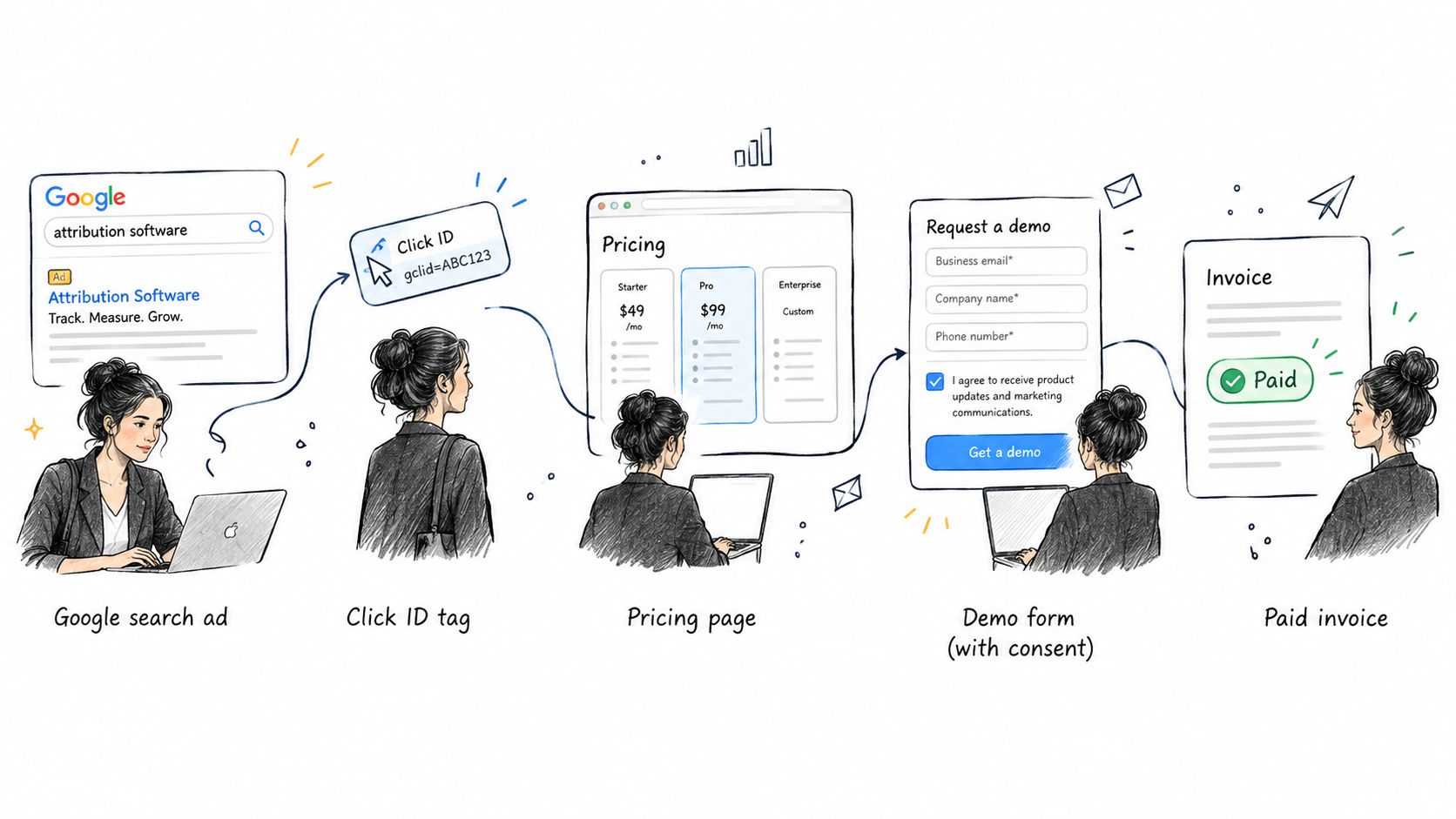
Think of each step as a receipt stapled to the next. Lose one receipt and you can still guess. Keep them all and you can prove the journey.
Click, Form and Booking
She clicks the ad. The landing page URL carries a click ID and campaign parameters, which your sitewide layer stores with the timestamp, referrer and consent state. She reads the pricing page, then returns two days later through a bookmark. The stored first-party identifier still connects the visit on your own domain.
She fills the demo form and ticks the consent checkbox. The form creates a CRM contact with name, email, company, source page and the original campaign context. She then books from the calendar widget. At booking, the lead is tied to the Google Ads campaign and landing page, and the meeting time is saved to the same contact.
This is the pattern behind closed-loop attribution from click through to revenue. The loop closes only when later revenue can travel back to the first interaction.
The short video below walks through the same handoff visually before the payment step.
Trial, Deal Stage and Payment
Sales runs the call and moves the CRM deal stage. She starts a trial, so account activity joins the record. When the trial ends, she pays through Stripe. Billing reports plan and invoice status, and the paid invoice matches back to the original contact, campaign and landing page.
SourceLoop's role in this kind of setup is narrow and factual. One lightweight snippet captures the visit and attaches it to the form, booking or chat, and qualified paid outcomes sync back to Google Ads, Meta and LinkedIn. The algorithms then learn from paying customers rather than form fills.
The before-and-after is conversational, not just technical. Before, the team debated which platform deserved credit for the deal. After, they compare cost per paid customer by source. They still can't see every anonymous touch, and they shouldn't pretend they can. But the deals that matter now carry evidence.
Audit One Path Before Scaling First Party Data
More records don't mean better decisions. That sounds backward until you watch a team scale broken identity. They get more dashboards, more exports and less confidence.
The evidence cards in the infographic below set the scale of the problem.
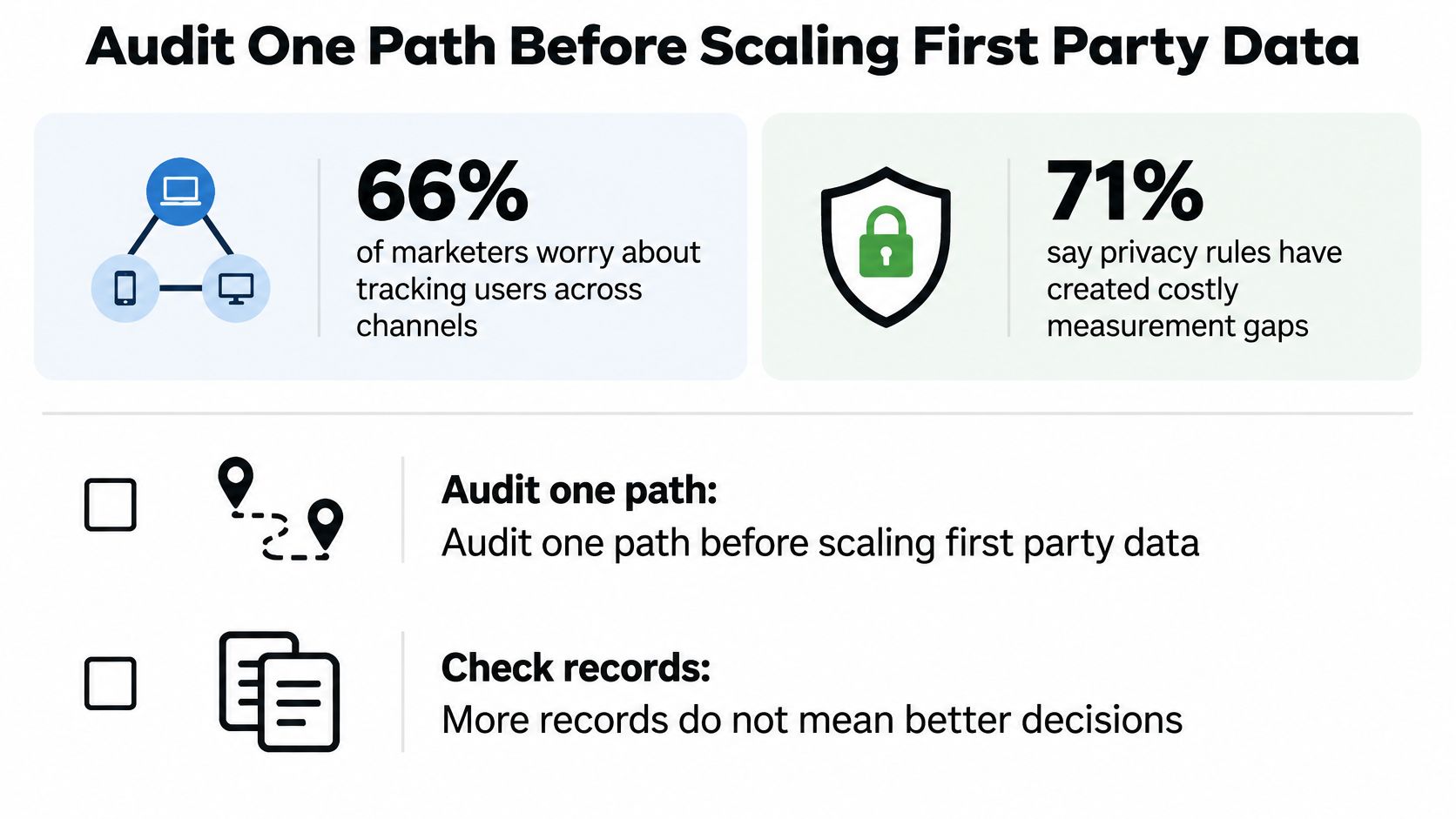
In a 2025 global survey covered in Supermetrics' 2025 marketing data findings on cross-channel tracking worries, 66% of marketers worry about tracking users across channels, 57% expect attribution and marketing measurement to become harder, and 41% cite cross-channel ROI measurement as a barrier. The same survey found 71% said privacy rules had created costly gaps in measurement.
Think of the audit as checking one bridge before opening a motorway. You don't need to rebuild every road this week. You need one route where a paying customer can cross without the record falling apart.
Six Checks Before Any Signal Leaves Your Stack
- Define one canonical identity: Choose one canonical contact, company and opportunity identity, then set a target share of closed deals that must carry a stored source.
- Label field origin: Mark every field as observed, modeled or user-provided, so nobody treats an estimate like a receipt.
- Record provenance: Put timestamps and source provenance on every event, including which form, page, widget or import created it.
- Propagate consent: Send the consent state to every destination, and block activation where consent doesn't cover the purpose.
- Deduplicate before counting: Merge duplicate contacts and conversions before reporting, not after a platform has optimized on doubles.
- Reconcile to payments: Compare CRM won deals against payments before sending signals back, accepting only a monthly gap you set in advance.
Set thresholds you will consistently monitor. You might require most closed deals to carry source, or allow only a small reconciliation gap. The exact target is your operational choice. Leaving it unstated isn't, because then every mismatch becomes an argument.
Audit One Path From Paid Click to Paid Invoice
Pick one path, such as Google search ad to demo form to paid invoice. Don't start with every channel.
- Confirm capture: Check every form and booking on that path records consent and source fields.
- Preserve touches: Keep first-touch and latest-touch values on each contact, in separate fields.
- Trace real customers: Follow five recent paying customers back to their first visit by hand.
- Send one signal: Export one qualified paid invoice to one ad platform and verify the match.
- Compare for 30 days: Put platform-reported conversions beside paid customers, not beside form fills.
Decision rule: If paid customers reconcile to platform numbers within your preset gap, add the next path. If they don't, fix identity and consent before adding more data.
First party data can't fix a weak offer, slow sales follow-up or missing consent. It also can't recover a click ID you never stored. What it can do, once audited, is tell you which records deserve to shape budget. That's enough to change the meeting.
Start with one path this week. Trace five paying customers from first click to paid invoice, note where source or consent breaks, and fix that single break before you collect anything new. If you'd rather not build the capture and sync yourself, start a free 7-day SourceLoop trial, install the snippet in minutes, and run the same one-path audit with qualified paid outcomes syncing back to your ad platforms.


 Paid Social


