
LinkedIn Ads for Lead Generation Playbook
Plan LinkedIn ads for lead generation around pipeline, not cheap form fills. Benchmarks, setup, forms vs pages, and CRM sync.
Only about 20% to 30% of sales-qualified LinkedIn leads progress to opportunities, according to Grou Global's LinkedIn lead-generation guide. That's the gap a low cost per lead can hide. When you run LinkedIn ads for lead generation, the defensible measure is qualified pipeline per dollar after sales acceptance, not how cheaply someone submitted a form.
A native form can win on conversion rate and still lose to a landing page on revenue. Your job is to connect Campaign Manager to the CRM, identify which audience and offer sales can work, and fund that combination.
Table of Contents
- LinkedIn Lead Benchmarks Worth Budgeting Against
- Choose the Audience and Offer Before You Spend
- Ad Formats and Creative That Earn the Click
- Build the Campaign and Pick the Conversion Path
- Track Pipeline and Send Qualified Leads Back
- Optimize After Sales Accepts the Lead
- Run the First Pipeline Test
LinkedIn Lead Benchmarks Worth Budgeting Against
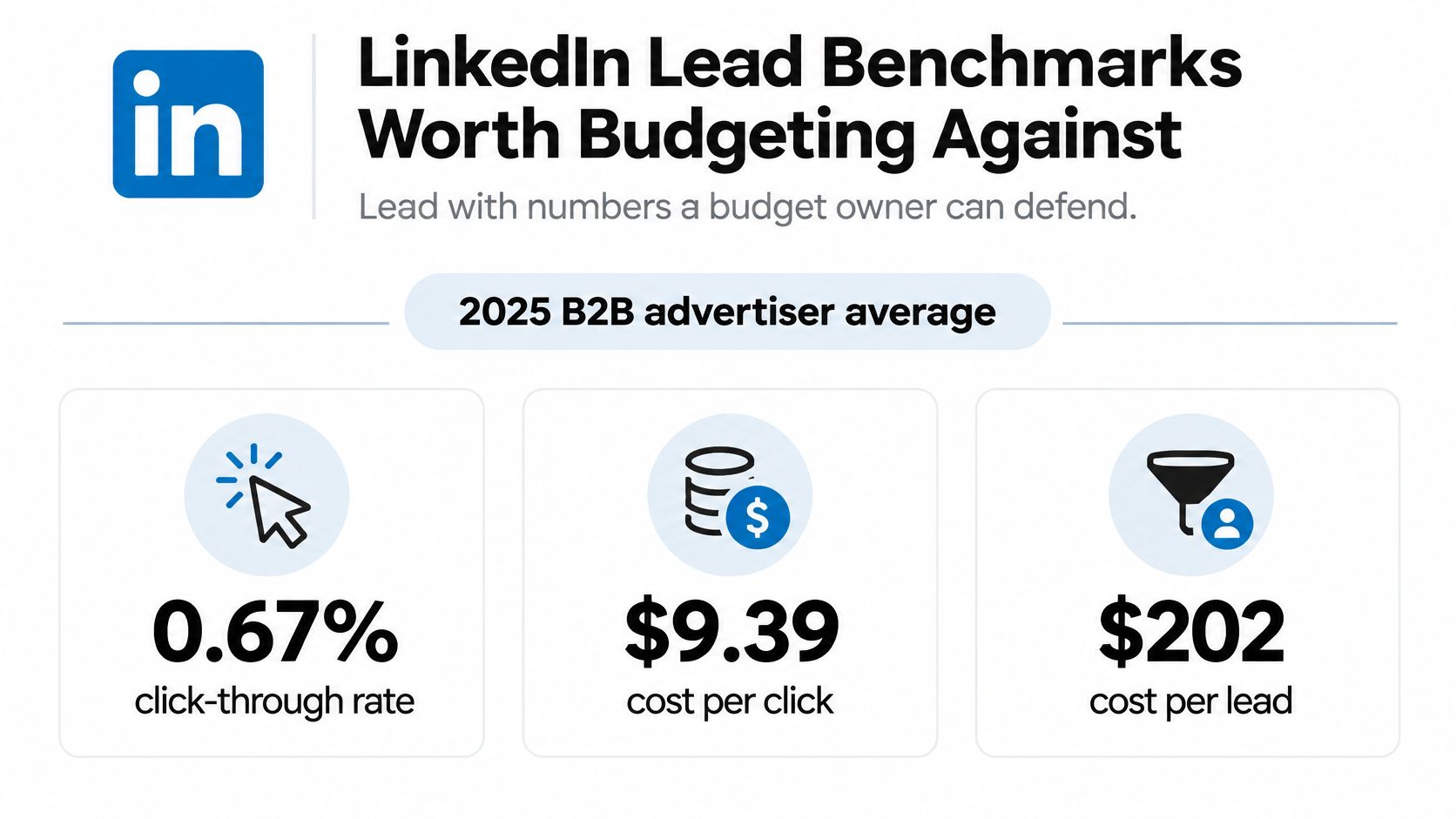
LinkedIn lead-generation campaigns averaged $202 per lead across 138 B2B advertisers in 2025, according to Metadata's advertising cost analysis. Treat that as a budget conversation starter, not a campaign target. A content download and a request to speak with sales aren't interchangeable purchases.
Build the planning sheet by offer
The table separates delivery costs from capture performance. Read its content and demo rows independently, then choose the row that matches what you're asking the buyer to do.
LinkedIn lead generation benchmarks for planning
| Metric | Benchmark | Sample | How to use it |
|---|---|---|---|
| Average CTR | 0.67% | 138 B2B advertisers, Metadata 2025 | If you're well below this, investigate creative or audience before adding budget |
| Average CPC | $9.39 | Same Metadata advertiser sample | Multiply by your planned click sample to estimate test spend |
| Average CPL | Blended lead-generation average | Metadata lead-generation sample described above | A planning reference only, not an offer-specific target |
| Lead campaign CPM | €43.21 | Merkelijkheid's 2024 lead-campaign benchmark | That campaign mix generated about 13 leads per €1,000 |
| Content offer CPL | Content-specific median | Kiin advertiser study, detailed under campaign setup | Benchmark ebooks, checklists, and webinars separately |
| Demo request CPL | Demo-specific median | Same Kiin form study | Keep demo campaigns in their own report |
| Form completion | Median, strong, and exceptional performance bands | Kiin form opens and submissions | Divide submissions by form opens, not impressions |
| Campaigns with no leads | Empty campaigns occurred in the Kiin sample | Kiin advertiser study | A live campaign can still produce nothing to optimize |
The delivery benchmarks are summarized visually below.
Budget for a decision, not just delivery
Use the LinkedIn Ads cost calculator to model spend against your expected click cost and lead rate. Then add the commercial assumptions the ad account can't supply: sales acceptance, opportunity creation, deal value, and the time required to reach those stages.
Don't combine benchmarks from different studies into a forecast that looks more precise than it is. An average CPC from one advertiser mix and a median form completion rate from another don't describe a single, proven funnel.
Budget rule: Approve enough spend to test an audience and offer, but release more budget only when sales accepts the resulting demand.
Paid advertising also shouldn't carry the entire acquisition plan. RedactAI's guide to generate more leads on LinkedIn offers broader channel context for teams coordinating advertising with profile content and outreach.
Your planning sheet should finish with an owner and a decision: who reviews rejected leads, what qualifies as an opportunity, and what evidence would justify more spend.
Choose the Audience and Offer Before You Spend
Start with the buying committee, not a list of every job title your product could theoretically serve. A finance director evaluating reporting software needs a different promise from an analyst trying to finish a spreadsheet.
Define a specific professional group first. Select a function, a seniority band, and a company-size band, then add industry only when the industry changes the problem or the offer. Piling on targeting filters without a commercial reason can leave you with an audience that's precise on paper but difficult to reach.
Write the audience as a buying situation
Before opening Campaign Manager, complete a short targeting brief:
- Buyer responsibility: Name the workflow, budget, or business outcome this person owns.
- Company fit: Describe the organizational conditions that make your product useful.
- Reason to act: Identify the change, deadline, or frustration that makes the offer relevant.
- Disqualifiers: State which roles and companies sales won't accept.
For account-based campaigns, upload a named company list built with sales. Don't substitute a broad industry audience and call it account-based marketing. Keep website retargeting separate from cold prospecting so you can distinguish existing interest from newly acquired demand.
Build exclusions before launch. Remove customers from acquisition campaigns, suppress open opportunities where appropriate, and exclude employees and competitors. Decide explicitly whether existing leads belong in acquisition, nurture, or sales-assisted campaigns.
Match the commitment to the buyer
A practitioner checklist and a director demo solve different problems. The checklist should help someone complete a task without requiring a buying conversation. The demo should show a buyer how your product addresses a problem they already recognize.
Write each offer in a sentence a salesperson would accept. For example: a reporting checklist for marketing operations practitioners who reconcile campaign and CRM records, not a generic guide for anyone interested in marketing.
For a demo, specify what the prospect will see and what they should bring. A walkthrough of campaign-to-opportunity reporting is more concrete than an invitation to discover a platform.
A content download earns permission to deliver the content. It doesn't establish permission to treat the person as an active buyer.
Referral demand belongs in a separate source category too. Otter A/B's discussion of ways to attract leads through referral programs can inform adjacent acquisition work, but don't assume those leads behave like cold paid prospects.
Finish the brief with the exclusion list, the offer, and the sales-accepted outcome. If the team can't agree on those, postpone the launch rather than buying traffic to settle the argument.
Ad Formats and Creative That Earn the Click
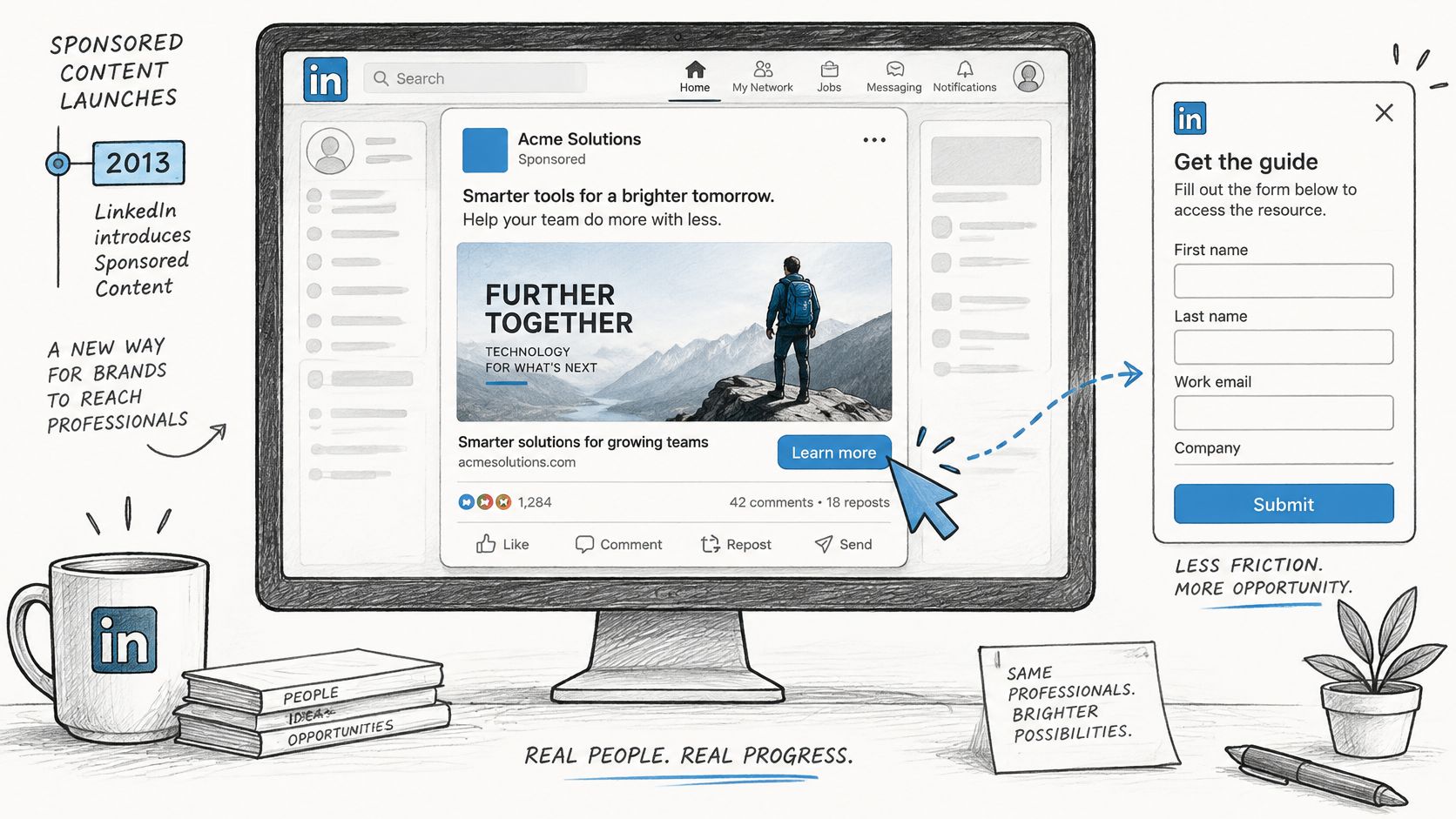
I would start with single-image Sponsored Content when the offer can be explained in a clear visual and a short opening line. It gives you a straightforward way to test the message without making video production a prerequisite.
The capture experience matters as much as the feed placement.
Choose the format for the evidence
A document ad makes sense when the document itself demonstrates value. Show useful pages from the guide rather than a cover followed by vague promises. Let buyers inspect the quality before asking them to access the rest.
Use video when a person or product can demonstrate the problem more clearly than a static image. Open with the broken workflow, the interface, or the buyer's question. Add captions, and cut the corporate introduction.
Reserve message and conversation ads for offers where the outreach would make sense coming from a salesperson. A targeted invitation can be appropriate; a broad pitch delivered into an inbox doesn't become relevant because it uses the recipient's name.
Thought leader ads are worth considering when an employee already publishes credible material about the problem. Don't manufacture a personal opinion that reads like company-page copy.
Give every creative a distinct reason to click
Each ad needs a recognizable pain, credible evidence, and a matching action. Use download or register for content. Use request a demo or book a walkthrough when a sales conversation is the actual offer.
Prepare creative variations with different evidence:
- Customer language: Use an approved quote that describes the problem or outcome.
- Product demonstration: Show the workflow the buyer will recognize.
- Buyer question: Open with a specific question the offer answers.
Only use numerical results you can substantiate. If you don't have permission or evidence for a customer result, show the mechanism instead of inventing a performance claim.
The embedded video provides another way to inspect the LinkedIn lead-generation workflow.
Keep the offer fixed while testing creative. Otherwise, you won't know whether the audience preferred the visual, the promise, or the different commitment. Review the opening line and image together, then confirm that the people who clicked match the roles you intended to reach.
Build the Campaign and Pick the Conversion Path
Build the campaign so each setting corresponds to a decision you can explain. Don't let the default objective, audience expansion, or form template decide what counts as success.
Set up Campaign Manager deliberately
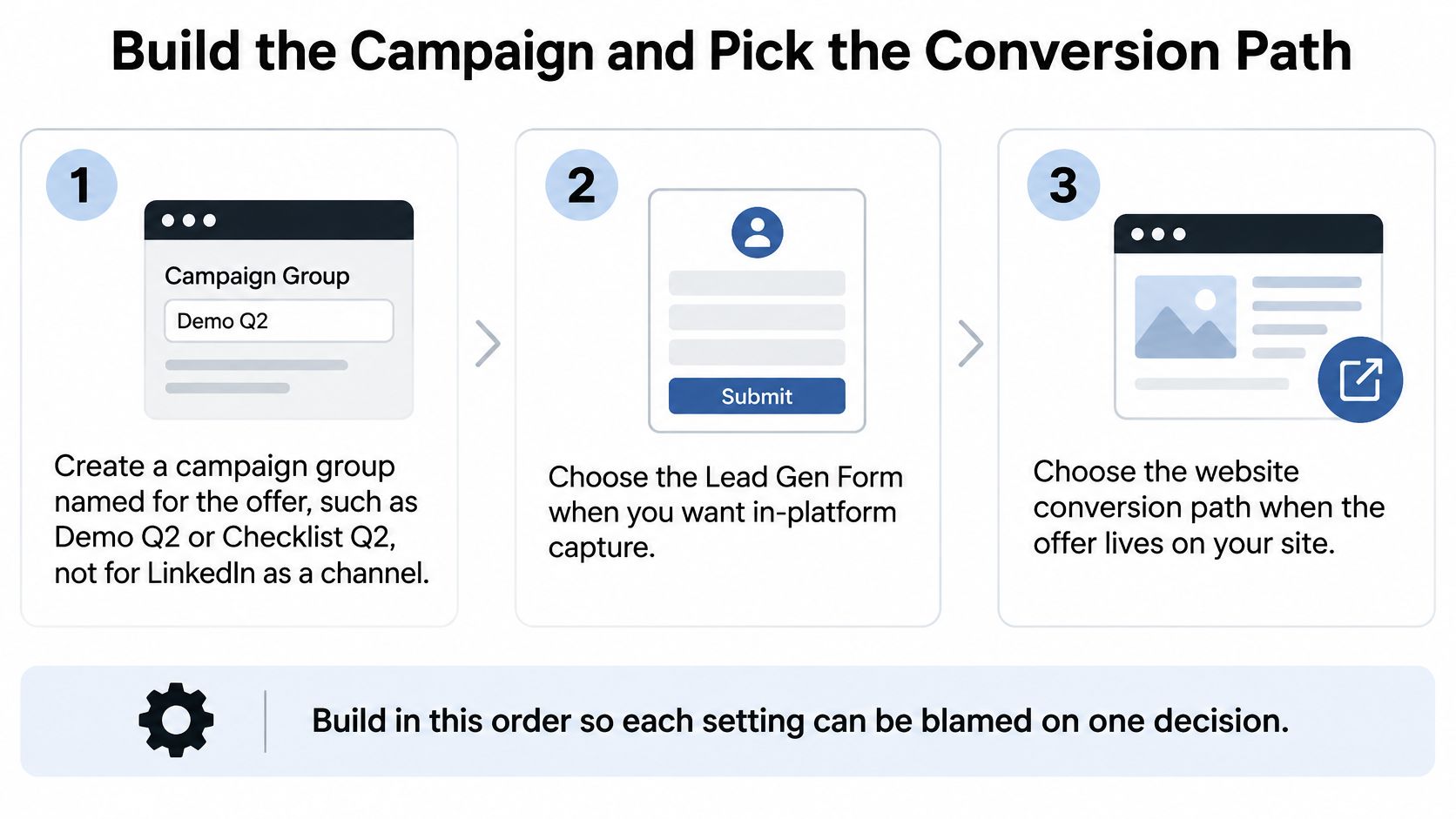
- Name the campaign group for the offer. Use a label such as Checklist Launch or Demo Launch, with naming conventions your CRM team can recognize.
- Choose Lead generation for native capture or Website conversions when the meaningful action happens on your site.
- Attach the approved audience and exclusions. Keep prospecting and retargeting in separate campaigns.
- Set a daily budget based on the click sample you need and the amount you can afford to lose while learning. A budget that produces occasional clicks won't support quick judgments.
- Choose an available bidding strategy deliberately. I would start with maximum delivery when establishing a baseline, then consider cost controls after observing actual acquisition economics.
- Load the creative variations, attach the offer, and verify the destination or form.
- Submit a test lead. Check delivery, field mapping, ownership, confirmation messages, and CRM source fields before paying for live submissions.
The setup sequence keeps the conversion destination explicit.
Compare capture paths without confusing the denominator
In Kiin's 2026 study of 489 advertisers, median CPL was $164 for content offers and $343 for demo requests; median form completion was 7.6%, versus 15.7% for stronger performers and 27.6% for the exceptional group. Across 572,814 form opens and 86,051 submissions, 28% of campaigns produced no leads.
Those are form-study results, not a promise that native capture will produce qualified demand. Form-open completion also isn't the same denominator as click-to-lead conversion on a website.
Lead Gen Forms versus landing pages
| Path | Conversion to expect | Best offer | Data you keep | Choose it when |
|---|---|---|---|---|
| Lead Gen Form | Measure submissions against form opens | Content, webinar, checklist | Submitted profile fields and custom answers | You need low-friction capture and the offer is low commitment |
| Landing page | Measure completed actions against attributable visits or clicks, consistently | Demo, pricing, product tour | Submitted fields, UTMs, and observable site interactions | You need explanation, qualification, or booking functionality |
| Hybrid | Evaluate each stream separately | Content and commercial offers in separate campaigns | Both capture streams, with distinct source labels | You need different experiences for different levels of intent |
Keep a native form short, but retain the question that changes routing or qualification. Ask only for information sales or nurture will actually use. Include a clear privacy notice and explain what happens after submission.
For website conversions, mirror the ad's promise in the page headline. Keep the booking or submission action obvious, and test the experience on mobile.
Use the Lead Gen Form capture setup guide to check the handoff into your measurement workflow. Bazzly's guidance on how to follow up with LinkedIn leads is useful when defining ownership and the response sequence.
A hybrid setup isn't automatically a fair experiment. To isolate form versus page, hold audience, offer, creative, and follow-up constant. Comparing cold checklist leads with warm demo requests tells you about two acquisition motions, not the causal effect of the capture path.
Track Pipeline and Send Qualified Leads Back
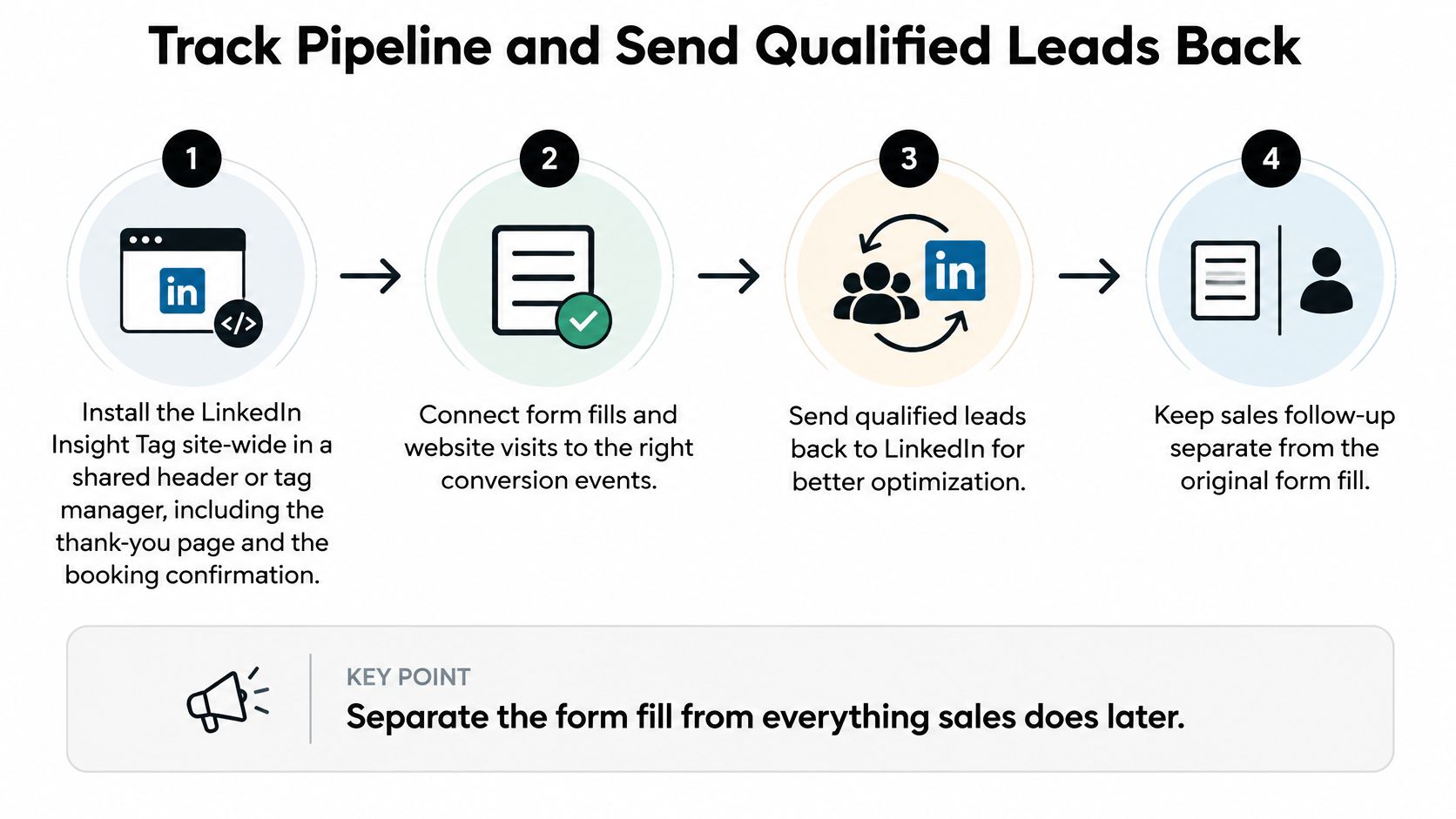
Separate acquisition from qualification in your event model. A form submission records what the prospect did; sales acceptance records what your team learned afterward.
Define events before connecting tools
LinkedIn's conversion-tracking documentation supports URL rules, event-specific implementations, campaign associations, attribution windows, and dynamic conversion values. It also distinguishes post-click from view-through outcomes, so the reported conversion total isn't just a count of people who clicked and then converted.
Build the measurement workflow in this order:
- Install the Insight Tag site-wide, subject to your consent requirements. Check the shared site template, booking flow, and confirmation pages rather than assuming the homepage installation covers everything.
- Create separate conversion definitions for form submitted, meeting booked, qualified opportunity, and purchase or closed-won. Use a precise URL or event trigger for each stage.
- Associate events with relevant campaigns. Apply consistent click and view windows across the campaigns you intend to compare.
- Pass a meaningful value when one is available. Don't label pipeline value as collected revenue or assign arbitrary values that make unlike events appear economically equivalent.
- Persist campaign context in the CRM. Store campaign, creative, offer, capture path, original timestamp, and a durable contact identifier.
- Send supported downstream events back to LinkedIn when the lead reaches the defined stage.
The process should preserve the distinction between the original submission and the later sales outcome.
Reconcile identities, stages, and dates
Use a stable event identifier for deduplication, together with the CRM record and conversion stage. Deduplicating only on email can accidentally suppress legitimate later events from the same person. Retrying an opportunity upload must not create another opportunity conversion.
Keep the event timestamp distinct from the upload timestamp. Also retain stage history so a reopened opportunity or changed qualification decision doesn't alter the acquisition report.
SourceLoop is one option alongside direct CRM integrations and custom API workflows: it connects visits and conversions to journeys, syncs contacts with CRM systems, and sends qualified offline conversions back to advertising platforms. The offline conversion configuration guide explains the LinkedIn setup.
Measurement check: A successful upload proves delivery. It doesn't prove correct attribution, matching, or qualification.
Allow for conversion lag. A HockeyStack 2025 benchmark reported an average MQL cycle of 24 days in Q1 versus 68 days in Q4, illustrating why an early revenue read can be incomplete.
Use your own stage timestamps to measure lag by offer and customer segment. Compare mature cohorts, and inspect alternate attribution windows without changing the production settings mid-test.
Keep self-reported attribution in a separate field from observed touchpoints. A buyer saying they heard about you on LinkedIn is useful evidence, but it isn't the same observation as a recorded ad click.
Optimize After Sales Accepts the Lead
Change one variable at a time. Freeze the qualification definition and attribution settings before comparing campaign performance, or you'll mistake reporting changes for advertising improvements.
LinkedIn's performance-analysis guidance defines CPL as spend divided by leads and distinguishes native-form leads from website conversions. Build your scorecard around those separate populations, then add sales acceptance, opportunities, pipeline value, and closed revenue.
Diagnose the break before editing
A weak click response calls for a different investigation from rejected leads. Use Campaign Manager to locate the initial drop, then use CRM rejection reasons to identify whether the commercial promise attracted the wrong people.
What the lead numbers are telling you
| What you see | Usual cause | Change this |
|---|---|---|
| CTR well below your relevant baseline | Creative or audience mismatch | Test a new image and opening line while keeping the offer fixed |
| Opens high, completion weak | Excessive friction or an unclear exchange | Remove an unnecessary field or clarify the offer, not both |
| CPL looks cheap, sales accepts almost none | Content interest mistaken for buying intent | Correct scoring and inspect role fit before expanding spend |
| LinkedIn conversions far above the CRM | Attribution differences, duplicate events, or inconsistent definitions | Reconcile event identities and windows |
| Spend increases and leads remain absent | Delivery constraints, an unsuitable offer, or broken capture | Test the conversion path before changing targeting |
| Demo acquisition cost is uncomfortable | Immature results or weak commercial conversion | Inspect cohort age and cost per opportunity before cutting |
Don't assume a discrepancy always means tagging failure. Missing tags can undercount website activity; duplicate events can overcount it; view-through attribution can credit activity without a click. Inspect the implementation and the definitions before deciding which system is wrong.
Use sales feedback as evidence
Require rejection reasons that a marketer can act on: wrong function, unsuitable company, no relevant project, duplicate contact, or unable to reach. A generic bad lead label doesn't tell you whether to change targeting, qualification, or follow-up.
Keep sales execution visible too. Delayed outreach, failed routing, and missed bookings can make a viable audience appear unqualified. Don't rewrite an ad to fix an ownership problem.
Calculate qualified pipeline per dollar as attributed, sales-accepted opportunity value divided by ad spend. Report opportunity count beside it so a single large deal doesn't conceal weak repeatability. Keep pipeline and revenue separate, and use a consistent attribution policy when opportunities involve multiple channels.
A campaign earns more budget when sales can work its opportunities at acceptable economics, not when its submission count looks impressive.
Review performance on a regular operating cadence, but don't force a budget change at every review. When a cohort is immature, the right action may be to fix routing, collect rejection reasons, or wait rather than pause a campaign that hasn't had time to produce its downstream outcome.
Run the First Pipeline Test
Launch a content campaign using native capture and a demo campaign using a dedicated landing page. Give each a named owner, an explicit exclusion list, distinct CRM labels, and the same definition of sales accepted.
Schedule separate operating and commercial reviews
At the early operating review, check delivery, message response, form abandonment, booking completion, and CRM routing. Correct broken mechanics immediately. Don't declare a revenue winner while the leads are still moving through qualification.
At the commercial review, compare mature cohorts on accepted opportunities, qualified pipeline per dollar, and eventual revenue. Agencies should include the client, offer, spend, accepted outcomes, and rejection reasons in the weekly note, not just a Campaign Manager screenshot.
- For acquisition planning: Compare the content and demo motions as separate ways to create pipeline.
- For capture-path testing: Run matched audience and offer cohorts through native forms and landing pages.
- Before scaling: Verify that accepted-stage events reach LinkedIn accurately and that duplicate uploads aren't inflating results.
Don't select the winner on meetings alone if those meetings never become accepted opportunities. Keep the campaign that produces commercially useful demand, even when it generates fewer submissions.
Choose the offer your sales team can qualify today, document the acceptance criteria with RevOps, and submit a test conversion through the entire workflow. Then launch with a written budget decision: scale only when you can name the audience, offer, and capture path producing the most accepted pipeline per dollar.



 Paid Social


