
Track Gravity Form as Meta Ads Conversions
Track Gravity Form as Meta Ads Conversions. Track Gravity Forms as Meta Ads conversions using the Meta Pixel and Conversions API. A practical guide
Most advice on tracking Gravity Forms in Meta Ads starts with a browser event and stops there. That's enough to prove that a form was submitted, but it isn't enough to tell Meta which submissions became qualified opportunities, booked meetings, customers, or revenue.
A form is an intake point, not necessarily the conversion your ad account should optimize toward. The practical model is to record the completed Gravity Forms entry, preserve its campaign context, and then send verified lifecycle outcomes through Meta Conversions API. That approach takes more planning than firing a Lead event on a thank-you page, but it aligns advertising feedback with the value your sales team creates.
Table of Contents
- Why Form Submissions Are Not Good Enough
- How Gravity Forms Connects to Meta Ads Tracking
- Building a Gravity Forms to Meta Ads Conversion Pipeline
- Preventing Duplicate Conversion Reporting
- Tracking Lower-Funnel Value Beyond the Form
- Using SourceLoop to Connect Gravity Forms to Revenue
- What Counts as a Good Conversion After Tracking Gravity Forms
Why Form Submissions Are Not Good Enough
A campaign can look healthy in Ads Manager while the sales pipeline tells a different story. Imagine a B2B advertiser receiving a steady stream of Gravity Forms submissions. The Pixel records every completed form as Lead, Meta learns which users are likely to submit, and the reported cost per lead improves. Yet many entries may be incomplete, outside the target geography, unsuitable for the service, or unwilling to speak with sales.
The tracking is technically functional. The optimization signal is still weak.
Meta's conversion framework makes a Gravity Forms submission measurable by sending an event from the website through the Meta Pixel. Tracked conversions appear in Ads Manager and Events Manager, where advertisers can evaluate funnel effectiveness and calculate return on ad investment, as described in Meta's conversion-tracking documentation. The problem isn't that a raw submission is useless. It's that treating every submission as equally valuable teaches the platform to pursue submission behavior, not customer behavior.

The cheap-lead trap
A low-friction form can attract people who are curious but not ready, applicants who don't meet your criteria, or prospects who provide unusable contact details. If all of those entries produce the same Lead signal, Meta has no reason to distinguish them from a high-intent buyer.
That creates a misleading trade-off:
- Raw submission optimization: More visible conversions and a clearer top-of-funnel count, but weak separation between useful and unsuitable leads.
- Qualified-event optimization: A smaller set of stronger signals, with more effort required to connect the form to CRM and sales outcomes.
- Revenue feedback: The most commercially meaningful signal, but it depends on reliable identity, lifecycle mapping, consent, and value data.
Practical rule: A conversion should represent the business milestone you want Meta to find more often, not merely the easiest event to trigger.
A form submission should usually remain measurable because it gives you an initial record and an opportunity to connect the visitor with later outcomes. But the strategic question is different: which event should influence delivery and budget decisions? For agencies, SaaS companies, and B2B teams, the answer often sits further down the funnel than the form itself.
How Gravity Forms Connects to Meta Ads Tracking
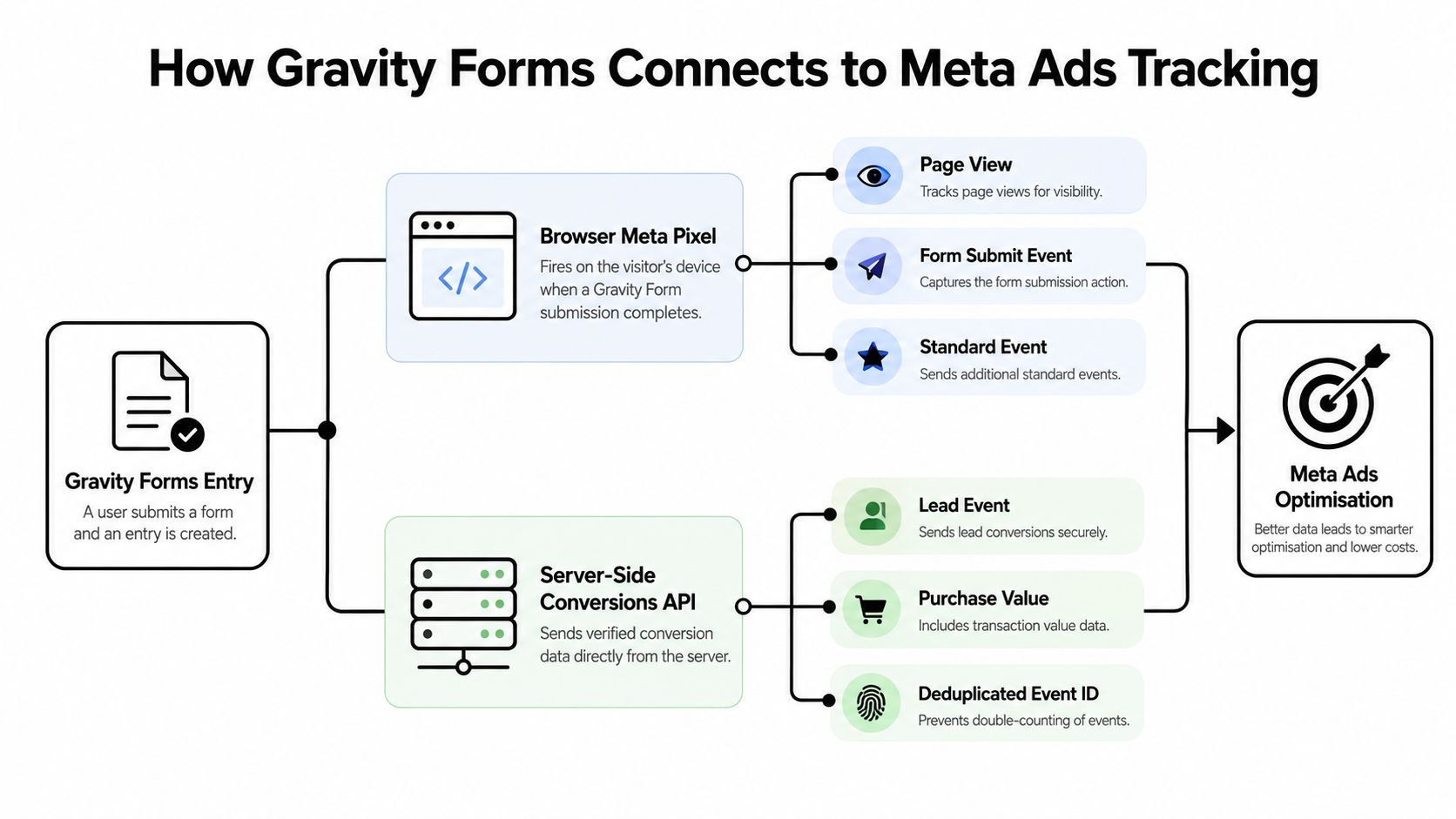
Gravity Forms and Meta Ads work together through two measurement layers. The first runs in the visitor's browser. The second sends event data from your server or integration layer directly to Meta.
The browser layer uses the Meta Pixel. When a visitor successfully completes a form, the site can call Meta's fbq('track') function and record a standard event such as Lead, or send a custom event that represents the form outcome. The important implementation detail is the success state. A page view or button click doesn't prove that Gravity Forms accepted the entry. The event should fire after a confirmed submission, not merely when the form loads or a visitor presses submit.
The server layer uses Conversions API. Meta describes this system as a way to receive web, app, physical-store, and business-messaging events through a unified endpoint. It can also carry CRM data, qualified leads, multi-site conversion paths, customer-value information, and other lower-funnel signals that a browser event can't reliably represent. Meta recommends sending events in real time or within one hour so they can support attribution and ad-delivery optimization, as outlined in its Conversions API implementation guidance.
Assign each layer a job
The Pixel is useful for recording the immediate browser interaction and supporting audience or event measurement. Conversions API is better suited to verified outcomes that exist beyond the browser session, such as a qualification change in a CRM or a later commercial milestone.
That doesn't mean you should send unrelated events through both channels. If the same submission travels through the Pixel and Conversions API, it needs consistent identity and deduplication, which is covered later. A clean event model might look like this:
| Funnel point | Suitable signal | Main purpose |
|---|---|---|
| Completed Gravity Form | Lead or a custom event |
Record initial intent |
| Sales qualification | Qualified lead event | Represent fit and readiness |
| Booked meeting or opportunity | Custom or mapped lifecycle event | Reflect pipeline progress |
| Closed deal or payment | Revenue event | Connect advertising to commercial value |
Teams that need broader implementation context can review this practical guide to Facebook ads conversion tracking 2026. For the website layer, preserving UTM parameters and form attribution is equally important, which is why a documented approach to Gravity Forms UTM tracking belongs beside the event setup.
Building a Gravity Forms to Meta Ads Conversion Pipeline
The most controllable architecture starts with Gravity Forms capturing the entry, then uses a server-side integration to decide what Meta should receive. Gravity Forms' Webhooks Add-On can send a qualifying submission to an endpoint as JSON, using conditional logic to restrict delivery based on fields such as lead type, budget, geography, or qualification status.
Start with the entry, not the ad event
First, make the form entry complete and attributable. Store the submission identifier, campaign parameters, landing-page context, and any consent state your organization needs. The entry should remain your source record even if the later Meta event is delayed or rejected.
Then define the event policy. A simple policy might be:
- Record every successful Gravity Forms entry internally.
- Send an initial
Leadevent only when the submission meets your minimum data and consent requirements. - Send a qualified event after sales or CRM validation.
- Send an opportunity or revenue signal when that milestone is confirmed.
The point isn't to hide submissions from reporting. It's to avoid making every raw entry an optimization target.
Put a validation layer between WordPress and Meta
Configure the Webhooks Add-On to send the relevant fields to an integration endpoint. That endpoint should validate the payload, normalize field names, preserve the original event identifier, and record delivery status before constructing the Meta Conversions API request.
Conditional logic is especially useful when the form includes qualification fields. A service business might gate the server event on geographic eligibility. A SaaS team might require a business email or a product-fit selection. An agency might separate budget bands or service categories so that Meta receives a signal closer to the type of client it wants to acquire.
The endpoint can also enrich the payload with campaign data, landing-page context, CRM status, or downstream value. The Gravity Forms Webhooks Add-On supports authenticated custom headers, multiple HTTP methods, and JSON or form-encoded payloads, which makes it suitable for a lightweight integration layer rather than a blind forwarding rule.
The form should collect the evidence. The integration layer should decide which evidence deserves advertising weight.
For teams still improving the page itself, guidance on how to build conversion pages with WordPress can complement the measurement work. Once the endpoint is defined, test successful submissions, rejected submissions, retries, missing identifiers, and CRM status changes. SourceLoop's documentation on configuring Meta Conversions API provides an implementation path for teams that want to connect attribution and server-side delivery without building every workflow from scratch.
Preventing Duplicate Conversion Reporting
Browser and server tracking can create a second problem after the first one is solved. If a completed Gravity Forms entry fires a Pixel event and the same entry is sent through Conversions API without a shared identity, Meta may count two conversions instead of one.
Meta's deduplication process relies primarily on matching event_name and event_id, according to its Pixel and server-event deduplication guidance. Identical events sent to the same Pixel without consistent identifiers can inflate reported conversions and give the delivery system a distorted view of campaign performance.
Generate one immutable event ID
Use the Gravity Forms entry ID as the foundation of a stable identifier. You can optionally prefix it with the form ID, creating an internal format such as form-entry, provided the resulting value is unique for each real submission.
The same identifier must travel through both channels:
- Browser Pixel: Pass it as the Pixel
eventIDvalue. - Conversions API: Pass it as the server event's
event_id. - Event naming: Use the same
event_name, for exampleLead, when both events describe the same conversion. - Retries: Resend the original identifier if the webhook or endpoint retries delivery.
- Identity context: Preserve matching identifiers such as
_fbpor a consistently derivedexternal_idwhen they're legally and technically available.
The identifier belongs to the submission, not to the delivery attempt. Generating a new ID during each retry defeats deduplication because Meta can interpret every retry as a separate lead.
Test the failure paths
A successful test form is only the beginning. Submit the form with the browser event enabled, then inspect the server payload and confirm that both channels use the same event name and identifier. Repeat the test with a retry or delayed delivery, and verify that the retry retains the original ID.
Also check whether separate forms can produce collisions, whether edited entries accidentally generate new identifiers, and whether a custom event is being treated as a different action from the browser event. A practical identity workflow can be documented alongside SourceLoop's identity stitching and deduplication guidance, particularly when the form, CRM, and payment systems all hold different record IDs.
A retry should repeat a conversion attempt, not create a new conversion identity.
Good deduplication protects both reporting and optimization. It prevents a campaign from appearing to generate more leads than it did and keeps later quality analysis anchored to the actual Gravity Forms entry.
Tracking Lower-Funnel Value Beyond the Form
The form submission is often the first useful signal, but it rarely represents the final business outcome. A sales team may reject the entry, qualify it, book a meeting, create an opportunity, or close a deal. Meta's Conversions API can ingest CRM data, qualified leads, multi-site conversion paths, margins, and historical customer-value signals, so the server-side layer can carry that progression beyond the initial browser event.
Map the lifecycle before sending events
Assign a stable lead identifier when Gravity Forms creates the entry. Store that identifier in the CRM and use it to connect later status changes to the original campaign context. The CRM should then trigger updates when the lead reaches a defined milestone.
A useful lifecycle map might distinguish:
- Form submission, an initial intent signal.
- Qualified lead, a validated fit that sales accepts.
- Booked meeting, a stronger commitment than a completed form.
- Opportunity, a recognized pipeline stage.
- Revenue closed, a commercial outcome that can carry value when appropriate.
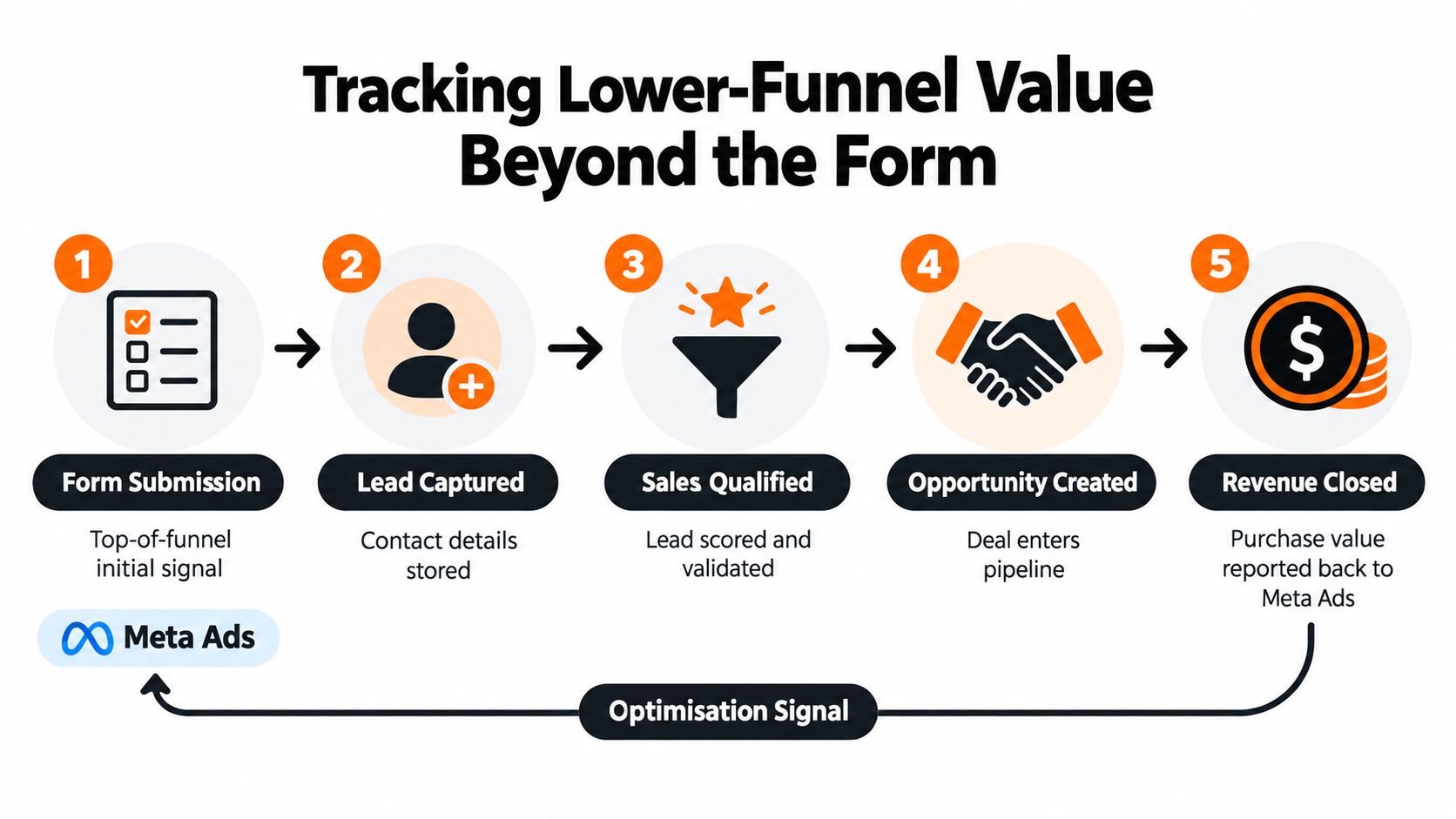
The event policy should specify which milestones are sent, when they're sent, and how rejected or disqualified entries are handled. Meta's guidance favors real-time or scheduled delivery, so a CRM-stage trigger is more useful than a one-time script that fires and disappears when the browser session ends.
Optimize for signal quality, not event volume
If Meta receives every form completion but never learns which entries became customers, it can optimize toward the behavior that generates the most immediate feedback. That may be a cheap submission rather than a valuable prospect.
SourceLoop can capture attribution for web forms, connect campaign context to CRM stages, and synchronize qualified offline conversions to Meta Conversions API. That gives teams a way to preserve the original Gravity Forms entry while sending later, verified outcomes as stronger optimization signals.
For audit work, a practical audit of Meta ad accounts should include event quality, deduplication, campaign attribution, and the relationship between reported conversions and actual pipeline. A high count of Lead events isn't proof that the account is learning the right audience.
The contrarian test is simple: if you remove low-quality submissions from the optimization signal, does the campaign still find qualified prospects? If the answer is no, the integration may be measuring activity rather than value.
Using SourceLoop to Connect Gravity Forms to Revenue
Immediate form optimization and delayed value-based optimization solve different problems. The first tells Meta who tends to complete a Gravity Form. The second gives Meta evidence about which completed forms progress toward pipeline and payment.
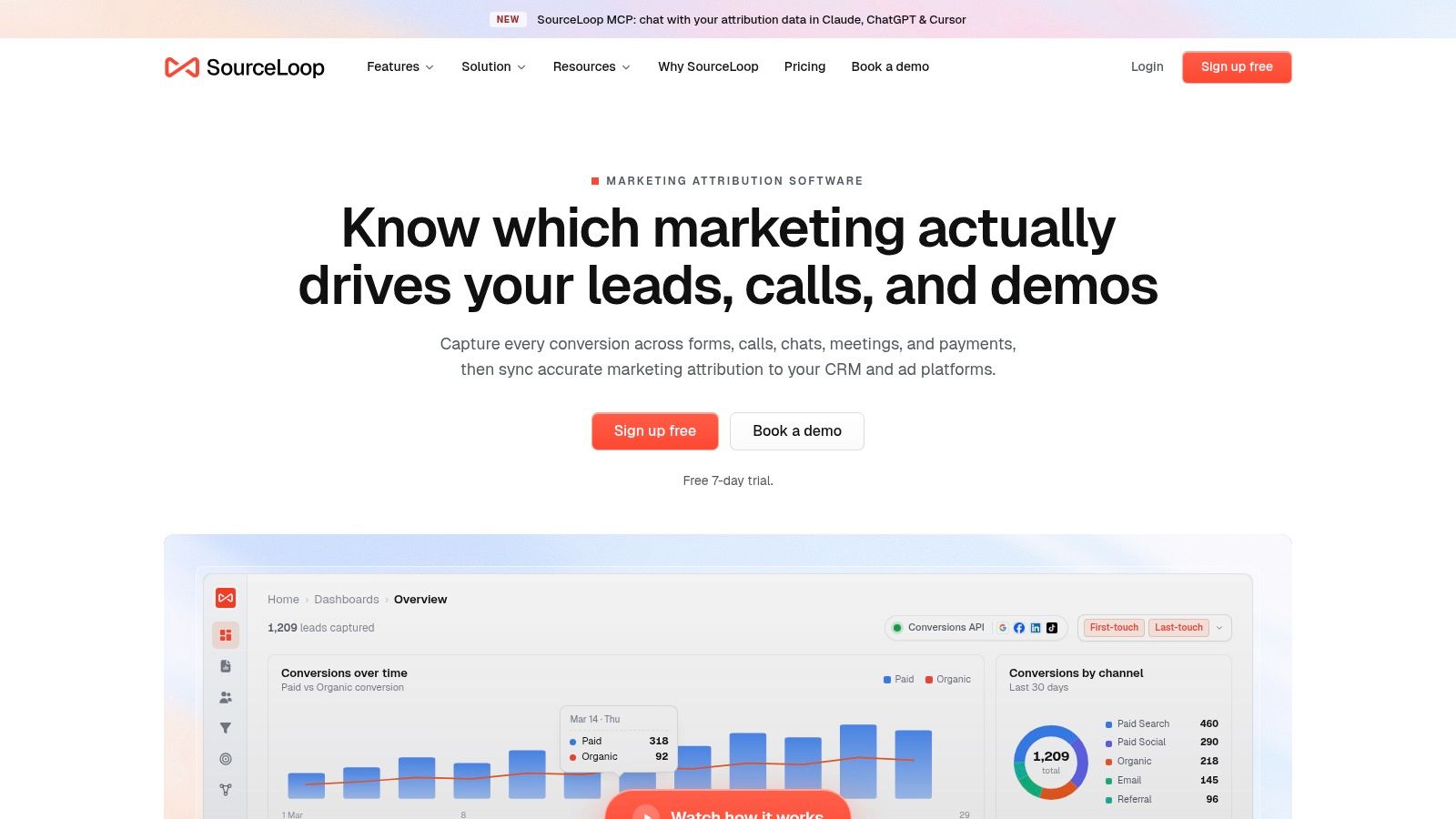
A platform such as SourceLoop can capture visits, retain campaign attribution, connect web-form submissions with chat and calendar conversions, and associate Stripe revenue with the originating channel. It can also synchronize lead-stage changes with CRM systems such as HubSpot, Salesforce, and Pipedrive, then send qualified offline outcomes to Meta Conversions API.
Compare the two operating models
| Model | What Meta receives | What the team learns |
|---|---|---|
| Immediate form tracking | Completed submissions | Which traffic produces initial responses |
| Delayed qualification tracking | Verified lifecycle events | Which traffic produces acceptable leads |
| Value-connected tracking | Opportunities or revenue outcomes | Which traffic contributes to commercial return |
The browser-first model is easier to launch and useful for diagnosing whether the form event works. It becomes limiting when sales quality varies sharply across campaigns, audiences, or acquisition sources. A delayed model requires stable IDs, CRM discipline, consent controls, and monitoring, but it gives the ad platform a more meaningful definition of success.
SourceLoop can also provide dashboards, a contacts hub, field mapping, webhooks, and alerts through Slack or email. Those operational features matter because attribution failures often come from silent breaks, changed form fields, missing CRM stages, or failed event delivery rather than from the original Pixel call.
This short demonstration shows how a marketing attribution workflow can connect acquisition data with downstream outcomes:
The right setup doesn't require choosing between measurement and optimization. Keep the initial Gravity Forms submission available for diagnostics and funnel reporting, then give Meta progressively stronger signals as the lead earns them. That keeps reporting honest while moving budget decisions closer to pipeline and payments.
What Counts as a Good Conversion After Tracking Gravity Forms
A good Meta Ads conversion isn't automatically the event with the largest count. It's the event that gives the platform a reliable reason to find more people who resemble your commercially useful customers.
Browser-only tracking can confirm that a Gravity Forms entry occurred. It can't, by itself, represent a later sales decision, a booked meeting, an opportunity, or a payment that happened outside the original browser interaction. Conversions API adds the server-side path for those outcomes, provided your team preserves identity, handles consent correctly, and maps CRM stages consistently.
Judge the setup against business evidence rather than Ads Manager volume:
- Signal integrity: Does each event represent a real, confirmed milestone?
- Identity continuity: Can the form entry be connected to CRM and revenue records?
- Deduplication: Do browser and server events describe one conversion only once?
- Optimization relevance: Is the selected event close enough to customer value to guide bidding?
- Operational visibility: Can the team detect rejected payloads, missing fields, and failed deliveries?
A healthy implementation may report fewer optimization events after low-quality submissions are excluded. That isn't automatically a regression. It can indicate that the account has stopped rewarding form completion as an end in itself.
The objective isn't to make Meta see more Gravity Forms submissions. It's to help Meta recognize which submissions are worth acquiring.
Track the initial form, preserve its attribution, and feed qualified outcomes back through the server. When the conversion definition reflects pipeline and revenue, your campaigns can be evaluated on the customers they help create, not just the forms they manage to collect.
If your Meta campaigns currently optimize for every Gravity Forms submission, audit the event model before changing creative or budget. Map the journey from entry to qualification, meeting, opportunity, and payment, then connect the stable identifiers and CRM stages needed to send the most valuable outcomes through Conversions API. Start by testing one form and one qualified milestone, verify deduplication and delivery, and expand the workflow only after the data matches your sales records.

 Paid Social


