
How to Send Offline Conversions to Google Ads, Meta, and ChatGPT Ads
Send qualified leads, won deals, and payments back to Google Ads, Meta, and ChatGPT Ads as offline conversions with their value, so bidding optimises for customers, not clicks.
On this page
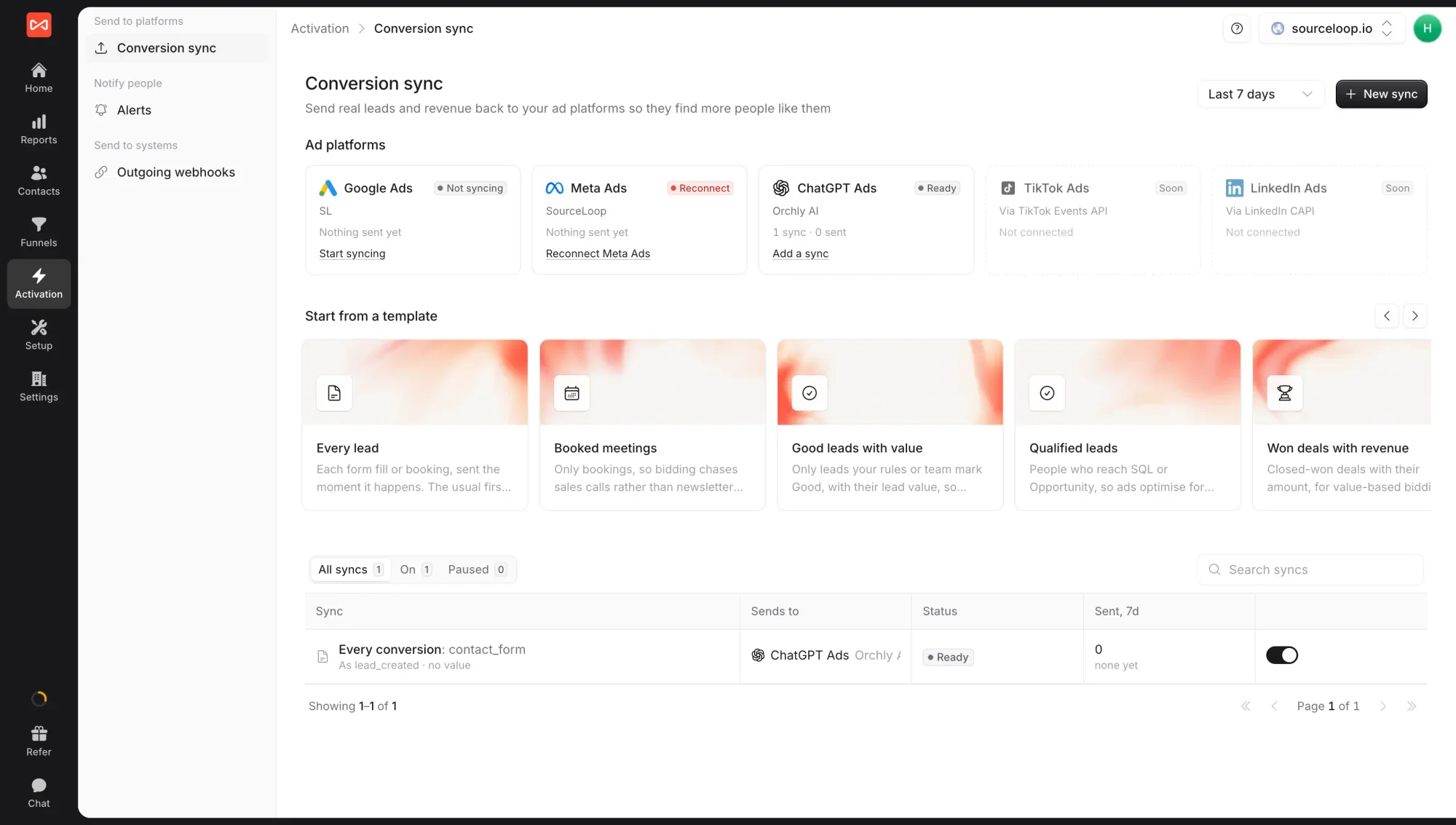
Your ad platforms optimise toward whatever you tell them is a conversion. If that is every form fill, they find more people who fill in forms, including students, competitors, and spam. Conversion sync sends them what really matters: leads your team marked Good, contacts who reached SQL, deals that closed, and payments that cleared, each tied back to the ad click that started it.
Conversion sync lives under Activation -> Conversion sync.
What you can send
Each sync sends one moment to one ad account:
| Moment | When it is sent |
|---|---|
| Every conversion | Each form fill, booking, call, or tracked conversion, as it happens |
| New lead | The first time a person gives you their email or phone, once per person |
| Good lead | When a lead is marked Good by your lead rules, Ask AI, or a teammate. Withdrawn if it stops being Good. |
| Reaches a stage | When someone reaches a stage you pick, such as MQL, SQL, or Customer |
| Status changes | When someone moves into a status you pick, such as Qualified |
| Deal won | When a deal is marked won in your CRM, with its amount |
| Trial started | When someone starts a free trial in your billing tool |
| Becomes paying | When a subscription starts paying, new, converted from a trial, or returning |
| Every payment | Each successful charge, renewals included |
Before you start
- At least one ad account connected under Setup -> Ad Platforms: Google Ads or Meta Ads
- For stage, deal, and payment moments: your CRM or billing tool connected
- For Good leads: rules set up under Setup -> Lead quality, or a team that marks leads in Contacts
Step 1: Check your ad platforms
The Ad platforms row at the top shows every account that can receive conversions, with its health:
- Ready or Sending: all good
- Not syncing: connected, but no sync uses it yet. Click Start syncing.
- Reconnect: the connection needs to be approved again
- Needs setup: something is missing, such as Meta’s pixel or a Google conversion action
Platforms you haven’t connected appear with a Connect button that takes you to Setup.
Step 2: Pick a template
Under Start from a template, pick the sync closest to what you want:
- Every lead: each form fill or booking, sent the moment it happens. The usual first sync.
- Booked meetings: only bookings, so bidding chases sales calls rather than newsletter signups
- Good leads with value: only leads your rules or team mark Good, with their lead value
- Qualified leads: people who reach SQL or Opportunity
- Won deals with revenue: closed-won deals with their amount, for value-based bidding
- Trials started, New paying customers, and Every payment for subscription businesses
Or click New sync to start from scratch.
Step 3: Set up the sync
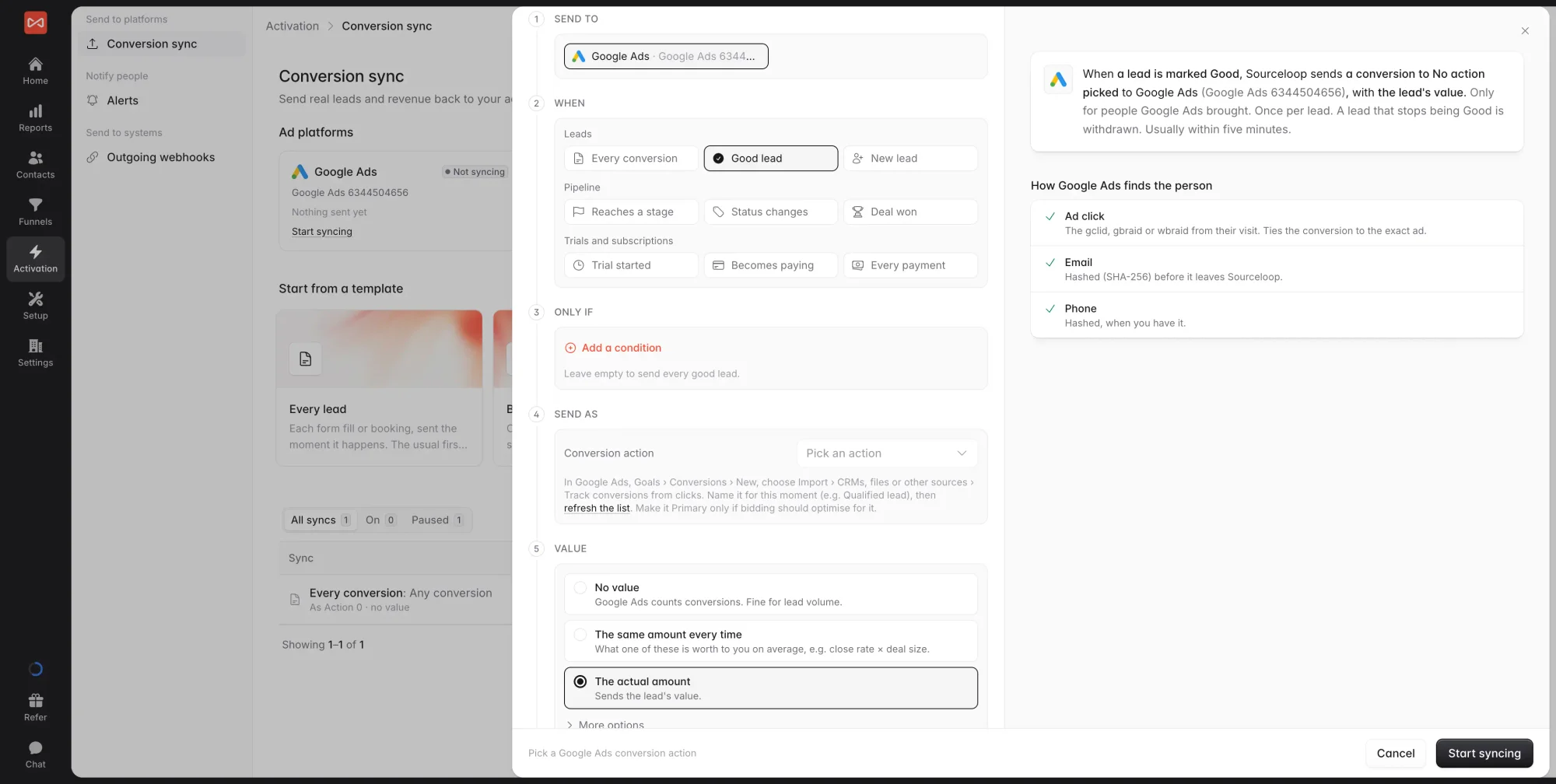
The builder walks through each step, with a preview on the right:
- Send to: the ad account. It can’t be changed after saving, so make a new sync for another account.
- When: the moment to send, from the table above. Stage and status moments ask which ones.
- Only if (optional): conditions every send must meet, such as conversion type is Meeting, country is United States, or campaign contains “brand”.
- Send as: the name the platform knows it by. For Google Ads, pick a conversion action from your account. For Meta and ChatGPT Ads, pick a standard event or type a custom one. SourceLoop suggests the platform’s recommended event for each moment.
- Value: send No value, The same amount every time, or The actual amount where the moment has one. For Becomes paying, choose how many months of revenue it counts as. You can also skip anything worth less than an amount, and update the value when a deal closes.
- Who counts: People the platform brought (recommended) or Only people with its click id, credited to the Last click or First click from that platform.
- Past conversions (new syncs only): send what already happened, up to 7 days back for Meta and ChatGPT Ads and 60 days for Google Ads.
The preview shows the sync as one sentence, the information the platform receives for a sample person, and how the platform will match that person: by ad click, by email, or by phone. Personal details are hashed before they leave SourceLoop.
Click Save. Sends usually go out within five minutes.
Step 4: Watch it work
Back on the Conversion sync page, each sync shows its status and how many conversions it sent in the selected period. Open a sync to see Recent sends: the last 50 people sent, what each one matched on, and anything waiting or skipped, such as a lead waiting for an email or a click, or a conversion too old for the platform to accept.
What’s next
- Set up Google Ads step by step: Send conversions to Google Ads
- Set up Meta step by step: Send conversions to Meta
- Get told in Slack when a Good lead arrives: Slack and email alerts
Frequently asked questions
-
Which ad platforms can I send conversions to?
Google Ads, Meta Ads, and ChatGPT Ads today. TikTok and LinkedIn appear on the page marked Soon.
-
Will this double count conversions my website tag already sends?
It can, if both report the same moment under the same name. Send SourceLoop's conversions under their own conversion action or event, or use them for moments your website tag can't see, such as a qualified lead or a won deal. The builder warns you when two syncs on the same account would report the same sale twice.
-
What does "Who counts" mean?
It decides which conversions a sync sends. People the platform brought sends anyone whose visit SourceLoop traced to that platform, which is the recommended setting. Only people with a click id is stricter and sends fewer people, because ad blockers, iPhones, and switching devices often drop the click id. People who came from another channel are never sent.
-
Can I send conversions that happened before I set up the sync?
Yes, for a new sync. Turn on Send past conversions and choose how far back to go. Meta and ChatGPT Ads accept up to 7 days, and Google Ads up to 60.
-
What happens if a lead turns out to be spam?
Leads marked Spam are never sent. If a lead was already sent and is later marked Spam, or stops being Good on a Good lead sync, SourceLoop withdraws it from the platform.
-
Can I have several syncs to one ad account?
Yes. A common setup is every lead under one name, qualified leads under another, and won deals with their revenue under a third. You can even send the same moment twice, split by a condition, such as web forms to one event and bookings to another.

 Paid Social


