
Track Intercom Chat as Meta Ads Conversions: A Setup Guide
Learn how to track Intercom chat as Meta Ads conversions using Conversions API, deduplicated event IDs, and qualified-lead milestones that actually improve ROI.
Your Meta dashboard says you're generating plenty of chat conversions. The sales pipeline says something else. A visitor opened the Intercom widget, asked about support, sent a spam message, or disappeared after the first reply, yet Meta counted each action as a success.
That setup teaches the algorithm to find more people who start chats, not more people who become qualified leads. To track Intercom chat as Meta Ads conversions properly, you need to choose a meaningful conversation milestone, preserve identity and click context, and send a stable server-side event when the business outcome is clear.
Table of Contents
- Why Chat Conversions Deserve Better Than a Pixel
- How the Intercom-to-Meta Data Flow Works
- Choosing the Right Conversation Milestone to Optimize For
- Sending Qualified Chats Through the Conversions API
- Deduplication and Event ID Discipline
- Privacy Identity and Data Quality Considerations
- Best Practices and a SourceLoop-Powered Launch Plan
Why Chat Conversions Deserve Better Than a Pixel
A chat-start conversion looks attractive because it produces activity quickly. The problem is that activity isn't the same as intent. Intercom can receive a conversation from a prospective buyer, an existing customer looking for help, an automated message, or someone who never provides enough information for a sales follow-up.
A browser event fired when the Messenger opens can't distinguish those cases. It tells Meta that a widget interaction happened, but not whether the visitor became a lead, reached a sales representative, booked a meeting, or created an opportunity. A campaign optimized around that signal can report an impressive conversion count while sending increasingly unsuitable traffic.
Practical rule: Don't ask Meta to optimize for the earliest event simply because it's the easiest event to fire.
The fix is to separate measurement events from optimization events. You can record a conversation start for diagnostics, but use a later milestone, such as a qualified chat or booked meeting, as the event that guides campaign delivery. That gives the advertising system a clearer connection between the original click and the result your sales team values.
Intercom's reporting model supports this distinction. Its Leads report records leads generated through the Messenger, shows reply speed, and identifies messages that convert visitors into leads. The report can be filtered across date ranges of up to one year, and Intercom defines new leads from the Messenger as leads generated through new inbound conversations and replies to ongoing messages, as documented in its conversation reporting guidance.
The practical outcome is a more honest funnel. The browser may register the initial interaction, Intercom can identify the lead or qualification state, and a server-side workflow can tell Meta when that conversation became commercially meaningful. You aren't throwing away chat data. You're giving each event the right job.
How the Intercom-to-Meta Data Flow Works
Intercom is the upstream system. It observes the conversation and its lifecycle, including the visitor's message, replies, assignment, handoff, and eventual outcome. Meta is the destination that uses conversion signals for measurement, reporting, attribution, and campaign optimization.
The bridge is Meta Conversions API, which accepts events from websites, business-messaging systems, offline sources, and CRMs through a server-side connection. Meta says these server events can support measurement and optimization in a way similar to events sent through the Pixel or mobile SDKs. Meta also announced in February 2023 that Conversions API fully supported offline events, bringing web, app, and offline measurement into the same framework, according to its Conversions API documentation.
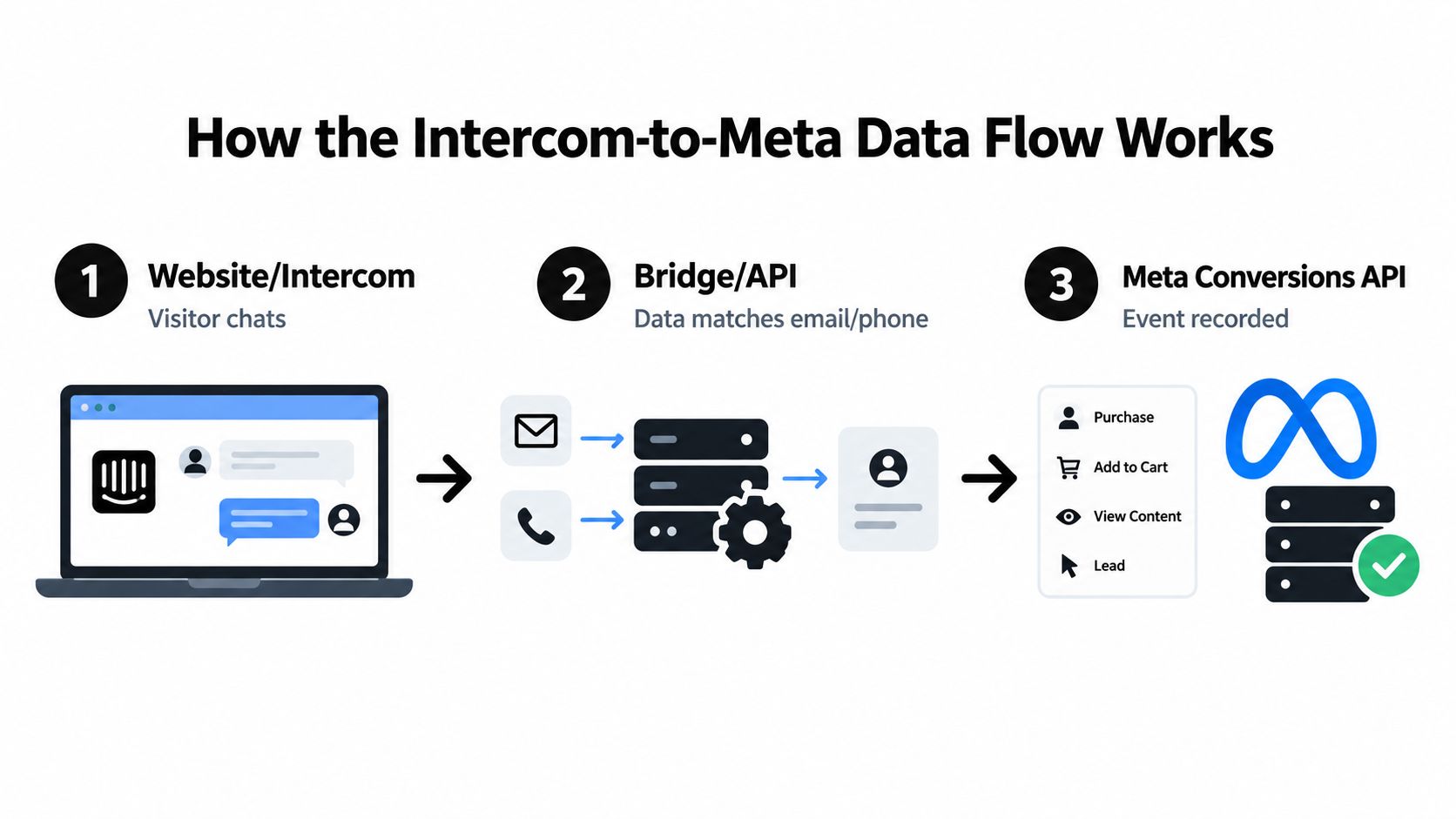
The pipeline in practical terms
A visitor arrives from Meta. Your site captures the available click and browser context, such as the landing URL, referrer, and
_fbpvalue when available.The visitor starts an Intercom conversation. Intercom stores the conversation and contact relationship. Your integration associates that conversation with the visitor's known identity and original acquisition context. Teams that need to preserve lead-source details can use a workflow such as capturing lead source data in Intercom.
Your qualification logic evaluates the conversation. A sales handoff, captured business email, booking, or explicit qualification decision can mark the conversation as a deeper-funnel event. A widget open shouldn't automatically receive that status.
A server-side process sends the event to Meta. The payload includes the event name, timestamp, source information, and normalized identifiers. The server can send the event when the qualification occurs, even if that happens after the visitor has left the original page.
Meta matches and uses the event. The platform can attribute the event where identity and click context are sufficient, then use the signal for reporting or optimization according to the campaign setup.
The Pixel is like a doorbell. It rings when someone arrives and may stop telling you anything once the person leaves. Conversions API is closer to a phone line that can report what happened later, including a lead that matured in Intercom or a CRM after the browser session ended.
This architecture doesn't make poor qualification rules disappear. It makes those rules operational. If your team labels every chat as a conversion, the server will transmit every chat more reliably. The improvement comes from deciding which lifecycle state deserves to influence acquisition.
Choosing the Right Conversation Milestone to Optimize For
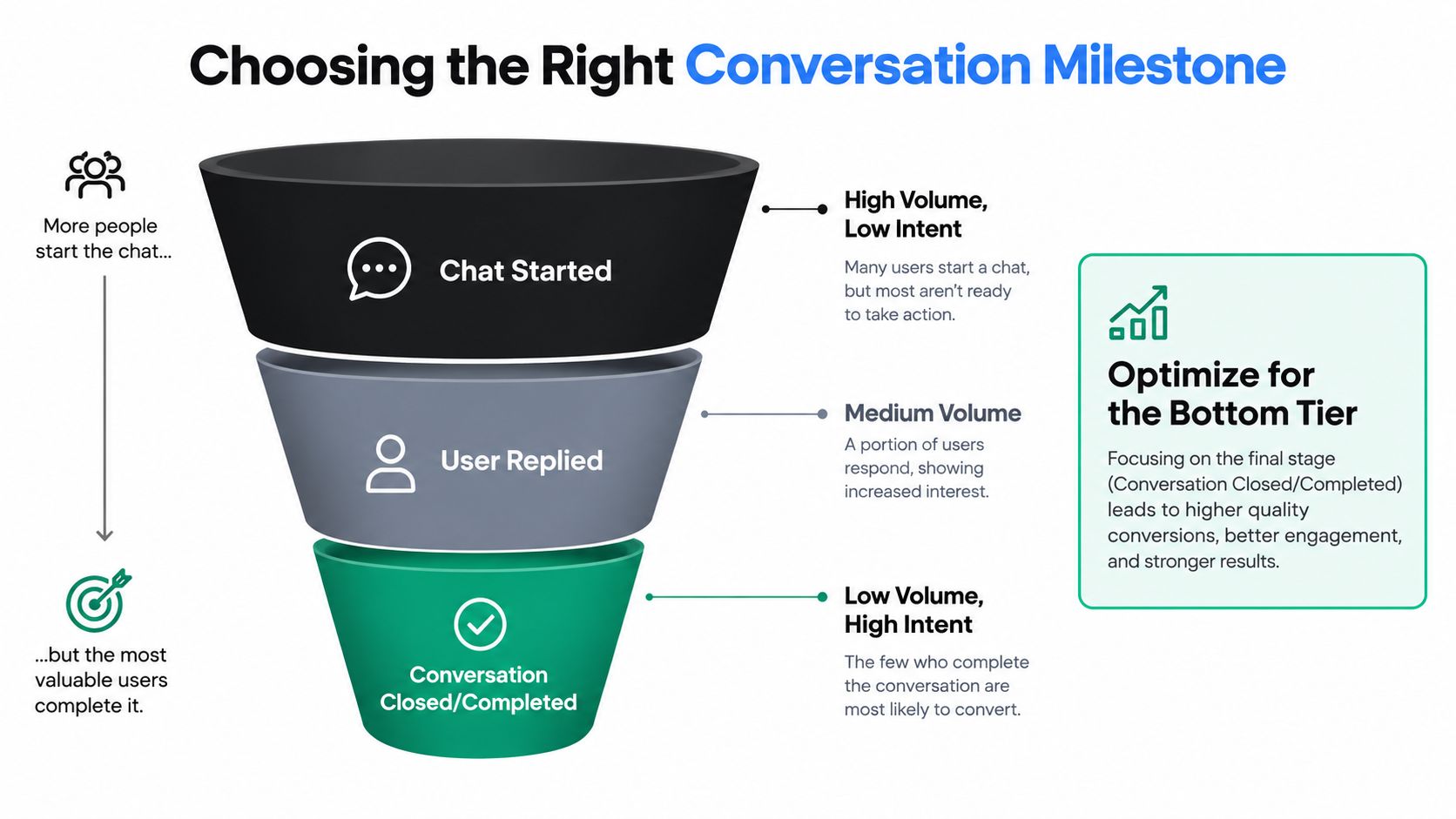
Intercom exposes several conversation states, including a user-created conversation, a user reply, an admin reply, assignment, and closure. Those states don't carry the same buying intent. A visitor who opens the Messenger and leaves is quite different from a visitor who answers a qualification question, shares a work email, and accepts a sales handoff.
A useful milestone ladder looks like this:
- Conversation started: The visitor initiated contact. This is useful for diagnosing demand and measuring top-of-funnel engagement, but it includes support questions, spam, and low-intent interactions.
- Lead created: Intercom recognizes a lead outcome according to its reporting model. This is more useful than a raw chat start, especially when your Messenger prompts collect meaningful contact details.
- Qualified chat: Your rules identify a sales-relevant interaction. The rule might require a business need, a suitable profile, a captured email, or confirmation from a human.
- Booked meeting: The visitor took a concrete commercial step. This is a stronger optimization event when your sales process depends on appointments.
- Opportunity or revenue event: The CRM records a later business milestone. This is usually the most valuable signal, although it arrives less frequently and with more delay.
Match the event to the decision
| Milestone | Buying Intent | Typical Volume | Best Use in Meta |
|---|---|---|---|
| Conversation started | Low and ambiguous | High | Measurement, audience diagnostics, or temporary optimization when deeper signals are unavailable |
| User replied | Moderate | Medium | Engagement analysis and an intermediate quality signal |
| Lead created | Moderate to strong | Lower | Lead reporting and qualification analysis |
| Qualified chat | Stronger | Lower | Preferred optimization event for sales-led chat acquisition |
| Booked meeting | High | Lower | Optimization when meetings are the core commercial outcome |
| Opportunity or revenue | Highest | Lowest | Down-funnel optimization and value-based analysis |
There isn't a universal rule that says every account should optimize for revenue immediately. If qualified events are too scarce for stable learning, a chat-start event may be a temporary measurement or optimization choice. But that choice should be deliberate, and the team should move toward qualified or revenue-linked milestones as the account develops enough downstream signal.
Intercom's lead reporting gives you a way to test the boundary. Compare which messages generate leads, how quickly teams reply, and whether your qualification criteria align with the conversations Intercom classifies as leads. The report's one-year filtering window also supports retrospective checks of whether a rule consistently identifies meaningful interactions, rather than merely producing a convenient event stream.
Meta's event intake can support a staged design. Send intercom_conversation_started quickly for visibility, then send qualified_chat, opportunity_created, or a later customer event when the CRM or sales process confirms the outcome. Intercom webhook events can provide the operational trigger for these state changes, using Intercom's webhook setup documentation as the implementation reference.
Sending Qualified Chats Through the Conversions API
The implementation should begin with a business definition, not an API request. Write down what makes a conversation qualified before you create the Meta event. For one team, that might be a completed human handoff. For another, it might be a booked meeting or a sales-qualified lead recorded in the CRM.
Once that state exists, create a server-side Lead event or a custom conversion event. Don't fire it when the widget opens. Fire it when the Intercom conversation reaches the state your acquisition team wants more often.
Build the event payload
A useful payload should contain:
- Event name: Use a stable name such as
qualified_chatoropportunity_created. - Event timestamp: Send the time the qualification happened, not merely the time the original page loaded.
- Source URL: Preserve the relevant page or landing-page context where available.
- Event source: Identify the origin appropriately, such as website, business messaging, or another supported source.
- Customer identifiers: Include normalized email, phone, external ID, and the browser
_fbpvalue when available. - Conversation reference: Keep the Intercom contact or conversation ID in your internal event log so the event can be traced and retried safely.
The identity fields need consistent normalization before transmission. An email should be cleaned and represented consistently, while phone values should follow one agreed format. The integration should also retain the relationship between the Intercom record and the original Meta click or browser session. If the visitor starts anonymous and identifies themselves only during the chat, the system needs to join those records instead of creating an unrelated lead.
Meta's Event Match Quality score is measured on a 0 to 10 scale and evaluates the presence and quality of customer-information parameters, along with the proportion of events matched to Meta accounts. Only matched events can be used for attribution and ad-delivery optimization, as described in Meta's Event Match Quality documentation.
Keep the handoff observable
A production workflow needs more than a successful HTTP response. Store the event name, timestamp, conversation ID, qualification state, delivery result, and the identifiers used for matching. This lets you answer practical questions when Meta reporting and Intercom reporting diverge.
If the first implementation sends only a contact email after the conversation starts, it may still produce weak downstream data. If it sends no identity at all, Meta has less opportunity to match the conversion. If it sends identity without a valid lawful basis, the technical result doesn't make the collection appropriate. Engineering, marketing, and privacy owners need to agree on those boundaries before launch.
Teams handling the setup can document the configuration through a Meta Conversions API implementation workflow. The important design choice remains independent of the tool: send the event when the business milestone occurs, and preserve the identifiers that connect that milestone to the acquisition touchpoint.
Deduplication and Event ID Discipline
A qualified Intercom conversation should produce one Meta conversion, even when browser and server delivery both occur. The common failure is duplicate transport paths: the Pixel sends the chat, the server workflow sends it again, and Meta counts two conversions because the IDs differ.
For the same event, send the same event name and a stable, unique event ID through both paths. Meta uses the event_name and event_id combination to deduplicate browser and server events. Matching events for one Pixel must arrive within the documented 48-hour deduplication window. Meta discards the later duplicate, according to its Pixel and server event deduplication guidance.
Generate the ID from the conversation's qualification milestone, not from the moment either transport sends its copy:
intercom_<conversation_id>_qualified
If the browser creates one ID and the backend independently creates another, Meta sees two events. Resolving that split requires joining the visitor identity across both paths, as explained in this guide to identity stitching and deduplication. A retry must reuse the original ID, or it can become another conversion. Create the immutable ID once, pass it as the browser eventID and CAPI event_id, and retain it in the event store.
Clean pipeline: one qualification, one event name, one immutable ID, and repeated transport attempts without minting another conversion.
Log the delivery status, event ID, event name, timestamp, conversation ID, and qualification state. Test browser-only, server-only, and combined delivery. Confirm that both copies merge rather than inflate reporting.
Privacy Identity and Data Quality Considerations
Identity persistence improves matching, but it also creates a governance responsibility. A lawful basis and an appropriate consent experience should govern whether customer identifiers and advertising context can be shared with Meta. Hashing or normalizing an identifier doesn't replace that decision. It changes the representation of the data, not the underlying responsibility for collecting and transmitting it.
Capture only the fields your measurement purpose requires. If an email and click identifier are enough for the workflow, don't export unrelated conversation content. Keep sensitive chat text out of the conversion payload unless a documented purpose and approved process require it.
Treat consent and quality as one process
The same identity record that helps Meta match a qualified chat must have a clear origin. Store consent state or the relevant permission signal with the event, apply your retention rules, and make sure the server workflow respects those rules. A resource on commitment to data privacy can help teams frame the governance discussion alongside the implementation work.
Data quality also depends on filtering. Automated conversations, support requests, internal tests, and spam shouldn't qualify because they reached an agent. Define exclusions in Intercom or the CRM, and ensure those exclusions prevent the downstream Meta event from being sent.
Use Intercom's historical reporting to validate the rules. Review the conversations classified as leads, compare messages that generate lead outcomes, and inspect whether your qualification state is catching sales-relevant interactions. A rule that looks precise in a handful of examples may behave differently across campaigns, landing pages, and audiences.
The underlying milestones are portable. A conversation, lead, qualification, booking, and purchase can be used across countries and advertising markets because the event definitions describe business outcomes rather than a particular market. Delivery can happen in real time when the event occurs or in batches according to an operational schedule, provided timestamps, identity, and deduplication remain reliable.
Best Practices and a SourceLoop-Powered Launch Plan
A strong launch starts with a narrow event contract. Write the qualification rule in language a salesperson, marketer, and engineer would interpret the same way. Then assign each stage its own event name, such as intercom_conversation_started, qualified_chat, and opportunity_created.
Use this checklist before enabling optimization:
- Define qualification: Specify the required action or review state, and list exclusions for support, spam, automation, and internal testing.
- Separate measurement from optimization: Record chat starts for visibility, but reserve the optimization event for a qualified or revenue-linked milestone.
- Preserve identity: Carry the Intercom contact or conversation ID, original Meta click context, email, phone, external ID, and
_fbpwhere available and permitted. - Use stable event IDs: Derive one immutable ID from the conversation and milestone, then reuse it across browser and server delivery.
- Choose delivery timing: Send the initial interaction promptly, then transmit later qualified, booked, opportunity, or customer events from Intercom or the CRM.
- Review match quality: Monitor Meta's Event Match Quality and investigate missing identifiers, inconsistent normalization, and unmatched records.
- Reconcile systems: Compare Meta event results with Intercom lead reporting and CRM qualification states, not just with browser event counts.
A tool such as SourceLoop can automate part of this workflow by capturing visit context, connecting Intercom contacts and conversations to the original acquisition touch, and syncing qualified offline conversions to Meta through CAPI. That can reduce the amount of custom stitching between the website, Intercom, CRM, and advertising platform, while leaving your team responsible for the qualification policy.
Don't judge the launch by whether the first chat event appears in Events Manager. Judge it by whether the system can answer three questions: which Meta interaction preceded the conversation, what made the conversation qualified, and whether Meta received exactly one trustworthy conversion for that outcome.
That shift changes optimization from “find people who open chat” to “find people who create qualified pipeline.” Define the milestone, implement the event contract, test deduplication, and move your Meta campaign toward the deepest reliable outcome your sales process can produce.
Start by auditing your current Intercom conversion trigger today. Replace widget-open conversions with a documented qualification event, connect the conversation to its original Meta click, and test one deduplicated server-side conversion before changing campaign optimization.

 Paid Social


