
Best Google Ads Attribution Tools Compared for 2026
Best Google Ads Attribution Tools for lead tracking: what each one measures, the data it needs, and how to pick the right one for your team.
If your attribution dashboard names a winning campaign, but your CRM can't connect that campaign to paying customers, what exactly have you measured? The best Google Ads attribution tools should help you follow an ad click through qualification, pipeline and revenue, then return eligible business outcomes to Google Ads.
That's a more useful buying test than counting attribution models. A polished journey report can explain how credit was divided without showing whether the lead was qualified, whether Google accepted the conversion or whether the revenue matches your CRM.
Table of Contents
- Quick Picks for Google Ads Attribution Tools
- What Lead Tracking Is and How Attribution Connects Clicks to Revenue
- Attribution Models Compared, From Last-Click to Data-Driven
- Data Thresholds Before Data-Driven Attribution Works
- Tracking Gaps From Consent, Missing IDs and Late Deals
- How to Choose a Tool That Proves Lift, Not Just Credit
- Confirm Attributed Pipeline Against Revenue Before Changing Bids
Quick Picks for Google Ads Attribution Tools
Quick picks for Google Ads attribution by team need
| Tool or category | Best for | Attribution models | Returns results to Google Ads | Cost |
|---|---|---|---|---|
| Google Ads data-driven attribution | Teams spending mainly in Google Ads | Data-driven and available last-click reporting, confirm options for each conversion action | Native, for outcomes recorded or imported into Google Ads | Included with Google Ads |
| Google Analytics 4 | Cross-channel web reporting | Data-driven and available rule-based reporting | Through linked accounts and configured conversion imports | Free |
| SourceLoop | Lead-generation teams and agencies that need CRM pipeline | First-touch, last-touch, linear, position-based and time-decay | Yes, offline conversions with the click that earned them | Free trial and paid plans |
| Dedicated multi-touch platforms | Higher-spend ecommerce and B2B teams | Documented rule-based or proprietary models in the selected package | Require demonstrated offline or server-side conversion uploads | Often quote-based |
Google Ads is the practical starting point when most paid activity happens within Google and you already record meaningful conversions there. Its native reporting won't independently explain the contribution of every outside channel or sales interaction.
GA4 fits website analysis across channels. Use it to investigate acquisition and on-site behavior, but don't assume a linked account supplies CRM qualification or closed-won revenue automatically. Those outcomes still need a configured collection and import process.
Our platform fits teams that need the connection between marketing journeys and CRM outcomes. We sync attribution data to CRM and ad platforms, rather than leaving lead quality in a separate sales report.
Dedicated multi-touch platforms belong on the shortlist when your requirements extend beyond straightforward lead tracking. Evaluate the actual package, not the category label. A platform might offer advanced reporting while reserving conversion uploads, revenue reconciliation or experimental measurement for another package.
Apply these buying tests
- Beyond form fills: Can the tool show qualified opportunities and revenue, not just submissions?
- Back into bidding: Can it return eligible qualified events and values to Google Ads, with visible upload results?
- Across your sales cycle: Can it retain the journey until the outcome arrives, rather than stopping at the booking?
Treat this table as a shortlist, not a universal ranking. Before committing, trace your own conversion records through each candidate and compare the resulting revenue against your CRM.
What Lead Tracking Is and How Attribution Connects Clicks to Revenue
Think of a lead as a parcel. The source information is its tracking label, and that label needs to survive every handoff from the website to the booking system, CRM and payment record.
Lead tracking records which ad, keyword or channel introduced a prospect and preserves that information through later actions. Attribution applies a rule or model to decide how much credit each recorded interaction receives.
The distinction matters. A model can divide credit only among the interactions your tracking captured.
The journey below shows how source information should travel with the customer record.
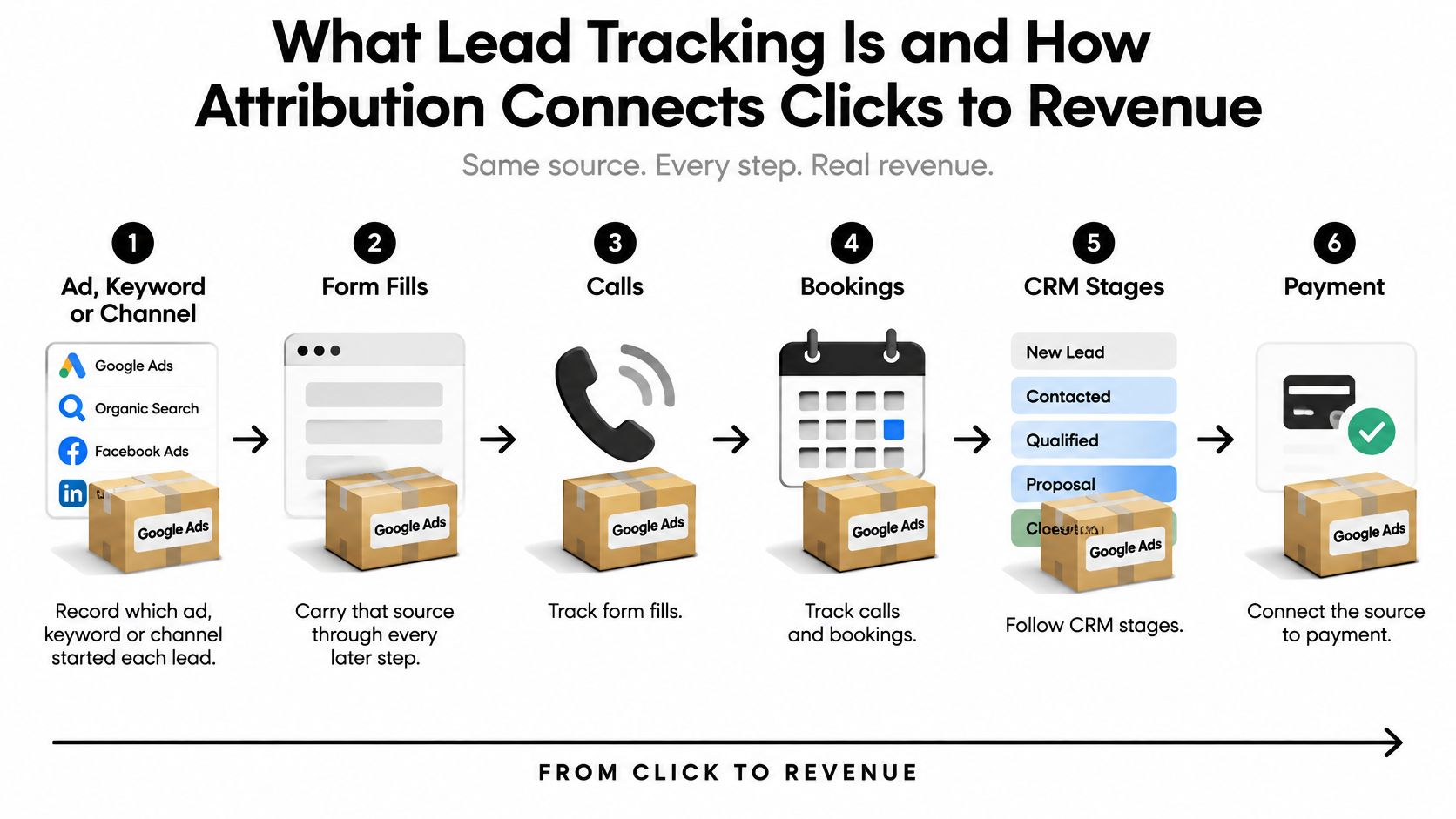
Follow the record through each handoff
- Capture the click source. Store campaign tags, such as UTM parameters, and the Google click identifier when available.
- Record subsequent visits. Keep the observable touchpoints connected to the visitor instead of replacing the original source at every return.
- Attach the journey to a lead. A form, call or booking should connect the visitor history to a stable lead ID.
- Follow CRM changes. Preserve that connection as sales qualifies the lead, creates an opportunity and records the outcome.
- Return the meaningful event. Send eligible outcomes, timestamps and values to the ad platform rather than treating every submission as equally valuable.
Rule-based models use a preset formula. Google's data-driven attribution instead compares converting and non-converting paths to estimate contribution across eligible Search, Shopping, YouTube, Display and Demand Gen interactions, according to Google Ads' attribution documentation.
That doesn't turn Google's model into an independent record of every marketing channel. Your broader journey reporting and Google's native attribution answer related but different questions.
A hypothetical journey
A prospect clicks a Search ad in March, returns through a LinkedIn ad, books a demo in April and becomes a customer in June. If your records begin at the booking form, the earlier introduction may disappear.
With connected tracking, marketing can inspect the acquisition path while sales confirms qualification and revenue. The independent report can compare cross-channel credit, and Google Ads can receive an eligible downstream conversion associated with its ad interaction.
Practical rule: Preserve the source before debating how to divide the credit.
Attribution Models Compared, From Last-Click to Data-Driven
Attribution resembles awarding medals after a relay. Last-click rewards the anchor runner, linear attribution shares recognition equally, and position-based attribution emphasizes the starter and finisher.
None of those choices changes who ran. They change how you describe each runner's contribution, which can change where you invest next.
Attribution models and the data each one needs
| Model | How it assigns credit | Best when | Data needed |
|---|---|---|---|
| Last-click | All credit to the final eligible interaction | Investigating closing interactions and short decisions | Final eligible interaction connected to an outcome |
| First-click | All credit to the first recorded interaction | Measuring which channels introduce demand | Original interaction retained through conversion |
| Linear | Equal credit to recorded eligible interactions | Comparing multi-step journeys without favoring a position | Connected touchpoint history and conversion record |
| Position-based | Heavier weight on first and last touches, with remaining credit across the middle | Introduction and closing touches deserve emphasis | Ordered journey and explicit weighting rules |
| Time-decay | More credit to interactions nearer conversion | Recent interactions deserve greater emphasis | Connected interactions with timestamps |
| Data-driven | Learns contribution from converting and non-converting paths | Sufficient observed activity supports modeling | Account interaction and conversion history sufficient for the applicable requirements |
These are conceptual model choices, not a promise that every tool currently offers every model. Check the available settings inside the product and conversion action you'll use.
For a deeper explanation of how the formulas affect channel comparisons, our guide to attribution modelling in marketing provides useful context.
Credit can affect optimization
Google reported that advertisers switching to data-driven attribution typically experienced a 6% average increase in conversions; it also described a six-week experiment combining data-driven attribution with Maximize Conversions that recorded a 37% increase in conversions, in its data-driven attribution results publication.
Those are platform-reported findings, not a forecast for your account. Conversion volume, campaign structure, tracking quality, bidding strategy and sales-cycle length all affect how useful the change will be.
Compare candidate models using the same underlying cohort and outcome definition. Otherwise, a report might look better because one view includes more recent leads or a different revenue event.
A first-touch report might emphasize the campaign that introduced a buyer, while last-touch emphasizes the campaign that brought them back to book. That disagreement is informative. It isn't evidence that either campaign independently caused the sale.
Choose a model that supports your decision, and keep its assumptions visible. Don't move budget solely because a different formula produces a more appealing ranking.
Data Thresholds Before Data-Driven Attribution Works
Audit conversion volume before accepting a data-driven recommendation. A model needs enough observed activity to distinguish a repeatable pattern from a campaign that happened to receive an unusually valuable deal.
Start with the conversion action you intend to optimize, not an account-wide total that combines unrelated outcomes.
- Count its recent conversions. Use a consistent reporting period and check whether the action represents leads, qualified opportunities or purchases.
- Count eligible ad interactions. Match the period and supported network scope.
- Check the applicable requirements. Separate a recommended modeling volume from conversion-action eligibility.
- Inspect the underlying journeys. Confirm that apparent winners produce qualified pipeline, not merely easily measured activity.
Google's conversion-action guidance describes recommended volume of 200 conversions and 2,000 ad interactions within 30 days, while some conversion-action guidance specifies 300 conversions and 3,000 interactions initially, followed by 200 conversions and 2,000 interactions to remain eligible.
Conversion volume requirements by case
| Case | Threshold | Action if below threshold |
|---|---|---|
| Google data-driven attribution on supported networks | Recommended volume described above | Use transparent rule-based comparisons and CRM-linked revenue views |
| Stricter eligibility on some conversion actions, to start | Initial eligibility described above | Don't claim the model is statistically useful without checking eligibility |
| Stricter eligibility on some conversion actions, to stay eligible | Ongoing eligibility described above | Monitor volume and use an available reporting fallback if necessary |
| Lower-volume B2B, SaaS or high-ticket funnels | Below the applicable requirements | Prioritize journey diagnostics and mature cohort views |
The difference between sparse outcomes and a repeatable pattern is easier to understand visually.

What to use when volume is low
Look at touchpoint sequences, click-to-opportunity lag, stage conversion rates and revenue by campaign. Those views let you inspect the mechanics of acquisition without pretending a sparse sample provides a definitive channel ranking.
Compare cohorts with enough time to mature. A campaign generating newly booked demos shouldn't be judged against a campaign whose opportunities have already completed the sales process.
Don't replace qualified outcomes with weak events merely to make the account look busier. If you need an earlier optimization event, choose a stage that sales can define consistently and validate against eventual customers.
A data-driven path in a low-volume account is a useful clue, not a verdict on where the next budget increase belongs.
Tracking Gaps From Consent, Missing IDs and Late Deals
What happens when a visitor declines consent, the identifier disappears or sales records the deal long after the conversion event? These gaps decide whether a report can be reconciled to revenue at all. They matter more than the number of dashboard filters a tool offers. A conversion without a consent signal, click identifier or timely sales update is hard to defend when finance asks which campaign produced the revenue.
The illustration below maps the handoffs most likely to need investigation.
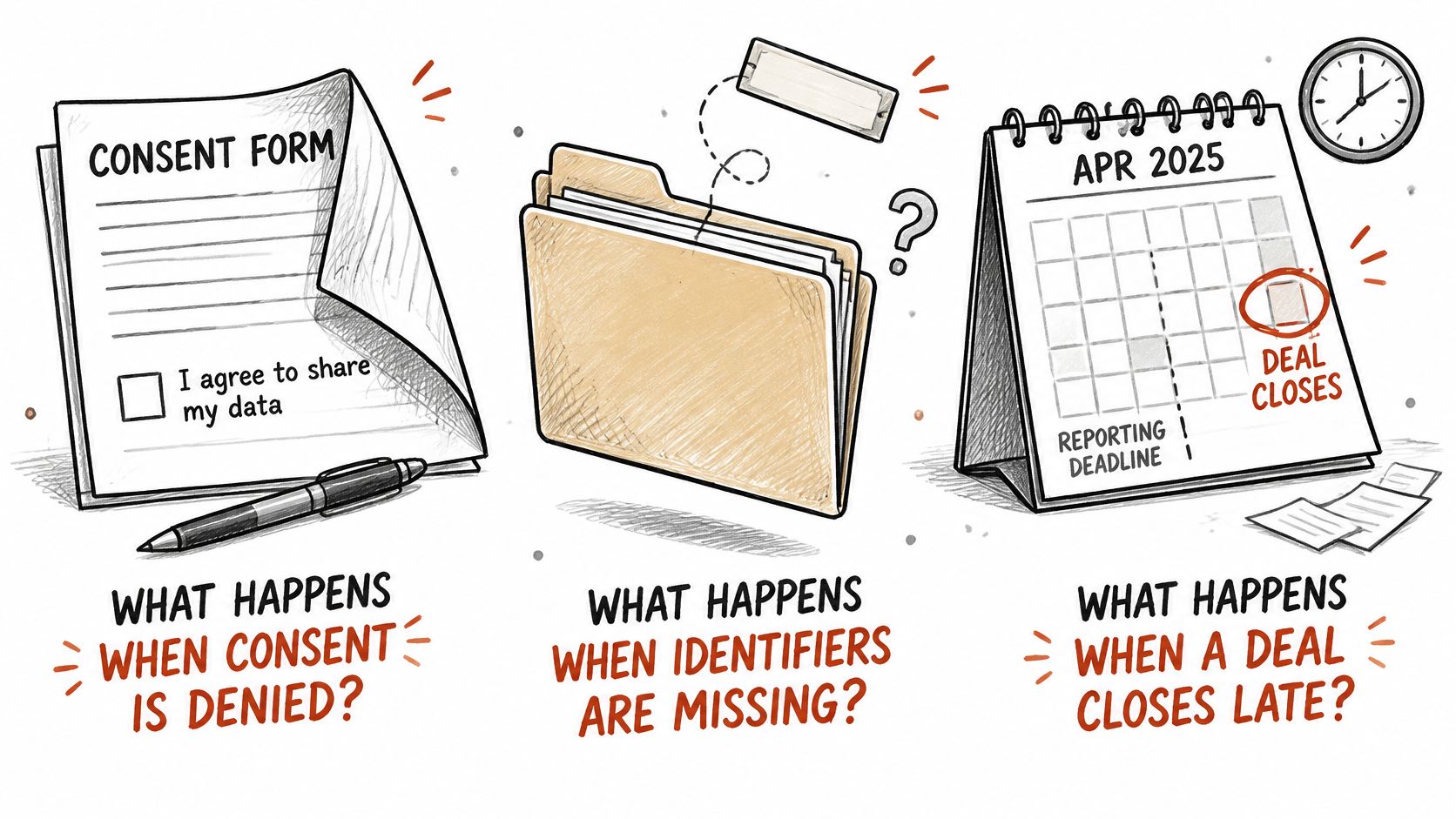
Consent and delayed reporting
Consent Mode can support cookieless pings and modeled conversions, but advertiser-specific modeling can require at least 700 ad clicks over seven days per country and domain grouping, according to Optimyzee's Google Ads conversion tracking guide. That guide also notes that attribution reports can bypass offline conversions uploaded more than seven days after the original event.
Don't confuse the clock after a conversion event with the time between an ad click and a closed deal. They are different clocks. Neither becomes a universal import deadline without checking the conversion method.
Server-side collection also isn't permission to ignore consent. The guide to GDPR-compliant conversion tracking helps frame the implementation questions.
Matching and upload reliability
Google's offline conversion API documentation explains how enhanced conversions for leads use normalized, hashed first-party identifiers alongside offline conversion imports. Preserve the original click identifier where available, keep a stable CRM ID and inspect conversion timestamps, values and duplicate handling.
Attribution here works like a relay: the click passes a baton to a lead record, and the CRM must pass it to an offline conversion without dropping it. Google doesn't support externally attributed conversions when enhanced-conversion imports use user-provided data. Keep independent multi-touch analysis separate from the eligible Google-attributed events you upload for optimization.
A short walkthrough of the tracking context follows.
Server-side tracking recovers conversions lost to iOS 14, ad blockers and cookie loss. SourceLoop reports capture figures of 98% for server-side tracking versus 62% for pixel-only tracking.
When reports disagree, Alpha Omega Digital's guide to fix GA4 and Google Ads mismatches is a useful troubleshooting companion.
Before approving a tool, verify:
- Consent handling: Collection follows the visitor's consent state.
- Identifier persistence: The source survives forms, bookings and CRM updates.
- Late-event handling: Rejected or delayed uploads remain visible.
- Reporting labels: Modeled results are distinguishable from observed records.
How to Choose a Tool That Proves Lift, Not Just Credit
Score each candidate on evidence you can inspect, not features a salesperson can describe.
- CRM-linked journeys: Can you open a revenue record and trace its recorded marketing interactions?
- Google Ads and Meta sync: Can you inspect accepted qualified events, values and failures?
- Control-group support: Can the platform run a holdout test, or export usable outcomes to an independent testing workflow?
A tool can satisfy the first criteria without satisfying the last. Attribution distributes credit across observed interactions; incrementality testing estimates additional outcomes caused by advertising. As PPC Land's analysis of data-driven attribution explains, credit can favor advertising shown to people who were already likely to convert.
A well-designed holdout compares eligible groups exposed to different advertising conditions. Its usefulness still depends on test design, adequate observations and allowing outcomes to mature.
The distinction is summarized below.
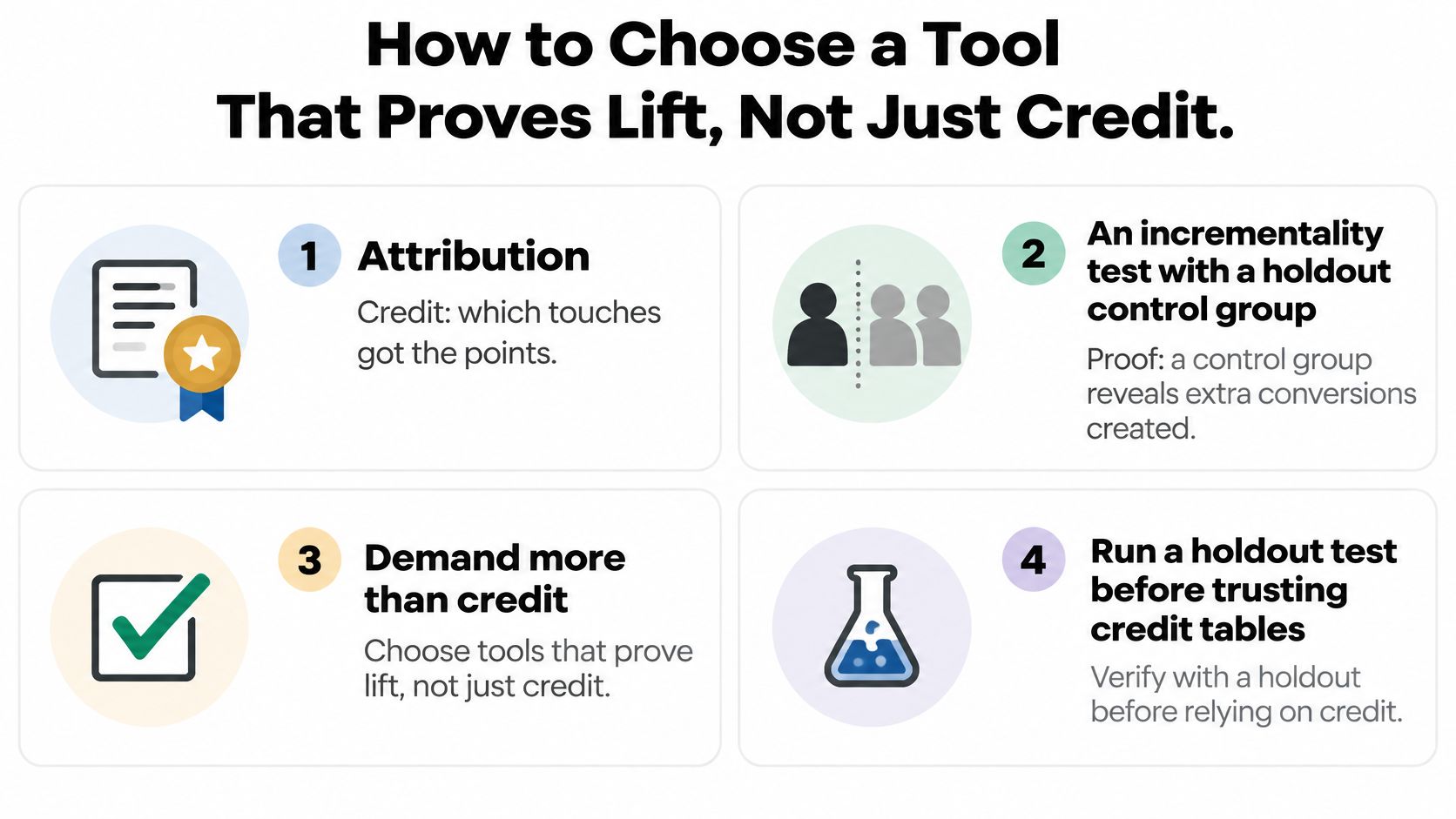
Match the tool to the decision owner
Agencies need client-facing reporting and a workable multi-client setup. Prioritize records clients can reconcile with their own CRM rather than a presentation they must accept on trust.
Lean SaaS teams need demo-to-close visibility. We send attribution data to CRM and ad platforms, so marketing and sales can work from connected lead records.
Ecommerce and DTC teams need order-level source information and the store integration they use. Our ecommerce tracking attributes Shopify orders to their source.
Sales-led companies need tests that allow pipeline to mature before interpreting revenue differences. A brief test judged only on bookings can miss changes in lead quality.
For test design and outcome selection, our guide to advertising effectiveness measurement provides a broader evaluation framework.
Buying criterion: Ask for a traceable business outcome and a credible validation method, not an accuracy promise.
Start with the cheapest diagnostic
Before buying, use our free UTM Campaign Builder and UTM Validator to create and check tagged links. Then use the free GA4 Channel Grouping Validator to investigate whether source naming will support useful channel reporting.
Check Google Ads, Meta Ads, LinkedIn Ads and your existing CRM first. We list integrations for those ad platforms and sync attribution data to CRM systems, but your acceptance test should still verify the exact fields and outcomes your team needs.
Confirm Attributed Pipeline Against Revenue Before Changing Bids
Don't change bids just because a new dashboard produces a different winner. First establish that the report reflects real business outcomes and that any unexplained differences are small enough for the decision you're making.
Reconciliation doesn't mean forcing every platform total to match. It means understanding which records belong in each report, which dates they use and why some outcomes appear in one system but not another.
Use a controlled acceptance plan
- Export a matched reporting cohort. Pull Google Ads conversion records alongside CRM closed-won and revenue records. Retain lead IDs, conversion actions, values, currencies and relevant timestamps.
- Explain the differences record by record. Separate missing identifiers, duplicate events, rejected imports and delayed uploads. Compare event-to-upload latency separately from click-to-close duration.
- Check the intended optimization action. Confirm it has the volume and eligibility appropriate to its model. Don't combine unrelated actions merely to pass a volume check.
- Validate the budget hypothesis. If experimental support is available, test a campaign with a suitable holdout. Define the business outcome and decision rule before reviewing results.
- Adjust only when the evidence supports it. When attributed pipeline and experimental outcomes disagree, investigate audience overlap, timing and lead quality before making a major change.
Also standardize what revenue means. Booked contract value, collected payments and revenue after refunds are different measures, and a dashboard can't reconcile them until the team chooses a consistent definition.
Separate installation from validation
Teams can track attribution within an hour of setup with our platform. That's an implementation milestone, not evidence that the reporting is ready to govern bidding.
Budget time for test submissions, CRM stage changes, accepted uploads and mature sales outcomes. Keep the initial model stable through a full sales cycle before comparing another model, and preserve a baseline so you can tell whether performance changed or only credit allocation changed.
Assign an owner to review failures and reconcile revenue regularly. Without that responsibility, even a correctly installed integration can become unreliable when forms, CRM fields or sales processes change.
Start SourceLoop's free 7-day trial with a specific acceptance test: connect Google Ads and your CRM, trace a qualified lead to its source, verify an eligible offline conversion upload and reconcile a closed-won record against revenue. Use the trial to validate the connection, then allow your sales cycle to mature before trusting the results with a larger bidding decision.




 Paid Social


