
Enhanced Conversions Google Ads: How They Work
Enhanced conversions Google Ads recover missed sales with hashed data. See the 5% and 17.1% benchmarks, consent rules, and 2026 setup paths.
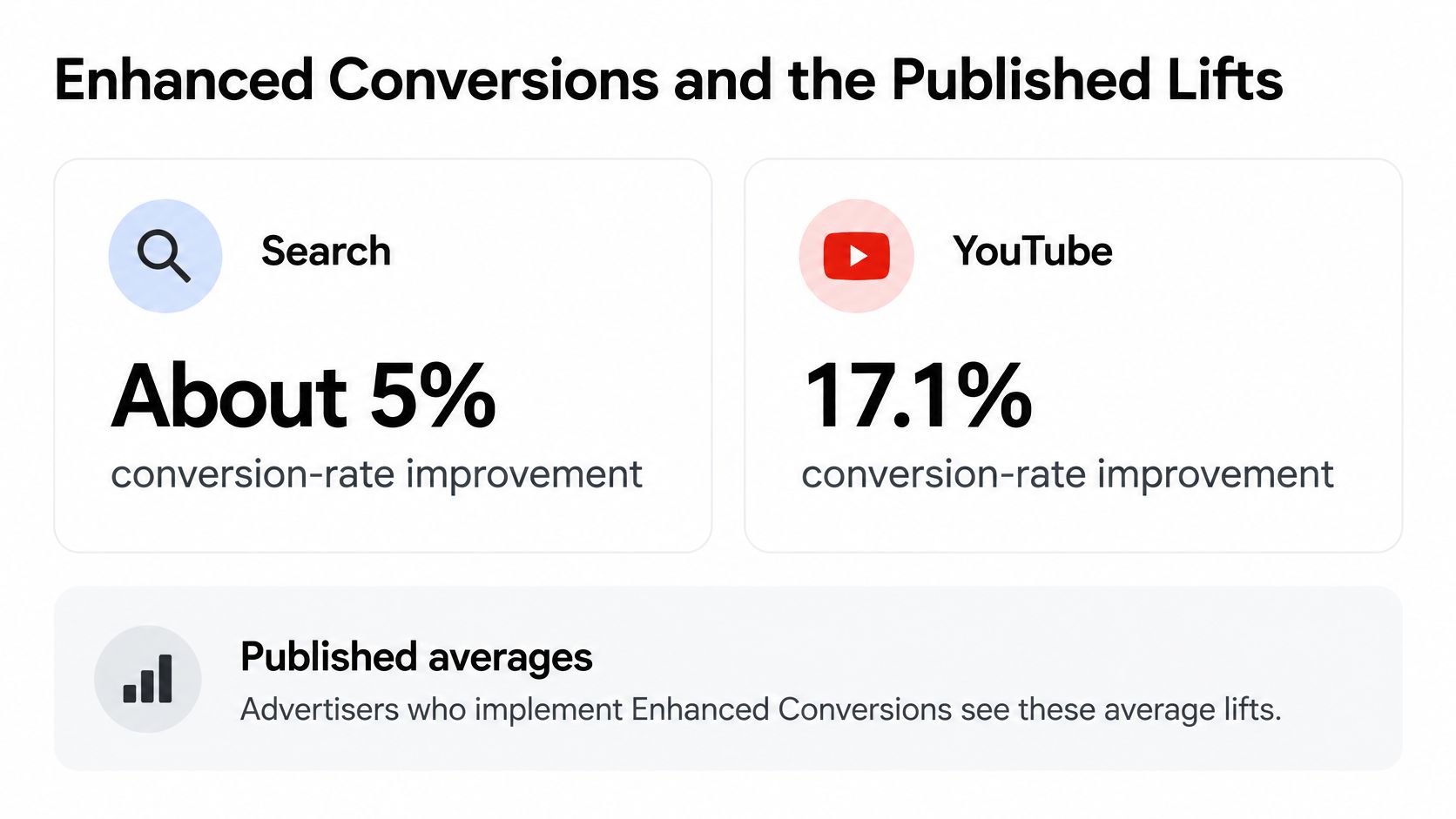
Enhanced Conversions in Google Ads supplement your standard conversion tag with hashed first-party customer data so Google can match more purchases, signups, and leads to earlier ad interactions, and Google publishes an average conversion-rate improvement of 5% on Search and 17.1% on YouTube. That's recovered measurement, not new demand appearing from nowhere.
Many advertisers treat this as a tagging task. You add user-provided data, hash an email, tick a box in Google Tag Manager, and mark it done. Then coverage stays thin, match rate stays empty, and nobody can tell whether consent blocked collection, the hash was malformed, or reporting isn't mature yet. I'd start from a different premise. Consent is the on-switch, data hygiene decides whether a match is possible, and your delivery path has to survive a platform migration that's already scheduled. Get those three things right and Enhanced Conversions Google Ads reporting becomes a bidding input you can trust. Get them wrong and you've added complexity that teaches Smart Bidding the wrong lesson.
Table of Contents
- Enhanced Conversions and the Published Lifts
- Consent Terms and Hashing Before Any Data Moves
- Better Matches for Bidding and Attribution
- How to Send and Verify Enhanced Conversions
- What a Matched Purchase or Lead Looks Like
- The June 2026 Move to Data Manager
- Sync Qualified Conversions with SourceLoop
Enhanced Conversions and the Published Lifts
The headline numbers deserve precision before they deserve excitement. Google's published Enhanced Conversions overview reports that advertisers implementing Enhanced Conversions see an average conversion-rate improvement of 5% on Search and 17.1% on YouTube. Those are averages across advertisers who implemented the feature, not a guarantee for your account, your vertical, or your next quarter.
Read them as measurement recovery. The feature doesn't persuade one extra person to buy. It helps Google recognise conversions that already happened but couldn't be tied back to an ad interaction through ordinary browser signals. When that recognition improves, reporting gets fuller and automated bidding gets more, and better quality, examples to learn from.
What actually gets sent
On an eligible purchase, signup, or lead submission, you can send first-party identifiers such as email, phone, name, or address alongside the conversion. Before transmission, that data is processed with SHA-256, a one-way hashing algorithm. Google compares the resulting hash with hashed data from signed-in Google accounts associated with ad interactions.
The raw email isn't what's transmitted for matching. You're sending a fingerprint that only matches if Google holds the same fingerprint on its side. If the hashes line up, a conversion that cookies or a browser tag would've missed can be attributed. If they don't line up, nothing matches, however good your creative was.
There are two jobs hiding under one label. Enhanced conversions for web measure online sales and events, typically at checkout or signup. Enhanced conversions for leads keep the hashed identity from the first inquiry and join it to a later imported offline outcome, such as a qualified lead or a closed sale. Conflating them is a common source of confusion, because the web version answers "did this online event follow an ad?" while the leads version answers "did this inquiry become revenue?"
Why Search and YouTube differ
| Situation | Product | What gets matched | Published effect |
|---|---|---|---|
| Search campaigns | Web or leads, depending on the event | Hashed email, phone, name, or address to a signed-in Google account | About 5% average conversion-rate improvement |
| YouTube campaigns | Web or leads, depending on the event | Same hashed first-party match where browser signals drop | About 17.1% average conversion-rate improvement |
| Online purchase or signup | Enhanced conversions for web | User-provided data with the website conversion tag | More observed online conversions; no separate published average |
| Website lead that closes later | Enhanced conversions for leads | Hashed identity from the inquiry plus an imported offline outcome | Better accuracy on qualified leads and revenue; no single published average |
Search usually starts with stronger direct intent and better existing conversion visibility. Someone typed a query, clicked, and converted in a tighter loop, so there's less lost signal to recover. That helps explain the smaller average.
YouTube loses more of the path. A view happens days before a search, a site visit, and a purchase, often across devices and sessions. More attribution signals drop between exposure and action, so there's more for hashed first-party matching and modelling to recover. A bigger published average doesn't mean YouTube suddenly outperforms Search for your offer. It means the measurement gap being repaired was larger.
Practical rule: Benchmark against your own diagnostics, not the published average for a channel you barely run.
Judge your account on three checks. Coverage tells you how much eligible conversion data carries usable customer information. Match rate tells you how much of that information Google can connect. Conversion uplift tells you how many additional conversions the feature reports. What moves those numbers is unglamorous: implementation quality, conversion volume, identifier availability, consent, and the share of eligible events that can be matched. A low-volume account with sparse emails and strict consent suppression shouldn't expect the published average, and shouldn't declare failure when it doesn't arrive.
Consent Terms and Hashing Before Any Data Moves
Consent determines whether enhanced-conversion data can move at all. Google's guidance on consent and Enhanced Conversions says user-provided data is not collected or processed until the advertiser accepts the relevant terms and, where applicable, sets the required consent parameters to granted.
If your consent-management platform, Google Consent Mode, tag-firing rules, regional policy, and enhanced-conversion setting disagree, even a correctly formatted hash may never leave the page. Assign ownership across legal, marketing, and whoever manages the tag container so each part follows the same consent policy. In the EEA and UK, Google recommends a strong consent framework alongside the feature. Use a clear process for GDPR-compliant conversion tracking before debugging tag variables.
Hashing is a fingerprint, not a locked box
Hashing doesn't encrypt an email for Google to recover later. It creates a one-way fingerprint: the same input produces the same output, which allows matching fingerprints to be compared.
Formatting matters. Normalize first, then hash. Lowercase and trim email addresses, use a consistent phone-number format, and apply one SHA-256 pass. Don't send raw values where hashed values are expected, and don't hash data that your CRM or form tool has already hashed.
Field completeness matters too. Google can use email, phone, name, and address, but a first name alone is a weak identifier. An email plus a phone number provides more useful matching information. Send clean, available identifiers rather than filling every event with incomplete or inconsistently formatted fields.
Three failure modes that look identical
A quiet account can point to different problems:
- Never collected: Consent wasn't granted or the terms weren't accepted, so the data didn't move.
- Collected but not matched: Data arrived, but Google couldn't connect it to a signed-in account associated with an ad interaction.
- Not mature yet: Data is flowing, but impact results haven't appeared.
Consent-mode and enhanced-conversion impact results need a reporting window. Keep the setup in place until that window has passed before treating flat results as evidence of an implementation failure.
During that period, check consent states in your highest-traffic regions, confirm that the account terms are accepted, and verify that denied-consent sessions behave as your policy intends. If results remain quiet after the reporting window, investigate consent and data flow before changing the hashing setup.
Better Matches for Bidding and Attribution
Start with the weakness of the default setup. A standard tag often stops at the click or the form submission. If the cookie is gone, the browser changed, or the value arrives weeks later in a CRM, bidding learns from a partial story. Worse, it learns confidently from that partial story.
Google's Enhanced Conversions documentation describes the feature as a way to improve conversion accuracy by supplementing standard conversion tags with hashed, first-party customer information, which Google compares with hashed data from signed-in Google accounts associated with ad interactions. For web events, that gives Smart Bidding a sturdier link between an ad interaction and an online sale or signup when browser signals drop. The conversion still has to happen. It just stops being invisible.
The lead problem is a value problem
Say two demo requests arrive from the same campaign on the same day. One is a student with no budget. The other becomes a five-figure annual contract. If both are sent to Google Ads as identical form fills with the same value, the bidding system has no reason to prefer the queries, audiences, or placements that produced the second one. It will happily find you more of the first, because they're usually cheaper and more plentiful.
Enhanced conversions for leads change the target. The hashed identity captured at inquiry is joined to a later offline record, so a qualified lead, opportunity, or paid deal can train the campaign instead of the raw submission. Now the system can start distinguishing demand that fills a spreadsheet from demand that fills a pipeline.
A rising form-fill count with flat qualified pipeline isn't growth. It's a bidding system optimising for the easiest event you gave it.
Data quality is causal, not cosmetic
Poor inputs don't just lower a reporting metric. They redirect spend. These are the failure points I'd audit first:
- Inconsistent email formatting: The same person becomes several unmatched identities.
- Missing identifiers: Eligible conversions arrive with nothing Google can match.
- Duplicate events: One outcome gets counted twice and looks twice as common as it is.
- Delayed uploads: Downstream value lands too late to shape bidding while it matters.
- Wrong conversion action: Qualified outcomes train a goal the campaigns aren't bidding toward.
Each one reduces matchability or distorts the signal that reaches bidding. The result isn't neutral. Budget drifts toward the wrong queries because the system is learning from corrupted examples of success.
Read the three diagnostics in order
Coverage is how much of your eligible conversion data contains usable customer information. Low coverage is a capture problem on your side. Match rate is how much of that information Google can connect to an ad interaction. Low match rate with high coverage points at identifier quality or genuine non-matches. Conversion uplift is how many additional conversions the feature reports once matching works.
For SaaS, ecommerce, agency, and revenue teams, those three numbers plus pipeline value are the verdict. Don't judge Enhanced Conversions Google Ads performance by whether lead volume went up. Judge it by whether the conversions reaching bidding look more like your customers than they did before.
How to Send and Verify Enhanced Conversions
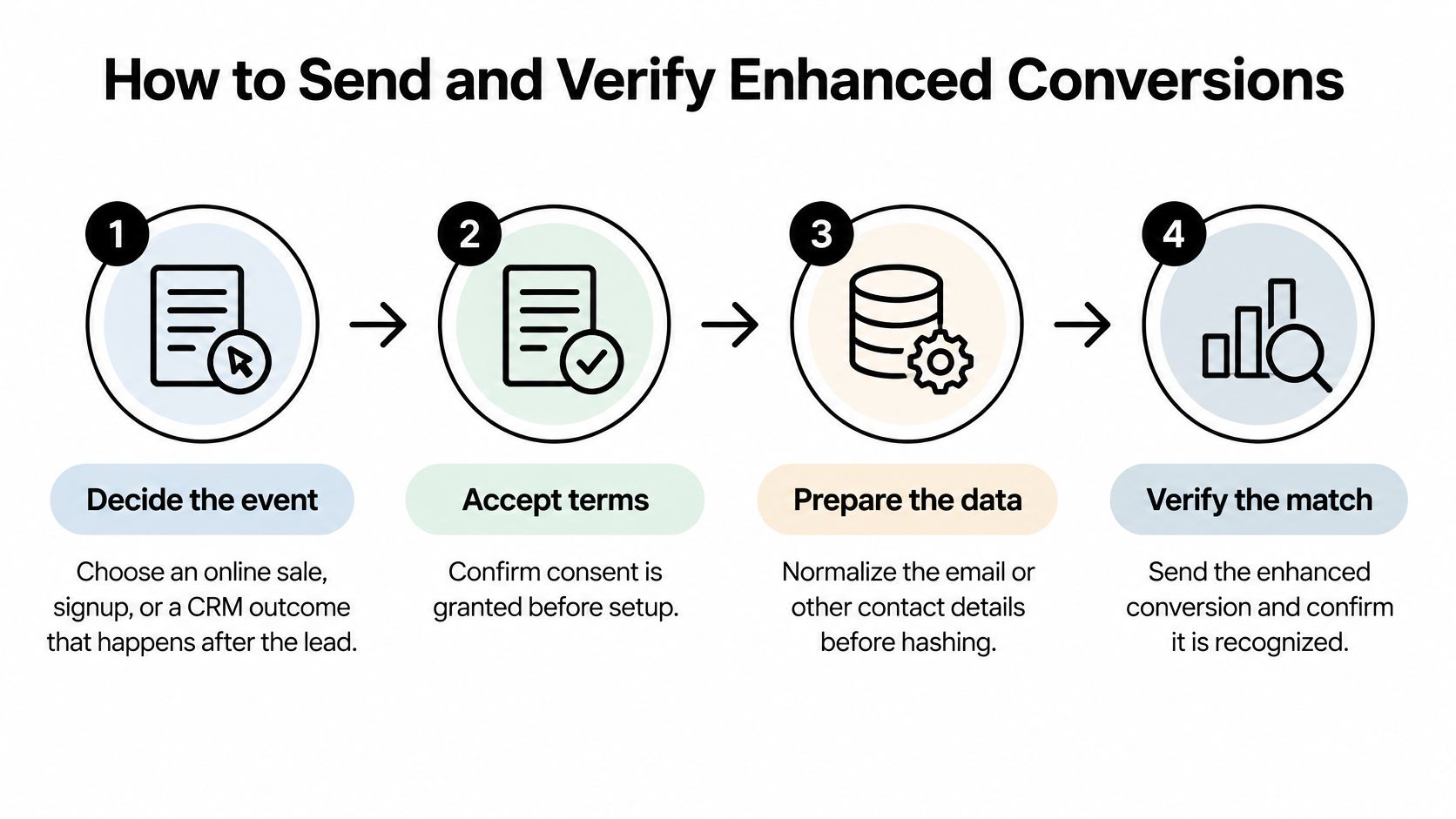
Decide what the event is before you touch a tool. An online purchase and a CRM outcome that happens four days after a demo request need different delivery paths, different timestamps, and different owners. Teams that start in Tag Manager usually end up forcing both jobs through whichever tag was easiest to fire. If you still need the underlying conversion actions built cleanly, this walkthrough on how to set up Google Ads conversion tracking from Silva Marketing covers that groundwork before you layer user-provided data on top.
The sequence I'd follow
- Classify the event: Online sale or signup, or a downstream CRM outcome such as qualified lead, opportunity, or revenue.
- Accept terms and confirm consent: Verify consent is granted for the traffic you're sending, then pick one delivery path.
- For web events: Pass user-provided data with the Google tag or Google Tag Manager on that specific conversion, not sitewide.
- For lead outcomes: Keep one conversion action, a stable event timestamp, a conversion value, and a clean identifier on the original record.
- Normalize, then hash: Clean the email or phone first, apply SHA-256 once, and supply hashed data with the imported offline event.
- Send once: If a server-side pipeline delivers the conversion, turn off the duplicate browser event for the same outcome.
- Verify in diagnostics: Check conversion action mapping, hash validity, and connection status rather than trusting a single test order.
The timing requirement for leads is tight. Per Google's enhanced conversions for leads documentation, hashed first-party data can be supplied with the imported offline event through an API connection, Google's supported upload workflow, or an equivalent server-side integration, and it should arrive within 24 hours of the conversion event. Google also states this supplements imported offline conversions and can improve measurement accuracy and bidding performance. A weekly CSV habit built for reporting won't meet that bar. You need a pipeline, even a simple one, that moves qualified outcomes daily at worst.
For teams already capturing forms, chat, and calendar bookings in one place, SourceLoop fits at step six. It can attach the visit journey to the lead and sync qualified offline conversions back to Google Ads, which removes the manual upload from someone's job. Whatever tool you use, the principle holds. One event, one owner, one delivery.
Pick the path by constraint, not habit
| Path | Best for | Constraint | Main risk |
|---|---|---|---|
| Google tag or Tag Manager | Online purchases and signups | Fires on the conversion with consent granted | Tag present but consent never granted |
| Enhanced conversions for leads upload | CRM outcomes after a website lead | Hashed data with the import within 24 hours | Late, duplicate, or badly formatted identifiers |
| Data Manager | Unified web and lead user-provided data | Current destination as settings merge | Skipping an event contract before the move |
| Google Ads API offline import | Legacy lead and offline uploads | Blocked for these uploads from 15 June 2026 | Staying on an endpoint that will stop |
| Server-side or CAPI-style sync | Qualified conversions from a lead platform | One event, with consent, value, and timestamp | Sending the same conversion from the browser and the server |
Verification needs patience as well as clicks. Diagnostics can lag, so a clean test conversion that hasn't appeared yet isn't automatically a failure. Confirm the conversion action matches what's configured in Google Ads, the hash format is valid, and any OAuth or tag status warnings are resolved. Then let the longer impact window run before you judge uplift. The table above guides the decision. Web tag for checkout, lead upload for CRM outcomes, Data Manager as the durable home, and the legacy API path only as something you're actively leaving.
What a Matched Purchase or Lead Looks Like
Two short scenarios make the mechanism concrete. The first starts at an ecommerce checkout, and the diagram below shows the matching flow both stories rely on.
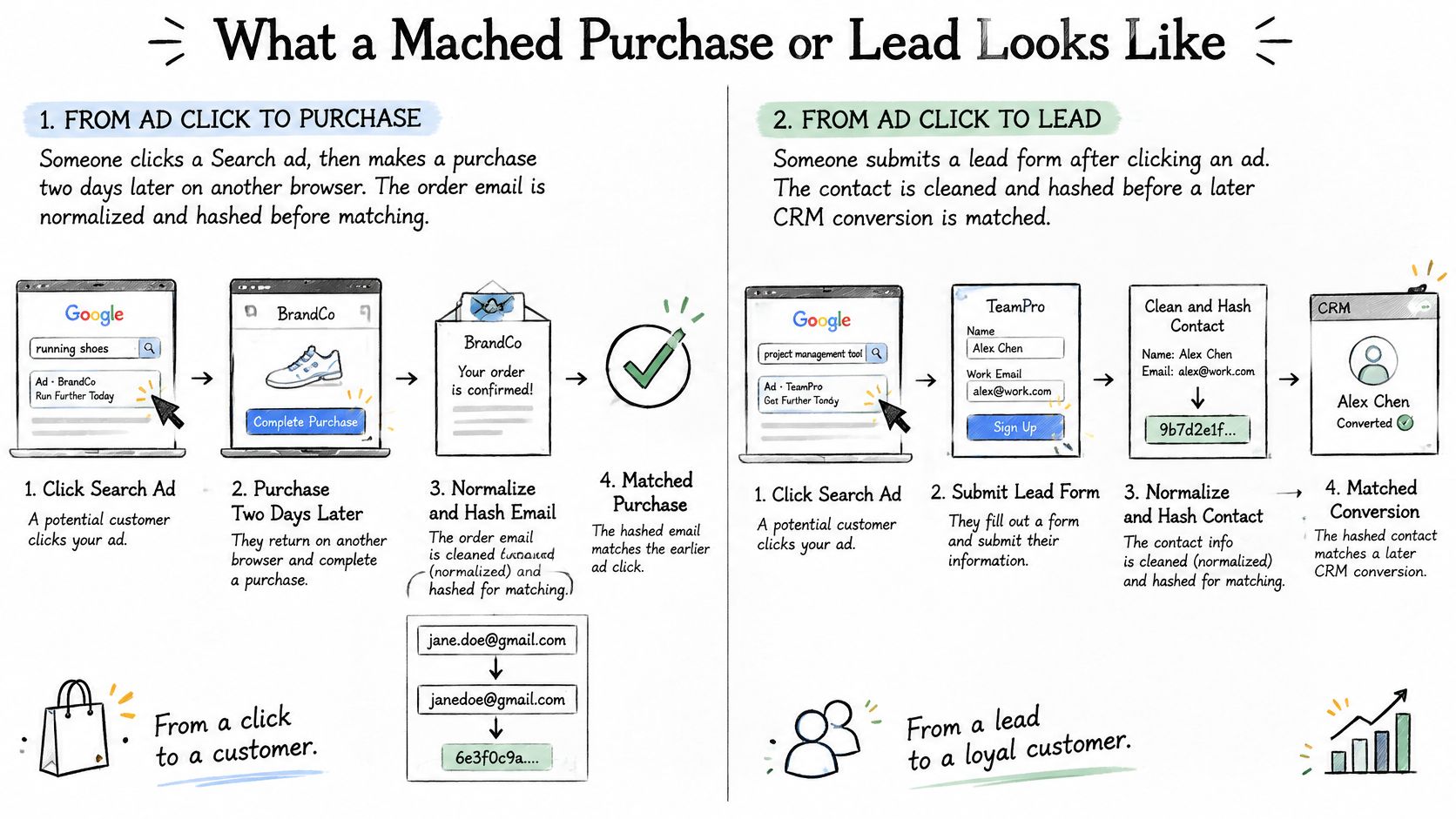
Say a shopper clicks a Search ad on Monday, browses, and leaves. On Wednesday they return through a different browser, signed into the same Google account, and buy. The cookie from Monday is gone, so a standard tag sees an unattributed order. With enhanced conversions for web, the checkout email is normalized, hashed, and sent with the purchase. Google matches that hash to the signed-in account that clicked on Monday, and the sale is credited instead of lost.
Now the failed twin. The same store hashes [email protected] with a trailing space and mixed case, exactly as it sat in the form field. Google's side holds a fingerprint of the normalized address. The fingerprints differ, so there's no match. In the account this looks like a privacy or consent failure. It's a formatting failure, and it's fixable in an afternoon.
The B2B version runs through the CRM
Say a prospect requests a demo. The form email is stored with the click identifiers, and on day four the sales team marks the lead qualified. That outcome is imported against the original conversion action, carrying its timestamp and an estimated or actual value. The campaign can now bid toward qualified pipeline instead of demo requests, which is a different and much more expensive thing to buy well.
The video below walks through how this matching plays out in practice.
Two mismatches break this story regularly. The form carries a personal Gmail address while the closed-won record carries a company email, so the identity never joins. Or the phone sits as (415) 555-0100 in one system and 4155550100 in another, producing two fingerprints for one person. Neither is a Google problem. Both are data entry and integration problems that surface as a disappointing match rate.
Calendar bookings and chat leads follow the same pattern as forms. The channel that captured the person doesn't matter. What matters is that one clean identifier rides with one event from capture to outcome. When the numbers still don't line up across platforms, it helps to understand why Google Ads doesn't match Google Analytics before assuming the enhanced conversion is broken.
Good looks boring in the account. The conversion appears once, carries a value, and later shows up in coverage and match rate. There's no second phantom conversion from a duplicate upload, and no mystery gap between the CRM count and the Google Ads count that nobody can reconcile.
The June 2026 Move to Data Manager
The main migration risk is architectural. Google's documentation on the unified Enhanced Conversions setting describes a unified setting for enhanced conversions for web and leads, with user-provided data accepted from website tags, Data Manager, and API connections. Since June 15, 2026, offline conversion imports and enhanced-conversions-for-leads uploads have been blocked in the Google Ads API and must use the Data Manager API.
If your agency or RevOps team relied on a custom Google Ads API upload, that workflow needs a replacement with new authentication and a tested cutover. Leaving the old job in place can stop qualified conversions from reaching bidding, even while the website continues to look unchanged.
More server-side data isn't automatically better
Sending duplicate browser and CRM events, inconsistent customer fields, or conversions without reliable consent and value fields can give bidding more data and a less reliable signal. During a migration, duplicates can appear when the old path stays live while the new one starts sending.
Decision rule: If you can't say which system owns an event, don't add a second upload path for it.
Write the event contract before you choose the pipe
Agree on what each enhanced conversion must carry before choosing a delivery method:
- Identity key: One normalized email or phone, defined once and reused everywhere.
- Click identifier: GCLID or equivalent where available, preserved from capture.
- Event timestamp: When the outcome happened, not when the upload ran.
- Conversion action: The exact action configured in Google Ads.
- Value and currency: Real or consistently estimated, never blank by default.
- Consent status: Recorded at capture and respected at send time.
- Deduplication key: A stable ID so retries don't double-count.
Reconcile counts between the site, the CRM, and Google Ads before and after cutover. A planned test makes discrepancies easier to investigate than a budget review does.
| What you see | Likely cause | What to check |
|---|---|---|
| Hashes rejected | Email or phone hashed before normalization, or hashed twice | Lowercase, trim, then apply SHA-256 once |
| Uploads fail authentication | OAuth or account access on the API connection | Credentials and the Google Ads account link |
| Conversions appear late | Diagnostics can lag before a conversion is judged missing | Check the event and upload status before treating it as lost |
| Conversion count roughly doubles | Browser tag and CRM upload both fire | Assign one owner to the event and use a deduplication key |
| Bids drift after the switch | Value, consent, or conversion action changed in the new payload | Compare the action, value, currency, and consent with the previous payload |
Work through the rows during migration. Check your payloads first for hashing, authentication, duplicate events, and changed conversion fields; then use diagnostics to investigate conversions that still appear missing.
Sync Qualified Conversions with SourceLoop
Make one decision and stop. If your account should hunt customers rather than form fills, send one qualified outcome per lead, with a normalized identifier, consent status, timestamp, and value, through a path that still works after the mid-2026 migration. I'd choose Data Manager or a maintained server-side sync over any legacy Google Ads API upload you're still nursing along.
SourceLoop is the practical route when your team already needs the journey behind forms, chat, meetings, and bookings in one place. One lightweight snippet captures the visit, ties it to the lead, and can auto-sync qualified offline conversions back to Google Ads, alongside Meta and LinkedIn. Two-way CRM sync covers HubSpot, Salesforce, Pipedrive, and others, so the qualified status your sales team sets is the same signal that reaches bidding. If HubSpot is your system of record, the walkthrough on how to track a Google Ads lead in HubSpot shows how that join should look end to end.
One warning, stated plainly. Don't fire the browser tag and the SourceLoop sync for the same conversion. Duplicate delivery is the fastest way to inflate your numbers and corrupt the bidding signal you built this to improve. Pick the owner, disable the other path, and confirm counts reconcile.
After setup, check coverage and match rate, allow diagnostics their lag, and judge uplift only after the reporting window has had time to mature. You're looking for a specific change. Campaigns should start paying more for the traffic that becomes pipeline and less for the traffic that merely submits forms.
Start the free 7-day trial of SourceLoop today, connect Google Ads and your CRM in minutes, and send your first qualified offline conversions back this week. You'll see within one reporting cycle whether bidding toward real customers, not raw submissions, changes where your budget goes.



 Paid Social


