
Track Jotform Submisison as Meta Ads Conversions
Track Jotform Submisison as Meta Ads Conversions with seven practical methods, honest trade-offs, setup guidance, and team-fit recommendations.
A successful event in Meta Events Manager doesn't automatically represent a useful conversion. A Jotform submission might be a qualified sales opportunity, a duplicate entry, a test, or a low-intent enquiry. If Meta receives every completion as the same “Lead” signal, it may optimize for volume while your sales team deals with the consequences.
The right setup depends on data quality, lead qualification, privacy requirements, technical capacity, ownership of customer data, maintenance burden, and submission volume. Browser pixel tracking, direct server-side delivery, automation platforms, attribution software, custom APIs, Jotform actions, and warehouse pipelines can all connect a form to Meta, but they don't provide the same reliability or context.
This roundup compares seven practical paths for tracking Jotform submissions as Meta Ads conversions. It also separates simple form completion tracking from the more valuable job of telling Meta which submissions become qualified opportunities or customers. That distinction matters for any team investing in digital advertising for businesses.
Table of Contents
- 1. Meta Conversions API direct integration
- 2. Native integration through Zapier or Make
- 3. SourceLoop native integration with two-way sync
- 4. Facebook Pixel with a server-side webhook
- 5. Custom API implementation with real-time conversion sync
- 6. Jotform built-in integrations and post-submission actions
- 7. Third-party warehouse integration through ETL
- JotForm → Meta Ads Conversions: 7-Method Comparison
- Choose the simplest reliable path for your team
1. Meta Conversions API direct integration
A direct Meta Conversions API, or CAPI, integration sends the Jotform event from a server or backend process instead of relying only on a browser event. Meta documents a direct event-ingestion endpoint tied to a dataset, while its guidance positions CAPI as the method for sending offline and physical-store activity into Meta's measurement system. See the Meta Conversions API documentation for offline events for the current endpoint model.
This is usually the strongest option when reliability and data ownership matter more than implementation speed. Your system can validate the submission, apply qualification rules, normalize identifiers, assign an event_id, and retry delivery when Meta doesn't accept an event immediately. It can also send a later qualified-lead or customer event from your CRM, rather than treating the initial form fill as the final business outcome.
What makes direct CAPI dependable
A server-side flow gives your team more control over the data sent to Meta and the logic that determines which events qualify. You can preserve the original submission ID, keep a record of delivery attempts, and compare events across Jotform, Meta Events Manager, and server logs.
Matching quality still depends on the identifiers you collect. Independent technical guidance identifies email and phone formatting, stable event IDs, and consistent hashing as important parts of a reliable Jotform-to-Meta workflow. That same guidance describes match rates below roughly 30% as a warning sign, 40% to 65% as a common range for well-implemented server-side setups, and 70% or more as strong. These benchmarks come from technical guidance on Meta offline conversions for B2B SaaS, so treat them as diagnostic context rather than a guarantee.
Direct CAPI is a good fit for SaaS, B2B services, and ecommerce teams with developers or a dependable technical partner. It isn't the best starting point for a small team that only needs a basic submission signal and has no one available to maintain an API integration.
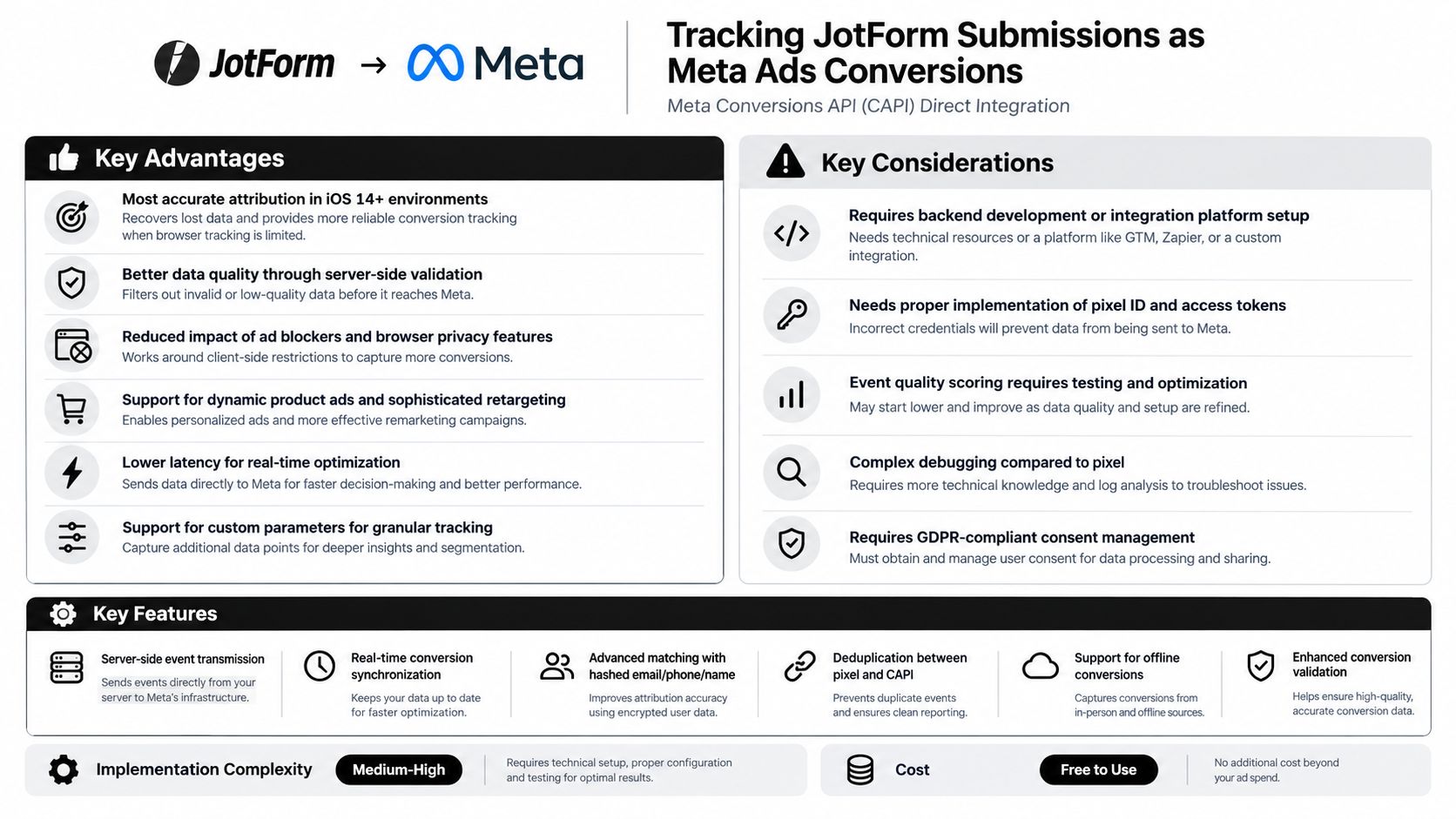
For implementation context, review this guide to configuring Meta Conversions API. The central trade-off is straightforward: you get control and resilience, but you own the engineering and monitoring.
2. Native integration through Zapier or Make
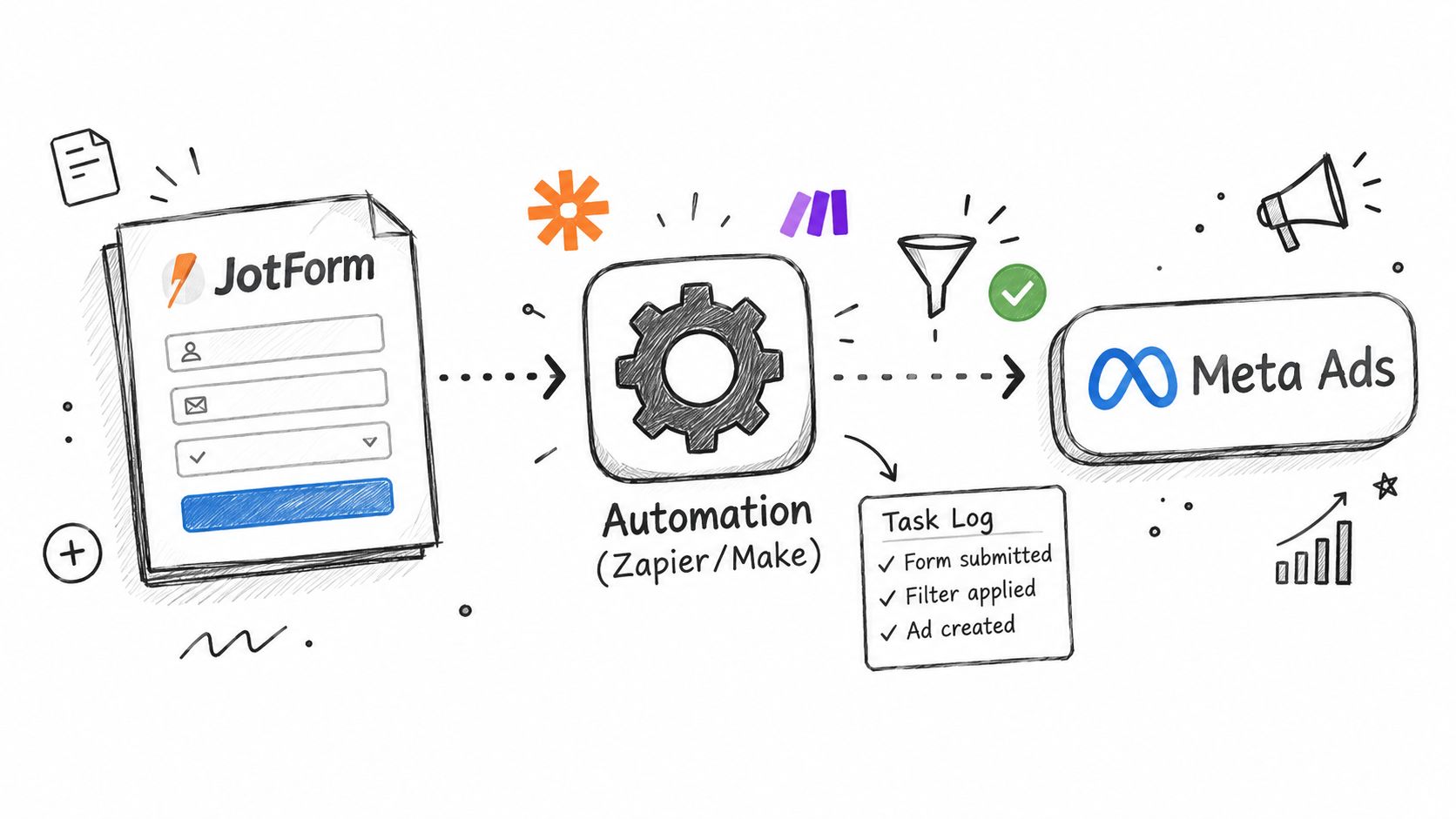
Zapier and Make provide a middle path between manual exports and custom engineering. A Jotform submission triggers an automation, the workflow maps form fields, and a Meta action or API request receives the conversion payload. The attraction is obvious: marketers can change routing and qualification logic without asking a developer to rewrite backend code.
This approach works well when the event is relatively simple. A local service company might send appointment requests, an agency might route client leads into separate conversion actions, and a SaaS team might pass free-trial registrations after checking whether a required field is complete. The workflow can also send alerts when a task fails, which is better than discovering a reporting gap after a campaign has already spent money.
Where no-code workflows need discipline
The main weakness is that the automation platform becomes another operational dependency. Field names change, authentication expires, task limits are reached, and a mapping error can turn a useful lead event into an incomplete request without notice. A successful automation run also doesn't prove that Meta matched or attributed the conversion correctly.
Use a small test set before enabling production traffic. Map and normalize email, phone, country, and other permitted fields before the Meta request, then add conditional logic so junk or clearly unqualified entries don't become optimization signals.
- Separate conversion types: Keep signup, lead, appointment, and purchase workflows distinct rather than sending every submission as one event.
- Preserve identifiers: Carry the Jotform submission ID or another stable value into the event so duplicate deliveries can be investigated.
- Monitor failures: Send an email or Slack alert when a scenario stops, an API call fails, or required fields are empty.
- Review usage: Check automation consumption regularly so the workflow remains predictable as submission volume changes.
Make is often more suitable when the workflow needs branching, field transformations, or a direct HTTP request. Zapier can be easier for a straightforward trigger-and-action sequence. Neither removes the need to understand consent, hashing, event naming, or reconciliation. Teams wanting a practical starting point can review this Jotform connection guide for Zapier and Make.
3. SourceLoop native integration with two-way sync
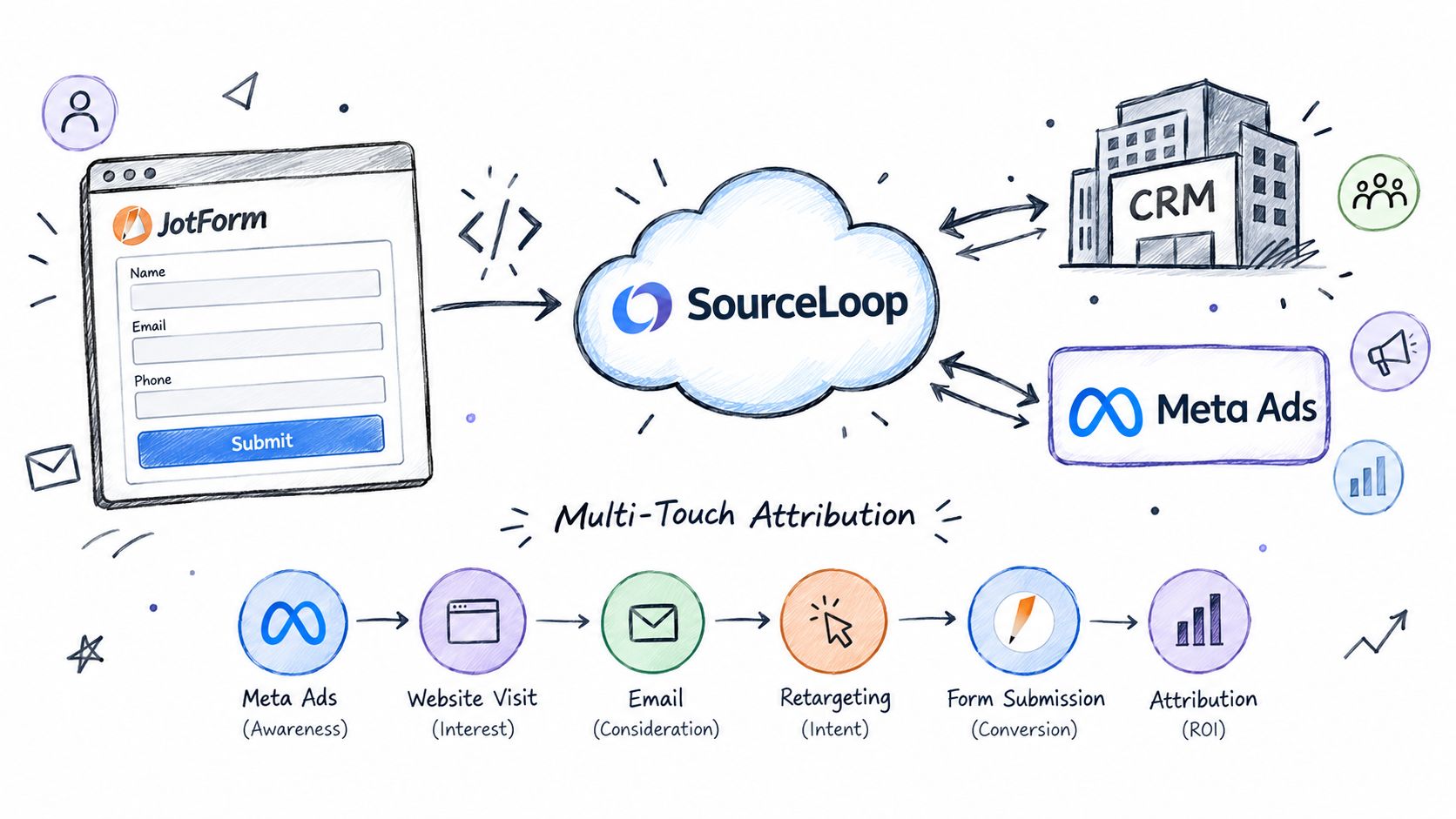
An attribution platform changes the question from “Did the form submit?” to “Which journey produced this submission, and did it become valuable?” SourceLoop is designed to connect web activity, form submissions, CRM outcomes, and advertising destinations, including Meta through the Conversions API. Its stated product model includes attribution capture through a lightweight snippet, contact and funnel reporting, CRM connections, and syncing qualified offline conversions back to advertising platforms.
That makes this route useful for teams that need more than an isolated Meta event. A B2B company may want to preserve the original campaign and landing-page context while a lead moves through qualification. An agency may need a repeatable process across multiple client sites. A SaaS team may care about the difference between a trial form, a sales-qualified opportunity, and a customer, not just the first completed form.
Attribution context changes the optimization signal
Jotform's own documentation shows that a Pixel widget can track form visits, completed payments, and completed registrations, with testing available through Meta Events Manager. That browser-based setup is practical for establishing a basic conversion signal, but it doesn't by itself explain what happened after submission. A connected attribution and CRM workflow can apply rules to later outcomes and send the stronger event when the business has evidence that the lead is qualified.
SourceLoop's Jotform-related workflow can pass attribution data with submissions and forward form activity for tracking. Use its Jotform and Meta conversion tracking resources as a reference point, then validate the actual fields, consent behavior, and downstream event rules in your own implementation.
Practical rule: Register the form completion first only when it is a meaningful optimization event. Otherwise, use the form to start a lifecycle record and send Meta the qualified outcome later.
This path reduces custom maintenance, but it introduces dependence on a third-party data layer and its field model. It suits lean marketing teams that need journey visibility without building an attribution stack. It may be unnecessary for a single low-volume form where a native action already provides enough reporting.
4. Facebook Pixel with a server-side webhook
The hybrid Pixel and webhook model combines browser-side visibility with a server-controlled handoff. Jotform sends a webhook after submission, your server processes the payload, and the website or tracking layer records the browser event. This can provide useful coverage without requiring a fully custom CAPI architecture, but it has more moving parts than a single native action.
It works for straightforward scenarios such as appointment requests, lead magnet downloads, or basic service enquiries. The browser event can support audiences and on-site reporting, while the webhook provides a separate record for troubleshooting or later processing. If the same conversion is sent through both paths, however, Meta needs a shared event identifier to distinguish one event from two.
Avoid double counting in hybrid setups
Duplicate reporting is one of the most common practical problems in a Pixel-plus-server design. A form may submit inside an iframe, redirect to a thank-you page, and trigger a browser event before the webhook arrives. If each trigger uses a different event ID, Meta may treat them as separate conversions.
Recent implementation guidance for Jotform and Meta tracking emphasizes event ID matching, test-event validation, redirect behavior, and comparing Jotform counts with Meta and server logs. Those checks matter more than just seeing a green status in a browser extension.
Use this model when a business already has a working Meta Pixel and wants incremental server-side support. It isn't ideal when the team can't explain which system is authoritative.
- Use one event ID: Generate or preserve the same identifier for the browser and server versions.
- Test redirects: Confirm that a refresh of the thank-you page doesn't fire another conversion.
- Inspect iframe behavior: Verify that the submission event reaches the parent page or webhook consistently.
- Reconcile regularly: Compare Jotform submissions, browser events, server deliveries, and Meta results.
The trade-off is moderate complexity with moderate control. It can be a sensible bridge, but teams should avoid leaving it in place indefinitely without documenting which event Meta should optimize toward.
5. Custom API implementation with real-time conversion sync
A custom integration gives an engineering team direct control over the entire path. Jotform sends a webhook to your backend, the backend validates the payload, applies business rules, and posts the event to Meta's CAPI endpoint. The same service can connect the submission to a CRM record, a lead score, a sales status, and a later qualified or revenue event.
This is the right choice when the form logic is not simple enough for an automation platform. A financial services organization may need strict handling of sensitive fields. An enterprise SaaS company may route different forms through different qualification rules. A multi-product business may need distinct event names and destinations while maintaining one monitoring system.
Build for operations, not just the first successful event
The first API request is the easy part. Production reliability depends on retries, idempotency, structured logs, alerting, secrets management, and clear ownership. The system should reject malformed payloads safely, avoid logging unnecessary personal data, and preserve enough diagnostic information to explain why an event was accepted, rejected, delayed, or deduplicated.
Meta's documentation describes CAPI events as tied to a dataset and accepted through a direct endpoint. That model gives developers a clear destination, but the implementation still needs current authentication, permissions, payload, and privacy handling. Don't copy an old example into production without checking the current Meta developer documentation for conversion tracking.
A custom service of this kind normally includes:
- Validation: Check required fields, consent status, event name, timestamp, and source form before delivery.
- Deduplication: Store a unique event ID and make retries safe.
- Error handling: Retry transient failures and alert a human when the integration needs intervention.
- Change control: Test API updates and document every custom field and qualification rule.
Custom code offers the highest control and the highest maintenance burden. It makes sense when data ownership, compliance, or conversion logic justifies permanent engineering support.
6. Jotform built-in integrations and post-submission actions
Jotform's own configuration is the simplest place to start when the business needs a basic completion event. Its documentation describes adding a Pixel widget in Form Builder, entering the Pixel ID, selecting events, and testing the result in Meta Events Manager. Jotform also documents standard events such as form visits, completed payments, and completed registrations, with tracked conversions appearing in Meta reporting tools.
That makes native setup a practical fit for a small business, consultant, nonprofit, or local service provider with one or a few forms. The team can keep the configuration close to the form rather than introducing an automation platform, server, or warehouse. It also provides a clear first diagnostic step, verify that the event fires, then confirm that Meta receives it.
Keep the native path narrow
The limitation is context. A post-submission action usually knows that the form completed, but it may not know whether the sales team accepted the lead, whether the customer paid, or which later CRM outcome should influence bidding. It can also become difficult to govern when many forms use slightly different event names or payloads.
Use conditional logic where available so only relevant submissions become advertising events. Document the Pixel ID, event names, form IDs, consent behavior, and thank-you-page triggers. Then monitor Jotform delivery information and Meta Events Manager instead of assuming the initial setup will remain correct forever.
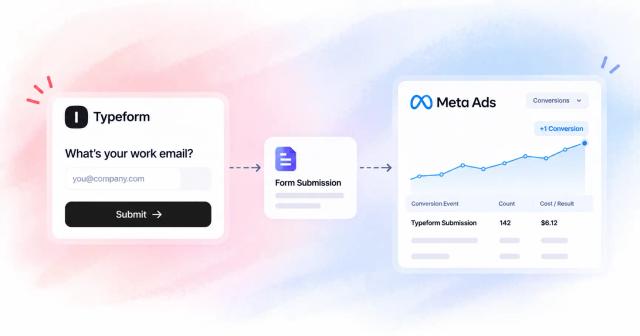
For a related example of form-based advertising conversion configuration, see this guide to tracking Typeform submissions as Meta Ads conversions. The platform is different, so don't copy its implementation blindly, but the same questions apply to Jotform: what event is sent, when is it sent, and how will duplicates be prevented?
Start with the native action when the completion itself is valuable. Add another layer only when you can name the reporting or optimization problem it will solve.
This route has the lowest complexity and maintenance burden, but also the least data ownership and lifecycle context.
7. Third-party warehouse integration through ETL
A warehouse pipeline places Jotform data inside the company's broader data system before sending selected conversions to Meta. An ETL or reverse-ETL workflow can ingest raw submissions, apply transformations, join CRM and billing outcomes, and deliver approved events through CAPI. The result is a governed record that can serve advertising, sales reporting, compliance reviews, and internal analysis.
This approach fits larger SaaS businesses, ecommerce organizations, and multinational teams that already operate Snowflake, BigQuery, Redshift, or a comparable warehouse. It is especially useful when the business needs regional policies, field-level access controls, retention rules, or a single definition of qualified lead across multiple systems.
The warehouse is powerful, but not automatically real time
A warehouse pipeline can improve data ownership and consistency, but every extra transformation introduces delay and another failure point. If Meta receives only a periodic batch, the advertising system may react later than it would to a direct event. The team also needs to decide which fields may leave the warehouse, how they are normalized and hashed, and how consent travels with the record.
Separate raw and transformed data so the company can audit what Jotform originally sent and what Meta ultimately received. Keep a stable event ID throughout the pipeline, and make the delivery job idempotent. Alerts should cover extraction failures, transformation errors, rejected API requests, and unexpected changes in submission volume.
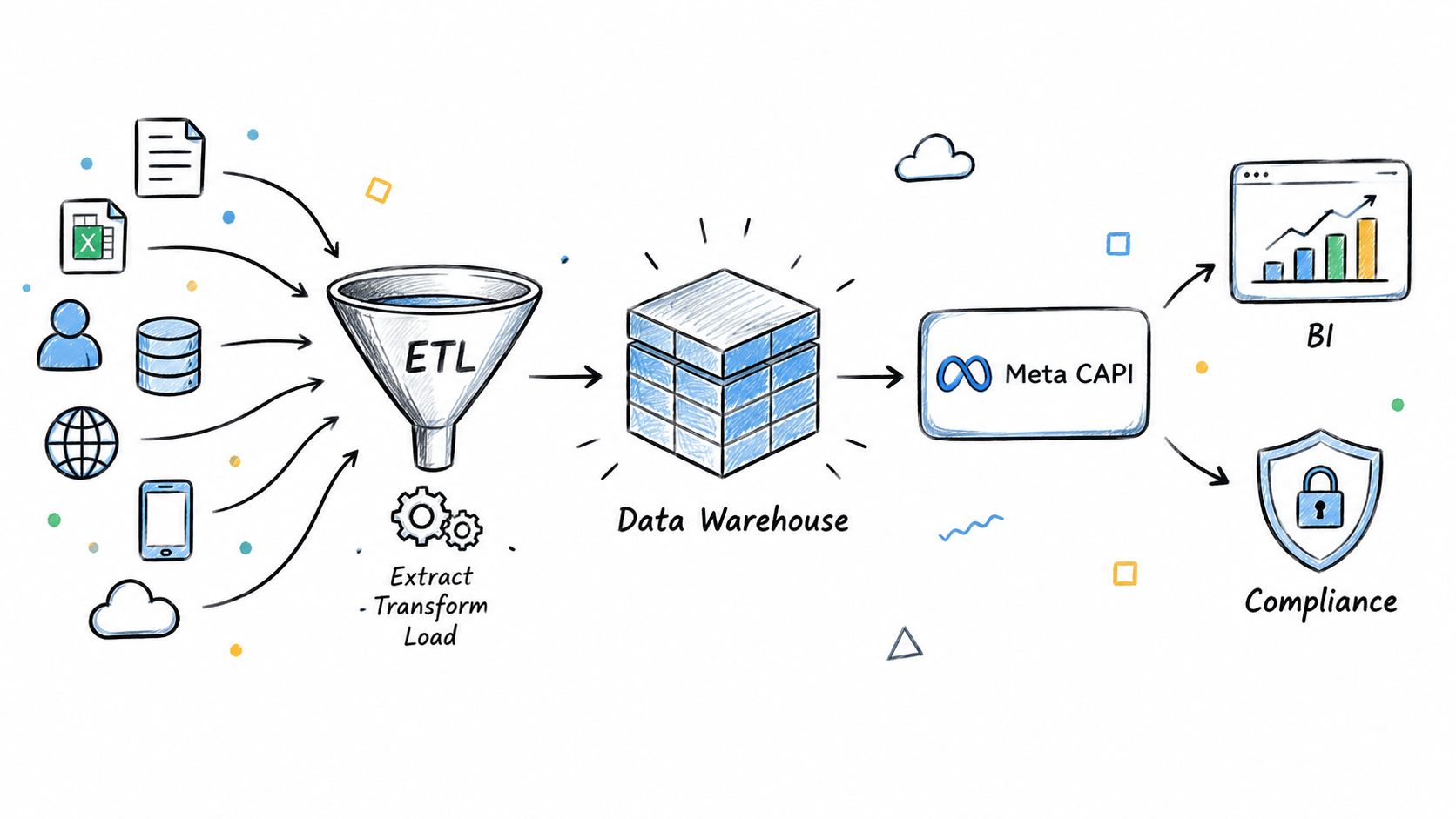
The warehouse route offers the strongest governance and broadest analytical ownership, but it is excessive for a small team with one lead form. Choose it when the organization already has the data engineering capability to operate it, not because a more complex diagram looks more accurate.
JotForm → Meta Ads Conversions: 7-Method Comparison
| Solution | Core features | Data quality & UX | Value proposition / USP | Target audience | Complexity & Price |
|---|---|---|---|---|---|
| Meta Conversions API (CAPI) Direct Integration | Server-side event transmission; real-time sync; advanced matching; deduplication; offline event support | Highest accuracy in iOS14+; low ad-block loss; requires validation/testing | Most accurate attribution and real-time optimization for large-scale campaigns | Tech-savvy marketers, enterprises, SaaS/e‑commerce | Medium‑High complexity; backend dev required; Meta API free (ad spend applies) |
| Native Integration via Marketing Automation Platforms (Zapier/Make) | No-code connectors; conditional logic; multi-step workflows; retries and logs | Good for small/medium volumes; some latency and limited advanced matching | Fast, no-dev setup; easy to iterate and add CRMs/notifications | Small teams, non-technical marketers, agencies | Low complexity; subscription $19‑99+/mo; costs scale with task volume |
| SourceLoop Native Integration with Two-Way Sync | Single lightweight JS snippet; automatic CAPI sync; multi-touch attribution; contact hub; two‑way CRM sync; real-time dedupe; consent mgmt | Enterprise-grade multi-touch accuracy; real-time syncing; GDPR-compliant; built-in analytics | Recommended, fastest time-to-value, zero ongoing maintenance, full journey visibility, scales without per-event fees | Lean growth teams, SaaS & DTC brands, agencies, RevOps | Very low complexity; setup in minutes; simple plans + free 7‑day trial; pricing scales by monthly tracked conversions |
| Facebook Pixel with Server-Side Webhook Implementation | Standard pixel + JotForm webhook; server-side pixel firing; event params & retargeting | Works for common scenarios; weaker in iOS14+ and subject to ad-blockers | Familiar, simple approach for standard tracking and custom audiences | Small e‑commerce, local services, content creators | Medium complexity; free (pixel); requires pixel + webhook maintenance |
| Custom API Implementation with Real-Time Conversion Sync | Full control over validation/transformation; custom conversion logic; real-time sync; detailed logging & retry logic | Maximum flexibility and auditability if well-built; enterprise reliability | Fully customizable to complex business rules and compliance needs | Enterprises with dev teams, finance/compliance-heavy orgs | High complexity; significant dev time and infra costs; ongoing maintenance |
| JotForm's Built-In Integrations with Post-Submission Actions | Native post-submission actions; webhooks; conditional logic; payload mapping; retry options | Simple and reliable for basic use; limited delivery visibility and audit trails | Centralized, no external tools; easy for basic conversion needs | Small businesses, nonprofits, DIY marketers | Low‑Medium complexity; included with JotForm (no extra cost) |
| Third-Party Data Warehouse Integration via ETL Platforms | ETL sync to warehouse; transformation/enrichment; BI integration; audit trail; CAPI from warehouse | Excellent governance and historical retention; higher latency vs real-time | Enterprise-grade data governance, cross-source enrichment, advanced analytics | Large enterprises, analytics-driven companies | Very high complexity; $1,000–10,000+/mo; requires data engineering and infra |
Choose the simplest reliable path for your team
The best implementation is the least complicated one that produces a trustworthy optimization signal. For a basic, low-volume form where every legitimate completion has similar value, start with Jotform's built-in actions and validate the event in Meta Events Manager. Jotform documents a practical workflow for adding the Pixel widget, selecting events, and testing the connection, so there's no reason to build a server architecture before proving that the basic signal is needed.
Choose Zapier or Make when marketers need to change routing, qualify submissions with form fields, or connect several tools without waiting for engineering work. Keep the workflow documented and monitored. A no-code setup is still production infrastructure, especially once campaign decisions depend on it.
Use direct CAPI when developers need control over identifiers, retries, event selection, and downstream qualification. Choose a custom API when the business has complex routing, strict compliance requirements, multiple products, or a need to connect Jotform submissions to lifecycle events. These paths take more effort, but they let the company decide exactly which records Meta receives.
Consider SourceLoop when the central requirement is qualified conversion sync plus full customer-journey attribution. Its product positioning combines web and form attribution with CRM context and qualified offline conversion delivery to Meta CAPI. That can be more useful than a raw completion count when the business needs to understand which campaigns produce pipeline or revenue, not merely completed forms.
Reserve a warehouse pipeline for organizations that already have data engineering, governance, and analytical systems in place. It offers strong ownership, but it adds operational overhead and may reduce event immediacy if the pipeline isn't designed for timely delivery. For teams building a broader revenue measurement system, a real-time B2B data extraction guide can help frame the surrounding data requirements.
Before launch, work through this migration checklist:
- Name events consistently: Decide whether the event represents a submission, qualified lead, appointment, payment, or customer.
- Capture consent: Store the permission context needed for advertising and downstream processing.
- Preserve matching fields: Collect permitted identifiers in a consistent format and hash them according to Meta's requirements.
- Deduplicate events: Use one stable
event_idacross browser, server, automation, and warehouse paths. - Run test events: Validate the payload and delivery before optimizing live campaigns.
- Monitor failures: Alert on webhook errors, API rejections, authentication problems, and missing fields.
- Reconcile records: Compare Jotform submissions with delivery logs and Meta reporting, then investigate meaningful differences.
A form completion is only the beginning of attribution. Pick the path your team can operate consistently, then improve the signal by feeding Meta the outcomes your business values.

 Paid Social


