
Track Jotform Submisison as Google Ads Conversions
Learn how to track Jotform Submisison as Google Ads Conversions with GCLID capture, offline imports, and attribution best practices.
You've checked the Google Ads account and the numbers look healthy. Jotform is recording submissions, the conversion action is active, and Smart Bidding has enough signals to keep spending. Then sales opens the CRM and finds that many of those “conversions” are duplicates, spam, unqualified enquiries, or leads that never became opportunities.
That gap usually starts before the form is submitted. The Google Ads click identifier never reaches the Jotform record, so the later CRM outcome can't be matched to the paid click that generated it. A reliable setup must preserve that identifier, connect it to the lead record, and send back a qualified conversion through the ingestion path Google is moving toward in 2026.
Table of Contents
- The Conversion Gap Most Marketers Miss
- What the GCLID Is and Why Google Ads Generates It
- Three Ways to Track Jotform Submissions in Google Ads
- Capturing and Persisting the GCLID in Jotform
- Mapping Jotform Submissions to CRM Deals and Qualified Conversions
- Troubleshooting the Most Common Jotform to Google Ads Issues
- Best Practices for Attribution That Survives the 2026 Shift
The Conversion Gap Most Marketers Miss
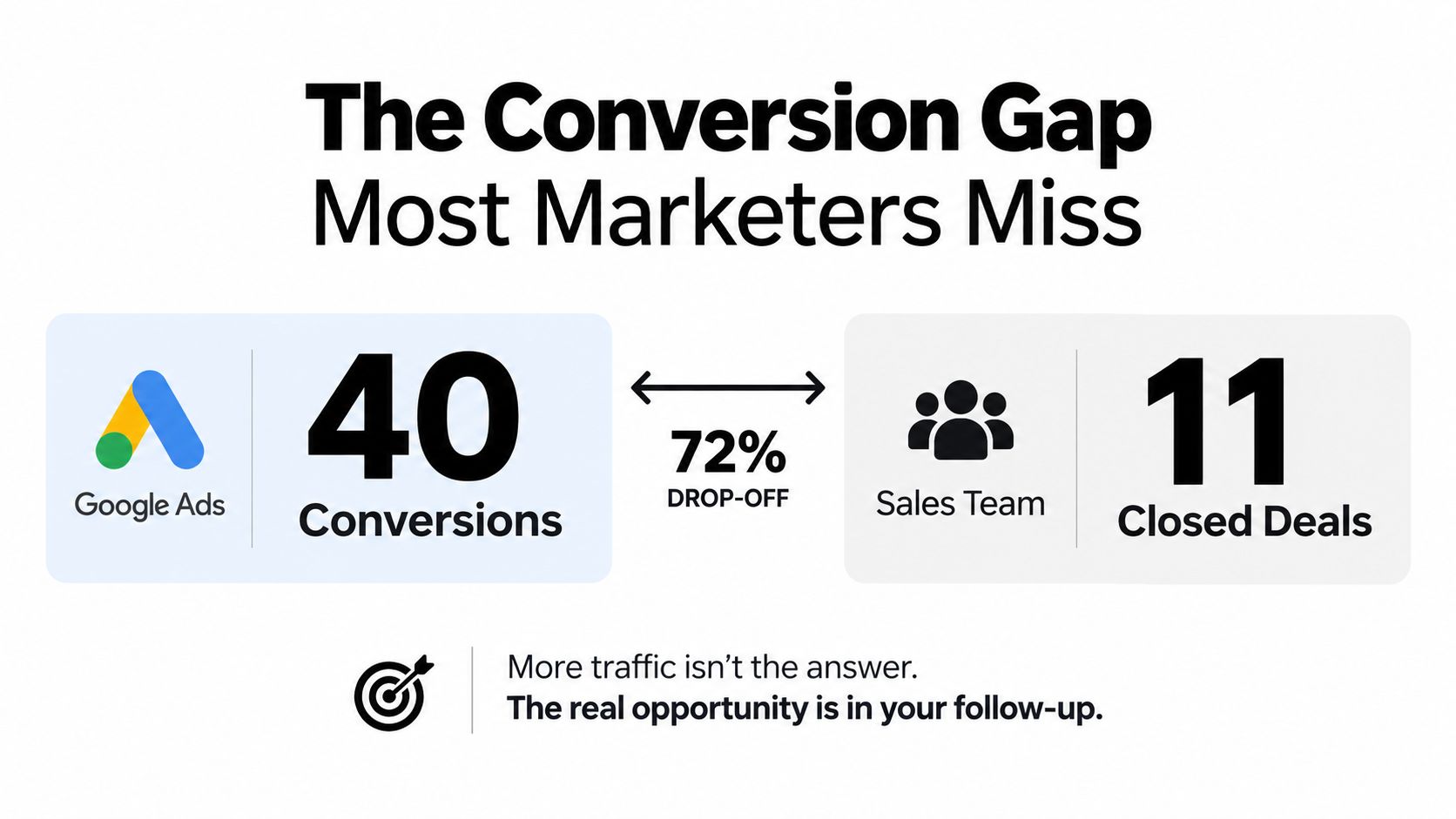
A paid media lead opens a Google Ads dashboard and sees 40 Jotform conversions for the previous month. The sales team checks the same period in the CRM and reports 11 closed deals. That example is a useful diagnostic scenario, not a performance benchmark. The important question isn't why the two totals differ. It's whether the form submission can be connected to the later sales outcome.
The missing layer is often the Google Ads click identifier, commonly the GCLID. If the landing page receives the identifier but the Jotform payload doesn't retain it, the marketing platform sees a form event while the CRM sees a contact without a reliable paid-click key. Sales can qualify the lead, create a deal, and close it, but the final outcome has no dependable route back to Google Ads.
Why the disconnect damages optimisation
A raw submission tells Google that someone completed a form. It doesn't tell Google whether the person matched your target account profile, answered the qualifying questions properly, booked a meeting, became an opportunity, or generated revenue.
That distinction matters for lead generation campaigns. Every disconnected lead becomes a blind spot in the feedback loop. If the account imports all submissions but can't distinguish qualified records, bidding may optimise around activity that the sales team doesn't value.
The problem becomes more pressing because Google has announced that, starting June 15, 2026, new adopters of offline conversion imports and enhanced conversions for leads will be blocked in the Google Ads API and moved to the Data Manager API. Google also describes enhanced conversions for leads and offline imports as converging into a simpler setup during that changeover. Google's offline conversion guidance is therefore more useful than older tutorials that assume the previous upload path will remain unchanged.
Practical rule: Treat the Jotform submission as the beginning of the lead pipeline, not automatically as the business conversion.
The durable fix has three parts. Capture the click identifier before the form loads, persist it in the Jotform record, and trigger the Google Ads conversion only when the CRM reaches a meaningful qualification stage. That design keeps the data useful even as the upload interface changes.
What the GCLID Is and Why Google Ads Generates It
The GCLID, or Google Click Identifier, is a value associated with an eligible Google Ads click when auto-tagging and conversion measurement are configured. Think of it as a receipt stapled to the visitor's journey. The receipt doesn't replace the order, but it gives the advertising system a reference it can use when the order arrives later.
Google needs that reference because the conversion often happens after the initial page visit. A person can click an ad, browse the site, open a Jotform, leave, return through a bookmarked page, and submit later. If the identifier disappears during that journey, the eventual form record becomes difficult or impossible to match to the original paid interaction.
For a deeper explanation of how click identifiers persist across a marketing journey, see this guide to click IDs and attribution.
The identifier has to survive the form
A common implementation reads the query string on the landing page and uses it only to fire a tag on a confirmation page. That can report a conversion, but it doesn't preserve the identifier inside the lead record. A redirect, reload, direct visit, or multi-page form can break the chain.
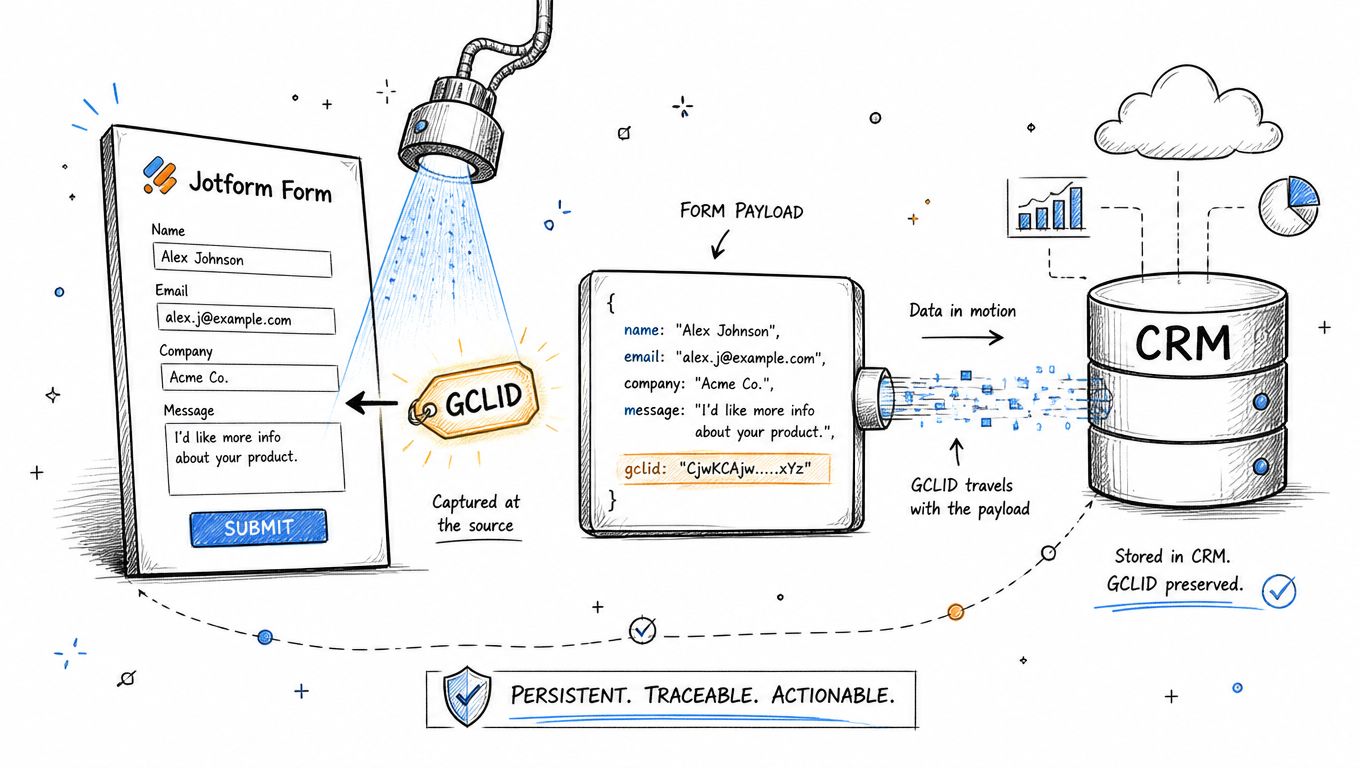
The stronger pattern is to write the value into a hidden Jotform field before submission. The field then travels with the form payload into the CRM, spreadsheet, webhook, or other downstream system. That gives the later qualification event a stable reference to use when it is sent to Google Ads.
Google's current conversion guidance describes conversion tracking as a free tool for understanding actions after ad interactions. It also requires advertisers to create a conversion action and install a Google tag, while explicitly including lead actions such as sign-ups and quote requests among the conversion types it can track. For lead forms where one lead per ad click is normally valuable, Google recommends the One counting option. Google's conversion tracking overview documents those setup principles.
The timing constraint matters too. Google's guidance says uploads more than 90 days after the ad click won't be imported. A long B2B sales cycle therefore needs an operational process that captures the click ID immediately and alerts the team when a qualified event is approaching the attribution limit. Waiting until a deal closes without preserving the original identifier is not a recoverable tracking strategy.
Three Ways to Track Jotform Submissions in Google Ads
There isn't one universal implementation. The right choice depends on how much control the team needs over lead quality and whether the form is a simple lead capture or part of a longer CRM journey.
| Approach | Setup Effort | Survives 2026 API Shift | Qualification Control |
|---|---|---|---|
| Thank-you-page Google tag | Low | Limited, because the page event doesn't solve the ingestion change | Low, usually counts the submission immediately |
| Jotform hidden field with GCLID capture | Medium | Strong foundation, because the identifier remains in the first-party lead record | Medium to high, depending on the downstream upload process |
| Server-side forwarding through a CRM or webhook | Higher | Strongest, provided the destination is updated for the Data Manager API | High, because the team can upload CRM-qualified events |
Thank-you-page tracking
A redirect to a dedicated confirmation page is easy to understand. The Google tag or Ads conversion tag fires when the page loads, and the account receives a form conversion without custom backend work.
That simplicity is also the weakness. A reload, bookmark, shared URL, or direct visit can create another event. The method also doesn't automatically preserve the click identifier inside the Jotform record, so it can't support a later qualified-lead upload by itself.
Hidden-field capture
The landing page reads the GCLID and places it in a hidden Jotform field. Jotform then sends the value with the submission, where the CRM can retain it until a qualification event occurs.
This approach is a practical middle ground. It requires more implementation than a thank-you page, but the data survives beyond the browser session and can support a downstream conversion action. It also keeps the form layer independent from the exact Google ingestion interface that receives the final event.
Server-side forwarding
A webhook, native Google Sheets integration, or CRM automation can pass the stored identifier to a backend. That backend then sends the qualified event through Google's supported conversion workflow. Google's documentation for form-submission tracking describes the broader move from pageview measurement toward event-based conversion actions, including capturing a form_submit event, marking it as a conversion, and importing it into Google Ads. Google's form-submission tracking discussion provides the relevant context.
For most serious lead-generation accounts, hidden-field capture plus delayed CRM-qualified uploads is the durable architecture. The thank-you page can remain useful as a diagnostic or immediate micro-conversion, but it shouldn't be the only signal used for bidding.
Capturing and Persisting the GCLID in Jotform
Capture starts on the first page that receives the paid click. Don't wait for Jotform to initialise, because an embedded form may load after the page scripts and can miss values that weren't stored elsewhere.
Create a hidden field in Jotform with a clear internal name such as gclid. Then read the query parameter and populate that field before submission. A developer can implement the logic in the landing page or form embed with a pattern like this:
read the gclid query parameter
URL-decode the value
trim whitespace
write the value to the Jotform hidden field
store the value for later pages
The exact implementation depends on the embed method and the field API exposed by the form. The important behaviour is consistent: the hidden field must contain the identifier in the actual submission payload, not only in the browser URL or thank-you-page address.
Use no-code mapping where it fits
Jotform's URL parameter mapping can provide a no-code route for passing a query-string value into a hidden field. It's a good starting point for a single-page form with a predictable URL structure. Test the actual submission response, though. A field that appears populated in the interface isn't enough if the webhook or CRM payload omits it.
Teams that already capture campaign parameters can use this Jotform UTM tracking guide as a reference for the broader parameter-persistence pattern. The GCLID should be treated with the same care, but kept in its own field rather than mixed into a free-text campaign value.
A cookie or localStorage layer makes the implementation more resilient. On the first visit, store the decoded identifier in a first-party browser value. When the user moves through a multi-page funnel, opens an accordion form, or delays submission, read the stored value and repopulate the hidden field. Respect the site's consent configuration and privacy requirements before storing marketing identifiers.
Give the developer a precise handoff:
- Field name: Define one canonical field, such as
gclid, across Jotform, the webhook, the CRM, and the upload process. - Data handling: Normalise casing, remove accidental whitespace, and URL-decode the value once.
- Payload coverage: Include the field in every Jotform submission payload, not merely the redirect URL.
- Fallback logic: If the final form step has no value, retrieve the first-party stored value before allowing submission.
- Testing: Submit from a tagged ad URL, inspect the Jotform record, inspect the CRM record, and verify that the identifier remains attached to the deal.
The minimum viable setup writes the value on the final submit. The resilient setup captures it at first touch, persists it across the journey, and copies it to every downstream lead and deal record.
Mapping Jotform Submissions to CRM Deals and Qualified Conversions
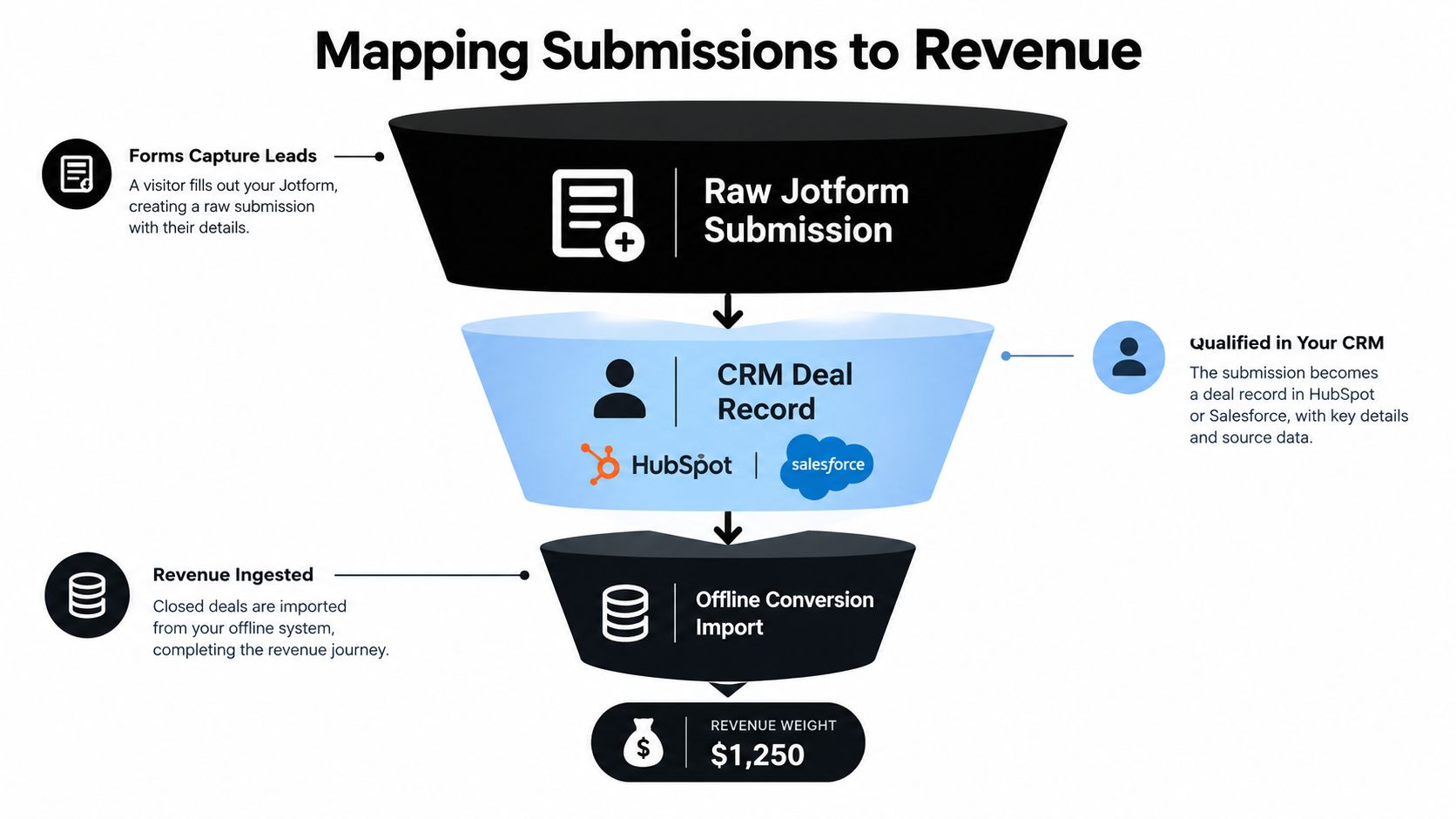
A Jotform record should enter the CRM as a lead object with attribution fields, not as an isolated notification in an inbox. Store the GCLID on the contact and copy it to the associated deal when the sales team creates one. That prevents attribution from disappearing when the record moves from marketing automation into a pipeline.
The same design works across HubSpot, Salesforce, Pipedrive, and other CRM systems. Keep the original submission ID, form name, landing page, campaign fields, consent state, and click identifier together. If the business sells complex services, a CRM designed to handle long sales journeys can also help teams evaluate CRM for multi-day tours where an enquiry may pass through several operational stages before revenue is confirmed.
Separate the form event from the business event
A raw form fill is usually an early signal. A qualified lead, sales opportunity, or closed-won deal is a later signal with stronger commercial meaning. The pipeline should make that distinction explicit:
Jotform submission
    ↓
CRM lead record with GCLID
    ↓
Qualification and duplicate checks
    ↓
MQL or SQL event
    ↓
Opportunity or closed-won event
    ↓
Google Ads conversion import
Google recommends enhanced conversions for leads as an upgraded offline-import approach, with benefits for reporting accuracy, cross-device measurement, and bidding performance. The practical implication is that the upload should carry the identifiers and consent information required by the selected Google workflow, while any customer data used for matching should follow Google's hashing and privacy requirements.
A delayed upload often produces a better signal than an immediate form conversion. Sales may need time to reject a duplicate, identify spam, confirm a service area, or verify that a company fits the target profile. Sending every submission instantly teaches the bidding system that all completed forms have equal value.
Google Ads offline conversion configuration guidance can help teams translate this CRM event model into an upload process. The implementation still needs account-specific decisions about conversion actions, event names, values, consent, and deduplication.
Revenue weighting needs discipline
For ecommerce, the downstream event may be a confirmed purchase or payment. For B2B, it may be a sales-qualified opportunity or a closed deal. Choose an event that sales and marketing can define consistently, then avoid uploading multiple versions of the same outcome under overlapping conversion actions.
Google says imported statistics can take about 3 hours to appear, so don't treat an empty report immediately after an upload as proof of failure. Build an operational check that compares source records, accepted uploads, rejected rows, and Google Ads reporting after processing has had time to complete.
The best signal isn't always the latest signal. It's the signal that represents a real commercial step and still contains the click identity needed for matching.
Troubleshooting the Most Common Jotform to Google Ads Issues
Most attribution failures don't announce themselves with a broken tag. The form still submits, the CRM still creates a contact, and Google Ads still reports conversions. The errors appear only when someone compares the lead record with the advertising data.
| Symptom | Root Cause | Recommended Fix |
|---|---|---|
| Conversions appear immediately, but qualified leads cannot be imported | The setup fires only on the thank-you page and doesn't store the click identifier | Persist the GCLID in a hidden Jotform field and carry it into the CRM |
| Late qualified records are rejected | The upload falls outside Google's click-to-conversion window | Capture the identifier at first touch and monitor ageing records before upload |
| Upload rows fail when customer data is included | The payload doesn't follow Google's privacy and matching requirements | Use the approved hashing and consent process, and send only permitted fields |
| Conversion totals rise without pipeline growth | Spam, duplicates, or low-intent submissions are counted as primary conversions | Gate the upload on CRM qualification, duplicate checks, or a trusted validation signal |
| The same lead appears more than once | Multiple tags, retries, or repeated form events create duplicate conversion records | Deduplicate using the conversion event and stored click identifier |
Check the window before blaming the tag
Google's documented limit is clear: uploads made more than 90 days after the ad click won't be imported. A lead can be valid in the CRM and still be unusable for that particular Google Ads conversion upload. Long sales cycles need an ageing report that surfaces records approaching the limit.
Google also documents a separate 63-day limit for uploads that contain personally identifiable information. That makes data hygiene and timing part of the measurement design, not just an engineering concern. The enhanced conversions for leads guidance explains those limits and the processing expectations.
Don't reward noise
A thank-you-page event can count a refresh. A bot can complete a weak form. A prospect can submit twice because the first attempt appears not to work. If each record becomes a primary conversion, the account may report a higher volume while giving Smart Bidding a less useful training signal.
Use a simple gate. Upload only records that meet a defined CRM stage, pass a duplicate check, and satisfy the business's lead-quality rules. A reCAPTCHA result can support that decision, but it shouldn't replace sales validation where the commercial qualification is complex.
More conversions aren't automatically better conversions. Google Ads needs a dependable definition of value, not just a larger event count.
Best Practices for Attribution That Survives the 2026 Shift
The June 2026 change makes the upload destination important, but the data model matters more. A team that stores no click identifier can't repair attribution by switching APIs. A team that preserves the identifier, qualification state, and event history can adapt the final connector without rebuilding the entire form funnel.
Use this checklist:
- Capture early: Read the GCLID at the first tagged landing page and store it before Jotform hydration.
- Persist deliberately: Keep the identifier through multi-step forms, delayed submissions, redirects, and CRM stage changes.
- Keep fields canonical: Use one field name and one normalised format across Jotform, webhooks, CRM objects, and upload jobs.
- Separate events: Report the form submission for operational visibility, but use a qualified CRM event as the primary bidding signal where appropriate.
- Deduplicate: Give each conversion event a stable record identity and prevent retries from creating additional outcomes.
- Monitor freshness: Review records approaching Google's upload limits before a sales cycle makes them ineligible.
- Prepare the connector: Update offline-import and enhanced-conversion workflows for the Data Manager API rather than copying an older Google Ads API tutorial.
- Validate the chain: Test the value from ad click to URL, hidden field, Jotform payload, CRM contact, deal, upload response, and Google Ads report.
SourceLoop is one possible option for teams that want Jotform attribution connected to CRM records and qualified offline conversions, while custom webhooks, CRM automation, or an internal backend may suit organisations with existing data infrastructure.
The marketers who protect attribution in 2026 won't define success as a form submit alone. They'll treat the submit as the start of a pipeline, preserve the click identity through qualification, and send Google Ads the outcome the business really wants.
Audit your current Jotform flow before the migration window. Submit a tagged test lead, confirm that the GCLID reaches the CRM deal, identify the stage that represents a qualified conversion, and verify that your upload process is ready for the Data Manager API. Fixing that chain now gives your paid campaigns a signal based on real pipeline value instead of unverified form volume.

 Paid Social


