
Best Marketing Attribution Tools for Salesforce: Compared
Best Marketing Attribution Tools for Salesforce, compared on client-side vs server-side tracking, privacy tradeoffs, CRM sync and when each fits.
Most guides ranking the best marketing attribution tools for Salesforce start in the wrong place. They line up a dozen vendors, count how many dashboards each one includes, and treat extra attribution models as a sign of accuracy. That approach ignores the only failure mode that breaks revenue reporting.
If a tracking setup drops half your paid visits to browser restrictions, loses campaign parameters during cookie expiration, or fails to attach touches to Salesforce Opportunity records, a complex model just distributes incomplete math. Extra charts can't fix missing pipeline data.
As a revenue operations analyst, you get a clearer picture by comparing tracking architectures before you ever book a software demo. Native Salesforce rules, client-side scripts, server-side relays, and hybrid stacks each lose data in different places. Judging every option by how much CRM-linked revenue survives browser loss, consent gates, and opportunity reconciliation strips away vendor hype and shows which setup fits your team.
Table of Contents
- Quick Picks by Tracking Approach for Salesforce
- How Client-Side Tracking Captures Conversions
- How Server-Side Tracking Recovers Lost Conversions
- Client-Side vs Server-Side Tradeoffs Side by Side
- Privacy and Consent Limits for Each Approach
- Validation Benchmarks for Salesforce Attribution Data
- Choose Client-Side, Server-Side or a Hybrid Stack
Quick Picks by Tracking Approach for Salesforce
Before diving into browser mechanics or server relays, compare the three core architectures teams use with Salesforce. Each one captures conversion signals differently and breaks under different operational conditions.
| Option | Tracking approach | Best fit | Watch for |
|---|---|---|---|
| Salesforce Campaign Influence (native) | CRM campaign membership and opportunity influence | Sales Cloud teams with clean contact roles | Legacy 1.0 gives 100% credit to one campaign and is unsupported in Lightning |
| SourceLoop | Single-snippet capture plus sync of attribution data to the CRM and ad platforms | Agencies, in-house teams and SaaS companies | Confirm Salesforce field mapping and sync direction before rollout |
| Browser pixels only | Browser-side tags reporting straight to ad platforms | Small budgets with no CRM sync | Each platform reports its own conversions, so totals overlap |
Choosing between these architectures matters because Salesforce rarely acts as a side database. According to Salesforce's FY2025 annual report, the company generated $37.9 billion in total revenue for the fiscal year ended January 31, 2025, reflecting 9% year-over-year growth, with no individual customer representing more than 10% of revenue. That breadth across industries and company sizes explains why Salesforce usually sits at the center of pipeline, account, opportunity, campaign, and booked-revenue workflows.
Why CRM Identity Matters More Than Ad Clicks
An ad platform dashboard only tells you that someone clicked an ad and hit a thank-you page. It doesn't know whether that visitor turned into a qualified opportunity, merged into an existing enterprise account, or closed as revenue months later. Any serious Salesforce attribution setup must preserve contact and campaign identity across those CRM transitions rather than stopping at top-of-funnel clicks.
Teams starting inside Salesforce often test native reporting first, but the version you enable changes everything. As detailed in Salesforce's Campaign Influence documentation, the legacy Campaign Influence 1.0 framework allows only one Primary Campaign Source, assigns 100% of attribution credit to that single campaign, and isn't supported in Lightning Experience. Newer customizable models add first-touch, last-touch, and even-distribution logic, while custom Apex-trigger models let admins build weighted splits such as 30% to first touch, 30% to last touch, and 40% divided evenly across middle touches, exposing fields like Revenue Share, Campaign Influence ID, and Opportunity ID.
Dedicated attribution platforms try to bridge web journeys and CRM fields without custom Apex code. SourceLoop captures visitor journeys through a single snippet, supports first-touch, last-touch, linear, position-based, and time-decay models, and syncs attribution data directly to the customer's CRM and ad platforms. Because field architecture varies wildly across orgs, RevOps teams evaluating this category should verify Salesforce field mapping and sync direction before rolling anything into production.
Attribution also sits alongside the rest of your lifecycle tooling, from email nurturing to lead routing. If you're auditing how campaign tags flow into Salesforce from upstream software, these top marketing automation tools reviewed offer helpful context on how different platforms structure contact capture and workflow triggers.
Browser-only pixels sit at the opposite extreme. Running Google Ads and Meta pixels directly on landing pages requires almost no CRM configuration, but each network claims credit inside its own walled garden. When a single buyer clicks a LinkedIn ad, searches your brand on Google, and submits a form, both platforms report a full conversion while Salesforce receives zero structured journey history.
How Client-Side Tracking Captures Conversions
Most marketing teams begin with client-side tracking because it runs directly inside the visitor's web browser and requires minimal engineering effort. The process follows a straightforward four-step chain from the first page load to the outbound analytics request.
Below is a visual overview of how browser-based capture passes a visitor's conversion signal from page load to ad platform.
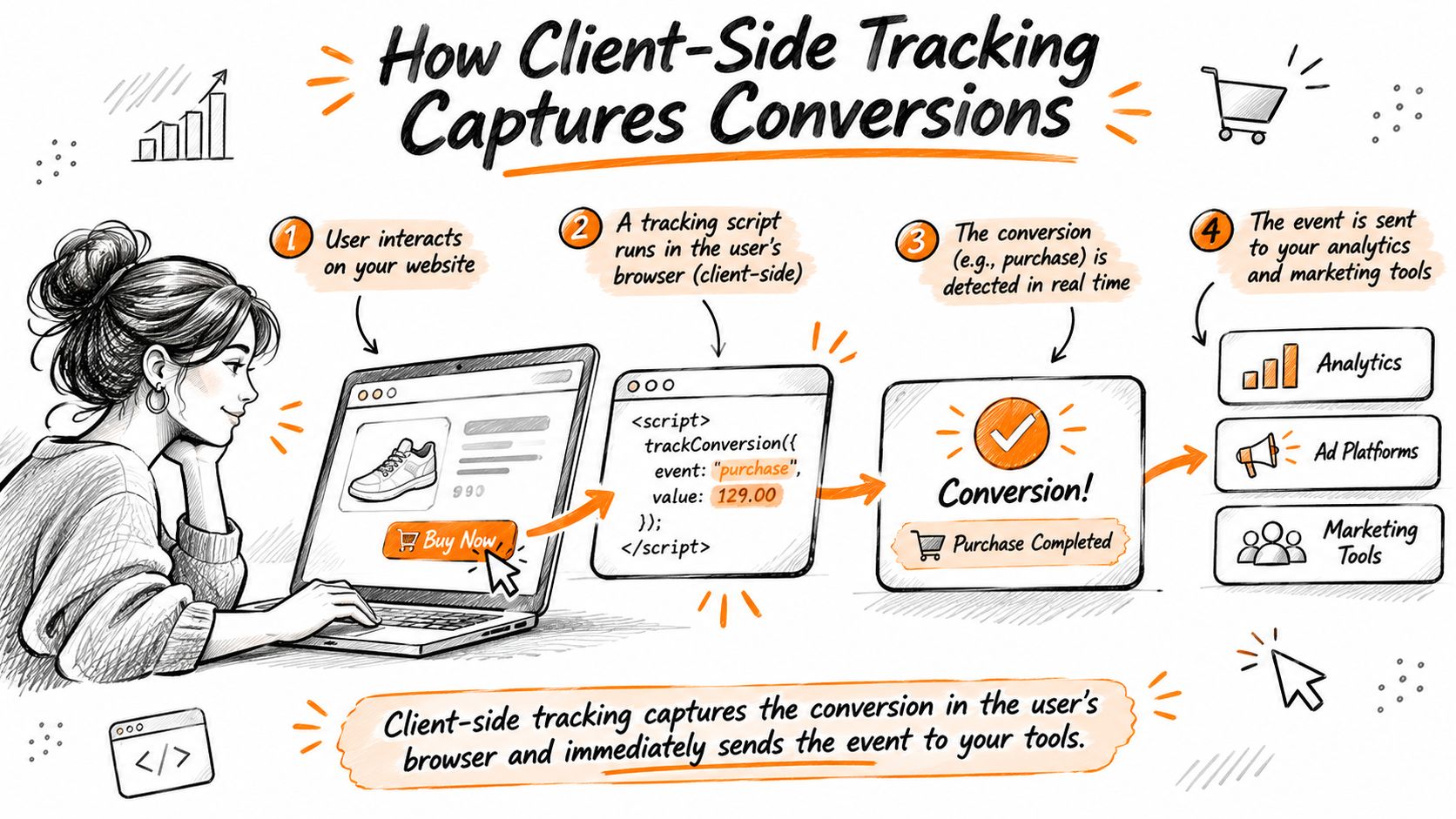
- Tag initialization: A lightweight JavaScript snippet loads inside the visitor's browser as soon as the page renders, waiting to observe session activity.
- Parameter storage: The script reads URL parameters such as
utm_source,utm_campaign, andgclid, then stores them inside a first-party cookie or local browser identifier so the origin survives page-to-page navigation. - Event firing: When the visitor views a pricing page, submits a lead form, starts a live chat, or books a calendar meeting, the tag captures that action and pairs it with the stored session parameters.
- Direct dispatch: The browser sends the conversion payload straight to analytics endpoints and ad platforms like Google Ads or Meta.
The appeal is speed and low overhead. Setup typically enables attribution tracking within an hour, gaining real-time visibility into landing page conversions without provisioning cloud servers or pulling developers off product sprints.
Where Browser Capture Leaks Salesforce Revenue
Speed comes with structural fragility because the browser belongs to the user, not your RevOps team. Every step in the client-side sequence faces interference that strips campaign context before data reaches Salesforce.
- Ad blockers halt scripts: Privacy extensions and built-in browser shields frequently block third-party tracking domains or stop JavaScript snippets from firing altogether, erasing the session before an identifier is ever written.
- Shortened cookie lifetimes erase early visits: Modern browsers aggressively cap JavaScript-set cookies. If a buyer clicks a paid search ad on Monday and returns two weeks later to request a demo, the original cookie has often expired, sending a blank or "direct" lead into Salesforce.
- Consent banners pause capture: When a visitor lands from a paid campaign and ignores or delays clicking the cookie banner, scripts stay suppressed. Even if they accept on a second page, the landing URL parameters are already gone.
- Cross-device switching breaks identity: Clicking a LinkedIn ad on a phone during a commute and filling out a form on a work laptop later that afternoon creates two unrelated browser profiles.
For Salesforce admins, the operational fallout shows up as orphaned leads. Anonymous visitors can't bind to a Lead or Contact record until they submit an email address, so every unrecorded early visit disappears from the opportunity timeline.
Watch the short walkthrough below to see how browser-side tagging behaves in practice and where gaps appear during real user sessions.
Practical diagnostic: Pull one week of platform-reported form conversions from Google Ads and Meta, then compare that count against Salesforce leads created with matching campaign parameters during the exact same seven days. The gap between those two numbers shows how much attribution data your browser tags are dropping right now.
How Server-Side Tracking Recovers Lost Conversions
When browser tags leak too much revenue signal, teams move to server-side tracking. Instead of letting the visitor's browser talk directly to half a dozen external ad networks, the browser sends a single event stream to an endpoint hosted on your own domain. A server or server-side tag container receives that payload, enriches it with CRM and campaign identifiers, and forwards clean conversion records to ad platforms and Salesforce.
This diagram contrasts the conversion drops inside a browser-only path against the recovered flow of a server-side relay.
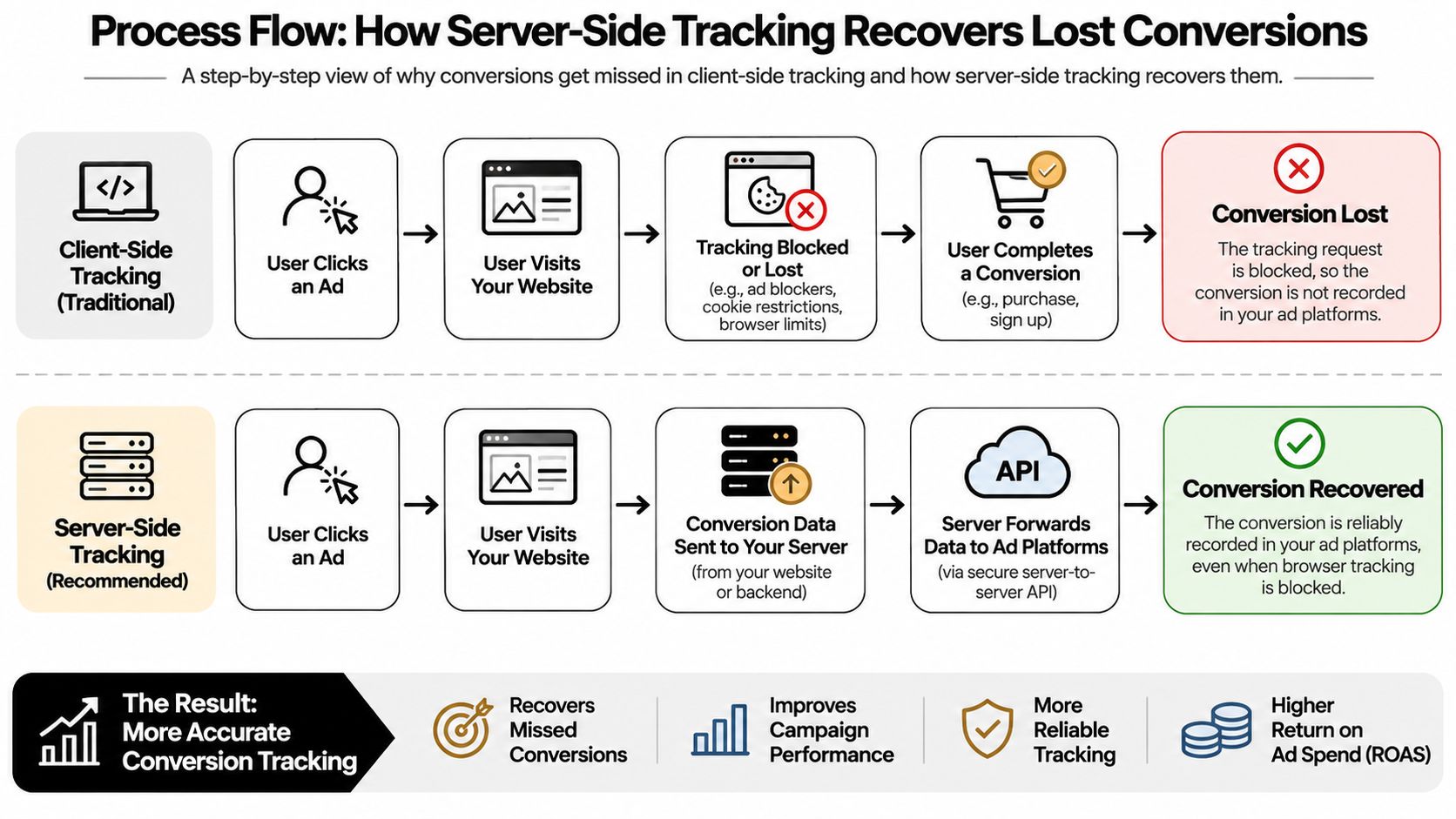
Follow these five steps to understand why each handoff protects data integrity:
- Capture the conversion moment: A visitor submits a demo form, starts a qualified chat, or schedules a call. Capturing the event at identification gives you a durable key (such as an email address or CRM record ID) that doesn't vanish when browser cookies clear.
- Route to a first-party endpoint: The site transmits the event to a subdomain you control rather than an external ad-tech URL. First-party requests face far fewer automated blocks from privacy filters, keeping the conversion intact.
- Enrich and govern on the server: Your server attaches stored click IDs, campaign parameters, hashed email addresses where consent allows, and an explicit consent flag. Performing enrichment server-side keeps sensitive formatting rules out of public browser code and ensures every downstream tool gets consistent fields.
- Forward to ad APIs and Salesforce: The relay dispatches the verified event to Google Ads, Meta Conversions API, LinkedIn, and your Salesforce instance. Routing from one central server guarantees that your CRM and your ad networks receive matching records.
- Deduplicate with a shared event ID: Both client and server events carry an identical event ID when run in parallel. Ad platforms use that shared key to discard duplicates so a recovered conversion never inflates reported totals.
Closing the Offline Loop With Salesforce Pipeline
Server-side tracking recovers conversions lost to iOS 14 restrictions, ad blockers, and cookie loss because your server transmits the confirmed event rather than hoping the user's browser completes the call. For a closer technical breakdown of how endpoints and payloads handle these relays, review this guide on how server-side tracking recovers lost conversion signals.
The deeper payoff for Salesforce teams is the offline conversion loop. Once a lead converts into a Sales Cloud opportunity, progresses to a qualified stage, or closes won, your server can push that CRM milestone back to Google Ads, Meta, and LinkedIn tied to the original click ID. Ad algorithms then optimize bids toward real pipeline and revenue rather than cheap, unqualified form fills.
That reliability isn't free. Running your own server-side pipeline adds cloud hosting fees, engineering setup time, log monitoring, and recurring maintenance whenever Meta, Google, or LinkedIn modifies its conversion API schema.
Never push server-side events without carrying a verified consent status and a synchronized event ID. Ignoring consent flags creates immediate regulatory exposure, while mismatched event IDs double-count conversions and trick automated bidding into overspending on phantom results.
Client-Side vs Server-Side Tradeoffs Side by Side
The right question is not which architecture has more features. It is how much CRM-linked revenue survives browser loss, consent filtering, and reconciliation under each one. Comparing both across operational criteria makes that survival rate visible before you commit budget.
| Criterion | Client-side tracking | Server-side tracking |
|---|---|---|
| Setup effort | Tag plus consent banner, often within hours | Endpoint, hosting and engineering, typically days to weeks |
| Ad-blocker resilience | Often blocked or stripped | Sent from the company's own domain, far less exposed |
| Cookie and iOS loss | Shortened cookie lifetimes lose early touches | Server sends the conversion even when the browser loses the ID |
| Data control before sending | Limited to what the browser exposes | Full control over fields, hashing and deduplication |
| Debugging | Browser developer tools | Server logs and event-level monitoring |
| Ongoing cost | Low, mostly tag maintenance | Hosting plus engineering time for upkeep |
| Consent handling | Tags wait for banner acceptance | Consent flag must travel with every event |
Client-side tracking is the faster starting point for small budgets validating early marketing channels without developer help. Server-side tracking is the better architecture once conversion volume drives automated ad bidding or supports high-value Salesforce pipelines. The deciding factor is usually deal size: when a single closed-won opportunity justifies months of ad spend, even a modest share of lost conversions costs more than the engineering time needed to recover them.
Why Preserving Early Journey History Changes Budget Decisions
Architecture choices directly distort which campaigns look profitable because B2B buyers rarely convert on their first visit. A 2025 scholarly review published by Springer examined original multi-touch attribution research spanning 2011 through 2024, documenting over a decade of analytical work focused on dividing conversion credit across multi-step paths. In a typical Salesforce pipeline, an opportunity is preceded by paid search, organic articles, webinars, email nurtures, partner referrals, sales outreach, and repeated site visits.
When a tracking setup drops early touches, your attribution model can only split credit among the late interactions that survived. That bias systematically starves demand-generation channels and over-credits branded search or direct return visits. The distortion compounds over time, because budget decisions made on skewed data shift spend further toward the channels that merely close demand rather than create it.
Consider a concrete case. A B2B software team produces short product walkthrough videos, editing them with tools like ClipNova's AI video creator, and promotes them on LinkedIn to introduce buyers to a new workflow. A prospect watches the video, clicks through to read a case study, and leaves. Three weeks later, after the browser cookie expires, that same buyer searches the company name and books a demo. Under a leaky client-side setup, Salesforce attributes the entire opportunity to branded search while the video campaign looks like wasted spend. The team then cuts the very channel filling the top of its pipeline, and the loss only surfaces quarters later when lead volume thins.
Even with complete touchpoint logs, analysts also have to separate observed association from causal impact. Fractional multi-touch models show which interactions correlate with closed-won Salesforce deals, yet assigning credit to a webinar or ad click doesn't automatically prove the deal wouldn't have closed without it. Surviving data is a prerequisite for attribution analysis, but it is not the analysis itself. Teams that confuse the two end up with accurate records of a question they never tested.
Privacy and Consent Limits for Each Approach
A common misconception in marketing operations is that moving tracking server-side solves privacy headaches. It doesn't. Server-side tracking only bypasses technical browser restrictions; it never overrides legal consent requirements.
Under client-side tracking, consent enforcement happens visibly in the browser. A consent management platform holds analytics and ad scripts until the visitor opts in, and cookies govern what gets stored. Under server-side tracking, your relay often transmits hashed personal identifiers like email addresses or phone numbers alongside click IDs. That shifts legal accountability directly onto your own endpoint, requiring documented inventories of which fields leave your infrastructure, which vendors process them, and what consent basis authorizes each transfer.
GDPR compliance is the practical baseline for any team operating across international markets. Before routing CRM records back to ad APIs, map your consent states carefully using established GDPR-compliant conversion tracking workflows so declined sessions are stripped before leaving your server.
Why Person-Level CRM Attribution Has a Hard Ceiling
Even a flawless, compliant Salesforce integration can't capture everything. According to Salesforce's Marketing Intelligence Report, 90% of marketers surveyed said privacy changes had altered how they measure performance, and fewer than two in five felt completely successful evaluating key metrics definitively. The same report found that nearly four in five marketers view data quality as essential, yet manual integration and limited resources continue to hold back performance evaluation.
Those numbers point to a structural truth most software comparisons gloss over: individual-level attribution works well for some channels and fails badly on others.
- Where CRM-linked attribution holds up: Consented lead forms, demo bookings, sales-accepted opportunities, call tracking, and closed-won offline revenue tied to known contacts.
- Where person-level tracking breaks down: Anonymous ad impressions, dark social sharing in private Slack groups or podcasts, broad brand awareness campaigns, and sessions where visitors reject cookies.
Trying to force user-level tracking onto unmeasurable channels produces false precision. Instead, RevOps teams pair CRM attribution with aggregate methods like incrementality tests, holdout groups, and geo experiments. Running a geographic holdout on paid social or pausing a brand campaign in test regions isolates true causal lift rather than relying on fragile click trails.
Per-channel measurement rule: Trust person-level Salesforce attribution for direct-response channels driven by consented conversions, and use holdout or geo experiments to validate brand, social, and upper-funnel spend where individual tracking is incomplete.
Validation Benchmarks for Salesforce Attribution Data
Dashboards look convincing even when half your pipeline is missing underneath. Before trusting any vendor demo or native report, run a repeatable audit against your own Salesforce records using five core data benchmarks.
| Benchmark | How to calculate | What a gap points to |
|---|---|---|
| Opportunity match rate | Matched closed-won opportunities ÷ total closed-won opportunities | Missing touches, broken association or late CRM sync |
| Revenue coverage | Attributed revenue ÷ booked revenue | Revenue not synced from closed-won stages |
| Touch-to-CRM lag | Median time from touch to CRM association | Slow sync that delays optimization |
| Key completeness | Touches with campaign, contact and timestamp keys ÷ all touches | Tagging gaps or identity resolution failures |
| Contact role coverage | Opportunities with a contact role ÷ total opportunities | Campaign influence cannot attach to those deals |
The reason these five metrics matter more than UI features lies in Salesforce's underlying data model. As documented in Salesforce's Multi-Touch Attribution Dashboard guide, multi-touch reporting requires Connected Campaigns and Campaign Influence, joining Account Engagement asset activity with Sales Cloud opportunity records. Salesforce's automatic association logic only connects influential campaigns to an open opportunity when a related contact holds an Opportunity Contact Role.
If account executives create opportunities directly on an Account without linking the buying committee through Contact Roles, Salesforce drops marketing credit for those deals. No third-party chart fixes a broken join key unless the tool explicitly resolves account-level matches or flags missing roles.
How to Audit Your Salesforce Data Before Trusting Dashboards
Run this validation check before purchasing or renewing any attribution software:
- Pull a closed-won sample: Export a representative batch of closed-won opportunities from the past two or three quarters so you capture full sales cycles rather than quick wins.
- Trace each deal to recorded touches: Check how many opportunities carry at least one linked campaign interaction, verify whether booked revenue matches attributed totals, and confirm that contact, campaign, and timestamp keys are populated.
- Measure sync speed and failure transparency: Log the median delay between a web touch and its appearance in Salesforce, and run live test submissions using practical steps to verify that tracking is firing and capturing keys properly.
Expect friction when you run this audit for the first time. In Salesforce's 9th Edition State of Marketing report, only 31% of marketers reported feeling fully satisfied with their ability to unify customer-data sources, even though improving attribution remained a top priority. Benchmarking your own org shows whether low coverage stems from vendor limitations or internal CRM hygiene like unmerged duplicate leads and missing UTM governance.
Five Technical Controls to Require From Any Vendor
When your audit reveals gaps, evaluate candidate platforms on engineering controls rather than model counts:
- Bidirectional Salesforce synchronization: The tool should write clean touchpoint records into Salesforce and read updated opportunity stages and closed-won revenue back out.
- Deterministic field mapping: You need explicit control over which Salesforce Lead, Contact, and Opportunity fields receive first-touch, last-touch, and full-path values without overwriting original sources during lead conversion or ownership changes.
- Historical backfill: Confirm whether the system can populate existing records and reconcile open pipeline rather than starting from zero on launch day.
- API retries: Salesforce API limits and transient sync errors happen; production tools queue failed writes and retry automatically instead of dropping leads.
- Audit logs and exception reporting: Finance and RevOps teams must be able to reproduce historical numbers when opportunity stages shift.
If an attribution tool can't list unattributed Salesforce opportunities alongside the exact reason each deal lacked credit, treat its reported revenue totals as estimates rather than auditable data.
Choose Client-Side, Server-Side or a Hybrid Stack
Every Salesforce team operates with different sales cycles, ad budgets, and engineering bandwidth. Matching your tracking architecture to your operational reality prevents both under-measurement and six-month implementations nobody maintains.
Matching Architecture to Four Team Scenarios
Sales Cloud teams with clean contact roles and long B2B cycles usually get the strongest return from combining Salesforce's native Campaign Influence with a dedicated CRM-synced attribution layer. Platforms like Dreamdata, Adobe Marketo Measure, and GA Connector address different layers of this market depending on whether you need multi-stakeholder account stitching or straightforward traffic-source population on CRM records. Because long sales cycles outlast browser cookies and ad platform windows, storing permanent touchpoint records inside Salesforce keeps multi-quarter deals auditable.
Agencies and lead-generation firms managing several client accounts prioritize fast deployment, server-side conversion syncing, and transparent CRM reporting clients can verify themselves. Client retention often hinges on proving which campaigns generate booked revenue across phone calls, forms, and meetings. One customer noted that multi-touch attribution on every call showed which ads start a booking and which ones close it, turning spend reviews from guesswork into concrete budget shifts.
Ecommerce and DTC brands reliant on ad-platform bidding need server-side conversion APIs and offline revenue synchronization above everything else. When Meta and Google Ads algorithms decide daily spend allocation, feeding confirmed purchase values from your backend directly into platform APIs protects return on ad spend far better than browser pixels alone.
Small teams without dedicated engineering capacity should start with client-side capture paired with a lightweight CRM-linked platform instead of building custom server containers from scratch. When a lead converts through any form, chat, or booking, SourceLoop attaches all 8+ attribution data points to the lead and pushes it to the CRM. It also offers two-way Salesforce and HubSpot sync alongside automated offline conversion syncing back to Google Ads, Meta, and LinkedIn, though every RevOps team should verify exact Salesforce field mapping, backfill behavior, and sync direction inside a test environment before rollout.
The real differentiator: The best marketing attribution tools for Salesforce aren't the ones boasting the longest list of models; they're the ones that reconcile attributed pipeline to Salesforce closed-won totals and expose every unattributed dollar.
Why a Hybrid Stack Fits Most Revenue Teams
For most growing B2B and revenue teams, a hybrid measurement stack outperforms either extreme. Keep lightweight client-side capture to record initial landing pages, referrers, and UTM parameters cleanly on the first visit. Layer server-side confirmation on top to pass qualified leads, pipeline milestones, and closed-won Salesforce revenue back to ad platforms reliably. Then pair that CRM foundation with periodic holdout or geo experiments for brand campaigns and dark social channels where individual tracking runs blind.
Organizations operating physical venues, retail locations, or hospitality touchpoints alongside digital campaigns often face an additional blind spot where offline guest visits meet CRM records. Teams connecting on-site customer engagement with broader marketing stacks can explore available network integrations to align location-level touchpoints with their digital attribution workflows.
Before you book another vendor demo or buy new software, run one concrete test this week. Pick a single closed-won opportunity in your Salesforce org and trace it end to end from the first marketing touch to booked revenue using the five validation benchmarks above. Wherever that chain breaks, whether at missing UTM parameters, expired browser cookies, skipped Opportunity Contact Roles, or delayed CRM syncs, tells you exactly which tracking architecture to fix first.
Ready to see how much pipeline survives from first click to closed-won Salesforce revenue? Start a free 7-day trial of SourceLoop to test single-snippet multi-touch capture, two-way Salesforce sync, and server-side conversion recovery in minutes, or audit your current campaign tagging right now with our free UTM Validator and Marketing Attribution Calculator.




 Paid Social


