
How to Track UTM Parameters in Formidable Forms (2025)
Follow these 5 easy steps to capture UTM parameters in Formidable Forms
Table of contents
Do you run marketing campaigns through different marketing channels like Google Ads, Meta Ads, Social Media Marketing, SEO, etc., but don’t know which brings how many leads or customers?
You are probably not leveraging UTM (Urchin Tracking Module) effectively.
In this blog, we’ll learn how to use UTM parameters and a simple tool called SourceLoop.ai for Formidable Forms UTM tracking and understanding where each lead and customer comes from.
Let’s get started…
5 Easy Steps to Track UTM Parameters in Formidable Forms
Here are the five simple steps to capture UTM parameters in Formidable Forms in just five minutes.
1. Add UTM Parameters to Your Links

Start by placing UTM parameters in all the links pointing to your website.
If you are running PPC ads on Google Ads, Meta Ads, LinkedIn Ads, TikTok Ads, etc., they all provide a way to define UTM parameters in the ad links so that when a visitor clicks on the ad, they visit your website with the right campaign details in the URL.
UTM parameters are not limited to just performance marketing ads—you can place them effectively in any link pointing to your website, whether in an email newsletter, a third-party website, or a social media post.
Here’s what a link with UTM parameters looks like:
https://website.com?utm_source=paid_social&utm_medium=LinkedIn&utm_campaign=prime_offer
Resources:
2. Install SourceLoop on Your Website

Next, sign up for SourceLoop.ai and add your unique tracking code to your website.
SourceLoop.ai ensures that when a user lands on your website with UTM parameters (or even without them), it captures the UTM data, organizes it into easy-to-understand marketing attributes, and passes it along with form submissions.
Unlike other tools that only pass the UTM parameters if they exist in the URL, SourceLoop.ai captures parameters from the first visit to the website and then stores them in the user’s browser so they are not lost when the user browses different pages of your website.
3. Add Hidden Fields to Your Forms (Optional)
Once you have installed the SourceLoop.ai tracking code on your website, it will automatically capture the UTM parameters from the link of each visitor to your website.
For each visitor, based on UTM parameters and other available tracking information, it will organize the data into easy-to-understand marketing attributes.
Example:
Let’s say Airbnb is using SourceLoop.ai and a user searches for “Hotels in London” and clicks on an Airbnb Google Ad.
SourceLoop.ai will capture and organize the user’s visit information like this:
- Channel = Paid Search
- Channel Drilldown 1 = Google
- Channel Drilldown 2 = Hotel Campaign
- Channel Drilldown 3 = Hotels in London
- Landing Page = www.airbnb.com/hotels/london-united-kingdom
- Landing Page Folder = hotels
- Last Seen = Aug 29, 2025
If a user visits Airbnb multiple times within a year, SourceLoop.ai will store each visit’s UTM and page visit data.
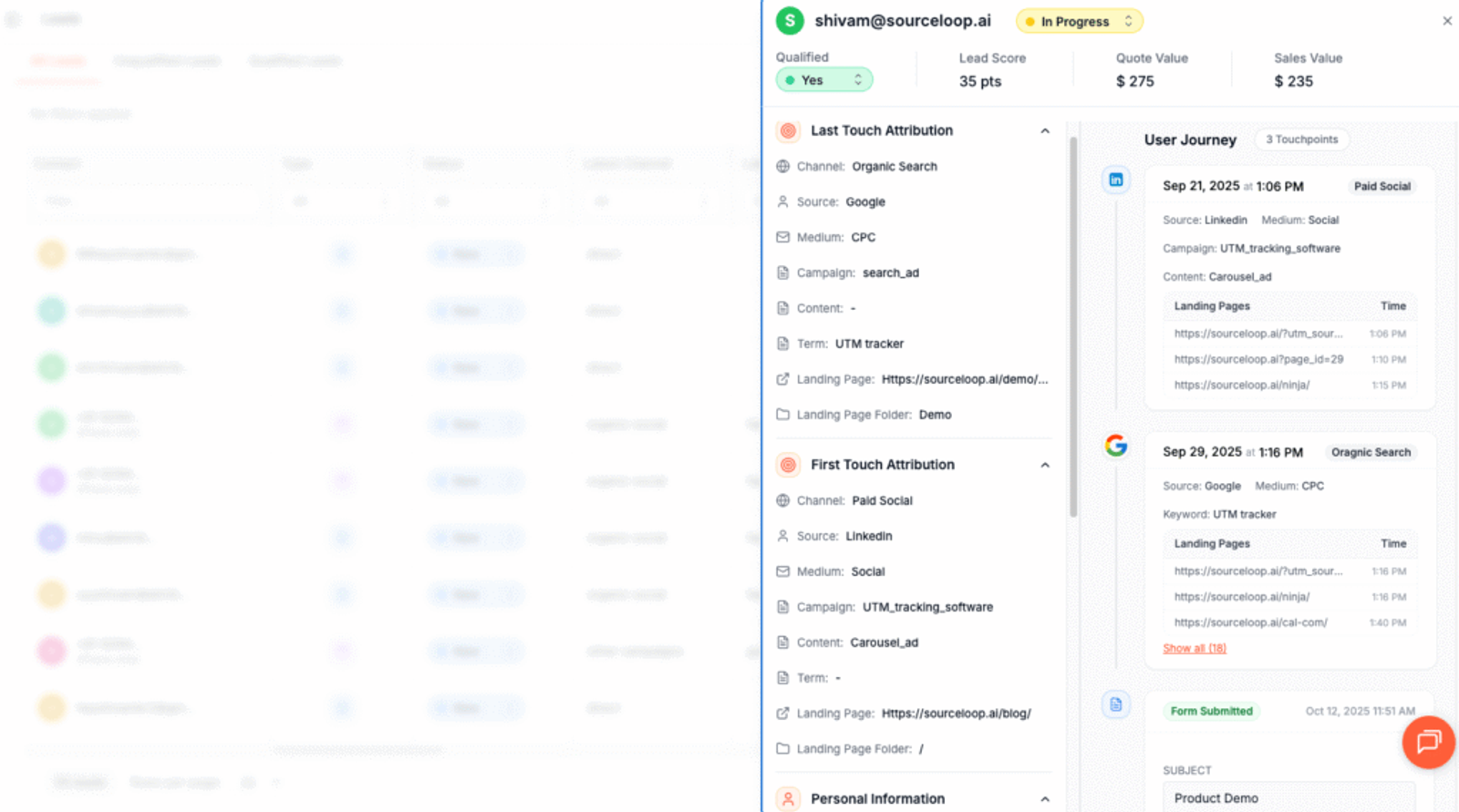
As soon as they submit the form, it will cpature and display the user’s attribution data on the Lead Manager page.
More Resources:
- How to Track UTM Parameters in Contact Form 7
- How to Track UTM Parameters in Forminator Forms
- How to Track UTM Parameters in Jotform
4. Add Hidden Fields to Your Forms (Optional)
Next, you need to add a few hidden fields to your Formidable form.
These fields won’t be visible to visitors but will be used by SourceLoop.ai to pass UTM data with each form submission.
To add a hidden field in Formidable Forms, simply open your form and drag and drop the “hidden” block at the end of your form.
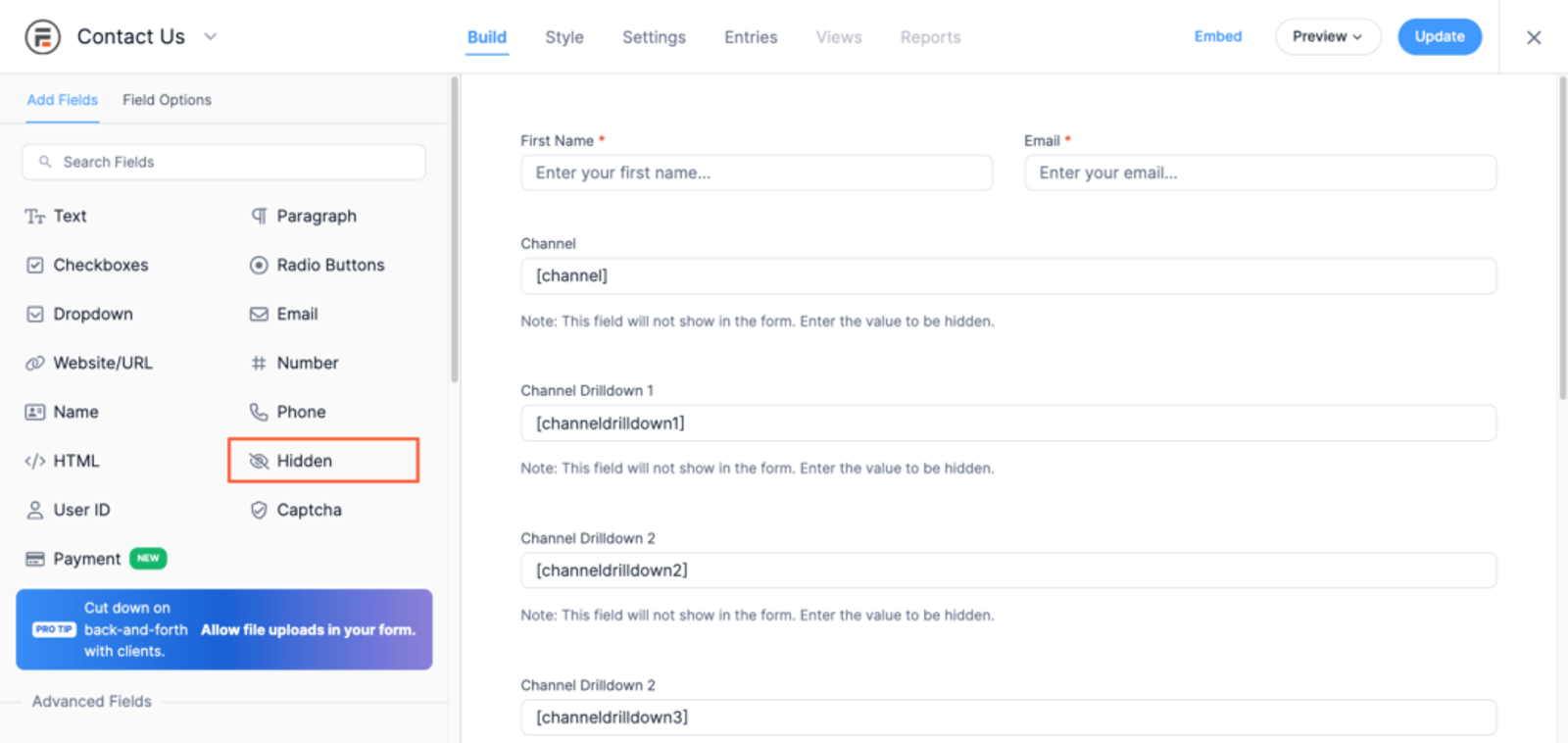
You should add the seven hidden fields with the following default values that SourceLoop.ai will use to pass different UTM and other relevant data:
channelattribution_sourceattribution_attribution_attribution_termlandingpagelandingpagefolderlastseen
If you want to track first-visit data (in case users have visited your site multiple times in the last 365 days), you can also use the following additional hidden fields:
first_channelfirst_sourcefirst_mediumfirst_campaignfirst_termfirst_landingpagefirst_landingpagefolder- firstseen
Make sure you add these fields in all the lead forms on your website, such as contact forms, price quote requests, newsletters, demos, etc.
5. UTM Parameters Are Passed for Each Formidable Forms Submission
Now, when a user finally visits the webpage that has a Formidable form embedded in it, it will identify the hidden fields with default values and then pass the stored UTM and marketing attributes to those fields in the background.
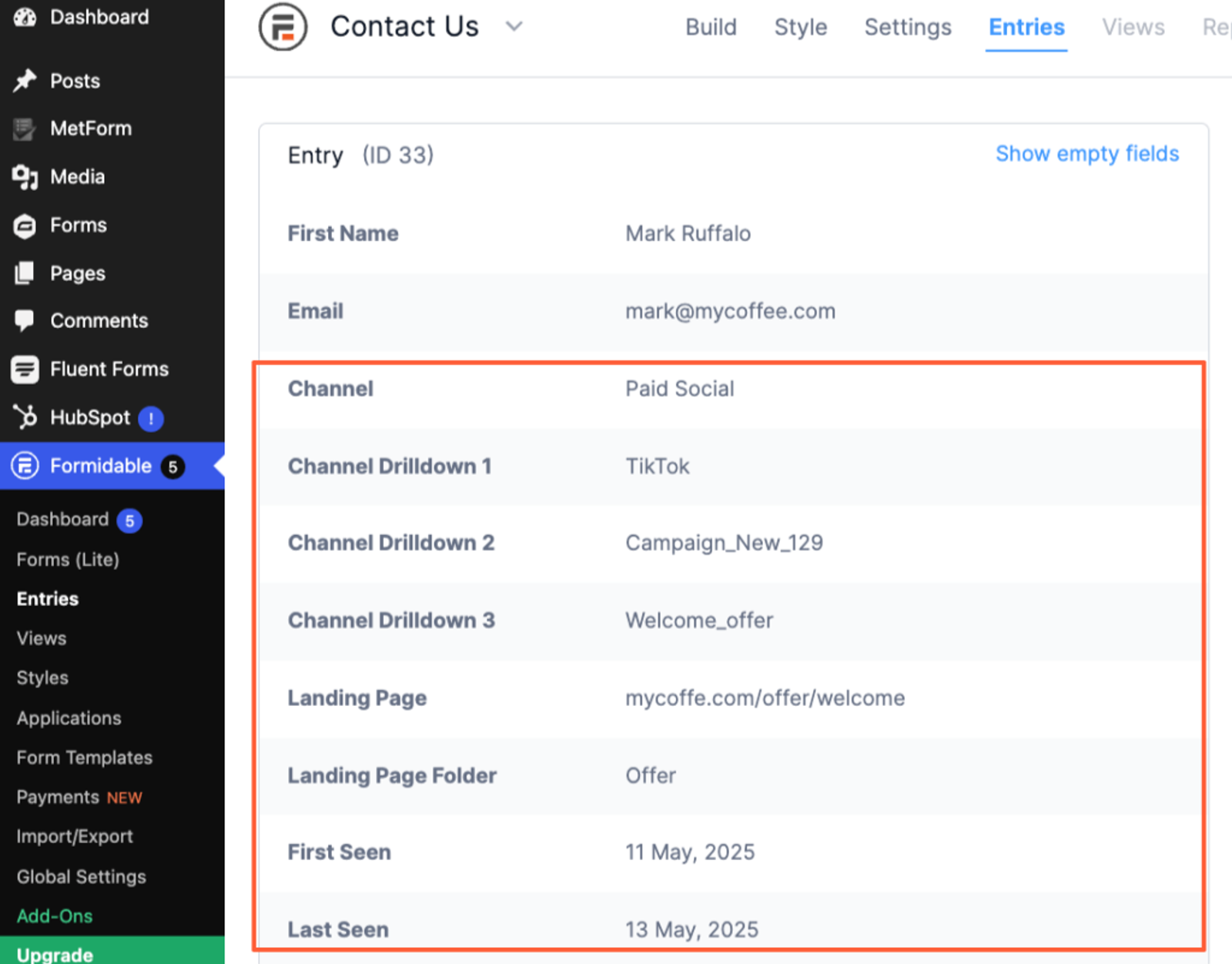
So, you’ll be able to view the UTM and other marketing data for each lead in your Formidable Forms Entries section.
Formidable integrates with CRM platforms like HubSpot & Salesforce, eCommerce platforms like Stripe & WooCommerce, and email marketing platforms like Mailchimp, so you can easily sync the UTM data of each lead with your preferred platform.
On top of that, it connects with Zapier, which means you can essentially sync the lead source data of each lead with any of your CRM or marketing tools and create reports by marketing channel, campaign, and more to understand the ROI and impact of marketing activities.
More Resources:




 Paid Social


