
How to Track Google Ads Lead in Pipedrive
Learn how to track Google Ads lead in Pipedrive with GCLID matching, offline conversions, and CRM sync for accurate attribution.
Your Google Ads dashboard looks healthy. Leads are arriving in Pipedrive, sales receives notifications, and the form integration appears to work. Then someone asks which paid-search leads became customers, and the reporting collapses into “inbound.”
That gap is common. Capturing a lead is only the first handoff. To understand how to track Google Ads leads in Pipedrive properly, you need to preserve the Google Click Identifier, or GCLID, from the ad click through form submission, CRM ownership, deal progression, and the offline conversion sent back to Google Ads.
Table of Contents
- Where Google Ads Leads Quietly Disappear in Pipedrive
- What Google Ads Actually Needs From Your CRM
- Capturing the Click Identifier and Landing It in Pipedrive
- Sending Offline Conversions Back to Google Ads
- Choosing Between Native Integrations, Zapier, and Attribution Platforms
- A Real Bidding Improvement After Fixing the Conversion Stage
- Your Google Ads to Pipedrive Tracking Checklist
Where Google Ads Leads Quietly Disappear in Pipedrive
A marketing team can have Google Ads leads arriving through web forms and Leadbooster and still lack a reliable answer to the revenue question. Pipedrive may show the person, organization, and deal, but the deal's original paid-search context is missing. Sales reports then group the opportunity under “inbound,” while Google Ads receives a conversion signal that says little about qualification or commercial value.
The leak usually starts before Pipedrive. Auto-tagging may be disabled, the landing page may strip query parameters, or the form may omit the hidden GCLID field. A multi-step form can reset the value between screens. A chatbot can create the person record without preserving the original click identifier. Even when the lead has a GCLID, the value may stay on the lead and fail to migrate to the deal that sales updates.
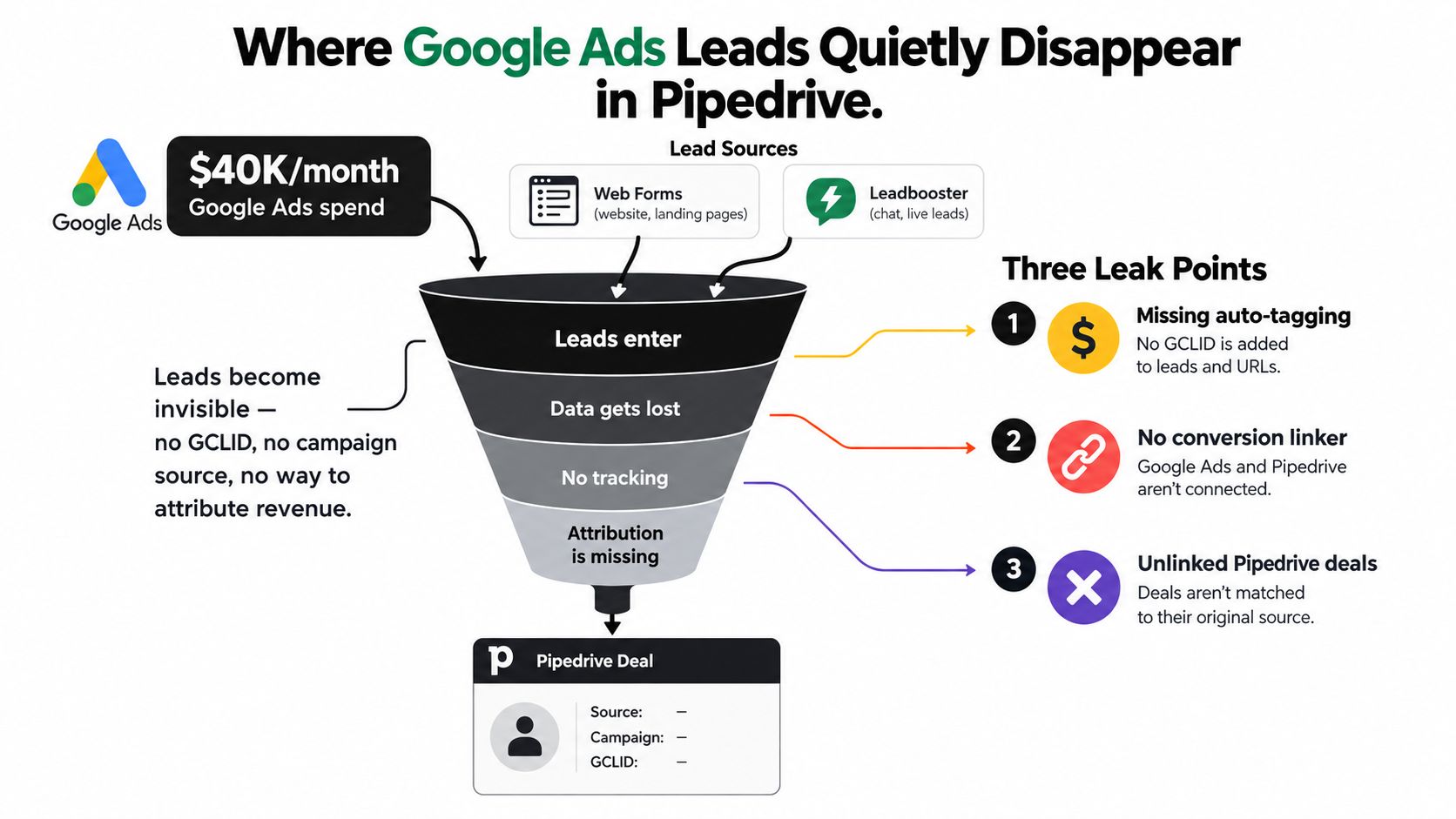
The three handoff failures
- The click identifier disappears: The landing page or form doesn't retain the GCLID.
- The source stays disconnected: Pipedrive stores a lead, but campaign and click data don't follow it into the deal.
- The signal fires too early: Google Ads counts every new lead, including records that never become qualified opportunities.
Pipedrive's Google Ads Lead Forms app listing says that leads generated through Google Ads campaigns are captured and imported into Pipedrive instantly. That solves the intake problem. It doesn't, by itself, create a complete offline revenue loop.
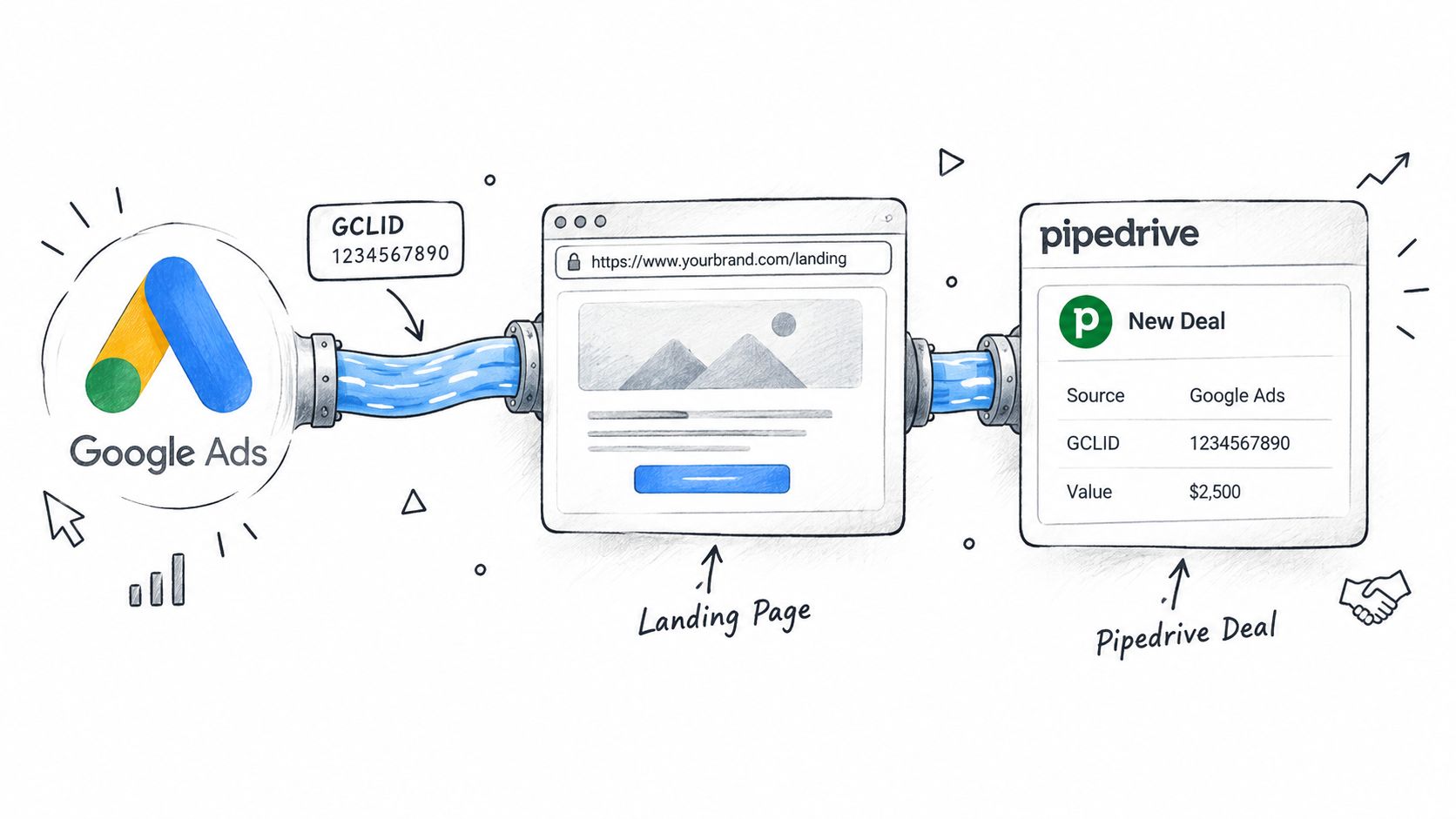
The practical model is a continuous thread. Google Ads creates the click identifier, the landing page passes it into the form, the form maps it to Pipedrive, and the deal automation sends a staged conversion back to Google Ads. Break any link, and you can still have plenty of CRM records with no dependable campaign-to-revenue attribution.
Operational rule: A lead in Pipedrive isn't proof that Google Ads can learn from the eventual sale. The identifier and the outcome must remain connected.
What Google Ads Actually Needs From Your CRM
Google Ads needs a matchable identifier and a meaningful business event. The GCLID is the main thread for standard click-based offline conversion matching. If the original click context isn't stored with the CRM record, Pipedrive can't tell Google Ads which click produced the later opportunity or customer.
An offline conversion is an event that happens after the website interaction, such as a qualified opportunity or won deal. It differs from a browser-side form conversion because the CRM outcome is sent later. Enhanced conversions for leads can use hashed first-party user data as an additional matching route, but the implementation still needs disciplined identity handling and a clearly defined event.
The event should include a timestamp, the relevant conversion action, and a value when your commercial model supports one. The timestamp needs to reflect when the qualifying CRM event occurred, not when someone eventually remembered to upload a file. Your growth infrastructure for CRM systems also needs consistent field mapping, ownership rules, and lifecycle definitions, because attribution fails when marketing and sales use different meanings for “qualified.”
Decide what deserves a conversion
“Lead created” is easy to trigger, but it often teaches bidding systems to seek form completion rather than sales potential. If your forms attract students, vendors, job seekers, duplicate records, or poor-fit companies, sending every submission as a primary conversion trains Google Ads on the wrong behavior.
A qualified deal or sales-accepted opportunity is usually a stronger optimization event. A closed-won event is closer to revenue, but it arrives later and may be too sparse for frequent bid feedback. Many teams therefore use separate conversion actions, keeping lead creation for observation while making a qualified stage or won deal the primary optimization signal.
The basic measurement logic remains simple. Pipedrive describes conversion rate as (number of conversions / total visitors) × 100 in its marketing metrics guidance. The operational challenge is defining which milestone counts as the conversion and preserving the source data across every stage. For a related implementation perspective, see this guide to tracking marketing attribution in Pipedrive CRM.
| Field | Required | Source |
|---|---|---|
| GCLID | Required for click matching | Google Ads landing-page parameter |
| Conversion action | Required | Google Ads conversion setup |
| Conversion date and time | Required | Pipedrive stage-change timestamp |
| Conversion value | Applicable when value is assigned | Deal value or approved pipeline value |
| Order or deal ID | Recommended for deduplication | Pipedrive deal identifier |
| Hashed user identifiers | Applicable to enhanced conversions | CRM contact fields, prepared according to Google's requirements |
Capturing the Click Identifier and Landing It in Pipedrive
Start in Google Ads by confirming that auto-tagging is enabled. The ad click should append the GCLID to the landing-page URL, and the site should retain that value long enough for the visitor to submit a form. A conversion linker can help preserve advertising click information in the browser, but it won't repair a form that never maps the identifier into its submission payload.
On the landing page, read the gclid query parameter and write it into a hidden form field. The implementation can use a small JavaScript snippet, a tag manager variable, or an attribution utility, depending on your stack. The important behavior is the same: capture the value when the visitor arrives, retain it through navigation, and populate the hidden field when the form is submitted.
Preserve the value across the CRM lifecycle
Map the hidden field into a Pipedrive custom field rather than leaving it in a temporary integration payload. Store it on the person record and copy it to the deal when the lead becomes an opportunity. Add corresponding fields for other relevant identifiers and attribution context, such as the landing page and campaign parameters, so sales and marketing can inspect the origin without reopening the original session.
Pipedrive's native lead forms can support a direct intake pattern, while Leadbooster and external form tools may require separate field mapping. Zapier or Make can carry the value between systems when the form platform doesn't offer the needed native connection. The key test is not whether a contact appears in Pipedrive. It's whether the GCLID is still present on the deal that reaches the qualifying stage.
Test the awkward paths, not only the happy path
Run a test where the visitor lands on the homepage, goes to a contact page, and submits later. Test multi-step forms, mobile sessions, duplicate contacts, and a lead that becomes a deal after ownership changes. For server-side implementation considerations, Data Hunters Agency's guide to server-side tracking provides useful context on the distinction between browser and server execution.
A common failure is overwriting a stored first-touch identifier with a later empty value. Another is mapping the GCLID to a person field but not copying it when a deal is created. Review the actual Pipedrive record after every test. Don't assume the integration's field list proves that the value survived.
For practical field-mapping patterns, this guide to pushing UTMs to Pipedrive is useful alongside the GCLID setup. UTMs support readable campaign reporting, while the GCLID supports click-level matching back to Google Ads.
Sending Offline Conversions Back to Google Ads
Once the GCLID sits on the Pipedrive deal, choose how Google Ads will receive the later outcome. The three practical routes are an API-based enhanced-conversion workflow, scheduled CSV uploads through the Google Ads interface, or a CRM sync tool that handles the exchange between Pipedrive and Google Ads.
The trigger belongs in the sales lifecycle, not at the point where a record first enters the CRM. A “Lead In” stage is usually too early if the objective is qualified pipeline. A sales-qualified lead or opportunity-created stage can provide a timelier signal, while closed-won gives the cleanest revenue outcome. Use separate conversion actions when you need both an early optimization signal and a later value signal.
Put the trigger under stage control
Create one explicit Pipedrive automation for the chosen stage. The automation should check that the deal contains a valid identifier, has not already been uploaded, and matches the conversion criteria. Write an upload status, event timestamp, and Google Ads response back to the deal so the operations team can investigate failures without guessing.
A deal can move backward and forward. If the automation fires every time the stage changes, the same deal may be uploaded more than once. Use the Pipedrive deal ID as an order or event reference where supported, and add an idempotency check before posting. A simple “conversion sent” flag can prevent duplicates, but it should be paired with a review process for corrections and legitimate later-stage events.
The payload should contain the GCLID, conversion action, conversion date and time in the user's relevant timezone, and conversion value when applicable. Enhanced-conversion workflows may also require normalized and hashed user identifiers. Google Ads offline workflows need matching click information within their applicable attribution windows, including the 90-day click and 7-day view limits described in the implementation guidance.
| Method | Best for | Trigger latency | Dedupe control |
|---|---|---|---|
| API or enhanced conversions | Teams needing event-level automation | Near real time when configured | Strong, if the implementation stores event IDs |
| CSV upload | Low-volume teams with a controlled process | Scheduled and manual | Spreadsheet validation and upload checks |
| CRM sync tool | Teams wanting staged rules without maintaining all API code | Automated, dependent on sync schedule | Usually includes matching and status handling |
The Pipedrive and Google Ads offline-conversion configuration guide can help when defining the mapping. Whichever method you choose, follow the same sequence: capture, qualify, stage-fire, deduplicate, and monitor conversion lag in Google Ads. Industry workflow guidance also recommends checking that an uploaded conversion appears in Google Ads within about 24 hours and watching for sync failures because the workflow isn't self-healing. See the Pipedrive offline conversion workflow for that operational pattern.
Choosing Between Native Integrations, Zapier, and Attribution Platforms
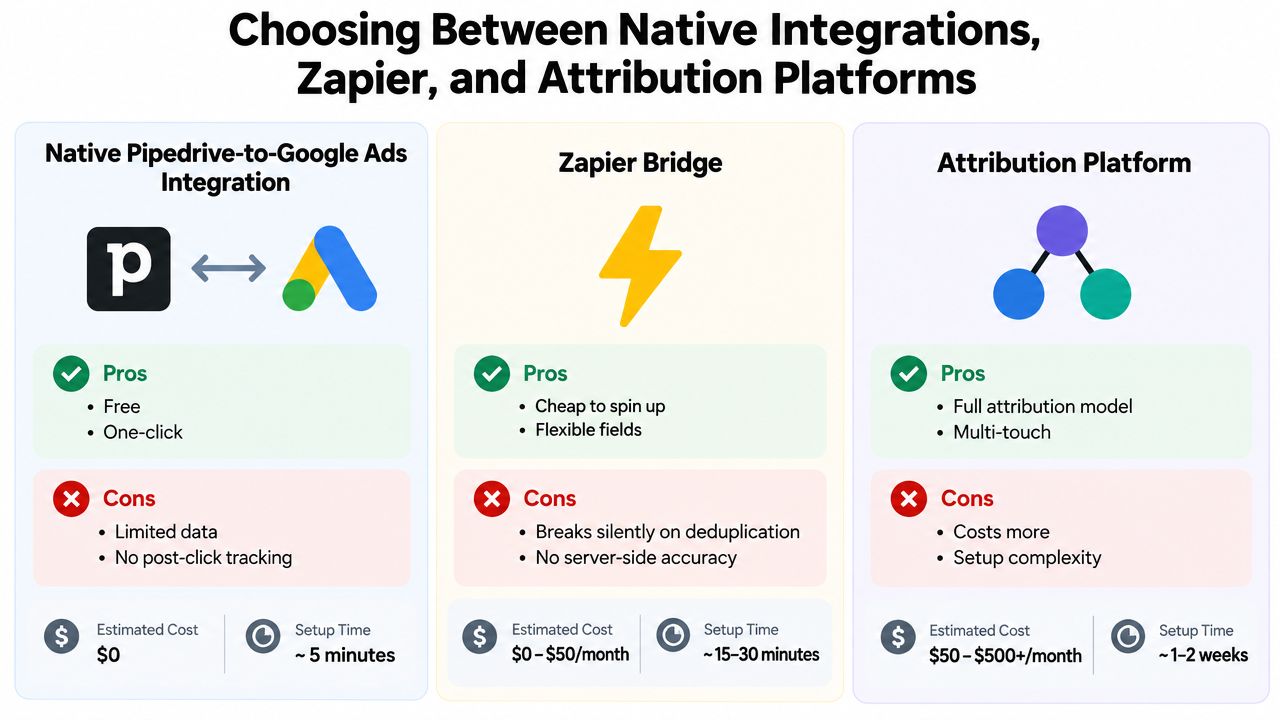
The right connection depends less on whether a tool can create a Pipedrive record and more on whether it can manage the outcome loop. A native integration is attractive for simple lead intake. Zapier is flexible and quick to configure. An attribution platform adds another operational layer for matching, staged events, values, and failure monitoring.
Pipedrive's marketplace integration for Google Ads Lead Forms is useful when the requirement is immediate lead capture. Its documented pattern focuses on importing campaign leads into Pipedrive, while broader connected workflows can assign and route records through automation. That's enough for a straightforward intake process, but it may not give you precise control over which deal stage becomes a Google Ads conversion.
Zapier offers a practical bridge for teams that need custom field mapping without building an API integration. The trade-off is maintenance. Token refreshes, rate limits, changed field names, missed stage transitions, and duplicate events can create quiet gaps unless someone owns monitoring and reconciliation.
Compare the operating models
| Approach | Strength | Weakness | Best fit |
|---|---|---|---|
| Native integration | Fast setup and fewer moving parts | Limited stage and value control | Simple lead capture |
| Zapier or Make | Flexible mappings and approachable automation | Requires testing, alerting, and upkeep | Smaller teams with custom workflows |
| Attribution platform | Centralized source data, matching, staged conversion rules, and monitoring | More setup and another system to govern | Teams measuring pipeline or revenue |
Manual CSV uploads remain reasonable when volume is low and the sales process is stable. They become fragile when deals change stages frequently or several campaigns need different conversion actions. A connector that supports GCLID matching, deduplication, value assignment, and failure alerts is more appropriate when paid search decisions depend on qualified pipeline.
For specialized campaigns, the same distinction applies to service businesses running plumber ad campaigns. Lead volume alone doesn't tell you which jobs, locations, or customer types create profitable work. The integration should reflect the business event that sales or operations actually values.
SourceLoop is one attribution-platform option that can sync attribution and revenue fields with Pipedrive and send qualified offline conversions to Google Ads using the original GCLID. It should be evaluated alongside native integrations, Zapier, Make, and custom API work against your own stage rules and monitoring requirements.
A Real Bidding Improvement After Fixing the Conversion Stage
A mid-market B2B SaaS team had a familiar problem. Pipedrive sent every newly created lead to Google Ads as a conversion, so the cost per lead looked acceptable while sales found the inbound queue full of poor-fit records. The team could see form activity, but it couldn't connect paid clicks to qualified pipeline.
The fix wasn't another dashboard. The team kept the GCLID on the deal, added a qualification check, and changed the primary optimization event from lead creation to a sales-qualified deal. It also assigned an estimated pipeline value to the qualified event and reserved closed-won for the revenue view.
What changed operationally
Google Ads stopped receiving the same signal for every submission. Pipedrive sent the event only when the deal met the agreed qualification criteria, and the automation recorded whether the event had already been sent. Sales and marketing then reviewed rejected or unqualified leads separately instead of treating them as evidence that bidding was working.
The team saw a modest rise in cost per lead, but the leads entering the qualified stage became more useful. SQL volume improved, sales acceptance became stronger, and representatives spent less time sorting through records that should never have been treated as optimization outcomes.
The lesson is straightforward: Google Ads searches for more of whatever you define as success. If success means a completed form, bidding will favor form completion. If success means a qualified deal with credible value, the system gets a stronger signal, provided your CRM stages are consistently maintained and your conversion uploads are accurate.
Your Google Ads to Pipedrive Tracking Checklist
Treat the setup as an operating process, not a one-time integration. The form can work today while a later pipeline change removes the GCLID from the deal, so every handoff needs an owner and a test.
- Capture identifiers: Preserve the GCLID on every paid-search form submission. Store parallel identifiers such as GBRAID, WBRAID, and the landing-page URL when your measurement design requires them.
- Store the source on the deal: Create Pipedrive custom fields and copy the identifiers from the lead or person record when a deal is created. Check records created through web forms, Leadbooster, and intermediary tools.
- Define conversion stages: Keep lead creation available for diagnosis if needed, but use a qualified deal and closed-won event for the signals that represent sales progress. Document which stage fires which conversion action.
- Validate uploads: Review Google Ads upload results, rejected events, missing identifiers, timestamps, and duplicate warnings each week. Pipedrive should also show the event status and last attempt.
- Choose the connection: Use a native path for straightforward intake, an automation bridge for manageable custom rules, and an attribution platform when staged, revenue-weighted events need matching and monitoring.
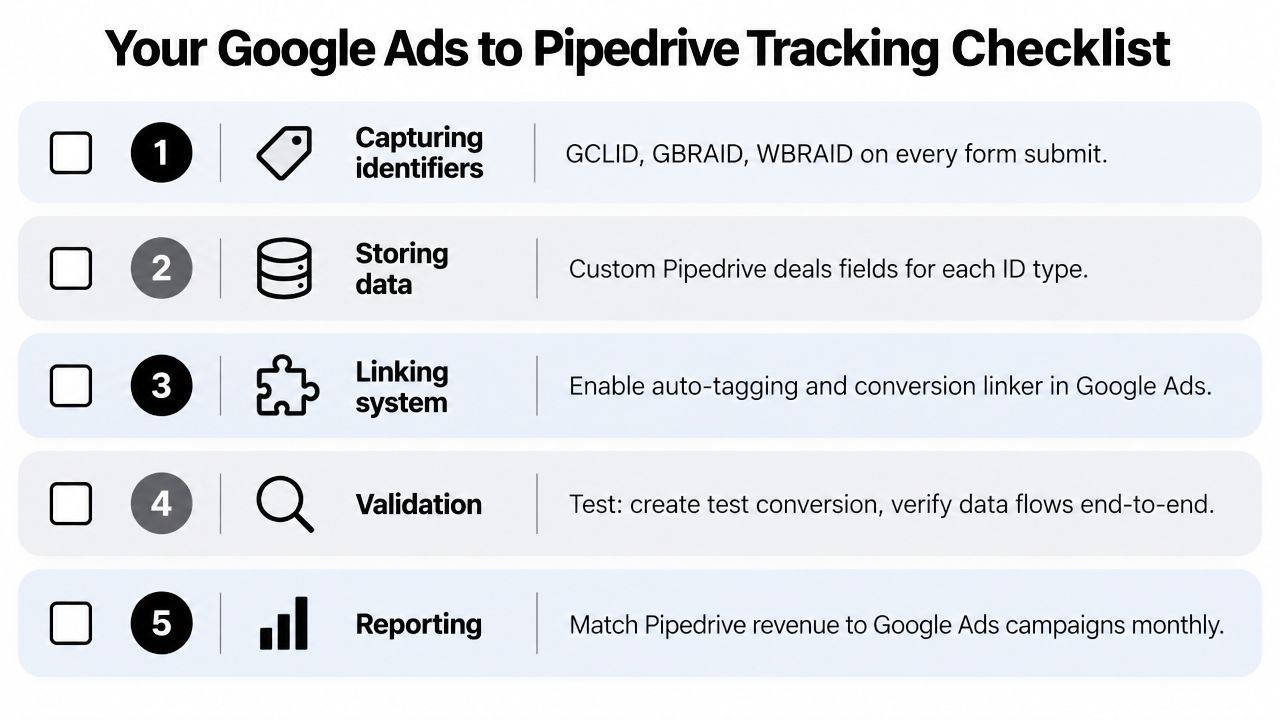
Use a test deal to verify the entire path, from ad landing page to hidden field, Pipedrive deal, staged automation, and Google Ads conversion record. Re-validate the loop quarterly and after any form, domain, CRM pipeline, or automation change. A broken GCLID field can degrade bidding within days because the platform keeps optimizing from the signals it still receives.
Audit your current Pipedrive records now. Open a recent Google Ads lead, confirm that the GCLID reaches the associated deal, identify the stage that should count as qualified, and run one controlled offline-conversion test before changing your bidding strategy.


 Paid Social


