
How to Track Google Ads Lead in Attio
Learn how to track Google Ads lead in Attio using first-party data. Capture clicks, sync CRM stages, and master offline conversion imports for 2026.
Capturing a GCLID in Attio is not the same as measuring Google Ads revenue. That popular recipe solves only the first handoff, and in 2026 it can leave your team with a CRM full of click IDs that Google can no longer use through the legacy workflow. The durable approach treats Attio as a first-party data hub, preserves identity and lifecycle context at the point of capture, and sends carefully selected CRM milestones through the current Google Ads conversion process.
That distinction matters most for B2B teams. A form submission is an event, not proof of buying intent. The useful measurement chain is ad click, known contact, qualified lifecycle stage, opportunity, and revenue. Each step needs its own data field, timestamp, consent decision, and conversion rule.
Table of Contents
- Why Legacy Click Tracking Fails in 2026
- Capturing Click Identity at the Form Layer
- Navigating Offline Conversion Time Windows
- First-Party Data Governance and Activation
- Manual Webhooks Versus Attribution Platforms
- Designing Clean Feedback Loops for Bidding
- Building a Future-Proof Revenue Pipeline
Why Legacy Click Tracking Fails in 2026
The old playbook sounds simple: capture the GCLID, place it in an Attio text field, and upload it later. That still has value as one attribution signal, but it isn't a complete operating model. A click ID without campaign context, first-party identity, lifecycle status, or a supported upload path can't reliably explain which ads created qualified pipeline.
Google changed the technical destination for this work. As of June 15, 2026, offline conversion imports and enhanced conversions for leads uploads moved to the Data Manager API and were blocked in the Google Ads API. Enhanced conversions for web and leads were also unified into a single on/off setting in April 2026. The change is documented in Google's API migration guidance. Any Attio automation built around an older Google Ads API recipe needs a design review, not just a credential refresh.
The CRM field is not the measurement system
Attio should retain the original acquisition context, but it should also become the place where your team records what happened after the click. Store the contact identity, consent state, source values, qualification status, opportunity relationship, and stage-change timestamps together. This gives RevOps a defensible first-party record even when browsers, forms, or intermediary tools fail to preserve session context.
The practical implication is broader than API maintenance. Teams planning paid search strategies by Sprints & Sneakers should treat conversion architecture as part of campaign design. Keyword selection and ad creative determine who arrives, while Attio determines whether that arrival became a sales-ready contact or merely a low-intent enquiry.
Practical rule: A GCLID is useful evidence of an interaction. It isn't a revenue model.
A future-proof setup therefore separates three responsibilities. The form captures acquisition data, Attio maintains the first-party customer record, and Google receives approved conversion events through the supported Data Manager workflow. That separation survives asynchronous imports and makes API changes less disruptive because your business data isn't trapped inside an ad-platform convention.
Capturing Click Identity at the Form Layer
Attribution is easiest to lose before a record exists. If the landing page accepts a form submission without writing click and campaign data into the payload, a later CRM workflow may know who submitted the form but not which ad path brought that person there.
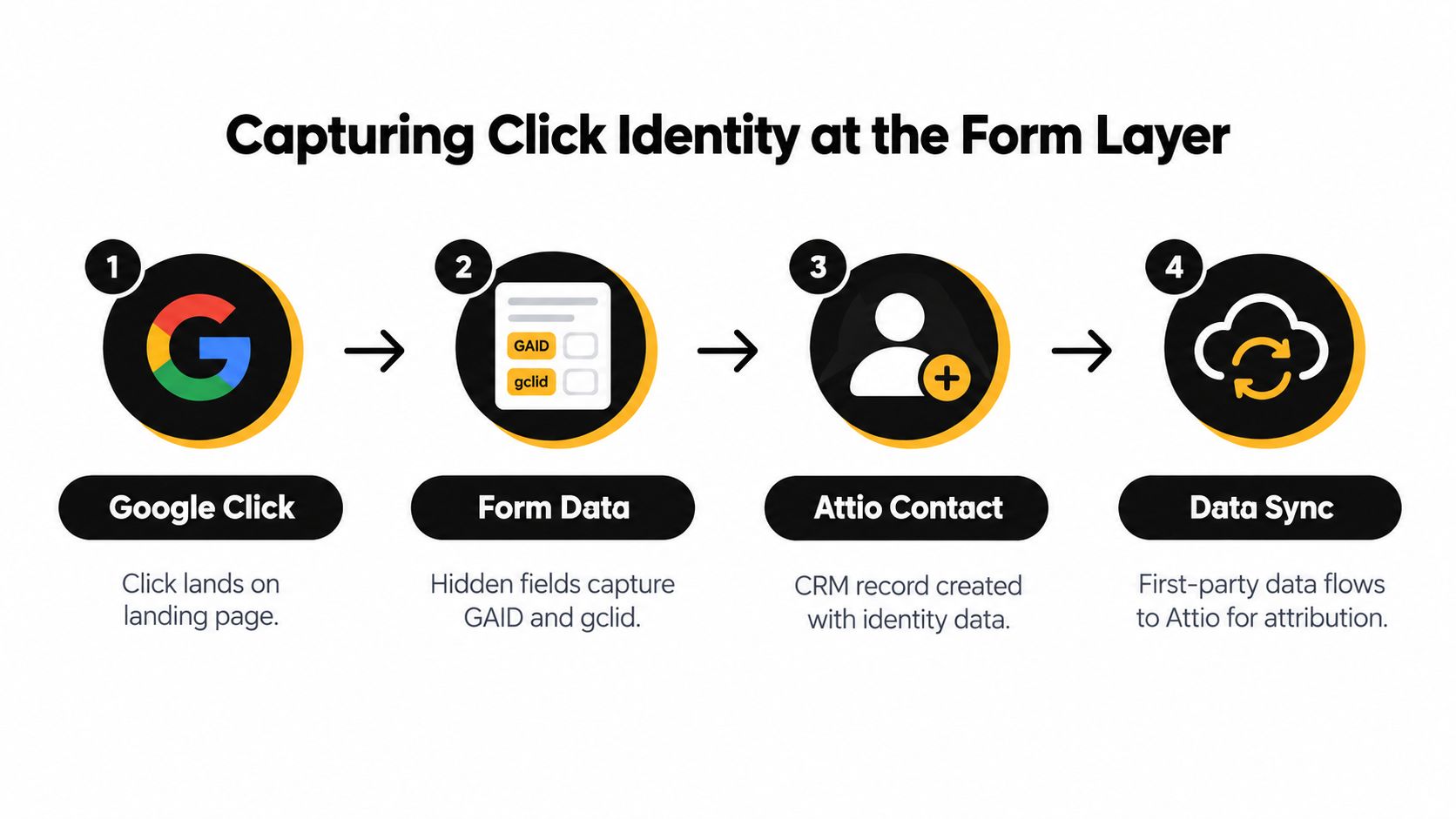
Use hidden fields at the form layer, then map those fields into Attio when the person or company record is created. The exact implementation varies by form tool, but the data contract should remain stable.
Use a durable attribution schema
Independent Attio workflow guidance recommends retaining Channel, Channel Drilldown, and Landing Page, while also writing Google Ads campaign, ad group, and keyword values into the form payload. The Attio attribution field guidance supports this approach because the record keeps its acquisition context after the submit event.
A practical schema can include:
| Field | Purpose |
|---|---|
gclid |
Preserves the Google click identifier when available |
channel |
Stores the broad source, such as paid search |
channel_drilldown |
Identifies Google Ads or a more specific source |
landing_page |
Records the entry page |
campaign |
Stores the campaign value |
ad_group |
Stores the ad group value |
keyword |
Stores the keyword value where available |
first_touch_at |
Records when the original acquisition context was created |
consent_status |
Records whether downstream activation is permitted |
Keep the original values immutable. If a contact returns through another campaign, add a separate touch or attribution record rather than overwriting the first-touch fields. That preserves both acquisition history and the current route to conversion.
Persist before routing
The form should read the landing-page query parameters and click identity, place them into hidden inputs, and submit them with the visible contact fields. The integration that creates Attio records must map those values explicitly. Don't depend on a later enrichment step to infer the source from a URL or manually edited note.
Good lead generation form conversion insights from Rendemo can help teams improve the visible form experience, but conversion UX and attribution persistence are separate jobs. A shorter form may increase submissions while still producing unusable records if hidden attribution fields aren't carried into Attio.
For teams documenting the identifier layer, this explanation of click IDs is a useful reference. The implementation test is straightforward: submit a controlled visit, inspect the form payload, inspect the Attio record, and verify that the values survive any webhook, enrichment, or routing step.
Navigating Offline Conversion Time Windows
The hardest problem isn't creating an Attio record. It's deciding which later stage can still be sent to Google Ads in time to influence bidding.
Google states that offline conversions uploaded more than 90 days after the last click aren't imported, while enhanced conversion lead uploads have a stricter 63-day limit. Those limits create a real conflict for long sales cycles, as documented in Google's offline conversion timing guidance.
A lead may enter Attio promptly, reach SQL after a sales review, become an opportunity after discovery, and close much later. If your only Google conversion is closed-won, the upload may arrive outside the permitted window. If your only conversion is the initial form fill, Google may optimize toward contacts that never reach sales.
Choose milestones before the deadline
Design conversion milestones around events your sales team can record consistently and your integration can transmit within the applicable window. Common candidates include:
- Qualified lead: Use a strict definition, such as verified fit and an accepted sales handoff.
- SQL: Trigger when sales confirms that the contact meets the agreed qualification criteria.
- Opportunity: Trigger when a real commercial process begins, not when a rep casually updates a field.
- Closed-won: Send it when timing allows, but retain late revenue for internal reporting when the upload window has passed.
The solution isn't to pretend that every late-stage outcome is available to Google. It is to send an earlier, meaningful milestone for optimization and use Attio or your reporting layer to analyze later revenue. The offline conversion configuration guide can support the operational setup, but your qualification definitions still need to come from RevOps and sales.
Model the gap instead of hiding it
Maintain both the event time and the upload time in Attio. A delayed workflow can then show whether a conversion was late because the sales cycle was long, an integration failed, or a stage was entered retrospectively. Without both timestamps, those causes look identical in a dashboard.
Don't relabel raw leads as qualified conversions to compensate for missed deadlines. That inflates the apparent value of campaigns and teaches bidding systems to seek the wrong audience. A better model reports late revenue internally, while Google receives earlier milestones that are demonstrably connected to commercial intent.
First-Party Data Governance and Activation
Attio becomes valuable here because it can hold the customer context that ad platforms can't infer from a form alone. That context includes normalized contact details, source history, consent, lifecycle state, and the relationship between a person, company, deal, and revenue event.
The governance layer should be explicit. Normalize identifiers before activation, keep raw and transformed values logically separate, record the legal basis or consent state required by your operating model, and restrict which workflows can export data. A CRM field containing an email address isn't automatically ready for advertising use.
Normalize identity before hashing
The documented Google workflow requires normalizing and hashing user-provided identifiers such as email, phone number, or mailing address, then uploading ClickConversion objects through the ConversionUploadService for offline sales tracking, as described in this Attio and Google Ads integration overview.
Normalization should happen consistently. Email casing, whitespace, phone formatting, and address representation need one defined policy, otherwise the same person can produce different hashes across systems. Store the operational status of the transformation, but avoid exposing sensitive values in logs or webhook payloads that don't need them.
Separate identity from permission
Identity resolution answers, “Which known contact does this event belong to?” Consent management answers, “May this data be used for this activation?” Those questions belong in separate fields and separate checks. A known contact without the required permission shouldn't enter an ad activation workflow because a GCLID exists.
Use Attio as the system of record for:
- Canonical contact identity, including deduplication rules.
- Acquisition context, including first touch and later touches.
- Lifecycle state, with controlled values and timestamps.
- Consent state, including the source and update history.
- Activation status, showing whether an event was queued, accepted, rejected, or retried.
A clean CRM record is not just easier to report on. It gives every downstream system the same interpretation of the customer.
This structure also makes failures diagnosable. If Google rejects an upload, your team can distinguish a missing identifier from a disallowed consent state, a malformed conversion event, or a conversion that arrived outside the permitted period.
Manual Webhooks Versus Attribution Platforms
A manual Attio-to-Google Ads pipeline gives engineering teams control, but that control comes with recurring maintenance. You need to capture form data, create or update records, detect stage changes, normalize identifiers, hash permitted fields, send events through the supported destination, process responses, and prevent duplicate uploads.
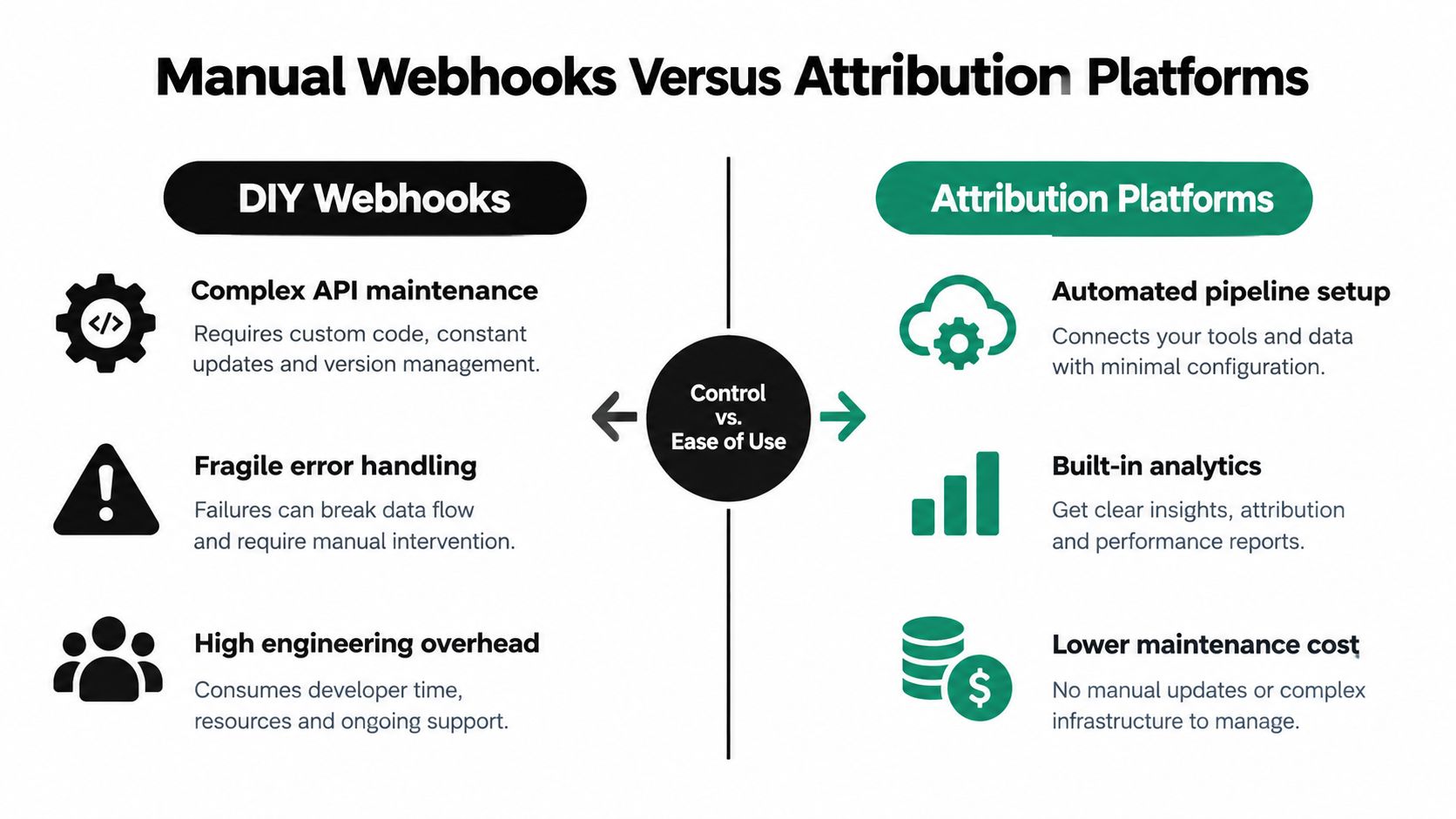
The DIY route makes sense when your team already operates reliable event infrastructure. You can define exactly which Attio properties qualify, preserve internal audit trails, and control how multi-touch attribution is calculated. You also own every edge case, including retries, schema changes, expired identifiers, and the Data Manager API migration.
Compare the operating burden
| Area | Manual webhooks | Attribution platform |
|---|---|---|
| Data capture | Custom form and webhook mappings | Managed capture and field mapping |
| Lifecycle events | Custom Attio triggers and handlers | Configured stage or conversion mappings |
| Identity handling | Your code normalizes and hashes data | Workflow supplies supported handling |
| Error recovery | Your team builds retries and reconciliation | Platform exposes operational status |
| Attribution | You define the model and reports | Platform provides configured journey reporting |
| API changes | Engineering must respond | Vendor maintains the connector |
Independent integration providers describe setups where Google Ads lead form entries create Attio records automatically, while Attio events such as stage changes or won opportunities can be connected back to the original click for attribution. That pattern is outlined in Attio and Google Ads lead integration examples.
A platform such as SourceLoop can connect web conversion data with Attio records and sync qualified offline conversions back to ad platforms, while a custom implementation keeps more logic inside your own stack. The right choice depends on whether your constraint is engineering capacity, attribution complexity, compliance review, or the need for unusual business rules.
Decide where control belongs
Use webhooks when you need bespoke routing, have engineers who can own operational support, and can test the full lifecycle from click to upload. Use a managed layer when your team needs form, chat, booking, CRM, and advertising events joined without maintaining each connector separately. Either way, document the contract in the incoming webhook overview before production traffic depends on it.
The failure mode to avoid is a hybrid with no owner. If a platform writes attribution fields while a custom webhook writes competing values, no dashboard can reliably explain which source is authoritative.
Designing Clean Feedback Loops for Bidding
Google Ads shouldn't receive every event that Attio records. A raw form submission may be useful for sales operations, but it can be a weak optimization target when many submissions never become qualified pipeline.
Google instructs advertisers to create a dedicated offline conversion action so raw lead submissions can be separated from higher-value milestones. The purpose is cleaner feedback for bidding, rather than allowing low-intent form fills to define success, as explained in Google's offline conversion setup documentation.
Map business stages to conversion actions
Create a controlled mapping between Attio lifecycle states and Google conversion actions. For example, an Attio SQL transition can trigger an “Qualified lead” action, while an accepted opportunity can trigger a separate “Opportunity” action. Keep closed-won available for reporting and optimization when the timing and data quality support it.
The workflow should evaluate more than a stage label. Check that the record has a valid source association, a permitted activation state, a usable identifier, a conversion timestamp, and an event ID that prevents duplicate delivery. If any required condition fails, send the record to an exception queue rather than marking it successful.
Troubleshoot the handoff systematically
- Missing click identity: Confirm the hidden field was populated on the landing page and mapped into the Attio record.
- Wrong campaign context: Check whether a later visit overwrote immutable first-touch fields.
- Hash mismatch: Apply the same normalization policy before hashing in every system.
- Duplicate conversion: Use a stable event key and record upload status in Attio.
- Late conversion: Compare the click timestamp with the lifecycle-event timestamp before queuing the upload.
- Rejected record: Preserve Google's response and route the contact to a retry or review state.
- Incorrect optimization: Check whether the selected conversion action represents qualification or merely submission.
A useful operational dashboard should show queued, sent, accepted, rejected, retried, and expired events. Revenue teams don't need another opaque “sync active” indicator. They need to know which contacts are missing data and why.
Building a Future-Proof Revenue Pipeline
The strategic shift is from counting leads to measuring how Google Ads contributes to qualified pipeline. Attio can hold the full story, but only if the record is designed for acquisition data, identity governance, lifecycle events, and conversion delivery from the beginning.
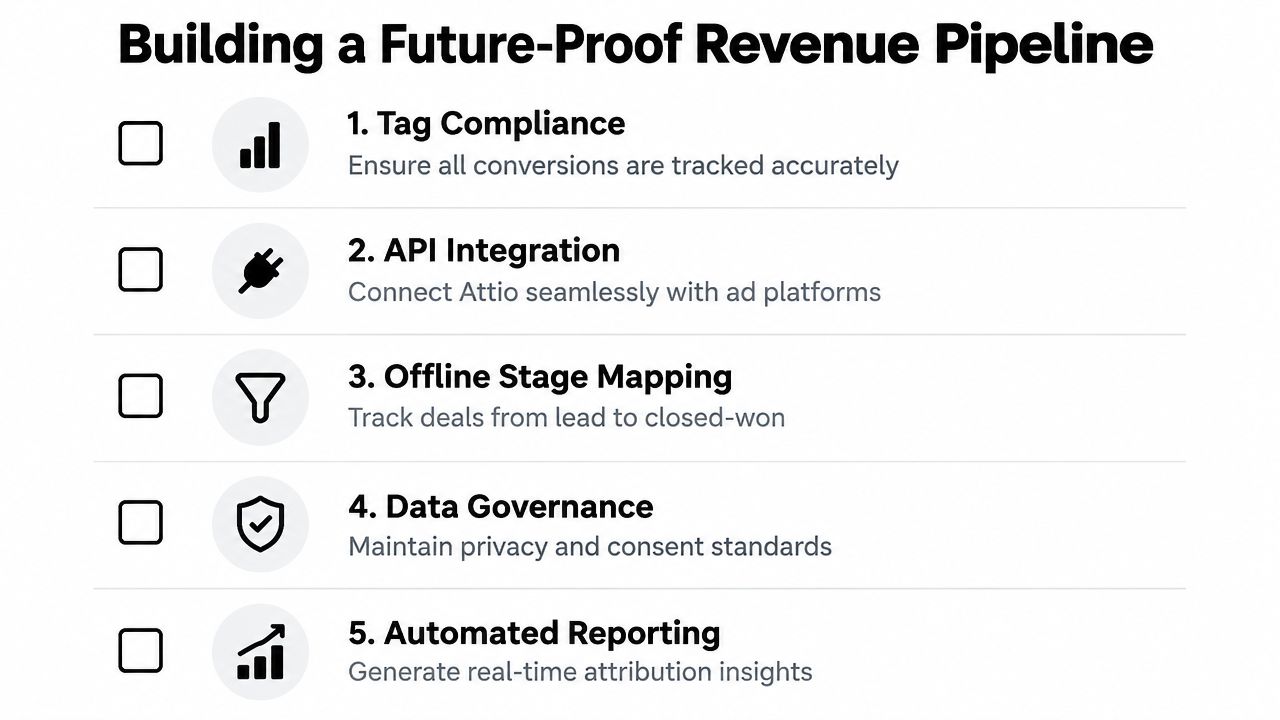
Start with an audit of your current records. Find out whether GCLIDs are captured before submission, whether campaign fields are immutable, whether lifecycle dates are trustworthy, and whether consent is checked before activation. Then inspect the upload path and identify any dependency on the older Google Ads API.
A practical roadmap has five parts:
- Capture: Persist click identity and UTM context in hidden form fields.
- Unify: Map those values into a stable Attio schema.
- Qualify: Define SQL, opportunity, and revenue events with accountable owners.
- Activate: Send eligible milestones through the supported Data Manager workflow.
- Reconcile: Compare Attio lifecycle outcomes with Google acceptance and internal revenue reporting.
The most important design decision is where to place the source of truth. Google Ads is the optimization destination, not the complete customer ledger. Attio should retain the first-party record, while Google receives only the conversion signals that are timely, consented, deduplicated, and meaningful for bidding.
If your current setup only stores a GCLID, don't discard it. Extend it. Add the surrounding context, create clear stage mappings, test the upload path, and build an exception process before campaign decisions depend on the numbers.
Audit your Attio fields and Google Ads conversion actions now. Verify one complete journey from landing-page click to CRM qualification, document every rejected or late event, and replace any legacy Google Ads API dependency with a Data Manager-ready workflow. That work will give your team a measurement system based on qualified pipeline rather than form volume.

 Paid Social


