
GDPR, cookies, and consent with SourceLoop
SourceLoop does not put you at legal risk, and compliance is simple. Most sites do nothing or flip one toggle. Three setups, about a minute.
On this page
The 30-second decision
| Your situation | What to do |
|---|---|
| Your visitors are in the US (or outside the EU/UK) | Nothing. Keep a privacy policy and you’re done. |
| You have EU/UK visitors and want the simplest setup | Turn on Cookieless mode (one toggle, usually no banner needed). |
| You have EU/UK visitors and want maximum accuracy | Keep the default install and gate it with a consent tool. |
Whichever you pick, SourceLoop already honors browser privacy signals (Global Privacy Control, Do Not Track) and Google Consent Mode automatically. You do not have to configure those.
How SourceLoop tracks, in plain terms
- It is a first-party script on your own site. No third-party pixels.
- By default it uses first-party cookies to recognize a returning visitor, which gives the best accuracy.
- Your visitor’s IP is processed but stored only as a hashed value, never in the raw.
- When someone submits a form, it captures the lead details (such as email) to attribute the conversion.
All of this data goes only to your own SourceLoop account.
Option A: Do nothing (US and non-EU audiences)
GDPR is an EU and UK law. If your business and visitors are in the US, you fall under US rules (such as CCPA), which are opt-out, not opt-in. That means you do not need an “accept first” cookie banner.
What you should still do:
- Keep a privacy policy that mentions you use analytics.
- That’s it. SourceLoop already respects the browser opt-out signal (Global Privacy Control), so anyone who opts out is excluded automatically.
This covers the majority of sites.
Option B: Cookieless mode (privacy-first, usually no banner)
If you have EU or UK visitors and want the easiest compliant setup, turn on Cookieless mode.
How to enable it:
- Open your website’s Tracking code page in SourceLoop.
- Toggle on Cookieless mode (GDPR).
- Copy the updated snippet and replace the one on your site.
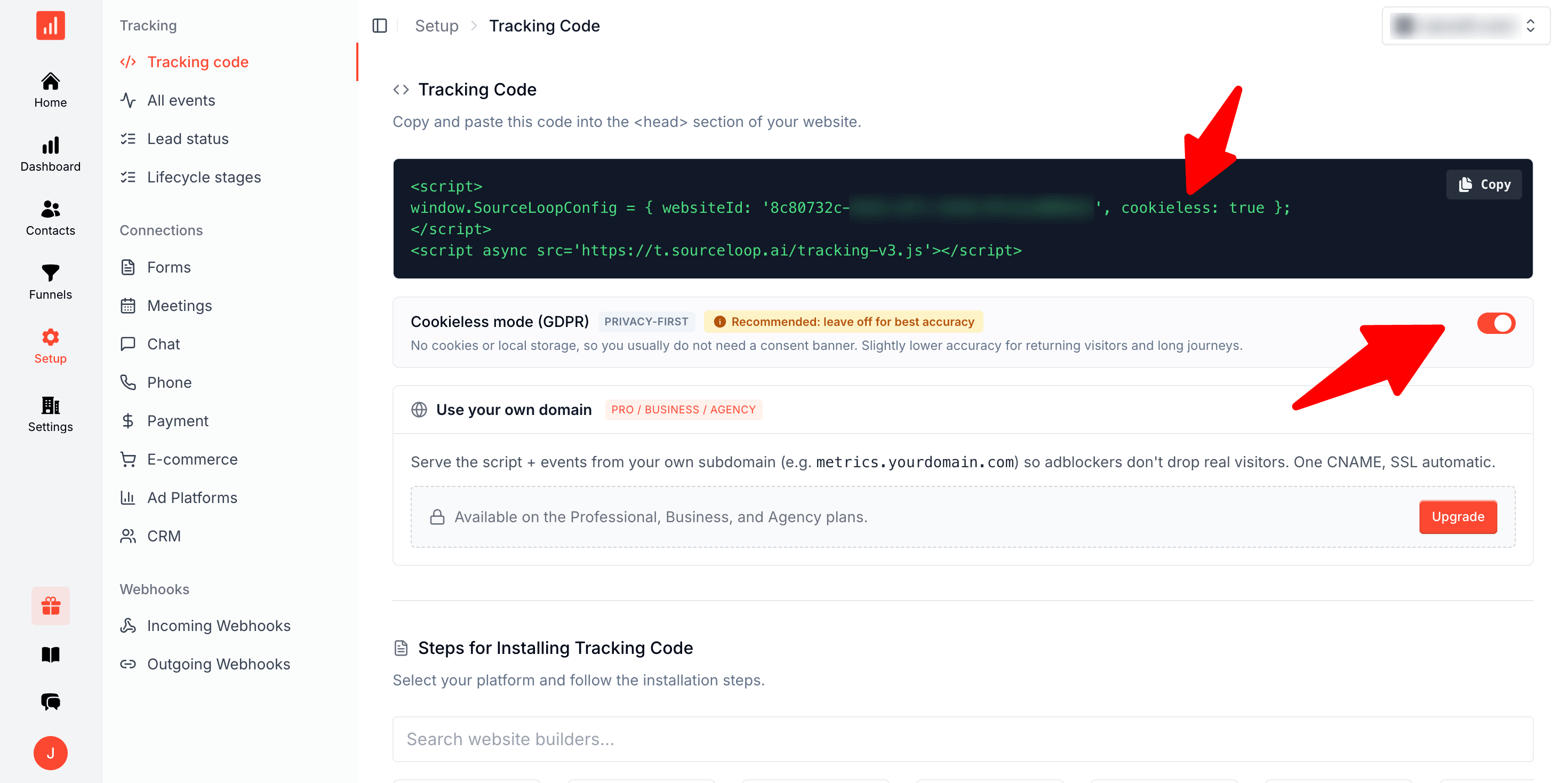
What it does:
- Sets no cookies and no local storage. Nothing persistent is stored on your visitor’s device.
- Visitors are recognized by a privacy-friendly server signal that resets every day, so there is no long-term identifier following anyone around.
- Because nothing is stored on the device, you usually do not need a cookie-consent banner. This is the same approach used by privacy-first analytics tools like Plausible and Fathom.
The tradeoff:
- Slightly lower accuracy for returning visitors and long multi-touch journeys. Because the signal resets each day, the same person can look like a new visitor on a different day.
Best for: EU-heavy sites that want the simplest compliant setup and are comfortable with a small loss in long-window accuracy.
Option C: Consent management tool (full accuracy, fully compliant)
If you want the most accurate attribution from the people who do consent, keep the default install and let a consent banner control it.
One thing to know first: a basic cookie banner is just a popup. By itself it does not actually block anything. To genuinely gate tracking you need a consent tool that can hold scripts until the visitor accepts. Common options, most with free tiers: Cookiebot, CookieYes, Termly, Iubenda, OneTrust, Osano.
There are two easy ways to wire it up.
1. Tag the snippet in your consent tool. Mark the SourceLoop script as analytics or marketing, and the tool holds it until the visitor accepts. For a Cookiebot-style tool, the script tag looks like this:
<script type="text/plain" data-cookieconsent="statistics">
window.SourceLoopConfig = { websiteId: 'YOUR_WEBSITE_ID' };
</script>
<script type="text/plain" data-cookieconsent="statistics" async src="https://t.sourceloop.ai/tracking-v3.js"></script>
The type="text/plain" plus the data attribute is what keeps it switched off until the visitor accepts. The exact attribute name differs per tool, and each one documents it.
2. Use Google Consent Mode v2. If your banner supports Consent Mode, just set analytics to denied by default. SourceLoop reads it automatically and stays completely off (no cookies, no events) until the visitor accepts, then turns on.
The tradeoff:
- Visitors who reject are not tracked, including their conversions. That is the correct and compliant outcome, and it is the same for every analytics tool. You keep full, accurate data for everyone who accepts.
Best for: EU sites that want maximum accuracy from consenting visitors.
What SourceLoop already does for you
No setup required for any of this:
- First-party only. No third-party cookies.
- IP stored hashed, never raw.
- Honors Global Privacy Control and Do Not Track. If a visitor has these on, tracking is disabled or personal data is stripped automatically.
- Reads Google Consent Mode v2 from your banner if present. Analytics denied means no tracking; ad-user-data denied means no email or phone is sent; ad-storage denied means no ad click IDs.
Which should I choose?
- US or non-EU audience: Option A. Do nothing.
- EU audience, want it simple: Option B. Cookieless mode.
- EU audience, want best accuracy: Option C. Consent tool.
You can switch any time by changing your snippet, so it is easy to start simple and revisit later.
Frequently asked questions
-
Will I get in trouble just for using SourceLoop?
No. Using an analytics tool is not illegal. The requirement is about getting consent for EU and UK visitors. Pick Option B (Cookieless mode) or Option C (a consent tool) for those visitors and you are set.
-
Does cookieless mean I capture nothing?
No. You still get page views, traffic sources, and conversions. You only lose some precision when connecting the same person across different days, because the privacy-friendly server signal resets every day.
-
If someone rejects the consent banner, do I still see their conversion?
In Option C, no, by design. A rejection means that person is not tracked, including their conversions. This is the same for every analytics tool, and it is what compliance requires. You keep full, accurate data for everyone who accepts.
-
Can I change my mind later?
Yes. Switching between the default install, cookieless mode, and consent-gated tracking is just a change to the snippet on your site, so it is easy to start simple and revisit later.
-
Do I have to configure Global Privacy Control or Google Consent Mode myself?
No. SourceLoop honors Global Privacy Control, Do Not Track, and Google Consent Mode v2 automatically, on every setup, with no configuration. If a visitor opts out or your banner sets analytics to denied, tracking is disabled or personal data is stripped automatically.

 Paid Social


