
Activate a subscription after the free trial
How the 7-day free trial works, what happens when it ends, and how to pick a plan, or restart one, through Polar so your tracking keeps running.
On this page
Every SourceLoop plan starts with a 7-day free trial. You pick a plan when you set up your account, add a card through Polar, and your first charge is when the trial ends. This guide covers starting your plan, what happens at the end of the trial, and how to restart if your subscription has ended.
Step 1: Pick a plan
New accounts see the plans as the last step of setup. If your workspace has no active plan, for example after cancelling, SourceLoop shows the same plan picker when you sign in. You can also open it any time:
- Click Settings at the bottom of the left sidebar.
- Click Billing under Organization.
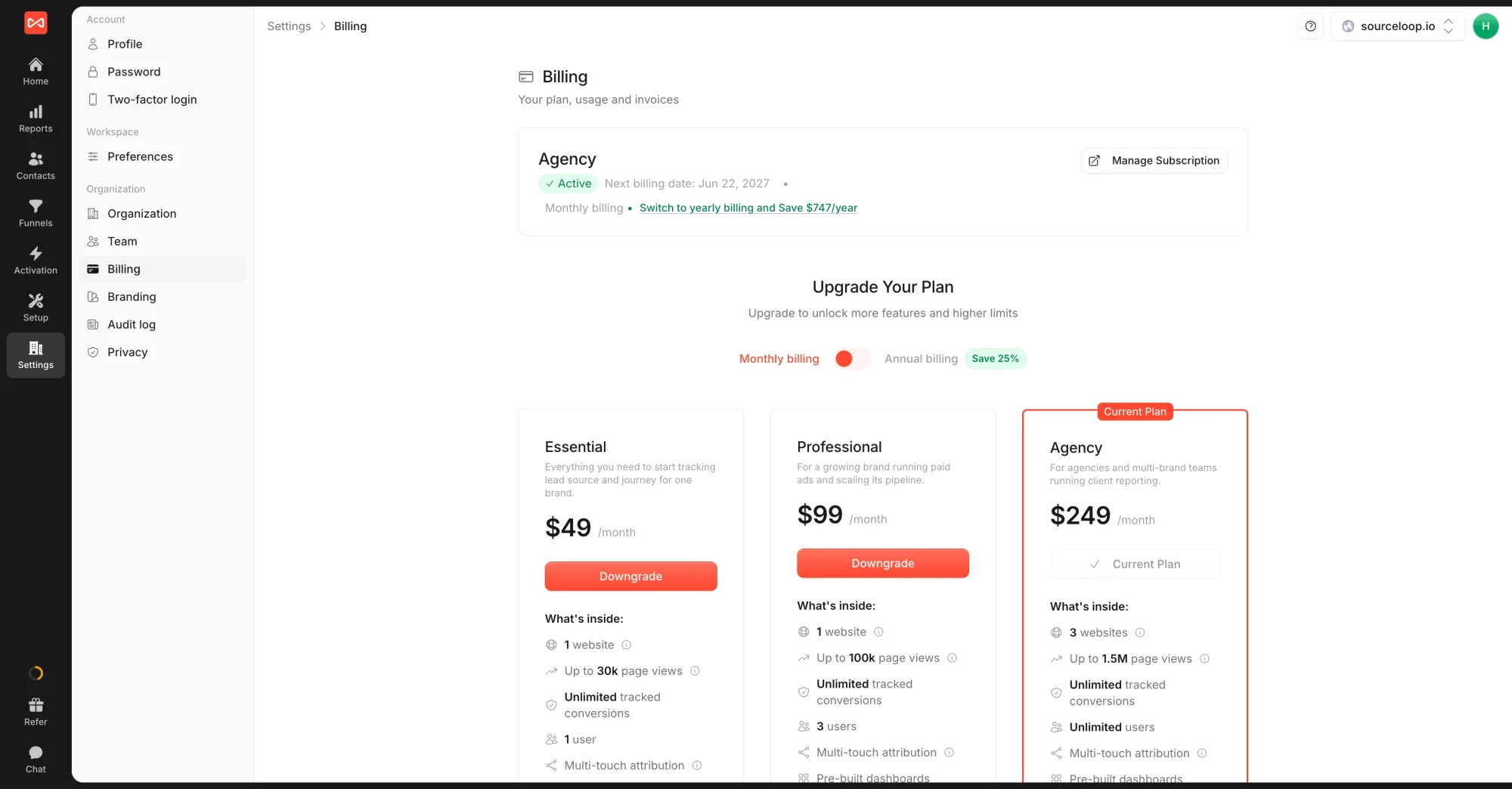
Choose Monthly billing or Annual billing, then pick Essential, Professional, or Agency. See Pricing and plans for what each includes.
Step 2: Check out on Polar
Polar opens with your plan and billing cycle already filled in.
- Check your billing email. It defaults to your SourceLoop email.
- Enter your card details.
- Business customers in the EU or UK can enter a VAT number to reverse-charge tax.
- Confirm.
You’re returned to SourceLoop and your plan is active straight away. If your workspace was paused, tracking, alerts, and syncs start again on the next visit to your site.
When the trial ends
If you keep your plan, Polar charges your card when the 7 days are up and your subscription simply continues. To stop before you’re charged, click Manage Subscription on the Billing page and cancel in the Polar portal. See Cancel your subscription.
What you can do next
- Update your card, see invoices, or cancel: click Manage Subscription on the Billing page. See Update your payment method.
- Switch plans later: see Change your plan.
- Bring in your team: see Invite team members.
If something goes wrong at checkout, such as a declined card, email [email protected] with the exact message from Polar.
Frequently asked questions
-
Will I be charged when my trial ends?
Yes, if you keep the plan. You add a card when you start the trial, and the first charge happens when the 7 days are up. Cancel before then from Manage Subscription on the Billing page and you won't be charged.
-
What happens to my data if my subscription ends?
Everything you've collected stays in your workspace: contacts, journeys, conversions, reports, and integrations. New tracking, alerts, and syncs pause until you pick a plan again.
-
Is anything replayed when I restart?
No. Tracking, alerts, and syncs pick up again from the moment your plan is active. Visits and events from the time without a plan aren't recorded.
-
Do I need to reinstall the tracking code after restarting?
No. The same tracking code keeps working. It starts capturing again as soon as your plan is active.
-
Why Polar instead of collecting cards directly?
Polar is our merchant of record. It handles VAT and sales tax, payments in every country, fraud checks, and invoices, so SourceLoop never stores your card and every charge comes with a tax-compliant invoice.
-
Can I choose monthly or annual billing at checkout?
Yes. Switch between Monthly billing and Annual billing above the plan cards before you check out. Annual saves 25%.

 Paid Social


