
How to track lead source in Lemon Squeezy
Tie every Lemon Squeezy order, subscription, and renewal back to the channel that drove it. Real revenue attribution for SaaS and digital products.


On this page
- Why this matters
- What SourceLoop captures from Lemon Squeezy
- Before you start
- Step 1: Install the SourceLoop tracking script
- Step 2: Create a webhook in your Lemon Squeezy Dashboard
- Step 3: Paste the signing secret back into SourceLoop
- Step 4: Wire attribution into your checkout
- (1) Hosted Buy URLs
- (2) API-created Checkouts
- Step 5: Run a test order to verify
- Where to see Lemon Squeezy revenue in SourceLoop
- Contacts: revenue per contact
- Traffic and Revenue report: revenue by channel
Lemon Squeezy is the merchant-of-record platform indie founders and SaaS teams reach for when they want a checkout that handles global tax automatically. The plumbing is great. What it doesn’t surface in its analytics is which marketing channel earned each subscriber, which is the number that decides where next month’s ad spend goes.
SourceLoop closes that gap. Every order, renewal, and refund mapped back to the visitor’s first session, so “Lemon Squeezy says we made $X” becomes “we made $X, and ProductHunt brought in half of it for free while the affiliate program barely covered the payouts”.
Five steps, around ten minutes. Works on every Lemon Squeezy store.
Why this matters
Lemon Squeezy’s strength is recurring revenue, and recurring revenue is exactly where most attribution tools fall apart. Picture the standard SaaS path:
- Someone discovers your product via a tweet in March
- They sign up for the $19/mo plan
- They upgrade to $49/mo in June
- They keep renewing every month for two more years
Without revenue tracking, the tweet gets credit for a single “checkout completed” event and never sees the $1,200+ of lifetime value that flowed from it. With Lemon Squeezy wired into SourceLoop, every renewal, every upgrade, every cancellation hangs off the same lead, and channel-level reporting reflects actual MRR, not just first-touch counts.
What SourceLoop captures from Lemon Squeezy
Each Lemon Squeezy customer arrives in SourceLoop tagged with:
- Acquisition channel of the visitor at signup (paid, organic, social, referral, direct)
- UTM parameters from the landing URL of the converting session
- Pages browsed before the checkout was opened
- Time on site and return-visit count ahead of the purchase
- Email + name from Lemon Squeezy’s customer record
- First-touch landing page plus the original referrer
- Source of the converting session (often distinct from first-touch)
- Full revenue history, one-off orders, subscription created / updated / canceled / resumed, recurring payment success (renewals), refunds
- Device, country, browser
Before you start
You’ll need:
- A SourceLoop workspace (free trial)
- Edit access to the site that hosts your Lemon Squeezy Buy URL or API-created checkout
- A Lemon Squeezy store with at least one variant published
- Admin access to your Lemon Squeezy Dashboard, you’ll need it to add a webhook
Step 1: Install the SourceLoop tracking script
Sign in to SourceLoop, open Setup -> Tracking code in the sidebar, and copy the snippet.

Paste it into the <head> of every page on your site, especially the pages with your Lemon Squeezy Buy buttons or overlay triggers. From this point on, every visitor session, UTM, and journey is being recorded. The next steps connect that data to the orders Lemon Squeezy will start sending.
Step 2: Create a webhook in your Lemon Squeezy Dashboard
Lemon Squeezy sends order and subscription events as webhooks. SourceLoop gives you a dedicated webhook URL, you paste it into Lemon Squeezy, and Lemon Squeezy starts delivering events.
- In SourceLoop, open Setup -> Payment in the sidebar. The payment provider cards are listed.
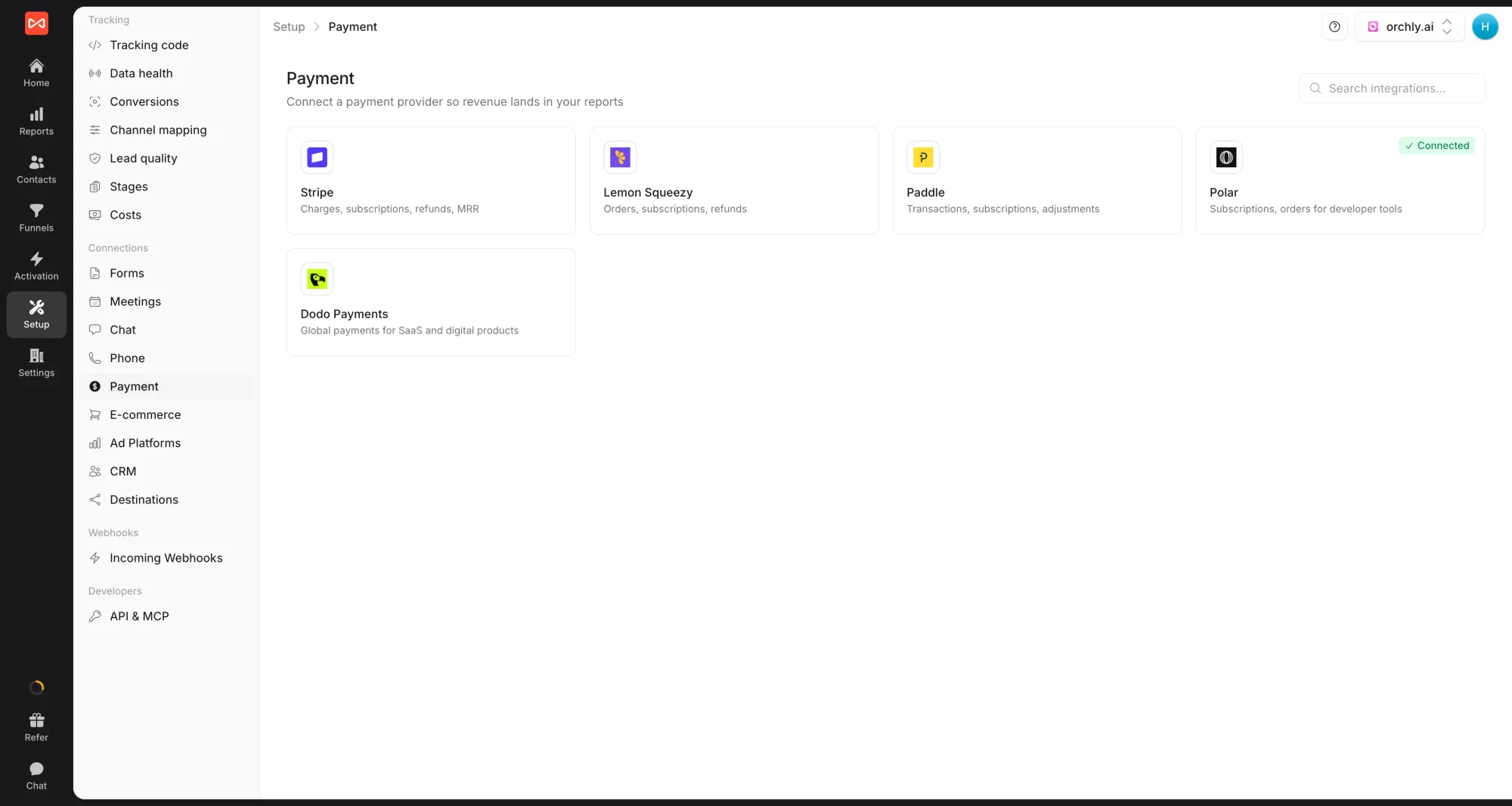
- Click the Lemon Squeezy card. A drawer opens on the right with numbered setup steps. Under Create the webhook in Lemon Squeezy, copy the webhook URL SourceLoop shows you.
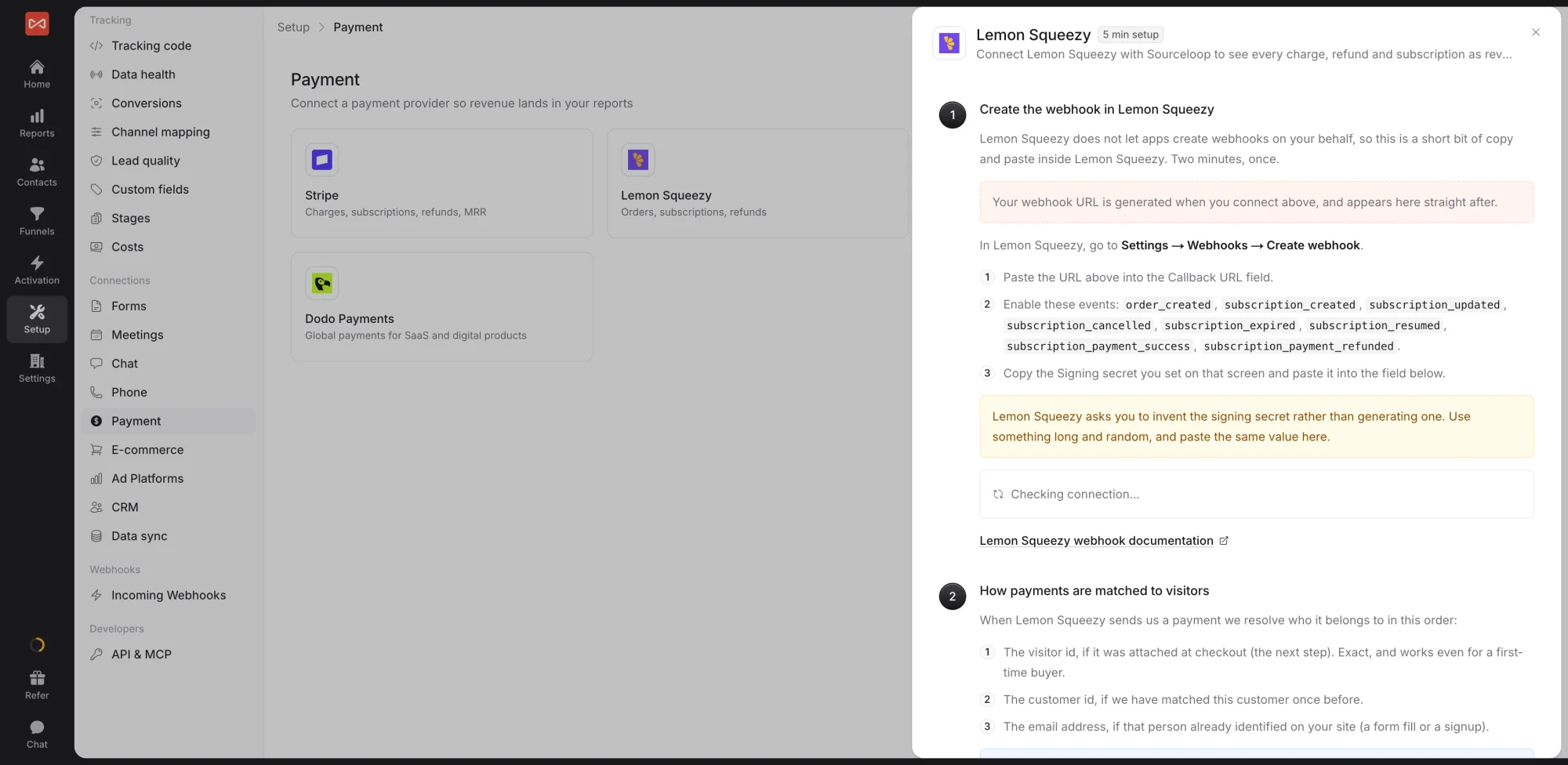
- Open the Lemon Squeezy Dashboard, navigate to Settings -> Webhooks, and click Create webhook.
- Paste SourceLoop’s URL into the Callback URL field.
- Under Events, enable all subscription and order events. The recommended set:
order_created,subscription_created,subscription_updated,subscription_cancelled,subscription_resumed,subscription_expired,subscription_payment_success,subscription_payment_refunded. - Set a Signing secret (any string you choose, treat it like a password) and save the webhook.
Step 3: Paste the signing secret back into SourceLoop
Lemon Squeezy verifies every webhook with the signing secret you just chose.
- Copy the signing secret you set in the previous step.
- Back in the same SourceLoop drawer, paste it into the Webhook signing secret field and click Save.
SourceLoop’s connection status flips from pending to active the first time Lemon Squeezy sends a verified event through.
Step 4: Wire attribution into your checkout
The webhook tells SourceLoop a payment happened. The attribution wiring tells SourceLoop which visitor session that payment belongs to. Without it, events still flow in, but stitching falls back to matching by customer email, lower fidelity, especially for one-off purchases where the customer signs up at checkout.
Once the tracker is installed, it exposes a small helper on every page that returns the two stitching identifiers for the current visitor:
window.sourceloop.checkoutMetadata()
// returns { sourceloop_anonymous_id: '...', sourceloop_id: '...' }
Pass that object through to Lemon Squeezy using the method that matches your checkout. Use this guide to pick:
- (1) Hosted Buy URLs: The default for most stores. If your Buy / Subscribe button links to
https://your-store.lemonsqueezy.com/buy/...or opens via the Lemon.js overlay, this is you. Covers digital products, license sales, indie SaaS, course launches, anything that hands the customer off to Lemon Squeezy’s hosted checkout. - (2) API-created Checkouts: When you create the checkout server-side via the Lemon Squeezy API and redirect the customer to the returned URL. Use this for tamper-proof metadata (the client never sees it), pre-applied discounts, or per-customer custom prices.
Wire each one you use.
(1) Hosted Buy URLs
Append the checkout[custom][...] query parameters to every Buy URL before the visitor opens it. The same pattern works for plain anchors and the Lemon.js overlay.
Plain anchor tag:
<a class="ls-buy" href="https://your-store.lemonsqueezy.com/buy/your-variant-id">
  Subscribe
</a>

<script>
  document.querySelectorAll('a.ls-buy').forEach(a => {
    const m = window.sourceloop.checkoutMetadata();
    const u = new URL(a.href);
    u.searchParams.set('checkout[custom][sourceloop_anonymous_id]', m.sourceloop_anonymous_id);
    u.searchParams.set('checkout[custom][sourceloop_id]',           m.sourceloop_id);
    a.href = u.toString();
  });
</script>
Lemon.js overlay:
const m = window.sourceloop.checkoutMetadata();
const url = new URL('https://your-store.lemonsqueezy.com/buy/your-variant-id');
url.searchParams.set('checkout[custom][sourceloop_anonymous_id]', m.sourceloop_anonymous_id);
url.searchParams.set('checkout[custom][sourceloop_id]',           m.sourceloop_id);

LemonSqueezy.Url.Open(url.toString());
(2) API-created Checkouts
Pass the metadata in checkout_data.custom when creating the checkout server-side. This is tamper-proof because the client never sees it.
Server (Node.js):
const checkout = await fetch('https://api.lemonsqueezy.com/v1/checkouts', {
  method: 'POST',
  headers: {
    Authorization: 'Bearer ' + process.env.LEMONSQUEEZY_API_KEY,
    'Content-Type':            'application/vnd.api+json',
    Accept:                    'application/vnd.api+json',
  },
  body: JSON.stringify({
    data: {
      type: 'checkouts',
      attributes: {
        checkout_data: { custom: meta },
      },
      relationships: {
        store:   { data: { type: 'stores',   id: STORE_ID   } },
        variant: { data: { type: 'variants', id: VARIANT_ID } },
      },
    },
  }),
}).then(r => r.json());

return { url: checkout.data.attributes.url };Step 5: Run a test order to verify
Open the page with your Lemon Squeezy Buy button in an incognito window, append ?utm_source=test&utm_medium=verify&utm_campaign=ls-check to the URL, and complete a real transaction. Lemon Squeezy test mode is the safest path if you’d rather not move real money, just enable test mode on the webhook while testing.
Within seconds of Lemon Squeezy confirming the order, the customer should appear at the top of Contacts in SourceLoop with the test UTMs attached and a revenue event linked to the same contact.
Where to see Lemon Squeezy revenue in SourceLoop
Contacts: revenue per contact
Every Lemon Squeezy customer becomes a contact row at app.sourceloop.ai/contacts with a revenue column showing what they’ve paid you to date. Click a contact to expand the full revenue ledger, original order, every renewal, every upgrade, every refund, alongside the visitor’s pre-purchase journey.
Filter, sort, or segment the hub by revenue to surface your highest-value customers, or by source to see which channels are bringing in paying subscribers vs. just clicks.

Traffic and Revenue report: revenue by channel
app.sourceloop.ai/reports/traffic adds a revenue column alongside the breakdowns you already see: source, medium, campaign, landing page, content, term, device, country. So instead of “Twitter referral drove 600 sessions”, you see “Twitter referral drove 600 sessions and $4,200 in attributed Lemon Squeezy revenue.”
Switch attribution models from the dropdown at the top to see how the numbers shift:
- Last Non-Direct (the default, matches Google Analytics)
- First Touch / First Non-Direct for top-of-funnel weighting
- Last Touch for closing-channel weighting
- Linear to split credit evenly across every touchpoint
- Position-Based (U-Shaped) for 40% first / 40% last / 20% middle
- Time Decay to weight recent touches higher (7-day half-life)
A ProductHunt launch may look weak under Last Touch (because most subscribers come back through Google later) but dominate under First Touch. The model switcher is how you tell that story.

Once Lemon Squeezy revenue is flowing, push it back to Google Ads and Meta as offline conversions with revenue values so the bidding algorithms optimise toward real paying customers, not signups or vanity clicks. The conversion sync guide covers the wiring.
Frequently asked questions
-
Does this work with Lemon Squeezy hosted Buy URLs and API-created Checkouts?
Yes. Both surfaces are covered. The webhook setup is identical for both, the only difference is in step 4, where you wire attribution. The article walks through each method.
-
Lemon Squeezy is the merchant of record. Does that affect what SourceLoop sees?
No. Merchant-of-record handling (VAT, sales tax, payouts) happens entirely on Lemon Squeezy's side. SourceLoop captures the order, subscription, and renewal events at face value, the gross amounts customers paid.
-
Are subscription renewals attributed back to the original source?
Yes. Every `subscription_payment_success` event gets stitched onto the same contact that started the subscription, so MRR and LTV stay tied to the channel that earned the original signup, not just the first order.
-
How do refunds and chargebacks show up?
Refunds (`subscription_payment_refunded`) flow into SourceLoop as negative revenue tied back to the original lead. The Traffic and Revenue report nets them against the original source so reported channel revenue stays accurate.
-
I'm using the Lemon.js overlay (`LemonSqueezy.Url.Open`). Anything different?
No, treat it the same as the anchor-tag path. Patch the URL with the custom-data query parameters before calling `LemonSqueezy.Url.Open()`. The article shows both.
-
Will my existing Lemon Squeezy automations (license keys, Discord roles, email receipts) still fire?
Yes. SourceLoop subscribes to its own webhook endpoint. Every other destination you've already configured continues to receive events independently.

 Paid Social


