
Cancel your SourceLoop subscription
Stop your SourceLoop subscription via the Polar customer portal, with what happens to your data, your access, and the billing period after cancel.
On this page
Cancellation runs through the Polar customer portal, same as every other payment-method change. SourceLoop hands off to Polar, you confirm there, and the cancellation takes effect at the end of your current paid period.
Your data isn’t lost the second you cancel. Cancelled workspaces stay in a read-only state for 30 days after the billing period ends, with a route to reactivate if you change your mind.
Before you start
You’ll need:
- An active SourceLoop subscription (trial accounts can just stop using the product, no cancellation needed)
- An Admin role on the workspace. Editors can manage billing only if an admin has allowed it.
- A clear head about the date math: cancelling now means access continues until the end of the current billing period
Step 1: Open the Billing page
-
Sign in to SourceLoop.
-
Click Settings at the bottom of the left sidebar.
-
Click Billing inside Settings.
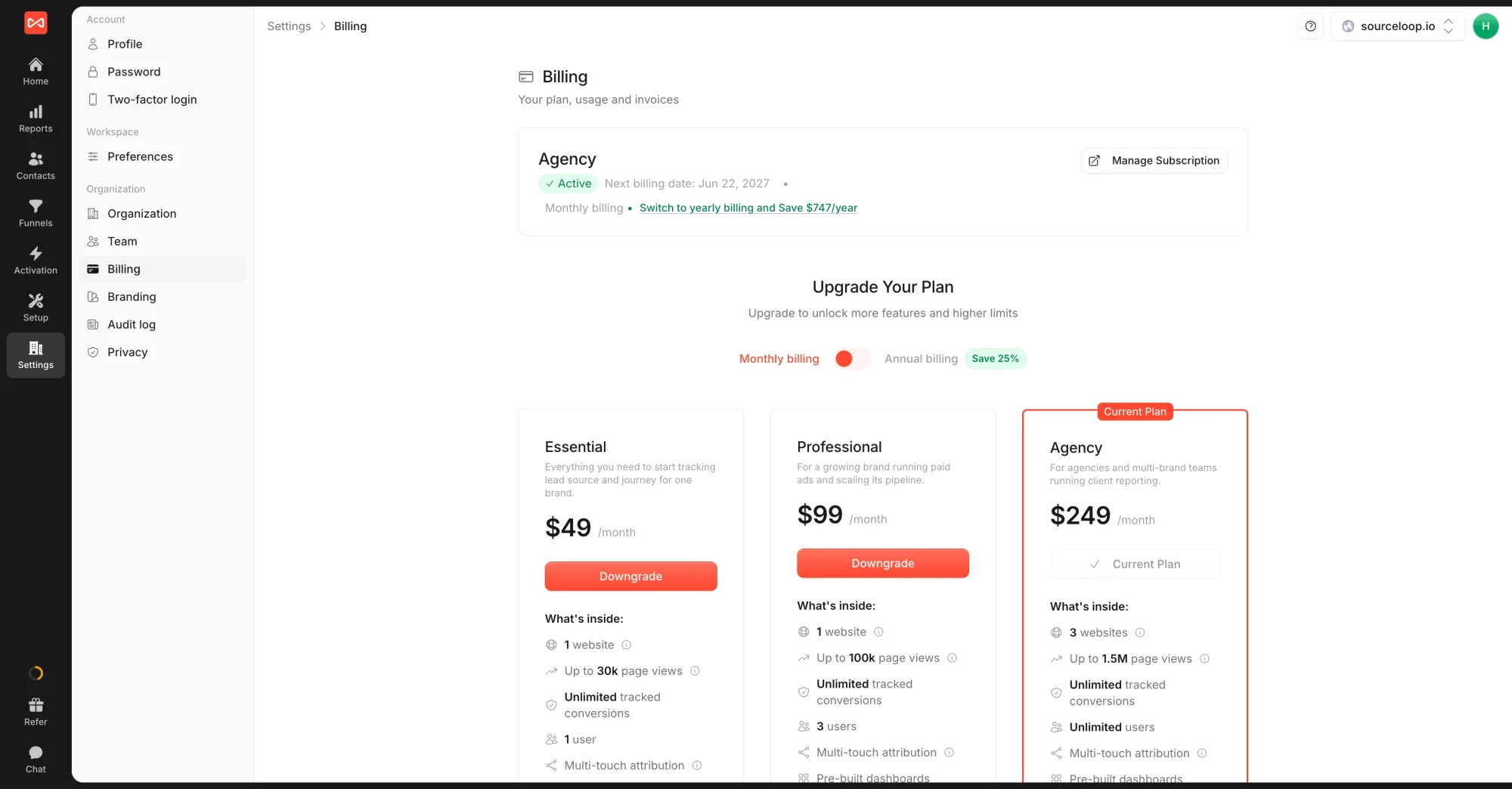
The current-plan card shows your plan, status, next billing date, and a Manage Subscription button.
Step 2: Open the Polar customer portal
- Click Manage Subscription on the current-plan card.
- A new tab opens to the Polar customer portal.
Polar owns the cancellation flow (and every other billing action) because they’re the merchant of record on the subscription.
Step 3: Cancel on Polar
- In the Polar portal, look for the Cancel subscription link or button (sometimes inside a “Manage plan” section).
- Polar asks for a confirmation and may ask why you’re cancelling (optional feedback).
- Confirm the cancellation.
Polar shows you the effective cancellation date: that’s the end of your current paid billing period, not the moment you click cancel.
What happens between cancel and end-of-period
Nothing changes. Until the date Polar showed you on cancellation:
- Your subscription stays Active
- All tracking continues
- All team members keep their access
- Every integration keeps firing
Use this window to export anything you need (CSVs from Contacts, report exports, integration configs) if you don’t intend to reactivate.
What happens after the cancellation date
At the end of the billing period:
- Your workspace flips to Read-only
- Tracking pauses, no new conversions or events are captured
- The Billing page surfaces a Reactivate button on the current-plan card
During this read-only window (30 days), every Admin can still sign in, view reports, view contacts, and export data. The only thing they can’t do is capture new data or change integrations.
After 30 days of read-only state with no reactivation, the workspace is queued for permanent deletion. Once deleted, the data can’t be restored, no backups, no recovery path.
Reactivating before deletion
If you change your mind during the read-only window:
- Sign back in to SourceLoop.
- Go to Settings -> Billing.
- Pick a plan (same as the activate flow).
- Check out on Polar.
Your workspace flips back to Active, tracking resumes on the next page load, and every report, contact, integration, and lead comes back in place.
If you have questions about exporting before cancel or want to delete immediately instead of using the read-only window, email [email protected].
Frequently asked questions
-
Will my data be deleted when I cancel?
Not immediately. Cancelled accounts stay in read-only mode for 30 days after the current billing period ends, so you can come back, log in, export anything you need, and reactivate if you change your mind. After 30 days of read-only state with no reactivation, the workspace is queued for permanent deletion.
-
Can I reactivate after cancelling?
Yes, until your data is permanently deleted (30 days after the cancellation-end date). Just sign back in and pick a plan from the Billing page. Your reports, contacts, integrations, and historical attribution all come right back.
-
Do I get a refund for the unused part of the billing period?
No. Cancelling stops the next renewal but doesn't refund the current period. Your access continues until the end of the period you've already paid for. If you cancel monthly mid-month, you keep access until the end of that month. If you cancel annually mid-year, you keep access until the next yearly renewal date.
-
Is there a difference between "cancel" and "delete my account"?
Yes. **Cancel** stops the subscription, you keep read-only access for 30 days after the billing period ends. **Delete my account** is a separate request to wipe everything immediately. Email [email protected] to request a full account deletion, this is irreversible.
-
What about my team members after I cancel?
Every member loses access to reports at the same time you do (end of the paid period). The read-only window covers the workspace, so any Admin can sign in and export until the 30-day grace period expires.
-
Can I pause my subscription instead of cancelling outright?
Not today. The two options are cancel (next renewal stops) or downgrade (move to a lower tier). If you need a true pause, email [email protected] with the context and we'll look at it case-by-case.

 Paid Social


