
Change your SourceLoop plan
Upgrade or downgrade between Essential, Professional, and Agency in one click. Pro-rated charges are handled automatically by Polar.
On this page
Plan changes happen instantly. Click the Upgrade or Downgrade button on the plan card you want, confirm on Polar, and the new limits and features apply on the next page load. Polar handles the pro-rated charge or credit automatically.
Before you start
You’ll need:
- An active SourceLoop subscription (changing plans isn’t available during the trial; activate first via Activate a subscription after the trial)
- An Admin role on the workspace. Editors can manage billing only if an admin has allowed it.
Step 1: Open the Billing page
-
Sign in to SourceLoop.
-
Click Settings in the bottom of the left sidebar.
-
Inside Settings, click Billing.
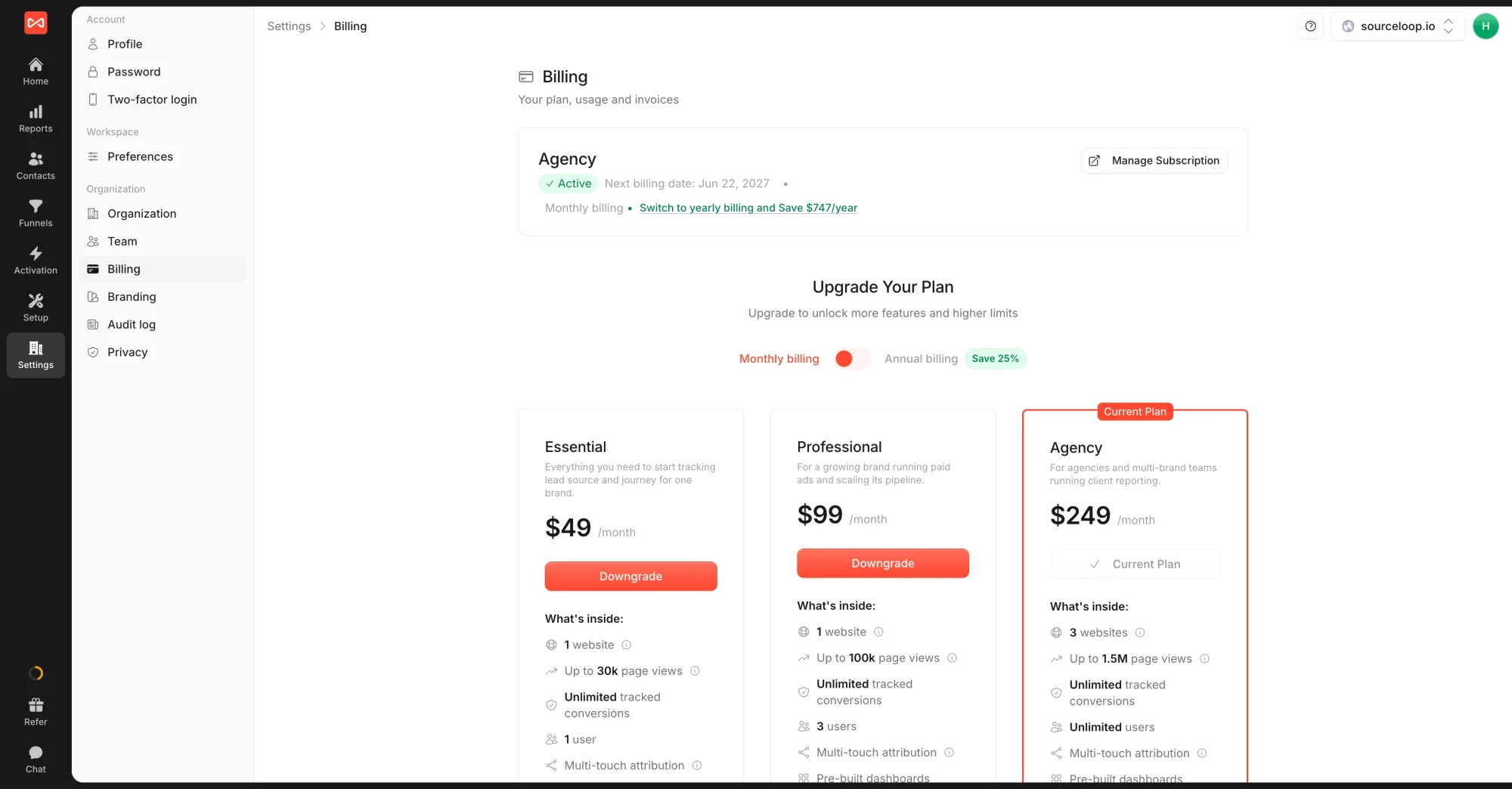
You’ll see your current plan at the top (with the next billing date) and three plan cards underneath. The button on each card reflects what changing to that plan means relative to where you are now, Upgrade, Downgrade, or your current plan (no action available).
Step 2: Pick the new plan
- Toggle Monthly billing or Annual billing if you’re also switching billing cycle. Annual saves 25%.
- Click Upgrade (or Downgrade) on the plan card you want.
You’re redirected to Polar with the new plan pre-selected.
Step 3: Confirm on Polar
Polar shows you the prorated charge (for upgrades) or credit (for downgrades) before you confirm.
- Review the new plan, billing cycle, and prorated amount.
- Confirm using the card already on file (Polar remembers it from your previous checkout).
- Click Confirm change.
That’s it. You’re returned to SourceLoop, the plan change takes effect on the next page load, and your invoice / receipt arrives from Polar by email within a few minutes.
What the change actually affects
For an upgrade, you get higher caps and more features (seats, websites, conversions, ad-network connections) immediately. Anything you’ve collected so far stays attached to the workspace.
For a downgrade, the new caps apply immediately. If you’re already past the lower cap (more seats, more conversions, etc.), see the FAQ above for what happens. Short version: nothing is deleted; new captures of the over-capacity type pause until your next billing cycle.
When the change is denied
A couple of edge cases will block the change at the Polar step:
- Card declined / authorisation failed: the prorated upgrade charge couldn’t be captured. Update your payment method via Update your payment method, then retry the upgrade.
- Past-due invoice: a previous invoice failed. Resolve that first via the Manage Subscription button, then change plans.
- Region restriction: rare, but some payment methods aren’t supported in every country. Email [email protected] if you hit this and we’ll help.
Frequently asked questions
-
What happens to my data when I downgrade?
Nothing. Your data (contacts, journeys, reports, integrations) stays intact whether you upgrade or downgrade. Downgrading lowers the seat / website / conversion caps, but anything that was already captured remains accessible.
-
I downgraded and I'm now over the new limit. What happens?
SourceLoop doesn't delete data. It flags the account as over-limit and pauses new captures of the type that's over. For example, if you downgrade to Essential and you currently have 800 tracked conversions for the month, the next conversions in that month won't be recorded until the next billing cycle reset (or until you upgrade back).
-
Does upgrading or downgrading cost extra outside the new monthly price?
No. Polar pro-rates the change automatically. If you upgrade mid-cycle, you're charged the prorated difference for the rest of the period. If you downgrade mid-cycle, the unused portion is credited to your account and applied to the next invoice.
-
How fast does the new plan take effect?
Immediately. The moment you confirm the change on Polar, the new plan's limits and features are active. There's no waiting for the next billing cycle.
-
Can I switch billing cycle (monthly to annual or back) without changing the tier?
Yes. Change your plan on the Billing page, but pick the same tier on the toggle you want (monthly or annual). Polar treats this as a plan change and handles the proration the same way.
-
I want to move from a paid plan back to a free / trial state. Is that possible?
No. SourceLoop is free for the 7-day trial only; after that, you're on a paid plan or your subscription is cancelled. See [Cancel your subscription](/help/cancel-your-subscription/) for the cancel flow if you want to stop paying entirely.

 Paid Social


