
How to Create Custom Channel Groupings for Marketing Attribution
Fix how visits are grouped into channels: file partner links, job boards, and newsletter tools correctly, ignore payment-page referrers, and re-sort past reports.
On this page
Every visit to your site is filed under one channel, such as Paid search, Organic social, Email, or Referral. SourceLoop’s built-in rules handle most traffic, but every business has exceptions: partner links counted as Referral, job boards inflating referral traffic, a payment page taking credit for sales, or internal banners tagged with UTMs. Channel mapping fixes them.
Open Setup in the left sidebar, then Channel mapping. Workspace admins and editors can make changes. Only admins can publish.
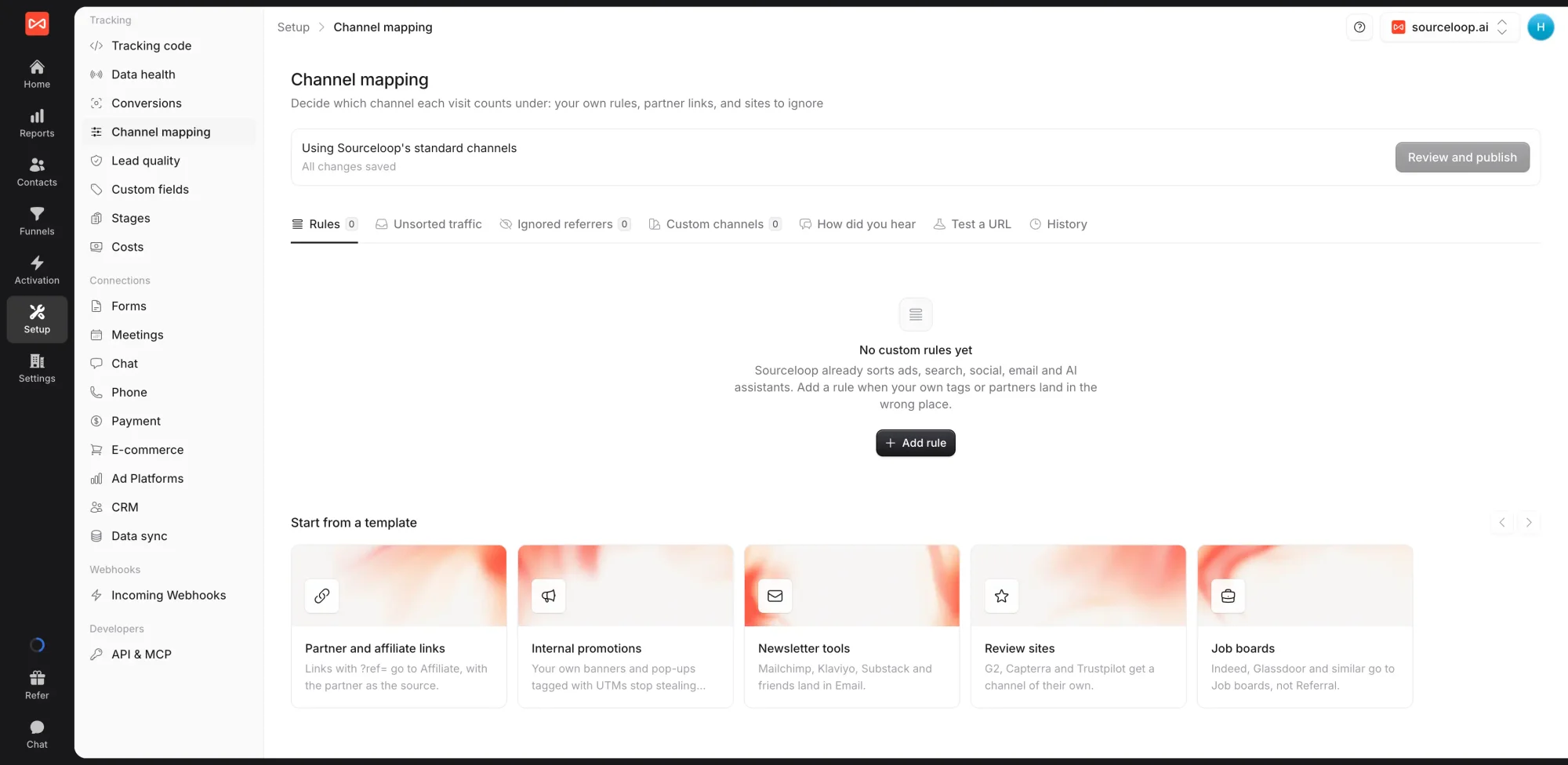
For how the built-in channels are decided, see Channel definitions.
Step 1: Start with Unsorted traffic
The Unsorted traffic tab lists the traffic that landed in Referral or Other in the last 30 days. It is the quickest way to see what needs a rule, such as a partner site, a review site, or a newsletter tool.
Step 2: Add rules
On the Rules tab, add a rule from a template or from scratch. Templates include:
- Partner and affiliate links: links with
?ref=go to Affiliate, with the partner as the source - Newsletter tools: Mailchimp, Klaviyo, Substack, and similar land in Email
- Internal promotions: your own banners and pop-ups tagged with UTMs stop stealing credit
- Job boards: Indeed, Glassdoor, and similar go to Job boards, not Referral
- Review sites: review platforms get a channel of their own
A rule has conditions on the visit’s referrer domain, landing page path, UTM values, or any parameter on the landing URL. Conditions can be is, is not, contains, does not contain, starts with, ends with, is missing, or is present.
Then choose what happens:
- File the visit as a channel, optionally with a source, medium, or campaign, fixed or taken from the URL
- Not a marketing touch: the visit keeps the channel the visitor already had
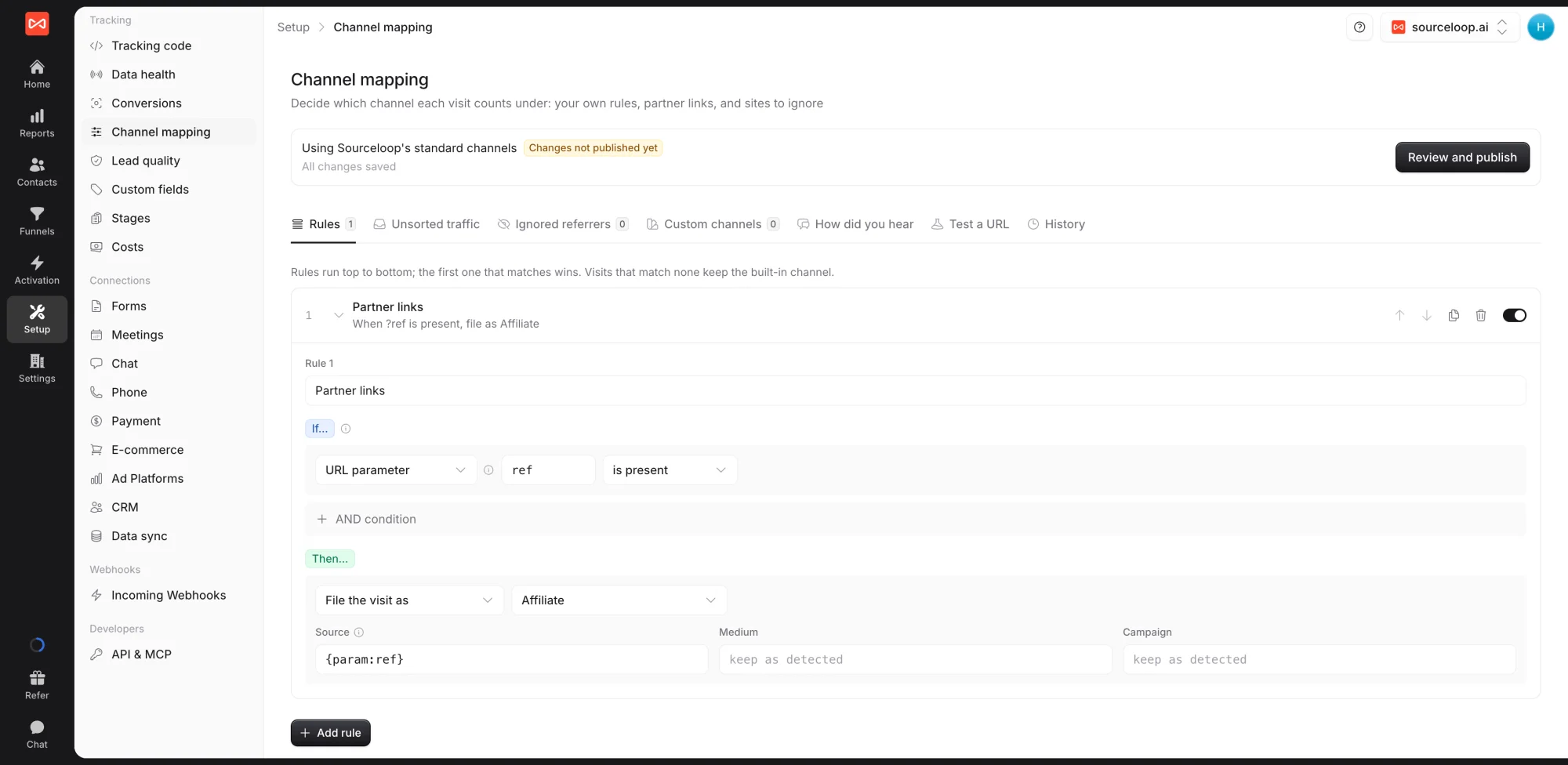
Rules run top to bottom, and the first one that matches wins. Visits that match none keep their built-in channel.
Step 3: Ignore referrers and add channels
- Ignored referrers: sites that should never count as a source, such as Stripe checkout, PayPal, or a sign-in provider. A visit back from them keeps the visitor’s original channel. Common ones are always ignored.
- Custom channels: channels of your own, such as Events or Partners. Templates like Review sites create one for you.
Step 4: Test before you publish
Paste a link into Test a URL to see which channel it lands in with your changes and with SourceLoop’s defaults. The publish preview also shows how many recent visits would change channel.
Step 5: Publish
Changes save as a draft, marked Changes not published yet.
- Click publish and review What changes.
- Under Apply to past data, choose Only new visits, the Last 90 days, or All past data (18 months).
- Add an optional note and publish.
New visits follow your settings within a minute. Past reports, journeys, and contacts’ first and latest touch update in the background. History lists every publish and lets you restore an earlier version.
Bonus: use “How did you hear about us?”
If your forms ask how people found you, the How did you hear tab maps those answers to channels. A lead with no tracked visit who answered “Radio” then counts under Offline, with radio as the source. This saves at once, with no publish needed.
What’s next
- Understand the built-in channels: Channel definitions
- Tag campaigns so they never need a rule: UTM best practices
- Reuse your rules on other clients: Clients overview for agencies
Frequently asked questions
-
Do I need channel mapping?
No. Every visit is filed under a built-in channel from its UTMs, click ID, and referrer. Channel mapping is for traffic the built-in channels file wrongly for your business, such as partner links landing in Referral or a payment page stealing credit.
-
Will my past reports change?
Only if you choose. When you publish, pick Only new visits, the Last 90 days, or All past data (18 months). Past reports update in the background, including contacts' first and latest touch.
-
Why can't I use regular expressions?
Rules use simple conditions such as contains, starts with, and is missing, which cover almost every case and can't slow down tracking. Domains match their subdomains, and paths ignore case and a trailing slash.
-
What does "Not a marketing touch" do?
The visit keeps whatever channel the visitor already had, instead of taking a new one. Use it for links that shouldn't count as a new source, such as your own app or a login page.
-
Can I undo a publish?
Yes. Open History, restore an earlier version into the draft, and publish it.

 Paid Social


