
How to Track ChatGPT Ads Conversions and ROI
Track the leads and revenue ChatGPT Ads really brings, next to its spend, and send conversions back through the Conversions API so its ads find more customers.
On this page
ChatGPT now shows sponsored answers and product placements, and like any ad platform it reports its own conversions. Connecting ChatGPT Ads puts its spend next to the leads and revenue SourceLoop traced to it, and lets you send real conversions back so its ads learn who your customers are.
Before you start
- A ChatGPT Ads account with access to Ads Manager
- The SourceLoop tracking code on your website
- An Admin or Editor role in SourceLoop
Step 1: Create an Ads API key
- Open ChatGPT Ads Manager.
- Go to Settings, then API keys, and create a key.
- Copy it. One key covers one ad account.
Step 2: Connect it in SourceLoop
- In SourceLoop, open Setup in the left sidebar, then Ad Platforms.
- Click the ChatGPT Ads card.
- Paste the key into Ads API key and connect.
SourceLoop checks the key, finds your ad account, and creates the pixel and Conversions API key it needs to send conversions. If the key is rejected, check you copied the whole key from Ads Manager.
Step 3: Send conversions back
- Open Activation, then Conversion sync. ChatGPT Ads now shows as Ready.
- Click Add a sync on its card, or pick a template such as Every lead or Good leads with value.
- Choose the moment to send and keep the suggested event, such as
lead_created, or pick another. - Set the value and who counts, then save.
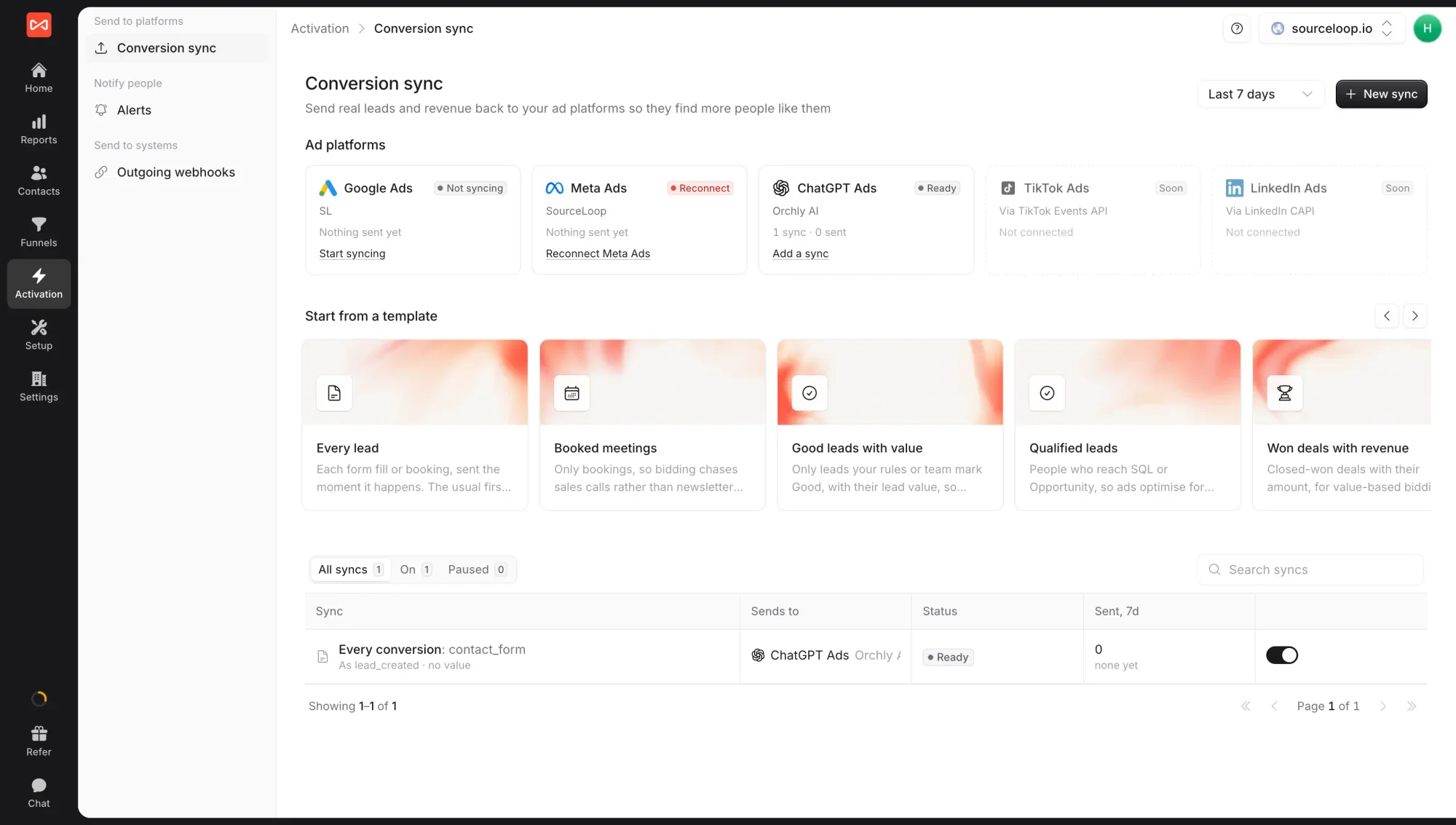
See the Conversion sync overview for every option.
Step 4: See the results
ChatGPT Ads spend and results appear in the Ads performance report next to your other platforms, with platform-reported conversions beside the leads and revenue SourceLoop credited. Spend also counts in the Spend report, under Paid search.
What’s next
- Every option for sending conversions: Conversion sync overview
- Compare ChatGPT Ads with Google and Meta: Ads performance report
Frequently asked questions
-
Where do I find the Ads API key?
In ChatGPT Ads Manager, open Settings, then API keys. One key covers one ad account, so connect each ad account with its own key.
-
Do I need to set up a pixel or a Conversions API key?
No. SourceLoop creates the pixel and the Conversions API key for you when you connect. Paste your own only if you'd rather manage them yourself in Ads Manager.
-
Which events can I send to ChatGPT Ads?
SourceLoop suggests one for each moment, such as lead_created for leads, trial_started for trials, subscription_created for new subscriptions, and order_created for won deals and payments. You can pick another standard event, such as appointment_scheduled, in the sync.
-
How far back can I send past conversions?
Seven days, when you create a new sync with Send past conversions turned on.
-
Which channel does ChatGPT Ads spend count under?
Paid search, alongside Google and Microsoft, in the Spend report and cost per lead figures.

 Paid Social


