
How to Track Free Trial Conversions by Marketing Channel
See which marketing channels and campaigns bring free trials that convert to paid, with trial-to-paid conversion rate, days to convert, and expired trials by source.
On this page
Free trial attribution answers one question: which marketing brings trials that actually pay? A trial that never pays costs you as much to acquire as one that does. The Trials report follows every trial from start to paid or expired, and shows which plans and channels bring trials that convert.
Open Reports in the left sidebar, then Trials under Subscriptions. It fills in once a payment tool is connected under Setup -> Payment and your subscriptions start with a trial.
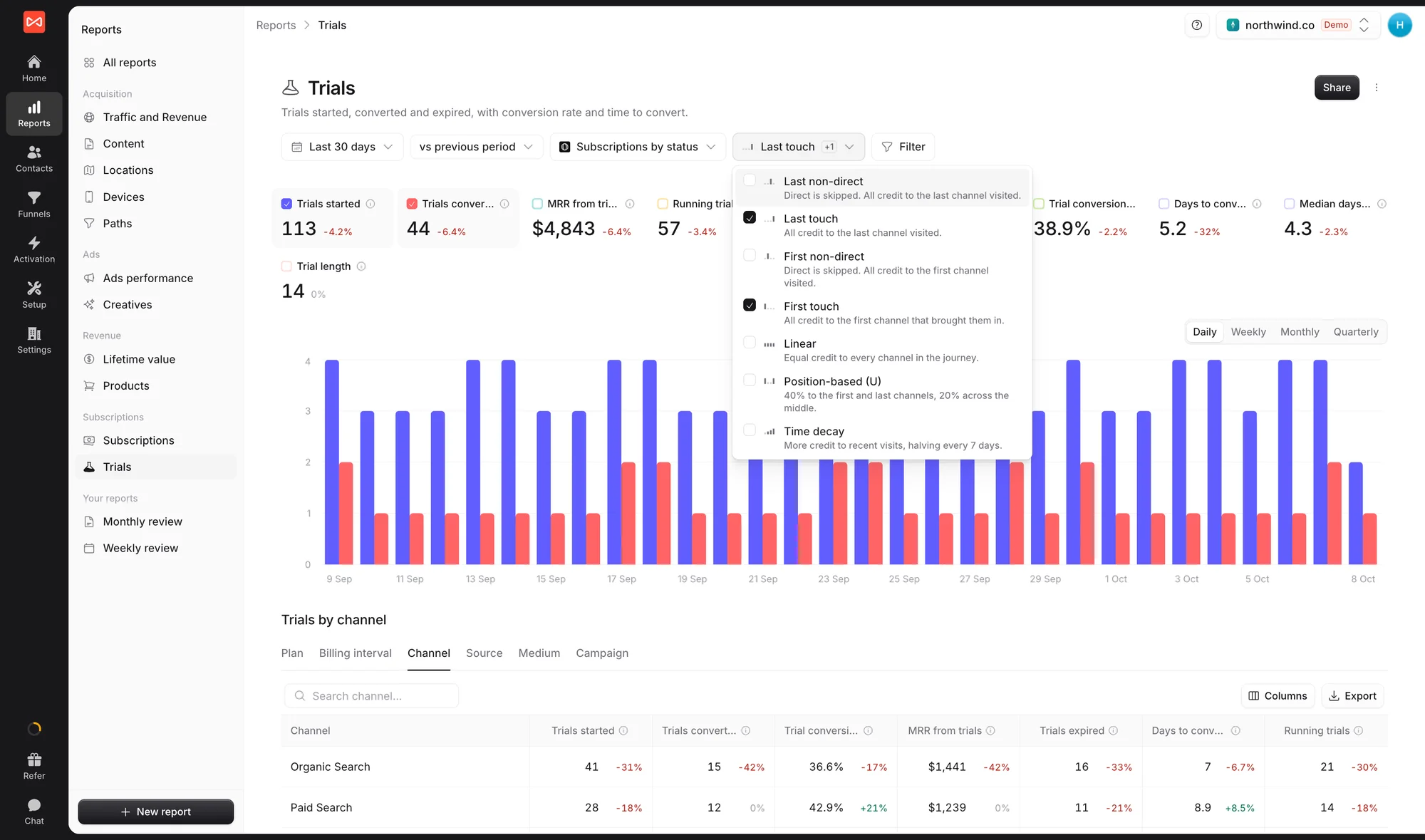
Step 1: Set the controls
Choose the date range and comparison period. Measuring is set to Subscriptions by status, and the attribution models you tick decide how the channel table at the bottom credits trials.
Step 2: Read the trial figures
- Trials started, Trials converted, and Trials expired in the period
- MRR from trials: monthly revenue added by trials that converted
- Running trials and Trial MRR: trials still open, and what they are worth if they all pay
- Trial conversion rate: of the trials started in the period, the share that converted so far
- Days to convert and Median days to convert: how long converting trials took to pay
- Trial length: the average length of the trials you offer
The chart starts with trials started and trials converted side by side. Switch between Daily, Weekly, Monthly, and Quarterly.
Step 3: Break trials down by plan or first touch
Trials by channel has tabs for Plan, Billing interval, Channel, Source, Medium, and Campaign. Each row shows trials started, trials converted, conversion rate, MRR from trials, trials expired, days to convert, and running trials.
Use Plan to see whether one plan’s trial converts far better than another, and Campaign to find the ads whose trials actually pay.
Step 4: Credit trials to channels by model
The last table credits trials, conversions to paid, and MRR to the visits behind each trial, with one group of columns per attribution model. Tick First touch to see which channels introduce your best trial users, and Last touch to see which ones close them.
Expand a row to break it down further, or click a number to see the people behind it.
What’s next
- Track MRR, churn, and plans: Subscriptions report
- See what converted customers pay over time: Lifetime value report
- Connect your billing tool: Track SaaS signups and subscriptions
Frequently asked questions
-
Why is the conversion rate low for the most recent weeks?
Trial conversion rate is measured per cohort. Of the trials that started in the period, it shows the share that has converted so far. Trials still running count as not converted yet, so a recent period reads low until its trials finish.
-
What's the difference between Days to convert and Median days to convert?
Days to convert is the average time from trial start to first payment. The median is the point by which half of the converting trials had paid. The median is less affected by a few very slow conversions.
-
Where do trials come from?
From your payment tool. A subscription that starts in a trial, in Stripe, Paddle, Polar, Lemon Squeezy, or Dodo Payments, appears here as a trial started, then as converted or expired.
-
Can I compare models for trials?
Yes. The model picker applies to the channel table at the bottom, where each model gets its own group of columns. Each option in the picker carries a one-line explanation of how it splits credit.

 Paid Social


