
How to Track Ad Creative Performance and Real ROAS
Compare every ad creative by spend, real ROAS from tracked leads and sales, CTR, and video hook rate, and see which creative formats return the most revenue.
On this page
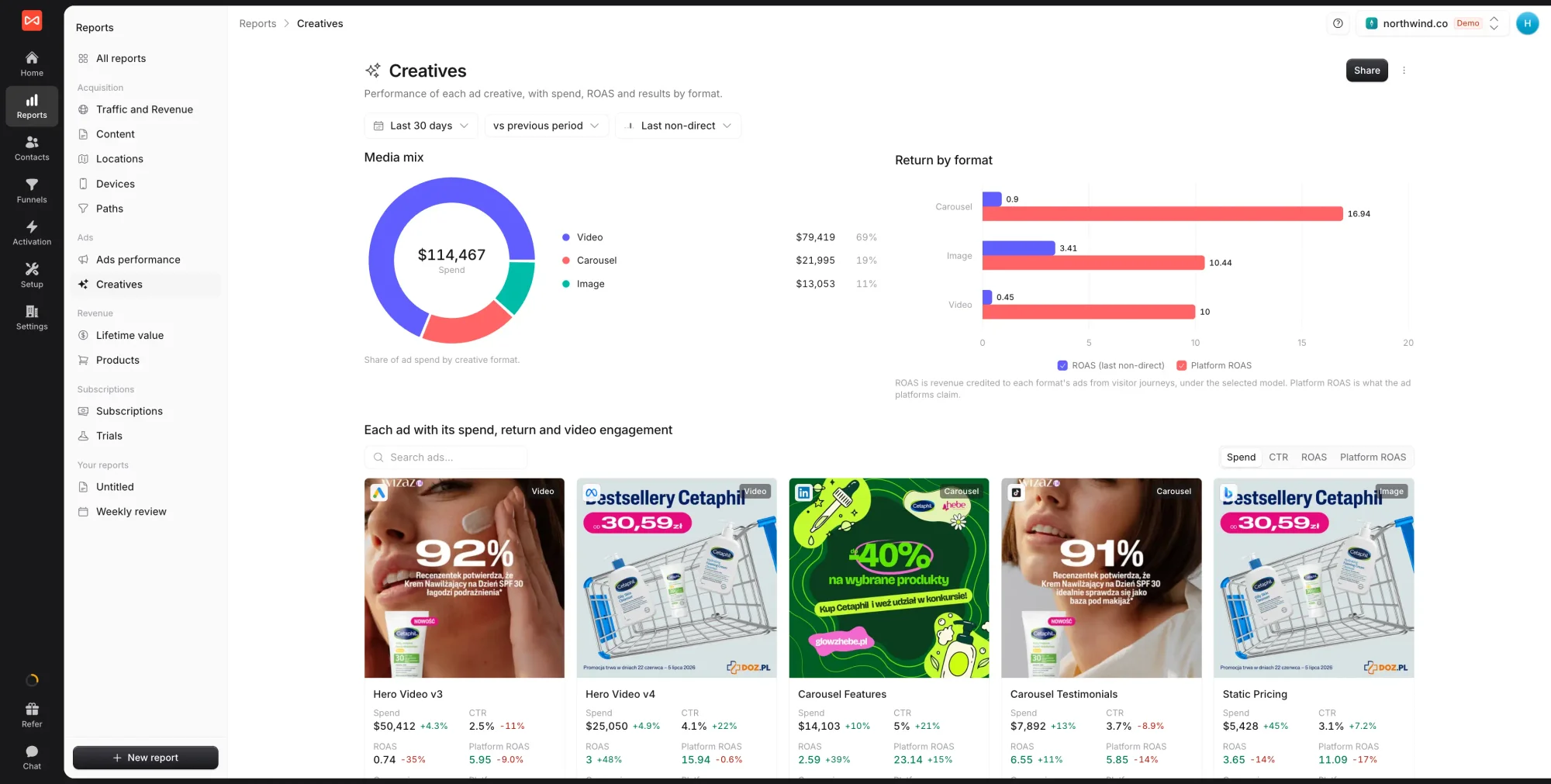
Ad creative performance is where most paid budgets are won or lost. The Creatives report answers the question a campaign-level view can’t: which ads are actually working. Every ad appears as a card with its thumbnail, so you can see what the winners have in common and what the money-losers look like.
Open Reports in the left sidebar, then Creatives under Ads. It fills in once an ad account is connected under Setup -> Ad Platforms.
Step 1: Set the period and model
Pick the date range, the comparison period, and the attribution model that credits revenue and conversions to each ad. The report starts on Last non-direct, which skips direct visits when crediting an ad. Try First touch to see which creatives introduce people to you.
Step 2: See where the spend goes
Two charts sit at the top:
- Media mix: your ad spend split by creative format, such as image, video, and carousel
- Return by format: ROAS beside Platform ROAS for each format
If video takes half your budget but returns the least, that’s worth knowing before you plan the next batch of creative.
Step 3: Compare ads side by side
Below the charts, every ad is a card showing its thumbnail, platform, and format, then eight figures:
| Figure | What it tells you |
|---|---|
| Spend | What the platform reports you spent on the ad |
| CTR | Clicks as a share of impressions |
| ROAS | Revenue SourceLoop credited to the ad, divided by spend |
| Platform ROAS | The return the platform claims |
| Conversions | Conversions SourceLoop credited to the ad |
| Platform conv. | Conversions the platform claims |
| Hook rate | Impressions that watched at least a quarter of the video |
| Completion | Impressions that watched the whole video |
Reading credited and claimed figures in pairs is the point. An ad the platform loves but real journeys don’t support shows up at a glance.
Use the search box to find ads by name or headline, and sort the cards by spend, ROAS, or any other leading figure.
Step 4: Act on it
- Strong hook rate, weak ROAS: the opening works but the offer or landing page doesn’t. Check where those clicks land in the Content report.
- Weak hook rate, strong ROAS: a small, high-intent audience is converting. Test a stronger opening before scaling spend.
- High Platform ROAS, low ROAS: compare under First touch. If it stays low, the platform is probably claiming conversions other channels earned.
What’s next
- See spend and return by campaign, ad set, and keyword: Ads performance report
- Put all marketing cost against leads: Spend report
- Understand the models behind ROAS: Attribution models explained
Frequently asked questions
-
What are hook rate and completion rate?
Hook rate is the share of impressions where the video was watched to at least a quarter of its length, a good test of whether the opening grabs attention. Completion rate is the share watched to the end. Both only apply to video ads, so image and carousel ads show a dash.
-
Why do ROAS and Platform ROAS disagree for the same ad?
Platform ROAS is the value the ad platform claims under its own attribution window. ROAS is the revenue SourceLoop traced from real visitor journeys to that ad, under the model you picked. An ad with high Platform ROAS but low ROAS is often getting credit for sales other channels closed.
-
Where do the thumbnails and formats come from?
From your connected ad accounts. SourceLoop reads each ad's preview image and format (image, video, carousel, and so on) when it syncs your ad data.
-
Can I find one specific ad?
Yes. Use the search box above the cards to search ad names and headlines, and sort the cards by any of their leading figures, such as spend or ROAS.

 Paid Social


