
How to Track Cost per Lead and Marketing ROI by Channel
Track blended cost per lead, marketing efficiency ratio (MER), and return by channel, counting ad spend plus SEO retainers, agency fees, events, and tools.
On this page
Cost per lead by channel is only honest when every cost is counted. Ad platforms only know what you spend on ads. Your SEO retainer, agency fee, trade show stand, and podcast sponsorship never reach them, which makes organic and referral channels look free and paid channels look like the only cost. The Spend report fixes that by putting every marketing cost against the leads and revenue it brought, channel by channel.
Step 1: Add your costs outside the ad platforms
Ad spend arrives on its own from your connected ad accounts. Everything else you add once.
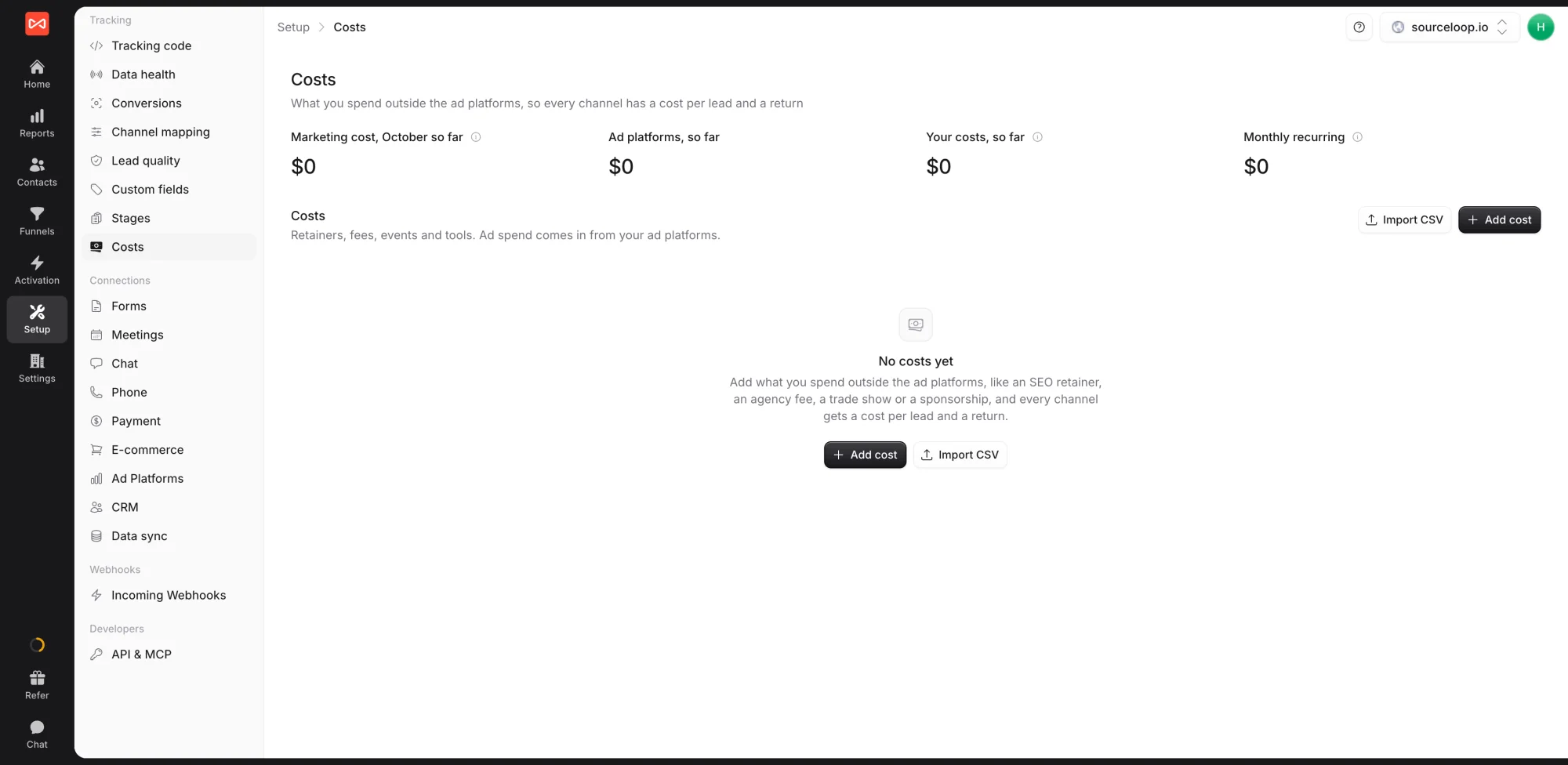
- Open Setup in the left sidebar, then Costs.
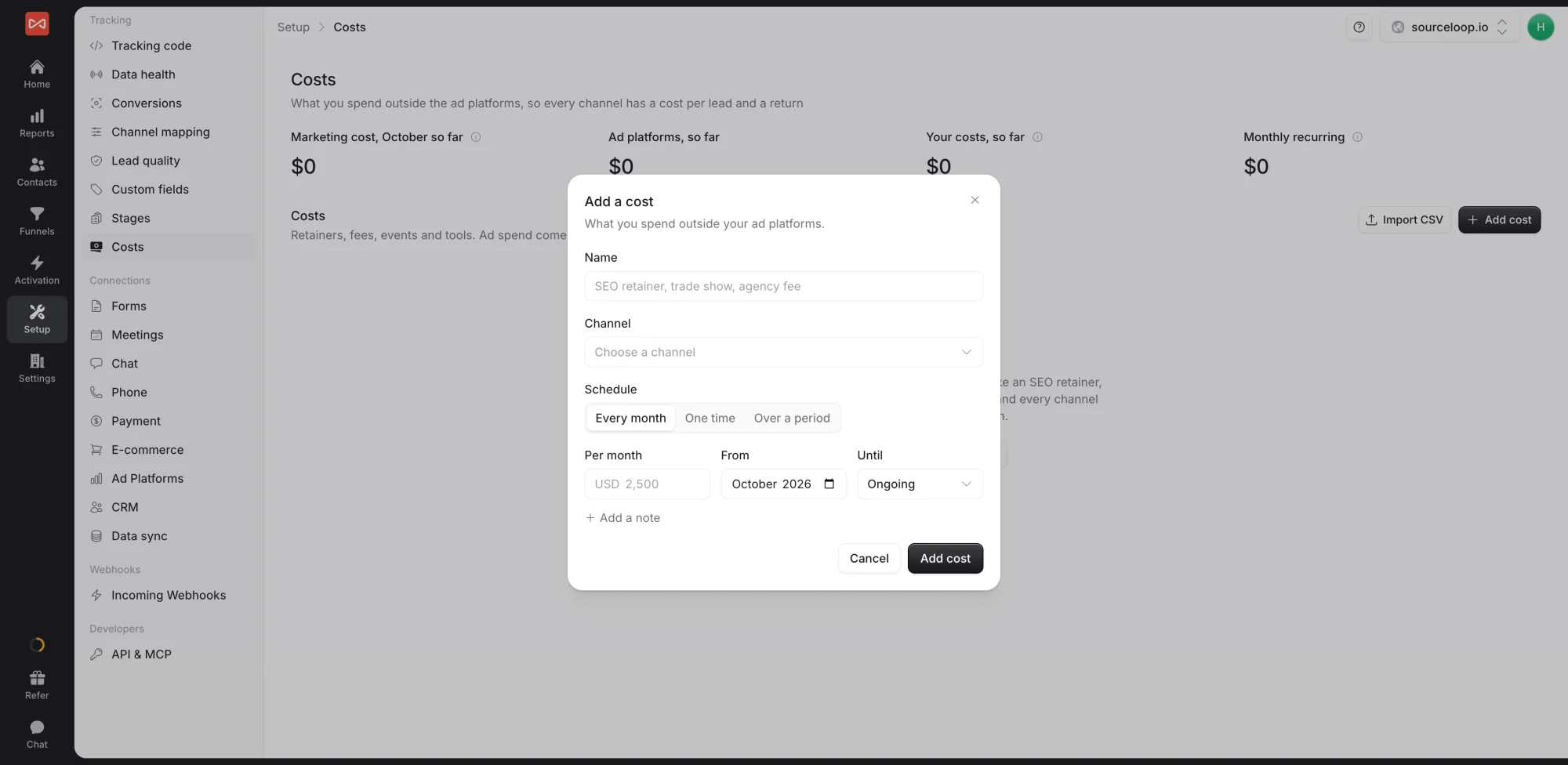
- Click Add cost, and fill in the Add a cost dialog.
- Fill in the cost:
- Name, such as “SEO retainer” or “Trade show, Austin”
- Channel it belongs to. Pick from the list, or choose Use a channel that is not listed for something like Events.
- How it is paid: Every month for retainers and subscriptions, One time for a single payment, or Over a period for one amount spread across dates, such as a quarterly contract
- Amount and the dates. A monthly cost can run until an end month or stay ongoing.
- An optional note, added with Add a note, such as the vendor or invoice number
- Save. The dialog shows how the cost will count, for example “Counts as $2,500 in October, spread over the month.”
Have a lot of costs? Click Import CSV to upload them in one go.
The Costs page then shows this month’s Marketing cost, Ad platforms, so far, Your costs, so far, and Monthly recurring, with each cost marked Running or Upcoming.
Step 2: Open the Spend report
Open Reports in the left sidebar, then Spend under Ads. Set the date range and comparison, and pick the attribution model that credits leads and revenue to each channel. Cost figures follow the date range and channel, but not visit filters such as country or device, because a retainer isn’t paid per visitor.
Step 3: Read the headline figures
Five figures sum up the period:
- Marketing cost: ad spend plus the costs you added
- Leads: conversions credited under your model
- Cost per lead: marketing cost divided by leads
- Revenue: credited revenue, once a payment tool or CRM is connected
- MER: revenue divided by marketing cost
Below them, Cost and leads charts spend as bars and leads as a line by week. Switch the bucket to see it by day or month.
Step 4: Break cost down
- Cost per lead by channel shows which channels produce leads cheaply once every cost is counted. This is where an “expensive” paid channel sometimes turns out cheaper than the SEO retainer.
- Where the money went splits marketing cost by cost item: each ad platform and each cost you added.
- Cost by channel compares ad spend and other costs for each channel.
- Ad spend by campaign lists every ad campaign with clicks, cost per click, leads, cost per lead, revenue, and ROAS. Tabs switch to ad platform, ad set, ad, or keyword, and ROAS below 1 is highlighted.
What’s next
- Compare platform claims with credited results: Ads performance report
- See how long each channel takes to pay back: Lifetime value report
- See leads and revenue for every channel: Traffic and Revenue report
Frequently asked questions
-
What counts as marketing cost?
Everything your connected ad accounts report as spend, plus every cost you add under Setup -> Costs, such as SEO retainers, agency fees, events, sponsorships, print, and tools.
-
What is MER?
Marketing efficiency ratio. It is revenue divided by marketing cost, so an MER of 4 means every dollar of marketing brought back four. By channel, revenue is credited under the attribution model you choose.
-
How is a monthly retainer counted over a two-week date range?
A monthly cost is spread evenly over the days of each month, so a two-week range counts roughly half the month's amount. A cost over a period is spread evenly over its dates, and a one-time cost lands on the day it was paid.
-
How do I give events or sponsorships their own channel?
When adding the cost, choose Use a channel that is not listed and type a name such as Events. Leads only count toward that channel once a channel rule files visits there, which you can add under Setup -> Channel mapping.
-
Who can add or change costs?
Workspace admins and editors. Every change is recorded in Settings -> Audit log.
-
Can I import many costs at once?
Yes. Click Import CSV on the Costs page and upload a file with up to 1,000 rows. The whole file is checked first and imported in one go, so a mistake in one row never leaves you with half an import.

 Paid Social


